
zx spectrum fault

  • Thread starter Thread starter replayuk
  • Start date Start date
  • Replies Replies 17
  • Views Views 477

replayuk

New member
Joined
Jul 4, 2014
Posts
81
Country
england
Region
lancashire
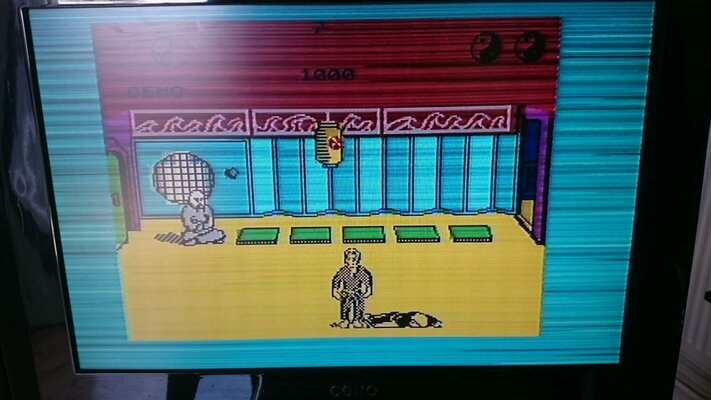
Does anyone know whats wrong with my spectrum 48k, here i show a picture of it playing exploding fist.
But for some reason its got loading bars going on the screen when the game is playing, Ps its not loading any game at the moment of it playing exploding fist, but it shows loading bars at the back of the game as though it is.
Please take a look at the picture i uploaded to see what i mean!
 

Attachments
  • DSC_0005.jpg
    DSC_0005.jpg
    191.4 KB · Views: 3
Last edited:
Try to swap the ULA with a working one.

There could be some devices close to the ZX spectrum that generates electromagnetic noise?
 
I dont think i have a spare ula chip to replace it with are you sure it could be the ula thats making this happen tony.

It only does this when playing games, its not on the normal boot up screen.
 
Last edited:
My first guess would also be the ULA, but it could also be something much simpler like a crack in the cable to the TV.

Bryce.
 
I am now trying my 16k spectrum on the same cables and power supply to see if i get the same results, but i cant load exploding fist in as this version is only 16k

- - - Updated - - -

i can now say that it does not happen on the 16k spectrum i just tried horace goes skiing and the lines are back on the 48k spectrum.
 
Last edited:
i have an old motherboard for the zx spectrum 128k plus 2 thats had some ram chips removed would the ULA chip from that fit the zx spectrum 48k, if so where about on the motherboard is it, and also for the spectrum 128k plus 2.

I have never seen this chip so i would need to know where on the motherboards it is and would it be compatible to fit the one from the 128 into the 48k.

Cheers everyone
 
i have an old motherboard for the zx spectrum 128k plus 2 thats had some ram chips removed would the ULA chip from that fit the zx spectrum 48k, if so where about on the motherboard is it, and also for the spectrum 128k plus 2.

I have never seen this chip so i would need to know where on the motherboards it is and would it be compatible to fit the one from the 128 into the 48k.

Cheers everyone
it seems realy like an ULA fault..
No, mate, the ULA from ZX Spectrum +2 will definitely not fit 48 because it is pin incompatible. please go to Retroleum page and buy a replacement, or ask Phil, maybe it is possible to barrow one just for tests only..
 
Last edited:
aah i see, i`m on his page now and he has none in stock at the moment.
So is everyone sure its the ULA chip before i order a new replacement, or am i taking a 50/50 that is the problem.
 
If you have a 16k then could you not get the ULA from that to see if this is the problem? I'm sure they would be the same as I remember that 16ks could be upgraded to 48ks by adding ram.
 
Last edited:
aah i see, i`m on his page now and he has none in stock at the moment.
So is everyone sure its the ULA chip before i order a new replacement, or am i taking a 50/50 that is the problem.

You can send Phil a message, he will answer as soon as he can. He's amasing, belive me.
The NebULA replacement is soldered by him own and because of that, he can offer only 3-5 pieces at once. You can ask when a new bunch will arrive approx. As alternative you can swap the ula from Your 16K Speccy - they are (almost) identical... Underneath a short summary of the different ULA models and in which ZX Spectrum issues they were used:

  • 5C102E: ZX Spectrum Issue 1 boards
  • 5C112E: ZX Spectrum Issue 2 boards
  • 6C001E-5: the first 6000 series ULA, probably for ZX Spectrum Issue 3 boards
  • 6C001E-6: ZX Spectrum Issue 3 boards
  • 6C001E-7: ZX Spectrum Issue 4A boards (and higher board issues)


  • The 6C001E-7 ULA version can be used on all ZX Spectrum 48K board issues.
  • The ZX Spectrum Issue 4A and above will ONLY work reliable with the 6C001E-7 ULA version; don’t use another ULA in an Issue 4A board or later Issue.
Of course it’s best to use the exact ULA model that corresponds to the ZX Spectrum Issue as listed above, but it will work to test purposes and vice versa - you will be able to see the same effect on 16K Speccy.
regards
 
Last edited:
Cheers Guys for all your help.

I am going to order a replacement ula chip from Phil as soon as i can get around to it.
 
Just to update everyone on the spectrum lines around the border fault, i replaced all the capacitors on the motherboard and this fixed the problem.
I did buy the nebula and fitted that first to find this did not remove the lines in the border so that not fixing the problem i decided to replace all the capacitors on the main board on the spectrum and now it works like new with a great picture.

Thanks everyone for all the help provided.
 
Great news,
we do not even discuss about recapping, everybody knows here - it's the first thing that should be done! Don't worry about a spare ULA, it is always good to have one since they are rare and expensive.. Please be careful, there are mistakes on silkscreen on some Spectrum MoBo's, showing "+" connection where actially negative pin is!!! Take a multimeter, and check for polarity, just to be sure..
Regards,
-Cook
 
Last edited:
Great news,
we do not even disuss about recapping, everybody knows here - it's the first thing that should be done! Don't worry about a spare ULA, it is always good to have one since they are rare and expensive.. Please be careful, there are mistakes on silkscreen on some Spectrum MoBo's, showing "+" connection where actially negative pin is!!! Take a multimeter, and check for the negative pins, just to be sure..
Regards,
-Cook


Could you take a picture of the one's that are wrong it
would be a good reference for future use me included
since I have one that needs repair..
 
The ZX Spectrum only has 12 electrolytic capacitors and if you are going to swap one, then I'd recommend swapping them all.

Bryce.
 
Bryse is totally right, You should swap not only one or two, but all of them.. About faults on silkscreen print - it's so easy to find.. Grab Your multimeter, switch it to check connection, place one probe on a heatsink, or middle pin of the voltage regulator and search with another probe for negative pin on all caps, then mark it, or make a dot or whatever.. that's it!
cheers,
Cook
 
Last edited:
As Bryce stated i replaced all of the caps on the zx spectrum mainboard, i will try to put up a picture soon with the zx spectrum after the recap.
 
Last edited:
Back
Top Bottom