A1200 won't boot with add-in card

  • Thread starter Thread starter j_l_a
  • Start date Start date
  • Replies Replies 15
  • Views Views 2495

j_l_a

Member
Joined
Aug 2, 2013
Posts
105
Country
USA
Region
Wisconsin
I have a card with an additional 8MB of ram. I also have 2 hard-drives, the standard spinning disk, 160MB, and a 4GB CF.

If I use the standard hard drive, I can boot fine, but when I use the CF card, the machine won't get to the workbench screen, unless I remove the add-in card. Any ideas why this would be like this?

Without the card, a lot of the classic workbench features like DOPUS will not open... Opens fine under emulation using the same CF card too.
Thanks,
J
 
Try a small(er) boot partition for your os for example 200mb. I had such a problem like this once and a smaller boot partition solved it.
 
Did you set the Maxtransfer rate at 00x1fe00 for the all your partions in HDToolbox?

I read you have a 8 MB memory expansion. This will cause problems when the max transfer rate has been set on default.

I had the issue also on various Amiga's and solved it by setting the Max transfer rate to 00x1fe00.
 
Well I tried to check in emulation, oddly I see no HD listed in HD toolbox. But I'm booting from it, and get to the classicWB screen.. No HD listed, and everything is greyed out except Help and Exit..
 
Well I tried to check in emulation, oddly I see no HD listed in HD toolbox. But I'm booting from it, and get to the classicWB screen.. No HD listed, and everything is greyed out except Help and Exit..

Check if DEVICE parameter is set to scsi.device under HDToolbox tool types. To get there right click on HDToolbox icon then click on Icon>Information.
 
I'm in the process of setting up another card from scratch, so hopefully this one will work out. The existing card has an older version of WHDload on it, and they don't sell the keys anymore. The new version requires no key.
..and whilst we are on that subject, does anyone know what it used to cost to buy the WHDload key? I want to use that as the basis of my donation.
 
Well I tried to check in emulation, oddly I see no HD listed in HD toolbox. But I'm booting from it, and get to the classicWB screen.. No HD listed, and everything is greyed out except Help and Exit..

Check if DEVICE parameter is set to scsi.device under HDToolbox tool types. To get there right click on HDToolbox icon then click on Icon>Information.

If you are booting from WinUAE then you'll probably need to change it from scsi.device to uaehf.device temporarily... this should make the HD show up.
 
Some updates. Set up a new 4GB CF card, all set up in emulation (aside from the disk partitions). WHDload installed, all running fine. I set up a couple of games from WHDload, and I get an 'WHDload dos error #205' object not found 'disk 1'. I get this on a few games I tried.
Decided to give it a go in the real amiga. Now instead of no screen, I get a red 'software failure' error. Again, when I pull the add in card out, boots fine, but I can't do anything as I'm down to 2MB at that point.
Not sure if these are related issues or two separate issues.. Any ideas?
Thanks,
J
 
Some updates. Set up a new 4GB CF card, all set up in emulation (aside from the disk partitions). WHDload installed, all running fine. I set up a couple of games from WHDload, and I get an 'WHDload dos error #205' object not found 'disk 1'. I get this on a few games I tried.
Decided to give it a go in the real amiga. Now instead of no screen, I get a red 'software failure' error. Again, when I pull the add in card out, boots fine, but I can't do anything as I'm down to 2MB at that point.
Not sure if these are related issues or two separate issues.. Any ideas?
Thanks,
J

I'm finding that CF adaptors are really picky when it comes to booting if the 5v is a little low...I'm guessing your PSU is a little weak and the 8mb expansion is pulling the 5v voltage below the threshold that the CF adaptor/card is happy with. I've moved across to SD adaptors now as they don't seem to suffer the same way.

Try a known good PSU, clean the edge connector for the expansion card or replacing the 8mb simm for another. I've got plenty of dodgy simms here so it's not uncommon!
 
Thanks for the input so far. Regarding the power supply suggestion, last night I installed (vanilla) workbench on a 2GB CF with the 8MB card in, and it seems to run fine. I'll have another poke around this evening with the 4GB and Classic WB.
 
Further update, here is where I am at:

With the 8GB fast ram on A1200:
1. Ive successfully installed workbench on 2GB CF. Can boot it on A1200 & WinUAE
2. My first 4GB CF that was set up my another forum member just gives me a black screen. Boots fine in WinUAE. Boots fine without Fast RAM.
3. A second 4GB that works fine in WinUEA gives a red 'software error'. Boots fine in WinUAE. Boots fine without Fast RAM.
4. Tried 2 different power supplies
5. Threatened A1200 to go back in the cupboard. To no avail.

This is driving me nuts, and ideas?
Thanks,
J

- - - Updated - - -

ARG! on a whim I jumpered the exapansion board to 2MB. It boots, leaving me with 13K of fast RAM.

Seems like its some problem with the board/8MB/WBClassic.

- - - Updated - - -


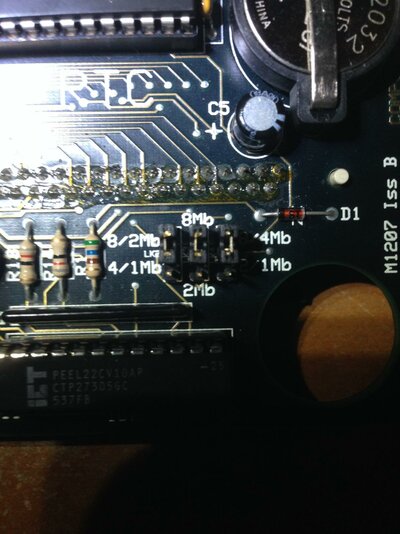
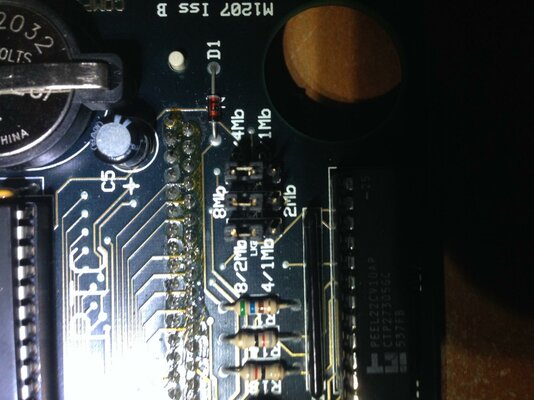
Can someone give me a pointer on how to set these jumpers. They were all up, which seems to signify 8MB, but I'm unsure how to set for 4MB, Thanks!

- - - Updated - - -

IMG_2444.jpg
 

Attachments

  • IMG_2444.jpg
    IMG_2444.jpg
    184.4 KB · Views: 6
Last edited:
The soldering job near the jumpers looks suspicious. I'd clean them with isopropyl/rubbing alcohol, grab the schematic or trace them visually and do conductivity tests to make sure everything is alright.

5. Threatened A1200 to go back in the cupboard. To no avail.
This made my day. :)
 
Further update, here is where I am at:

With the 8GB fast ram on A1200:
1. Ive successfully installed workbench on 2GB CF. Can boot it on A1200 & WinUAE
2. My first 4GB CF that was set up my another forum member just gives me a black screen. Boots fine in WinUAE. Boots fine without Fast RAM.
3. A second 4GB that works fine in WinUEA gives a red 'software error'. Boots fine in WinUAE. Boots fine without Fast RAM.
4. Tried 2 different power supplies
5. Threatened A1200 to go back in the cupboard. To no avail.

This is driving me nuts, and ideas?
Thanks,
J

- - - Updated - - -

ARG! on a whim I jumpered the exapansion board to 2MB. It boots, leaving me with 13K of fast RAM.

Seems like its some problem with the board/8MB/WBClassic.

- - - Updated - - -


Can someone give me a pointer on how to set these jumpers. They were all up, which seems to signify 8MB, but I'm unsure how to set for 4MB, Thanks!

- - - Updated - - -

View attachment 109733

Down/Up/Up should be 4MB :)
 
I've found a few other threads on other sites regarding this card. Seems it has problems when > 4mb are actually used, hits memory errors. Setting the jumpers to 4mb seems to be the common solution, no amount of swapping the RAM will fix this. This would explain why I can install WB and see 8mb, it recognizes that it's there, but it hasn't tried to use it yet.
So I'll be on the lookout for another card then :blased:
 
Back
Top Bottom