
You are using an out of date browser. It may not display this or other websites correctly.
You should upgrade or use an alternative browser.
You should upgrade or use an alternative browser.
A2091 14Mhz SCSI mod
- Thread starter SpeedGeek
- Start date
- Replies 63
- Views 48528


Tajmaster
Truth, Justice, all that stuff.
@Taj
I have a 4.1GB with your name on it =) its yours for postage if you want it =D...
hit me up on PM with some deets buddy and we can make it happen.
Wow thanks for the offer Keith!
 But I cant accept it as Im only looking to "complete" one of my A2000 to put up for sale in the near future, but thank you anyway
I did find another drive and the Suspend/Reboot error no longer comes up (so it was the drive at fault as suspected not the mod), but drive is flaky at best though
 oh: Gotta keep searchin LOL!
@Tajmaster
Edit:
I am in ERROR! The Quantum's had correct termination polarity. It was my A3000 motherboard which was in error! (The resistor packs are in sockets so it's an easy fix). The A2091 also shows incorrect polarity on PCB layout but the resistor packs were installed with correct polarity at the factory.
Edit:
I am in ERROR! The Quantum's had correct termination polarity. It was my A3000 motherboard which was in error! (The resistor packs are in sockets so it's an easy fix). The A2091 also shows incorrect polarity on PCB layout but the resistor packs were installed with correct polarity at the factory.
Last edited:
Tajmaster
Truth, Justice, all that stuff.
@Tajmaster
I have 2 older Quantum LPS drives and you might be interested to know the Termination polarity for the Resistor packs is backwards! Maybe the same guy who did A3640 PCB layout did Quantum LPS PCB layout!
Im not sure if thats the same as my drive, mine says Quantum Fireball on it??
@SpeedGeek.
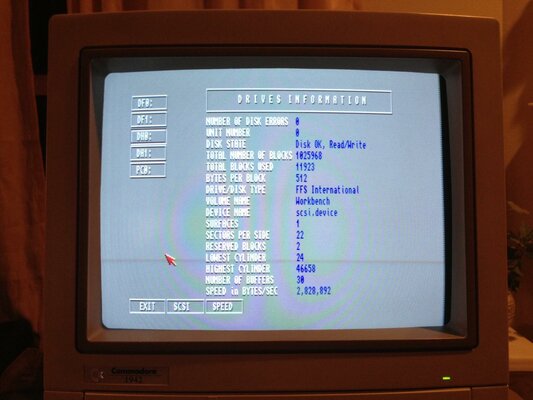
Before sometime I had post the above thread. The A2091 was purchased with fast scsi ic onboard. The speed rate made with SysInfo program. Now I no longer have this card because I buy an GVP 040 combo.
What do you think about my post?
https://www.amibay.com/showthread.php?p=155298#post155298
Before sometime I had post the above thread. The A2091 was purchased with fast scsi ic onboard. The speed rate made with SysInfo program. Now I no longer have this card because I buy an GVP 040 combo.
What do you think about my post?
https://www.amibay.com/showthread.php?p=155298#post155298
Last edited:
@psodas
I never experimented with undocumented jumpers on the A2091. But it's certainly possible that one of those jumpers is related to synchronous mode enable and could influence the results in this way. As far as using the fast SCSI chip (WD or AMD "A" version) it only offers a small performance improvement at the standard 7 MHz clock speed.
I never experimented with undocumented jumpers on the A2091. But it's certainly possible that one of those jumpers is related to synchronous mode enable and could influence the results in this way. As far as using the fast SCSI chip (WD or AMD "A" version) it only offers a small performance improvement at the standard 7 MHz clock speed.
Last edited:
Nice  Went from 1.4 to 2.2
Thanks again SpeedGeek !!
Went from 1.4 to 2.2 Thanks again SpeedGeek !!

I just did one of my A2091's. Went from 1.1 to 1.7! But I think it is because of my use of a DMA kludge patch: vbak2091 as I have 64MB of 32-bit RAM on my A2632 card!
Attachments
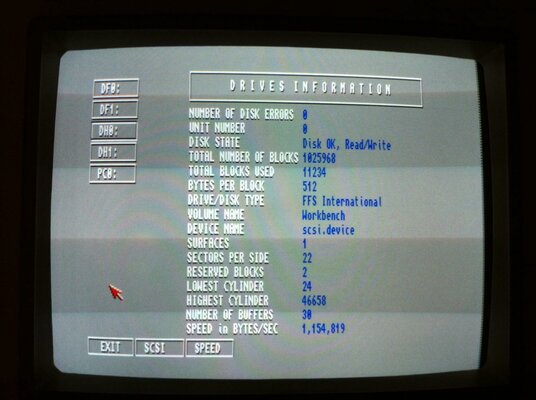
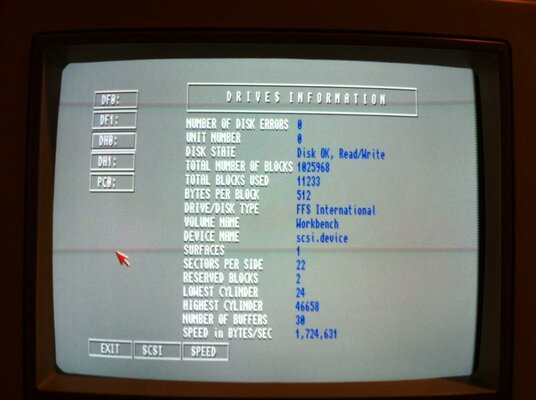
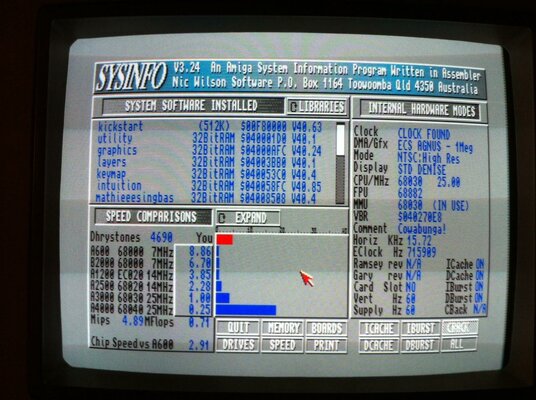
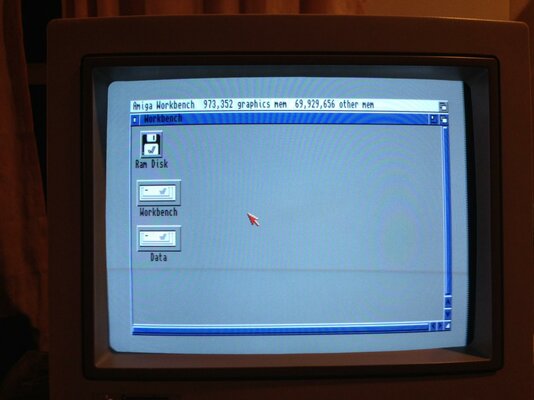
Last edited:
Well, I get 2.5 MB/sec buffered DMA but then again my A2630/DKB2632 is a very special case! 
But here are some tips you can try to obtain better transfer rates:
1) Open a shell window and execute "2632 -m0" this will set extended memory to the same priority as A2630 fast memory for benchmarking.
2) SysInfo uses a 128KB buffer which works good for IDE drives but not so good for SCSI so get RSCP from Aminet (you get buffer size control + CPU availability benchmark).
3) Set vbak2091 bufsize = 512K (I also set buffer mode to SINGLE to save CPU time and memory usage)
EDIT:
--------------------------------------------------------------------
4) Add CMQ&B (from EAB) to startup-sequence
5) Use CPU FASTROM (preferably after 2632 memory is added)
But here are some tips you can try to obtain better transfer rates:
1) Open a shell window and execute "2632 -m0" this will set extended memory to the same priority as A2630 fast memory for benchmarking.
2) SysInfo uses a 128KB buffer which works good for IDE drives but not so good for SCSI so get RSCP from Aminet (you get buffer size control + CPU availability benchmark).
3) Set vbak2091 bufsize = 512K (I also set buffer mode to SINGLE to save CPU time and memory usage)
EDIT:
--------------------------------------------------------------------
4) Add CMQ&B (from EAB) to startup-sequence
5) Use CPU FASTROM (preferably after 2632 memory is added)
Last edited:
Thanks, I already have the BUFSIZE set to 512 now. Will try to set the buffering to SINGLE to see if that helps.
I will get that other tool to measure the speed and see how it does. So how does lowering the priority to 0 help with benchmarking?
I will get that other tool to measure the speed and see how it does. So how does lowering the priority to 0 help with benchmarking?
I will get that other tool to measure the speed and see how it does. So how does lowering the priority to 0 help with benchmarking?
The A2091 will DMA to A2630 memory first if it's the same priority as 2632 memory so it lets you compare standard DMA vs. buffered DMA. The other tips (see edit) should help to speed up buffered DMA.
I will get that other tool to measure the speed and see how it does. So how does lowering the priority to 0 help with benchmarking?
The A2091 will DMA to A2630 memory first if it's the same priority as 2632 memory so it lets you compare standard DMA vs. buffered DMA. The other tips (see edit) should help to speed up buffered DMA.
WOW! That did the trick!!! 2632 -m0
:bounceBoingBall:
Only problem is I get a 10% performance hit as 030 cannot use burst mode.

Attachments
Last edited:
Sysinfo gives me totally nonsense results for SCSI speeds... workbench FELT noticeably faster, despite sysinfo telling me I had 450k/s 
Use this instead
http://aminet.net/package/util/moni/RSCP
This is an A590 on my A500, with a Mega Midget Racer at 36Mhz, and 1meg of "fast" ram in the A590...
Before:

After!:

Use this instead
http://aminet.net/package/util/moni/RSCP
This is an A590 on my A500, with a Mega Midget Racer at 36Mhz, and 1meg of "fast" ram in the A590...
Before:
After!:
** NEWS UPDATE **
It has recently come to my attention that there may be some timing problems with the 14 MHz mod. So a new archive with a 33C93A_Config tool has been uploaded to post #1. You can use this tool to determine if the correct driver or patched ROM is has been installed. (The 14MHz patched ROM and BindDrivers versions are posted on EAB threads).
With C= V7 ROMs you need to set J5-4 to on to enable synchronous mode. Thanks to psodas for posting this info!
A very special thanks to my friend Ralph Babel!
Ralph Babel:
The 14-MHz hacks are somewhat risky, btw.
The signals on some A2091s are flaky, see page 11 in the
Guru ROM manual for details. But what's much worse is that
the driver is unaware of the clock change. The chip needs
to be initialized differently depending on the clock speed,
and if it isn't, this may well mess up SCSI timings, in
particular for synchronous transfers.
SpeedGeek:
Yes, I was aware of the CLK divisor settings for the WD SCSI chip. I didn't worry about it because most users have upgraded to WD Rev. 8 (or the AMD version) and are using SCSI2 or better hard drives on cables much shorter than the original SCSI specs. allow for. The clock divisor for 10 MHz is 2 and for 14 MHz 3 and for 16 MHz 4. Do a little math and you see that the 10 MHz setting is actually using the highest clock speed.
Ralph Babel:
That's not the only place. It also affects the selection
timeout and the (dynamic) calculation of the sync period,
which is almost guaranteed to mess up synchronous
transfers. That's not a cable or chip-revision issue.
It has recently come to my attention that there may be some timing problems with the 14 MHz mod. So a new archive with a 33C93A_Config tool has been uploaded to post #1. You can use this tool to determine if the correct driver or patched ROM is has been installed. (The 14MHz patched ROM and BindDrivers versions are posted on EAB threads).
With C= V7 ROMs you need to set J5-4 to on to enable synchronous mode. Thanks to psodas for posting this info!
A very special thanks to my friend Ralph Babel!
Ralph Babel:
The 14-MHz hacks are somewhat risky, btw.
The signals on some A2091s are flaky, see page 11 in the
Guru ROM manual for details. But what's much worse is that
the driver is unaware of the clock change. The chip needs
to be initialized differently depending on the clock speed,
and if it isn't, this may well mess up SCSI timings, in
particular for synchronous transfers.
SpeedGeek:
Yes, I was aware of the CLK divisor settings for the WD SCSI chip. I didn't worry about it because most users have upgraded to WD Rev. 8 (or the AMD version) and are using SCSI2 or better hard drives on cables much shorter than the original SCSI specs. allow for. The clock divisor for 10 MHz is 2 and for 14 MHz 3 and for 16 MHz 4. Do a little math and you see that the 10 MHz setting is actually using the highest clock speed.
Ralph Babel:
That's not the only place. It also affects the selection
timeout and the (dynamic) calculation of the sync period,
which is almost guaranteed to mess up synchronous
transfers. That's not a cable or chip-revision issue.
Last edited:
** 2ND NEWS UPDATE **
I patched 4 bytes of code in the ODD ROM (U12)* and now I can boot with 33C93A registers set for 14MHz! The 33C93A_14MHz Util is NO longer needed for C= V7.0 ROMs (but still useful for testing patched ROMs).
So far working good with old (flaky) Quantum 52 & 105 + 550 MB Compaq HDs. You have to set JP5-4 on + Sync enable jumper on some HDs.
Dynamic calculation of Sync period still not patched but I don't think that's really necessary now since the A2091 scsi.device was ALREADY using the same default value as the A3000 scsi.device.
*NOTE: The even numbered ROM actually refers to the odd byte!
P.S. I don't think the Amibay rules allow me to post the ROM binary so unless I am told otherwise it will be posted on EAB.
http://eab.abime.net/showthread.php?t=67144
I patched 4 bytes of code in the ODD ROM (U12)* and now I can boot with 33C93A registers set for 14MHz! The 33C93A_14MHz Util is NO longer needed for C= V7.0 ROMs (but still useful for testing patched ROMs).
So far working good with old (flaky) Quantum 52 & 105 + 550 MB Compaq HDs. You have to set JP5-4 on + Sync enable jumper on some HDs.
Dynamic calculation of Sync period still not patched but I don't think that's really necessary now since the A2091 scsi.device was ALREADY using the same default value as the A3000 scsi.device.
*NOTE: The even numbered ROM actually refers to the odd byte!
P.S. I don't think the Amibay rules allow me to post the ROM binary so unless I am told otherwise it will be posted on EAB.
http://eab.abime.net/showthread.php?t=67144
Last edited:
With this patch, can you still run the controller at stock speeds? Or ASync mode?
I haven't tried that. I suppose it could work in Async mode if you don't mind significantly slower transfer rates.
Considering that you only need to swap one ROM (and 27C64s are dirt cheap these days) it makes more sense to purchase another ROM if you want to go back to the "Stock" 7 MHz speed.
You should know that the 33C93s were designed to run at 8 MHz minimum and that's why Sync mode timing was always unreliable at the 7 MHz clock speed.
P.S. Ralph told me that GVP upgraded their SCSI controllers to 14 MHz for that specific reason.
waltermixxx
Member
What a great hack!
What a great hack!
I just hacked my 2091 and everything seems to be working fine...I burned a U12 eprom with the mod, and it seems to be working fine
my transfer speed for the drive i have in place went from 1.3mb/sec to about 1.95 that is with 1 meg of ram added to the scsi card... ( yup got it working)
Thanks again for this great thread
What a great hack!
I just hacked my 2091 and everything seems to be working fine...I burned a U12 eprom with the mod, and it seems to be working fine
my transfer speed for the drive i have in place went from 1.3mb/sec to about 1.95 that is with 1 meg of ram added to the scsi card... ( yup got it working)
Thanks again for this great thread
Similar threads


- Replies
- 3
- Views
- 385


- Locked
- Replies
- 1
- Views
- 346