A3640 problem with A4000D motherboard fastram

  • Thread starter Thread starter cp256
  • Start date Start date
  • Replies Replies 9
  • Views Views 739

cp256

New member
Joined
Apr 28, 2023
Posts
9
Country
USA
Region
Western NY
I decided to try my rev 3.0 A3640 cards again in preparation for recapping and upgrading to rev 3.2. One had been in my A3000 desktop and was in good working condition when it was put into storage 20 some years ago. The second 3640 hasn't been used since about 1995 when I replaced the Warp 4040 in my BBS 4000D with a CS 060 and the WarpEngine went into the second 4000. I have been using the Warp in my one working A4000D with 64 MB on it and no fast mem on the mobo. It is partially recapped and tests 100% with DiagROMs.

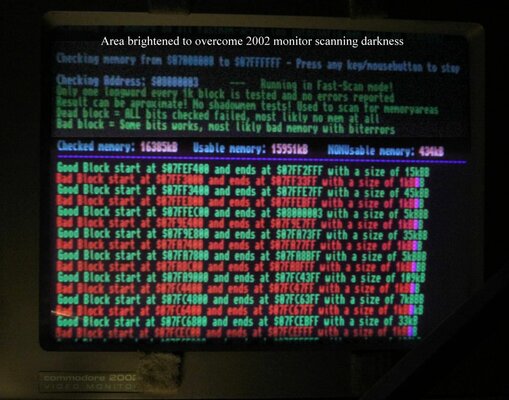
I slap a 3640 in, put a 4 meg SIMM on the mobo and it flashes a yellow screen at me. I reseat the 3640 (I had already cleaned the connectors) and SIMM and try again. Still yellow screening me. I try a different SIMM and then another and another with no joy. I move it from socket to socket and one time it boots after a flashing power LED failure, but shows 0 MB fast. It works fine with just chip mem and no fast. The sockets and SIMMs' contacts were cleaned with contact cleaner. I tried booting with 3.1, 3.1.4 and 3.2 ROMs and 16 MB mobo RAM, all give the yellow screen boot loop with flashing power LED, but a three finger discount one time (I think it was on 3.2) made it look like it was trying to boot, but it stayed on a dark grey/black screen and the activity LED never went out. I switch to the DiagROMs (I built a quad ROM switcher using 2 meg ROMs and a rotary switch) and it makes it to the menu. It detects blocks of 13 MB and 3 MB of fastmem (?!) and when I try the quick fastmem test it fails 434 KB out of the 16 MB. I have attached a shot of the 2002 monitor screen, the scandoubler doesn't work with the DiagROMs.

I slap the WarpEngine back in and add the mobo SIMMs back one at a time and they appear 4, then 8, then 12 and finally 16 megs, verified in Sysinfo. I switch over to the DiagROMs and test the mobo fast mem with no errors so all 16 MB of the 4 meg SIMMs are good.

Could bad caps on the 3640 cause this or maybe PALs/GALs?

I'm prepared to burn a new set of GALs for it and socketize them on the 3640. It looks like good practice.
 

Attachments

  • A3640-16MB_MemTest_HP7D3551.jpg
    A3640-16MB_MemTest_HP7D3551.jpg
    173.9 KB · Views: 21
Hello,

Out of curiousity, did you verify the simm ram independently in a working machine?

The A4000 is a bit picky on fast ram. FPM ram is what I have best success with(60/70ns), not EDO.
 
Hello,

Out of curiousity, did you verify the simm ram independently in a working machine?

The A4000 is a bit picky on fast ram. FPM ram is what I have best success with(60/70ns), not EDO.

Yes, all four SIMMs tested clean with DiagROMs and a WarpEngine 4040. The whole machine tests good with the WarpEngine.

I left Amiga Test Kit 1.20 testing chip mem all night with the 3640 and it was still going this morning. Boy is that thing a slug with only 2 megs of chip. SysInfo reports it being .83 as fast as a 3000.
 
I recapped the A3640 with C105, C106 and C107 at the correct polarity and it didn't fix the problem. It behaves exactly like it did before the recap. I guess it is time to remove the GALs and PALs and dump them to see if any are hosed. Maybe I'll do a set of SpeedGeek GALs. I'll may as well upgrade it to Rev 3.2. It also needs the U200 cut and jumper mod. The traces all look good and the leaky caps didn't roach anything. It cleaned up nicely.

I also recapped another 3640 that was a no booter and it fails the same way it did before. The HD activity LED stays lit solid for a couple of minutes, except for one tiny flicker, and then goes out. The screen stays black and never changes. I don't have a serial terminal setup so I don't know if the DiagROMs are putting anything at all out. This one has the cut and jumper U200 from the factory, even though it is a 3.0 rev. I may get it working to try to trade for an A3630.
 
Hello,

You mention the WarpEngine works with this ram, but as I remember it more versatile in terms of what simm modules it supports, I'm still quite convinced those modules are not compatible with the ram controller on the A4000d.

If you have 60ns modules, its very likely they are EDO (60ns FPM are more rare), could you please post pics of the modules or just the model numbers on the ram chips ?
 
The WarpEngine works with the four 4 MB SIMMs mounted on the motherboard sockets, which were originally from my A4000Ds, in addition to its own 16 MB SIMMs. The 4 MB SIMMs are 80 ns, the 16 MB SIMMs are 60 ns. After I got the WarpEngine and the CS MkII 060 back in the day I didn't use the 4 MB SIMMs because the RAM on the CPU boards was so much faster.

Three 4 MB SIMMs are Toshiba THM321000AS-80 with eight TC514400ASJ-80 chips and one unlabeled SIMM uses eight NEC 42S4800-80A chips. They were all bought new by me for use with the 4000Ds 30 years ago. I have more 4 meg SIMMs kicking around here somewhere. Between the Amigas, Alphas and peecees I have had here over the years this place is like a computer junkyard.
 
I see, so shouldn't be the ram then, those would definitely work fine.

How was the motherboard condition ? - usually you get these wierd faults when there's corrosion under the simm sockets. Being old computers, it's not really limited to that, you could have other issues causing problems.

Maybe get the A3630 and see what it does, those cards are always useful to keep around when things gets wonky :)

PS: There's nothing wrong with having a few (extra) computers you aren't using on a daily basis :D - dont worry !
 
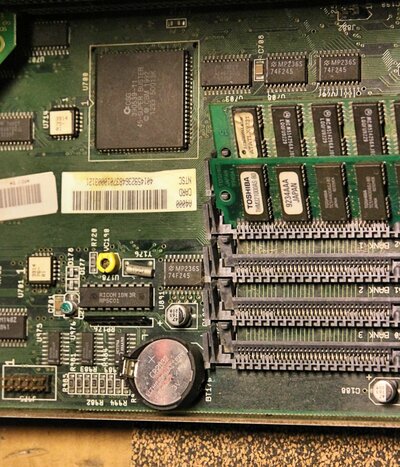
The motherboard looks pretty good. There was only minor leakage from the Farta battery that cleaned up nicely. This shot is with a couple years of cruft, but you can see that the sockets are in pretty good shape. I cleaned up the battery area with some white vinegar and 99% IPA after I removed the battery.

I ordered sockets and blank GALs for the 3640. I'll see if I can get it going one way or another.

I would like to get a replica 3630 board and build it. I loved my A3000 when I first got it back in '91. I put one of the 3640s in it and it worked great with original Quantum 105PLS SCSI drive. Super DMAC 02, Ramsey 04 and Super Buster 07. I hope the 3000 still works. The battery didn't leak at all, but I still removed it. It will even still hold a small charge. I even have its preggo mouse.
 

Attachments

  • A4000_Battery_08-07-23_HP7D3555.jpg
    A4000_Battery_08-07-23_HP7D3555.jpg
    339.4 KB · Views: 21
It does look fine from the picture, no darkening of vias or dull things - usually the last two simm sockets are where the corrosion hides out, but it doesn't look like yours came that far actually.

The a3640 boards are annoying, I have 4 here that have misc errors and they just a pain to get going again (not much point when you have something like the bfg with onboard memory anyway), so those are just for some rainy day I guess.

Love the A3000, I must confess I have 3 myself (with preggo mice), this machine was always my favourite over all the others, with the A4000 coming in on a second place :)

Chucky has made the pcb public, so you can probably built your own a3630 fairly easily, think it also supports PGA version of the 030 for some simpler soldering.
 
I have been keeping an eye out for a replica 3630 board for a while, but all that ever shows up on fleabay is a built replica from the same guy and not the bare board. I may have to pay a fab and end up with an extra 4 boards or so to sell/trade. I suppose I could always build extras and undercut the fleabay guy :P
 
Back
Top Bottom