A4000 no mouse movement?

  • Thread starter Thread starter mjnurney
  • Start date Start date
  • Replies Replies 17
  • Views Views 2678

mjnurney

we live as we dream. Alone.
AmiBayer
Joined
Aug 27, 2010
Posts
9,473
Country
england
Region
Towcester
hello,

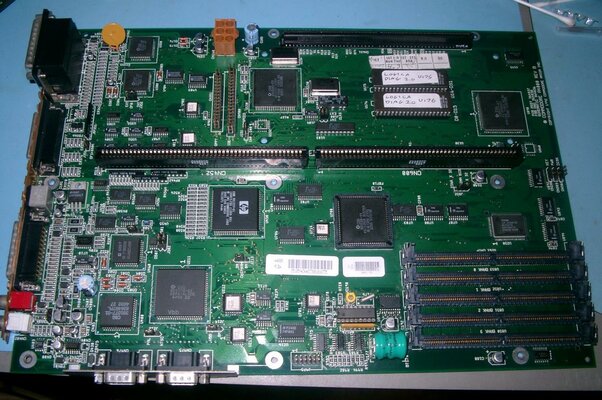
My newly acquired A4000 has had a battery leak (now removed) but has a few issues...

A) Guru meditation before booting (hasnt done this since cleaning the board around the battery - so fingers crossed)
B) random reboot / guru meditation
C) mouse now will not move but buttons work?
D) keyboard caps lock sometimes blinks too...single flash thats constant but thats stopped today lol

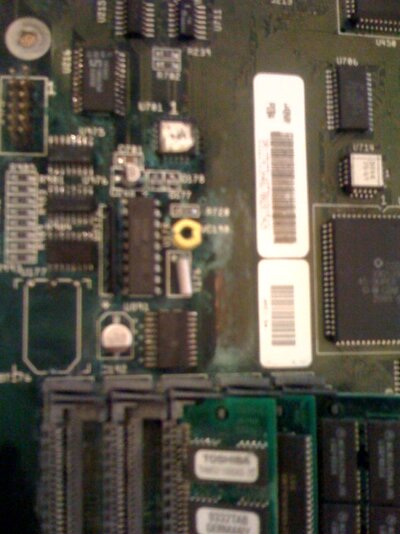
I have removed the leaking varta battery and cleaned the board and tried to clean some of the corrosion away from various tracks and traces..

but my big issue now is no mouse movement? and ideas?

thank you:help:

pics to follow as i get them off my iphone!
 

Attachments
  • photo.jpg
    photo.jpg
    67.1 KB · Views: 2
Last edited:
Best thing to do is check the traces around your battery and see if there's any gaps. Hopefully none are broken. Most likely it's a capacitor and/or a controller chip at fault, though I'm not well up on the 4000 motherboard someone could point out the right caps and chips.
 
Hi there,

Board doesn't look nice... :(
It seems that acid from battery ate some cooper tracks (and maybe killed some IC's too).
I suggest you to send this board to someone who can clean it and fix issues you described above.
@Cosmos for example.
If you are not skilled don't try to repair it by yourself.
 
hello.

maybe so but it was working yesterday which seems odd but anyway the copper tracks showing are where i have cleaned the corrosion off , i have pcb lacquer to recover the board once i know which ic controls the mouse port?

---------- Post added at 10:43 ---------- Previous post was at 10:12 ----------

i may consider repairing the board or just fitting a USB card...
 
>but my big issue now is no mouse movement? and ideas?

U975 and/or U976
 
No mouse movement, but the buttons work, eh? Hmm. That sounds very familiar. I have a rev. C board that had exactly that problem. It transpired that if you put some upwards-pressure on the mouse plug, it would work. In the end, given it had a number of other faults, I shipped the board to Anthony Hoffman in NZ, who has done a splendid repair job on the old girl. He tracked down the dodgy mouse problems to a cracked inductor on the board. If I can successfully dig up the paperwork, I'll post back telling you which one it was, it could well be the same problem you have with yours. I'll have a rummage and let you know!

Good luck!

Update:
According to Anthony, my A4000 mouse problems were caused by a cracked inductor, specifically FB-975 -- Might be worth a look!
 
thanks for the info guys , if have ordered two ic's that control the joy/mouse ports - very cheap and i'll change these and examine the board around that area...

yes id be interested in the info Andylandy...

thank you

---------- Post added at 13:44 ---------- Previous post was at 12:24 ----------

the two suspect ic are (i think)

U975 - HCT166D IC - SHIFT REGISTER
U976 - HCT166D IC - SHIFT REGISTER

any why i have ordered a pack of 5 lol
 
As per your PM,
I have an exchange board available: It's had a fair bit of repair done around the battery area, but is now fully working. Has new SIMM sockets, all new SMD capacitors, new battery. Buster-11. Kickstart not included. If you wanted to go ahead with it we can raise a thread.
Ideally on your board, the whole section where the battery damage has occurred needs stripping out and proper cleaning, otherwise it will just continue to eat away causing more problems in the future..
 

Attachments

  • IMGP3269.jpg
    IMGP3269.jpg
    214.9 KB · Views: 3
Just as more information: the mouse is controlled by Denise/Lisa (movements) & Paula (left & right buttons), but as they are far enough from the leakage area don't feel afraid for the girls.
 
Sending to the A4000 doctor (hikey) to exchange for a refurb unit, thanks hikey payment sent.

...it lives again!
 
Pls can a mod advise whether I need to start a thread in the wanted/for sale section for this transaction? Or can we just keep it in this thread?
 
You'll need to open a new thread. This one is in the community section, so doesn't allow feedback to be traded.

Thanks!
 
okay will do , thanks

you can close this thread

cheers
 
Last time my mouse did not move the front key was in wrong position :) .
 
this is a little more serious, the buttons work , the keyboard works but the mouse doesnt move...tried everything , cheese at the end of the table - but still nothin!
 
yes i expect that mine is the same, i started checking the pin outs but gave up, the battery damage is too much for me, so my new friend Adrian on here has kindly offered a mobo exchange so i'm happy
 
Back
Top Bottom