A500 NOOBIE tech questions

  • Thread starter Thread starter rob_santry
  • Start date Start date
  • Replies Replies 7
  • Views Views 1542

rob_santry

New member
Joined
Aug 30, 2012
Posts
50
Country
United States
Region
Oregon
Hi Group,

I have a few noobie questions. I mean, real noobie stuff.Well, I picked up an Amiga 500 the other day and hooked it up. It appears the enter key doesn't work. But the enter key to the right of the numeric keypad does. Also, I don't believe there is any sound. I tried using the workbench tool that should run the voice synthesizer but that didn't work. So, is there an easy test to see if the sound chip is working?
I took the Amiga apart to check out the rev number and to see if there was an on-board battery that could be leaking. The board is a (A500 Rev5 board). I couldn't find an on-board battery, but the RAM expansion board did have one . The board is a Microbotics M501 RAM board and there is a blue cylindrical battery there. One of the battery posts has a small amount of corrosion on it, but none on the board. So, what is a good replacement battery? I want to replace it. And, what is the voltage on it.
Is there any service manuals online for the Amiga 500?

Any help would be appreciated...

Regards,

Rob
 
I'll chime in with a couple of things here.

The Enter key is quite possibly a sign of broken tracks on the keyboard; have you checked all of the other keys to see which work and which dont ?

Having no sound could be related to a damaged chip on the mainboard or one that has simply worked loose from its socket; or a sign of one or more capacitors broken; did you notice any that were bulging/leaking when you opened the case ?

Only the 500+ had an onboard battery in the 500 range, but your memory expansion sounds like it has started to leak. You could just snip the battery off and use it without; though new/second hand ones are available for a small price too. You can also buy new batteries for a small amount too. Best thing for that is just look at the label on the existing one and check what its says.

:)
 
Well, I picked up an Amiga 500 the other day and hooked it up. It appears the enter key doesn't work. But the enter key to the right of the numeric keypad does.

Could be stuff under it, dirt or anything, could also be that the keyboard chip is wonkey and could also be a wire is damaged, but more keys shouldn't be working then.
Could also be as said above broken tracks.

A replacement keyboard shouldn't be hard to find as long as it's not from a rev 3.

Also, I don't believe there is any sound. I tried using the workbench tool that should run the voice synthesizer but that didn't work. So, is there an easy test to see if the sound chip is working?

That sounds like a dead Paula chip.

I couldn't find an on-board battery, but the RAM expansion board did have one . The board is a Microbotics M501 RAM board and there is a blue cylindrical battery there. One of the battery posts has a small amount of corrosion on it, but none on the board. So, what is a good replacement battery? I want to replace it. And, what is the voltage on it.

Battery is only on a rev 8A board in case of an A500 Plus, all A2000/3000/4000's have batteries that need to be taken off if they are old, except 4000D CR rev D and A4000T.

Batteries are also on memory expansions, emulator boards and even accelerator boards.
In general a CR2032 with diode or an ML2032 (which is rechargeable) will work with all of the above.

Is there any service manuals online for the Amiga 500?

There are, but they are unreliable, for basic repairs they will do, but in depth repair would not be recommended.
Repair on that level is best left to those who are experts in it.
 
Hi Group,

I have a few noobie questions. I mean, real noobie stuff.Well, I picked up an Amiga 500 the other day and hooked it up. It appears the enter key doesn't work. But the enter key to the right of the numeric keypad does.

They're independent keys, so nothing weird there.
Consider everything said already. If it's the only problem key, chances are it's the conductive bridge at the post under the key. Take the thing apart, swap posts and see if the problem moved elsewhere.

Also, I don't believe there is any sound. I tried using the workbench tool that should run the voice synthesizer but that didn't work. So, is there an easy test to see if the sound chip is working?

1. Paula at fault
2. LF347 opamp at fault
3. Capacitors
4. Other circuitry problem (check resistors etc and continuity according to schematics)

I took the Amiga apart to check out the rev number and to see if there was an on-board battery that could be leaking. The board is a (A500 Rev5 board). I couldn't find an on-board battery, but the RAM expansion board did have one . The board is a Microbotics M501 RAM board and there is a blue cylindrical battery there. One of the battery posts has a small amount of corrosion on it, but none on the board. So, what is a good replacement battery? I want to replace it. And, what is the voltage on it.
Is there any service manuals online for the Amiga 500?

Any help would be appreciated...

Regards,
Rob

For battery replacement, see here.
For schematics manuals, see here.
Also internet search is your friend.
 
silly question about the sound.

is it the modulator via RF to tv,, if so have you connected the left and right audio output to the rf input ??
 
Sardine has it

Sardine has it

Well, Sardine nailed it. I forgot to hook up the audio cable to the monitor. :( Kind of embarrasing.

Now on to the enter key. I have it apart and want to switch a key to see if the problem follows the key. So, how do you remove any key from the keyboard frame without breaking anything?

Bear with me on this, It's my first time on the Amiga 500. I only played games on my buddies machine 25 or so years ago. I never dreamed of taking one apart 'till now.

Rob
 
glad the sound is sorted.

I maintain and repair vending machines,, it pays to take a step back and look for the simplest solutions. :D
 
Now on to the enter key. I have it apart and want to switch a key to see if the problem follows the key. So, how do you remove any key from the keyboard frame without breaking anything?
Rob

Disconnect the keyboard connector from the motherboard header (take a note of the proper orientation) and remove the keyboard (there are 4 plastic flaps at the bottom of the case it slides under, it's surprisingly easy to break one if you don't slide the keyboard out properly).

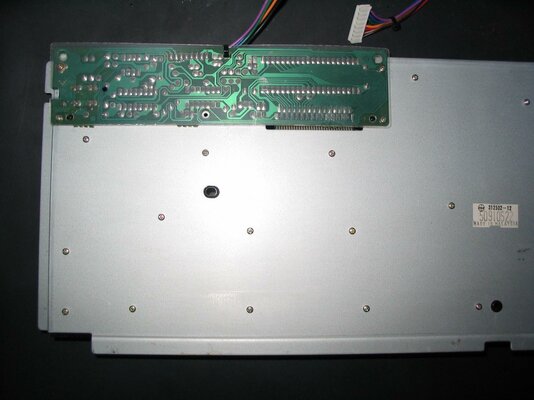
(Photo #1) Look at the back side and undo the 27 small screws on the backplate (there are another 4 screws on the PCB rectangle, no need to remove them). It is actually a good idea to arrange the 27 removed screws so that you remember which screwhole each one came from when you re-assemble the keyboard.

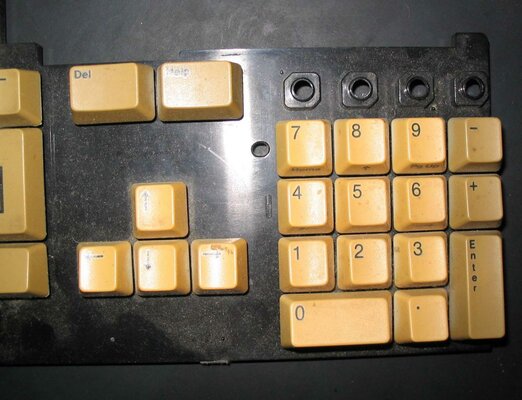
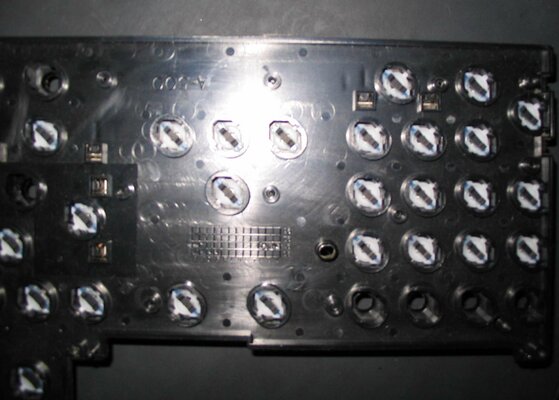
(Photos #2 and #3) Once the screws are removed, you can detach the black plastic base. The keys will not fall off. Take a look at its underside, you'll spot each key's fitting post with the conductive bridge at the end.

See here for some ideas and photos on how to unhook keys or posts without causing damage. The key springs tend to jump around, don't lose any. It may be a bit tricky to unhook the Enter key for your first time dealing with a keyboard (there are hinges and metal clips under it) so you might actually prefer to undo the fitting post as shown on the last photo.

Once the plastic base is detached, the membrane will be exposed. Give it a good visual check too. You can actually reconnect the keyboard that way and begin shorting pads while in a CLI windows to test for membrane functionality on any suspect keys.

These apply to the Mitsumi keyboard model, which is by far the most common one.
 

Attachments

  • IMG_0017.jpg
    IMG_0017.jpg
    194.7 KB · Views: 5
  • IMG_0019.jpg
    IMG_0019.jpg
    192.4 KB · Views: 5
  • IMG_0020.JPG
    IMG_0020.JPG
    143.7 KB · Views: 4
Back
Top Bottom