Amiga 600 optical cd dvd rom install: Pics Inside!

  • Thread starter Thread starter AmmoJammo
  • Start date Start date
  • Replies Replies 58
  • Views Views 11985
patch idefix...

yeah, I clearly missed that in the instructions...

*sigh*

that's most likely where I've been going wrong...

btw, I would think that a properly buffered ide interface would be ok with ide cables upto probably a meter long (I've used cables this long in PCs before)

The problem with the ide adapter you posted pictures of supaduper, is that there appears to actually be no buffering at all on the data lines...
 
It works! sorta...

step 1, find a version of idefix that can actually be patched...
step 2, find a program to patch it!
step 3, install idefix, which actually worked, and found the dvd drive.
step 4, restart, only to have CD0 not mount "cannot find scsi.device unit 0" or whatever it is...

riiight...

run "CD0" from devs/dosdrivers and the cd drive mounts every time...

so, how do I fix this? does having CD0 in the dosdrivers folder attempt to mount the device too soon in the startup sequence?
 
When you run ``Find Device` in the idefix folder what unit number is it ? if its 1, 2 try changing it in the CD0 settings
 
its 0 because its the master.

its all set right, it just doesn't seem to find the drive while workbench is loading.
 
I aint prob got your knowledge on the workings but I suppose have tried HD unit 0 and cdrom Unit 1
is there anyone out there who has succesfully got HD and CDrom working off the A600 IDE using just the header power, perhaps they have the answer
 
DVD drive is firmware set to master, so it can't be changed.

Wasn't sure if it would work like this, but it appears to... wasn't sure the ide cable would work like this, but that appears to as well...
 
Can you just setup a normal IDE cable? master/slave as usual, obviously with your cdrom as master, put that on just to eliminate your cable aint the prob
 
I know its a ball ache but just get a cheap JAE connector(will need power i.e floppy) for your cdrom.
I make out the cdrom its 50 pin optical connection so JAE will be fine, then just sort an suitable cable to connect both devces, just a thought bud.

That cable you made is a nice work of art by the way :)

*I tried a normal IDE cable on the port CDrom/master, cf/slave and I could not get it to recognise the Cdrom, just hung, but works on my idefix adapter, the cdrom seems the problem with its in built master/slave selection as a guess it dont like our miggy`s :(
 
Last edited:
This is working now Supaduper, it just doesn't mount during start up, I assume its because its trying to mount too soon in the start up procedure.
 
Hi Ammojammo,yeah think you have sussed,its like the opposite to the old problem of Harddrive spin up time no quick enough to boot !

Dont know if there is a way of timing the boot up of the cdrom but hey a manual mount aint that bad bud , good job me old Cobba !:thumbsup:

I too have now a working cf and cdrom in my A600, just got to squeeze the case down a bugs B**k to close the case:double
 
Smart A*** :p

Check your mail Ammo some goodies sent:cool:
 
Last edited:
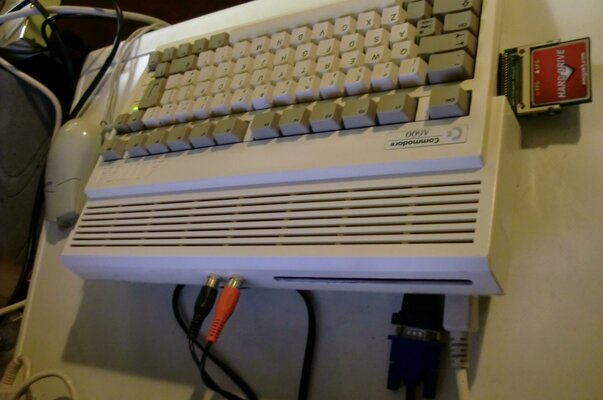
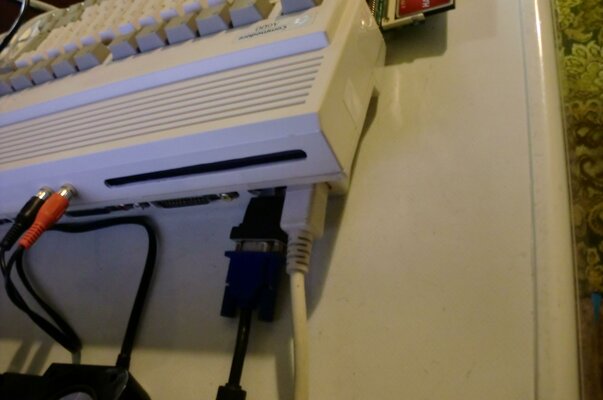
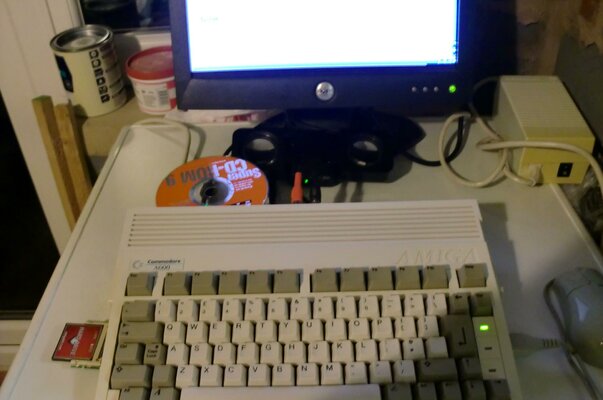
Gnats B**k attained A600 with Slot DVDrom now complete, and mines a slot not a tray Nah, nah ,na Nah na :p

A600 Finished_3.jpg

A600 Finished_4.jpg

A600 Finished_5.jpg
 
Last edited:
ACA620, with heatsink, overclocked to 25Mhz.
Internal slot load CD Rom drive.
A604 and Indivision ECS.
Internal DC-DC PSU (will happily do 5volts at 5amps, 12volts at 2amps)
4gb compact flash card.
Still has the original floppy drive too!

nEnuGr.jpg
 
The cd drive won't automount anymore, so I just added a button to Dopus to mount it when I need it.

I wanted to attach some thermometers to the CPU and PSU heatsinks, so I could monitor those temperatures with the case closed, but haven't done that yet.
 
Back
Top Bottom