Amiga A4000 Woes Continue

  • Thread starter Thread starter manic23
  • Start date Start date
  • Replies Replies 63
  • Views Views 13969
That's really good news mate. The USB is easy, simply run the installer. Note that since you have an A3640 you probably need to run the x-surf in ZII mode for USB to work. The driver can be downloaded from the icompe wiki (see the small printed manual)
 
After some experimentation it would seem that the 1st and 2nd (from top) slots on my bus card do not work. The 3rd one's working fine, so I'm going to post a wanted thread for a bus card, hopefully someone will have one for sale :)
 
Good luck bud. Hopefully you can find one soon.
 
by the way you were right about having to run the rapid road in ZII mode, does not work in ZIII with my 040, why is that Steve?
 
It's a known issue, Jens is working on a fix I think as he now has an A3640 to test with.
 
Update:

I received the Busboard yesterday (thanks bebek) and all seems well (ish) all the slots are working as they should however I have severe display corruption when the Picasso IV switches to using the flicker fixer in the Amiga native screen modes. I know it's not the busboard as I also had this with the old one. see this video...

[video]https://dl.dropboxusercontent.com/u/7792497/Shared%20Videos/A4000%20Screen%20Corruption.mp4[/video]

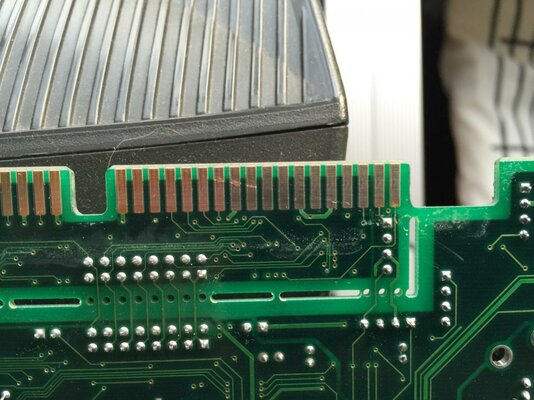
After a close inspection of the Picasso IV card I have noticed that there is rather a serious looking cut along one of the edge connectors, see this image...

Picassi IV Edge Connector Damage.jpg

What do you think, is this the most likely case of the corruption? and if so do you think it is repairable?

Thanks as always for your help.

- - - Updated - - -

Update:

After putting the card back in (for taking the photo) I now get no scan doubler output what so ever, however if I plug in my regulate Philips monitor (via regular SCART) at the same time the image is fine there, so there is no issue with the board as far as I can tell I just think I have a dodgy PIV card! Oh well If I have to live with having a two monitor setup I guess I can live with that, would be nice to know if the PIV is fixable though.
 
as for cut on the tracks you can test if its cut all the way through with a multimeter in diode test on either side on the track.
if its cut all the way through itll read open circuit,if its a heavy scratch itll read closed if its intact.
 
You're having a torrid time here aren't you.

Have you cleaned the Video slot with IPA? Just in case it's dirty. However if that slot is worn out it will cause these issues
 
It didn't look too dirty but I will try thanks Steve


Sent from my iPhone using Tapatalk
 
Just hope you didn't damage the PIV with all the fitting and removing :(

Maybe it's possible to fill the gaps on the connector with some solder? (Ask Roy if that's a good idea)
 
What do you think Roy is Steves suggestion a good idea?


Sent from my iPhone using Tapatalk
 
Thing is Steve it was doing the same with the other bus card I just was hoping that the new bus card would fix it


Sent from my iPhone using Tapatalk
 
Thing is Steve it was doing the same with the other bus card I just was hoping that the new bus card would fix it


Sent from my iPhone using Tapatalk

But it was working here?
 
What do you think Roy is Steves suggestion a good idea?


Sent from my iPhone using Tapatalk


if the contact isnt broken bud,best to leave it alone.
it wouldnt get any worse as the pins are spring loaded and the front is angled to ride over the front of the pcb when inserted.

you can fill it with solder as a very last resort(if the track is broken and only then),but youll have to flat it down after so its flat and smooth to go into the slot.
after that,you wont want to insert it to often solder is alot softer than the track being inserted.
 
i would probably go for using conductive paint/ink before solder.
you can get them easily these days, they are the same stuff you use to fix a broken rear screen demister. its a lot less work and less likely to damage anything further compared to soldering.
but with either method i would be careful to make use i only used enough to complete the circuit as this would reduce the chances of leaving any conductive material in the slot.
 
Thanks for that suggestion shambles1980 I have not heard of that before


Sent from my iPhone using Tapatalk
 
ARGGGGGG I don't believe this, I am now totally back to square one! No output from PIV and the bus board slots not working. Everything was working OK (ish) and then just wallop, all of a sudden I had screen corruption in RTG mode so I restarted and nothing, not a sausage, ziltch!!

There must be an issue with the board that is frying my busboard or something like that, I have no idea I'm packing it all up and sticking to my A1200 I am thoroughly peed off with this damn A4000 now.
 
Last edited:
i understand your frustration bud.


are any of the motherboard ic's in sockets?
 
i understand your frustration bud.


are any of the motherboard ic's in sockets?

No there are all soldered on the motherboard Roy. Sorry about throwing my toys out the pram in my previous post, sometimes I can get a little bit frustrated when things don't go my way ;) it's just that I have spent so much time and money on this damn Amiga I just want it working :(

Since my last post I did take out the bus board one last time and went over the edge connectors with a contact cleaner rubber thing I have, I did not do it when I got the board from bebek as it looked so clean, like new that I didn't think it would need it. However for the last hour or so everything is working, RTG and scan doubler mode, no corruption and all slots working. I am not going to tough anything, I will test again later tonight and tomorrow morning and we'll see if it goes again.

I suspect that it might go again, as I have been here before with everything working then you turn it on again the next day and were back to square one. I wonder if it could be the bus board connector on the motherboard that it as fault?

Anyway I really appreciate all your help chaps, you guys are awesome :bowdown:
 
Back
Top Bottom