
BlueSCSI v2 on the Amiga

  • Thread starter Thread starter Xanxi
  • Start date Start date
  • Replies Replies 46
  • Views Views 2979
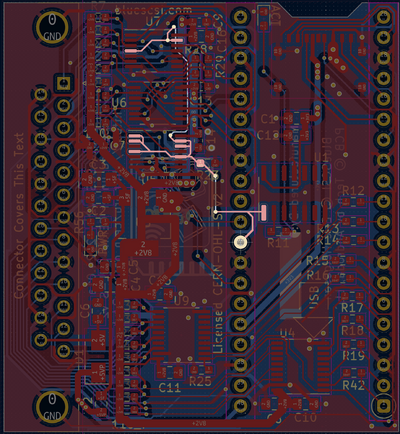
I had 20 min of free time today to do a solder job (really ugly solder job because it was too small for my eyes, presbyopia seems upon me after all) on my BlueSCSI to fix that HD LED signal. Soldering a wire from pin 32 on the pico to the DJBase's adapter works just fine (inverted signal actually so i guess that the DJBase's adapter inverts it too) and now the HD Led blinks just fine during drive access.

Now, i still need to rearrange cables inside (SCSI ribbon and cables for the AmiblasterCP and Freeway USB CP) to be able to close the case. Then i will work on the WiFi.
Going to ask @a.mi.goun to fix me a suitable SCSI cable.
 

Attachments

  • BlueSCSI HD signal.png
    BlueSCSI HD signal.png
    446 KB · Views: 11
More tinkering tonight.
Unfortunately, the bluescsi does not seem at all reliable with the disk images.
After having rebuilt all the images on the SD, DH1: has gone NDOS, then after a reset DH0: again.
In the meantime, i was trying to use the Daynaport Wifi with no success.
They say
"
mode= **VERY** important:
0: Original DaynaPORT Interface
1: Use with scsi.devie (A590/A2091)
2: Use with gvpscsi.device"

With 1230scsi.device, option 1 does not work. I think i should try Daynaport 0 but i can't now until i fix DH0: again.
It still works just fine with the RDB SD card but that defeats the goal to use both SCSI and Wifi with this device, unless there is an alternate way to use the Wifi without the NEx.hda image.
And then, with no Wifi, perhaps is there another non pico smaller SCSI adapter which would be easier to put inside the case?
 
And some more weirdness in action.
Even is the RDB partitionned SD card is apparently working fine, everything i can write on it is seemingly there but has vanished on next reboot.
Using SFS and not PFS3 which can have this kind of problem with write cache.
Blizzard 1230scsi.device is 8.2 by the way.
If i set SCSI synchronous mode, i get 8 MB/s instead of 5,7 but it is back on asynchronous on the next boot and the SCSI utilities has vanished as well.
How weird!

Apart from A590/A2091 and GVP, has this device been tested with Amiga controllers before?
 
I spent a long time configuring/trying a BlueSCSI v2 on a Re4091 and a BFG9060. I never succeeded and I blaimed the BFG9060, it's known for having SCSI issues on Amiga's. I decided to sell the BFG9060 and bought a TF4060 instead. The TF4060 was succesfully tested with the Re4091 and shouldn't have any issues with SCSI. Unfortunately, this was not the case with BlueSCSI. I ran into the same issues I had with the BFG9060. On first boot, the BlueSCSI image was recognised and I could partition the image. On next boot my Amiga refused to boot and all I got was a black screen and a solid amber led.
I tried multiple times but always my Amiga refused to boot.

I then bought a ZuluSCSI RP2040, performed the same steps and it rebooted without any issues. I could install WB without issues and boot into WB without issues. I created more images, could partition and use these without issues. I tested with FFS and PFS3, no issues whatsoever. I know use it with succes in my Amiga 4000.

I now only use BlueSCSI's in my vintage macs and gave up on using these in Amiga's. I have a 2500/30 with an A2091 SCSI controller and 200Mb SCSI disk. I haven't tried the BlueSCSI yet but I'm sure to get a ZuluSCSI for that one too. Same will be for the A590.

Although the BlueSCSI and ZuluSCSI or related, I wonder what's the issue with BlueSCSI not working all the time in Amiga's. I've read several forum posts about people succesfully getting it to work in Amiga's.
 
Thanks for your input which may saves me precious time by ditching that BlueSCSI.

My objective here is triple:
- integrate the device internally with the Blizzard SCSI DB25 SCSI2 as i have no way to have it externally, rear bay is occupied by the amiblaster CP / USB breakout, so it needs to be a small device
- have the HD LED connected to the device, which was possible with the external BlueSCSI on pin 32 of the pico
- benefits from Wifi with the same device.

The 2 first are mandatory, the third is not.

Is there any other small device similar to this one? ZuluSCSI seems to be big card with 50 pins header.
If not, i would have to return to slow IDE.
 
There's a smaller ZuluSCSI Mini RP2040 with DB25 connector. I don't know it that will fit in your case. It has a header for led, but you have to solder the header pins yourself.

The smallest one is the ZuluSCSI Pico Slim with DB25 connector. This hasn't got the led header but has the led installed. If you're good enough at soldering, you might be able to remove it and solder some wires instead.
 
Thanks.
I see that the ZuluSCSI Pico also have the PicoPi and Wifi. Can i expect the same fuss than with the BlueSCSI?
 
I don't really know. So far I have only experience with the full ZuluSCSI RP2040. But if these all work with the same firmware, I guess there won't be a problem.
 
For what it’s worth I’ve been using BlueSCSI v2 on A4000T SCSI (which is an integrated 4091) with BFG9060 and on 4000D with Warp Engine without issue.

OS 3.2, sync transfers (~8MB/s) PFS3aio.

I’ve used the default blueSCSI INI file without modification.

Have been using HD image files, not full drive mode.

Edit: BlueSCSI needs to know the sector size (in the image file name) if you don’t use the default 512 in hdtoolbox. I suppose this could mess up images.

I’ve seen reports of trashed RDB’s when using the Dayna wifi driver. Was the dayna scsi device on when this happened?
 
Last edited:
For what it’s worth I’ve been using BlueSCSI v2 on A4000T SCSI (which is an integrated 4091) with BFG9060 and on 4000D with Warp Engine without issue.

What speed do you run the BFG9060 at?
My A4000T SCSI glitches out at 100MHz when MMUlibs loads.

What other cards do you use?

Thanks.
 
For what it’s worth I’ve been using BlueSCSI v2 on A4000T SCSI (which is an integrated 4091) with BFG9060 and on 4000D with Warp Engine without issue.

OS 3.2, sync transfers (~8MB/s) PFS3aio.

I’ve used the default blueSCSI INI file without modification.

Have been using HD image files, not full drive mode.

Edit: BlueSCSI needs to know the sector size (in the image file name) if you don’t use the default 512 in hdtoolbox. I suppose this could mess up images.

I’ve seen reports of trashed RDB’s when using the Dayna wifi driver. Was the dayna scsi device on when this happened?

The sector size and the default of 512 in HDToolbox might be the issue I might have ran into. But I no longer have the BFG. Mine was running at stock btw, it was too unstable at higher speeds (rev 5 68060).
 
What sector size should be used? 1024? 4096?
 
I then bought a ZuluSCSI RP2040, performed the same steps and it rebooted without any issues. I could install WB without issues and boot into WB without issues. I created more images, could partition and use these without issues. I tested with FFS and PFS3, no issues whatsoever. I know use it with succes in my Amiga 4000.

Interesting, have had the opposite experience. ZuluSCsI is doing the same as those who have the BlueSCSI. Data working fine then loose DH1, reboot DH0 nonDOS. Data gone. Updated to latest firmware.
 
I’ve used 512 on BlueSCSI.

If you use a higher value make sure to change both in hdtoolbox and the BlueSCSI HDF file name.
I suppose this is equally important on the zulu.

JHanna: 100mHz (rev.6), PicassoIV, Ariadne (Roadshow), AD516 sound card.
 
Last edited:
Interesting, have had the opposite experience. ZuluSCsI is doing the same as those who have the BlueSCSI. Data working fine then loose DH1, reboot DH0 nonDOS. Data gone. Updated to latest firmware.

You can't use a computer like that!


I use SFS.
 
Blue scsi will always use 512 sector size when using a full SD card directly, so if your cards are set up with anything higher that’s probably not a good idea.

 
Blue scsi will always use 512 sector size when using a full SD card directly, so if your cards are set up with anything higher that’s probably not a good idea.


I have just checked the documentation of the RAW mode.
I didn't prepared the RDB partitionned SD for the blueSCSI, it was the one for my IDE port and i just noticed fortuitously that it worked.
And now i see it should have a small first partition in FAT32 for the bluescsi config data, which obviously it doesn't have here. Maybe that's why the drive does not retain new data written on it.
 
I have just checked the documentation of the RAW mode.
I didn't prepared the RDB partitionned SD for the blueSCSI, it was the one for my IDE port and i just noticed fortuitously that it worked.
And now i see it should have a small first partition in FAT32 for the bluescsi config data, which obviously it doesn't have here. Maybe that's why the drive does not retain new data written on it.

I interpreted that paragraph about fat32 as optional.

1: Use full card as unit 1/512 with default options, or

2: Set up multiple partitions, or mixed direct partition and HDF files, etc with the ntsc partition and settings file.

So AFAIK using an existing amiga SD card should still work if it’s using 512 block size
 
I have checked and this one indeed is already 512 block size. So i am still clueless.
 
Back
Top Bottom