
You are using an out of date browser. It may not display this or other websites correctly.
You should upgrade or use an alternative browser.
You should upgrade or use an alternative browser.
Computers last too long these days!
D
Deleted member 14264
Guest
Yeah. I found a few videos on YouTube on how to do that. The catch is you take the risk of having a more or less bricked system the day a serious update comes your way.Windows 11 will not run on a system without TPM. There are workarounds for getting most "older" systems working. I had Win 11 running on a non supported i7-2630QM.

If the hardware runs useful software, then is doesn't meet my definition of "obsolete."
Years back, my CP/M Osborne luggable and an Epsom dot matrix computer was given to a church for use with Word Star. Its still in use today, although it prints to an old LaserJet.
My Ryzen 3700 desktop and GTX 1080 runs Win 11, but Word 2021 still resists me placing graphics where I want them to go, so I use my A4000 and Final Writer for word processing.
Don't let others use their definition of obsolescence on your stuff.
Years back, my CP/M Osborne luggable and an Epsom dot matrix computer was given to a church for use with Word Star. Its still in use today, although it prints to an old LaserJet.
My Ryzen 3700 desktop and GTX 1080 runs Win 11, but Word 2021 still resists me placing graphics where I want them to go, so I use my A4000 and Final Writer for word processing.
Don't let others use their definition of obsolescence on your stuff.
D
Deleted member 14264
Guest
I have to admit my definition of obsolescence is mostly based on what I can do or exchange with the rest of the world.Don't let others use their definition of obsolescence on your stuff.
IMHO if you try to use an Amiga 4000 to watch videos on YouTube, play games you've never seen before and can buy at an online store or exchange business files with other people around the world then you'll be sorely disappointed.
I understand some Amiga applications do have functionality that are outside the normalized majority's needs and present some potential advantages not found on the most popular software and your example is good. However what exactly is preventing you from running a good emulator and do everything on your Windows 11 - Ryzen 3700 system ?
My question or point is more like : How old can a computer be yet still feel relevant everywhere on the Internet and have access to the vast majority of games and business applications of today ? Back in the late 90s it was about 18 months old. Around 2010 it was about 3-4 years old. In my case today it's 13 years old! Quite a jump in longevity.
This 13 years old PC that I use everyday can play this game which was released in ... 2023 !! https://www.gog.com/en/game/system_shock
(this is the remake of System Shock)
... with a very high frame rate too!
Added edit : Today I can go to Staples, buy a new mouse and/or keyboard and/or USB key, perhaps even a new SATA SSD for my old machine and they all work with it. There are still a few printers available with Windows 7 drivers. I can also run at dazzling speeds all Amiga 500-4000 software with it through emulation. Its all because of the hardware, not the software.
You can't say the same of your A4000 or Osborne luggable. What could you buy at Staples for your A4000 when it turned 13 years old around 2007-2008 ? A mouse pad, perhaps a power cord, maybe a new monitor since they still had a few 4:3 available then but AFAIK nothing else. These old machines are now closed off from the rest of the world in their own little bubbles. My i7-970 is not.
I suspect my Ryzen 9 7950X system will still be relevant in 30 years.
Last edited by a moderator:

In my late teen's & all through my 20's I needed to have the best laptop ever and I remember paying a high price for them to keep me up to date and they used to go out of date quite fast. Due to working in the Royal Navy and moving around alot at the time, this was the reason I was going for Laptops rather than a nice PC rig which would have been a higher spec for less money but heyho I was restricted on space.
In 2014 I did something different, I bought a Second-Hand Alienware Laptop, granted it was only a few months old at the time but a very good spec for a laptop. Surprisingly I'm still using it today and it still does everything I need it to do yeah its not gonna play the latest games on it any more but I have a PS5 for that.
However I find that I am retro gaming more and more these days and only a few new games have tickled my gaming taste buds .
.
I hate that Microsoft are forcing the TPM 2.0 & Blocking earlier Gen CPUs because Windows 11 has run fine on this laptop which is a Gen 4 i7 with no TPM not even a version 1 (Yes I understand that Microsoft may stop it from working soon). I've never seen it have an issue with windows 11 though, which makes it more and more frustrating that Microsoft are doing this. I was hoping to use it until it stops working which I feel is gonna be sometime soon because it is 10 years old and its bound to have a something go wrong with it eventually but we didn't need Microsoft cutting the life on older gen PC's short!
The OS itself to me is not much of an improvement over Windows 10 and they have removed some features like toolbars on the taskbar why remove this feature, arghhh
Anyway had my little rant and feel better now but if I am honest I'm glad my computer has remain useful for longer because the rate I was buying laptop in my younger years was also becoming unsustainable bit like this Retro bug we all have  can't afford it anymore and have to be thankful with what I've got.
In 2014 I did something different, I bought a Second-Hand Alienware Laptop, granted it was only a few months old at the time but a very good spec for a laptop. Surprisingly I'm still using it today and it still does everything I need it to do yeah its not gonna play the latest games on it any more but I have a PS5 for that.
However I find that I am retro gaming more and more these days and only a few new games have tickled my gaming taste buds
.I hate that Microsoft are forcing the TPM 2.0 & Blocking earlier Gen CPUs because Windows 11 has run fine on this laptop which is a Gen 4 i7 with no TPM not even a version 1
(Yes I understand that Microsoft may stop it from working soon). I've never seen it have an issue with windows 11 though, which makes it more and more frustrating that Microsoft are doing this. I was hoping to use it until it stops working which I feel is gonna be sometime soon because it is 10 years old and its bound to have a something go wrong with it eventually but we didn't need Microsoft cutting the life on older gen PC's short!The OS itself to me is not much of an improvement over Windows 10 and they have removed some features like toolbars on the taskbar why remove this feature, arghhh
Anyway had my little rant and feel better now
but if I am honest I'm glad my computer has remain useful for longer because the rate I was buying laptop in my younger years was also becoming unsustainable bit like this Retro bug we all have can't afford it anymore and have to be thankful with what I've got.
D
Deleted member 14264
Guest
On my 2011 i7 laptop (this one did support the upgrade to Windows 10) I just increased the RAM to the maximum supported by the machine and replaced the HD with a SATA SSD and it is essentially a PC with no lifespan limit.In 2014 I did something different, I bought a Second-Hand Alienware Laptop, granted it was only a few months old at the time but a very good spec for a laptop. Surprisingly I'm still using it today and it still does everything I need it to do yeah its not gonna play the latest games on it any more but I have a PS5 for that.
...
The OS itself to me is not much of an improvement over Windows 10 and they have removed some features like toolbars on the taskbar why remove this feature, arghhh
The only thing I would recommend for your 2014 laptop is that you change the HD for a SATA SSD too. It will probably give you another 10 years of good service.
It already has a SSD in it lol

@Timtheloon I too have been through a few gaming laptops, the last being an ASUS G53 ROG. I wasn't using it for gaming anymore since the GPU was way out of tech by todays standards and having a Gaming PC I built, I just didn't feel the need to buy another but, it did everything else just fine and was meeting my needs, until it died last year. I kept it clean and serviced it a few times, changed the thermal pastes etc during it's life but, one day it refused power on and was completely dead, no life at all. Being a PC repair tech I stripped it down and found an issue with the motherboard. I have since replaced it with an Asus Zenbook for daily use, you just can't beat the portability of a laptop but I will never buy another gaming laptop. It didn't support Windows 11 but, was more than capable (thanks Microsoft). 
My little Alienware Alpha R2 is also unsupported and it has a TPM 2.0 module but because its processor is apparently too old its a no go but again it runs without issue with Windows 11
Not sure why Speccy is saying my GTX1080 is only 4GB lol but you get the idea

Not sure why Speccy is saying my GTX1080 is only 4GB lol but you get the idea
Last edited:
.I have to admit my definition of obsolescence is mostly based on what I can do or exchange with the rest of the world.
IMHO if you try to use an Amiga 4000 to watch videos on YouTube, play games you've never seen before and can buy at an online store or exchange business files with other people around the world then you'll be sorely disappointed.
I understand some Amiga applications do have functionality that are outside the normalized majority's needs and present some potential advantages not found on the most popular software and your example is good. However what exactly is preventing you from running a good emulator and do everything on your Windows 11 - Ryzen 3700 system ?
My question or point is more like : How old can a computer be yet still feel relevant everywhere on the Internet and have access to the vast majority of games and business applications of today ? Back in the late 90s it was about 18 months old. Around 2010 it was about 3-4 years old. In my case today it's 13 years old! Quite a jump in longevity.
This 13 years old PC that I use everyday can play this game which was released in ... 2023
.
.
You can't say the same of your A4000 or Osborne luggable...
Opinions differ from person to person.
In any case, I have several computers (some running constantly), none newer than the DIY from 2020 daily desktop. My pfSense firewall runs on an 8-core i7 with 24 GB RAM, then there's the Atomic Pi (4-core. Celeron w/ 2GB RAM ) running Pi-Hole, my PiFi (wireless VPN) running on an 8 GB Raspberry Pi 5, a Lenovo m900 that records relevant streaming content from Prime and Max, and my main A4000. Lastly, I watch YT videos, video streams, comment on forums, and general entertainment stuff on a POS 8" Amazon tablet in bed (such as now, since it's 5:45 am here).
Each has its forte, and I use Amiga emulation to test software prior to use on my A4000, and/or A1200 builds. I learn little from emulation (it took a week of experimentation to work out a cooling solution for a standard cased A1200 with a 68LC060 running at 100 MHz), something an Amiga emulation couldn't simulate.
I don't enjoy vintage gaming under an emulator. It's not "fun" for me.
This is just me. So, to each his own ☺, and the same for past, present and future relevance

Last edited:
D
Deleted member 14264
Guest
That's a massive facepalm moment! What's the CPU in that thing for Win11 to dislike it ?My little Alienware Alpha R2 is also unsupported and it has a TPM 2.0 module but because its processor is apparently too old its a no go but again it runs without issue with Windows 11
It seems that when Microsoft threw random darts at a wall of CPU names, some of the darts just hit blank wall, missing some CPU names entirely.That's a massive facepalm moment! What's the CPU in that thing for Win11 to dislike it ?
D
Deleted member 14264
Guest
Task Manager, performance tab should tell you.It seems that when Microsoft threw random darts at a wall of CPU names, some of the darts just hit blank wall, missing some CPU names entirely.
The processor is detailed on my screenshot for my Alpha R2 in post #29That's a massive facepalm moment! What's the CPU in that thing for Win11 to dislike it ?
Its a Intel Core i7 6700T @2.80GHz (Skylake 14nm Technology)
My 10 year old laptop Spec is here:
Last edited:
imqqmi
Member
I replaced my PC in 2023, when it was about 10 years old. Still ran fine but couldn't run the latest games at acceptable frame rates. Former PC was a core i5 4570, 4 core, 16GB memory and a 7850 nvidia gfx card, 512GB OS nvme in an PCIE slot, with 4TB hdd data storage running windows 10.
New one is a core i9 13900K (yeah, I know, but no issues) with 32GB and rtx4070ti, and first PC without mechanical hard drives, 1TB nvme OS and 8TB SSD for data. It's noticeably faster than the old one though. Boots faster and feels more snappy, still W10. I hope to use it for the next 10 years.
I still have my PC of the generation before it, which was constantly upgraded and in the end had a core2 quad 9550 processor, 16GB ram and the gfx card I can't remember. The capacitors popped and were replaced and still works fine. I used it to run my CNC router but it gave too many issues (it was more due to the CNC controller board though). Haven't used it since. I replaced it with a 2014 laptop that has liquid damage (chicken soup to be exact). After rinsing it 5x under the sink it started working again. It's still working to this day with replaced battery and keyboard and using a better CNC controller board.
I have more PCs and laptops laying around, I think the oldest is from around 1999, still with a floppy drive. I used to be in IT business managing networks, it's amazing what you can collect. Businesses would usually replace a pc every 3 years. I guess the replacement rate is now between 6-10 years. It's better for the environment as well.
New one is a core i9 13900K (yeah, I know, but no issues) with 32GB and rtx4070ti, and first PC without mechanical hard drives, 1TB nvme OS and 8TB SSD for data. It's noticeably faster than the old one though. Boots faster and feels more snappy, still W10. I hope to use it for the next 10 years.
I still have my PC of the generation before it, which was constantly upgraded and in the end had a core2 quad 9550 processor, 16GB ram and the gfx card I can't remember. The capacitors popped and were replaced and still works fine. I used it to run my CNC router but it gave too many issues (it was more due to the CNC controller board though). Haven't used it since. I replaced it with a 2014 laptop that has liquid damage (chicken soup to be exact). After rinsing it 5x under the sink it started working again. It's still working to this day with replaced battery and keyboard and using a better CNC controller board.
I have more PCs and laptops laying around, I think the oldest is from around 1999, still with a floppy drive. I used to be in IT business managing networks, it's amazing what you can collect. Businesses would usually replace a pc every 3 years. I guess the replacement rate is now between 6-10 years. It's better for the environment as well.

FWIW ... TPM2.0 is dead, completely bypassed and nullified years ago by those who know how. How long do you think CPU checking will last before it's patched and laughed at?
Microsoft might have great programmers on the payroll but there's always been better hackers.
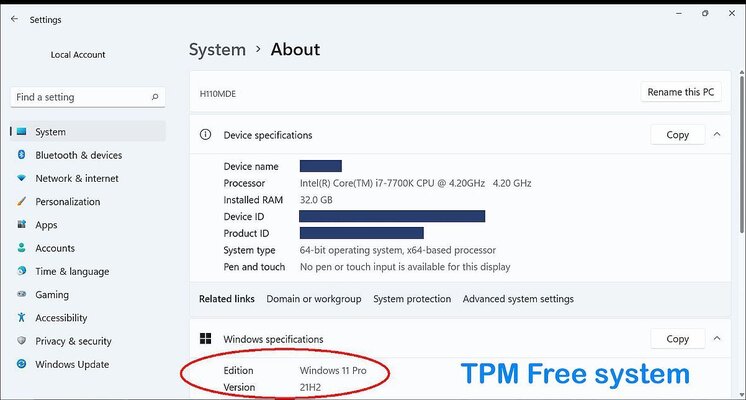
Microsoft might have great programmers on the payroll but there's always been better hackers.
Last edited:
From a word processing point of view, I likely could use PaperClip with my Batteries Included 80 column card on my 64 for almost all of what I do today.If the hardware runs useful software, then is doesn't meet my definition of "obsolete."
Years back, my CP/M Osborne luggable and an Epsom dot matrix computer was given to a church for use with Word Star. Its still in use today, although it prints to an old LaserJet.
My Ryzen 3700 desktop and GTX 1080 runs Win 11, but Word 2021 still resists me placing graphics where I want them to go, so I use my A4000 and Final Writer for word processing.
Don't let others use their definition of obsolescence on your stuff.
Undoubtedly, I could use WordPerfect 4.1 on my A500 far more comfortably today as well. I used this setup for word processing duties from '87 to '94 before moving on to Word in the workplace.
While I haven't yet tried this, the options available make this interesting, it claims to, "How to create a Windows 11 install USB that will bypass Windows 11 hardware requirements, bypass the Windows 11 Microsoft account, and de-bloat Windows 11. Also, it does all of this automatically without any use interaction. It does this by using an autounattend.xml file. "
There is a YT video about it here:
There is a YT video about it here:
D
Deleted member 14264
Guest
I preferred Professional Page. The later versions could do a lot of stuff impossible on the Mac or PC.From a word processing point of view, I likely could use PaperClip with my Batteries Included 80 column card on my 64 for almost all of what I do today.
Undoubtedly, I could use WordPerfect 4.1 on my A500 far more comfortably today as well. I used this setup for word processing duties from '87 to '94 before moving on to Word in the workplace.
Last edited by a moderator:
Protext on the Amiga works for me for basic letter writing. For anything more fancy then it's Microsoft's Word.
<edit>
If you want to be retro, send a letter printed out on a dot-matrix printer in draft mode
<edit>
If you want to be retro, send a letter printed out on a dot-matrix printer in draft mode
Last edited:
Similar threads

- Replies
- 17
- Views
- 3K

- Replies
- 1
- Views
- 708


- Replies
- 21
- Views
- 820
