For Sale Dicke Olga - 030 CPU 64/128MB Accelerator card for A2000 Amiga (USED)

Thank you, dicke Olga is now recognised with the above maprom :)

The command; Maprom kickfile lide.ROM errors with not enough space (or words to that effect).??

Also, I'm going to need help with the startup sequence, does it need a reference to lide for Dicke Olga and the lan-ide card? I assume this is why the lan-ide card (purchased from your good self)) isn't showing the cdrom attached to it?

Pardon my ignorance, very little of relevance on google :/
I believe I need to extract the .device file from the lide.ROM file and load it with loadmodules, if correct, how do I extract it?

Of course, I still need to get the .ROM file loaded into the Dicke Olga to enable it for lide, I think?

Side note.. On the two finger mouse startup screen it showed the Dicke Olga as Z3, is that correct?

Many hours of google behind me and perhaps more to come!

Any help appreciated! :)

Life is much simpler on the A1000 :)
 
I believe I need to extract the .device file from the lide.ROM file and load it with loadmodules, if correct, how do I extract it?

Of course, I still need to get the .ROM file loaded into the Dicke Olga to enable it for lide, I think?
Nope, lide bootROM is programmed in the ROM IC above Xilinx cpld, it is already there, You don't need do anything. You can check it by run Sysinfo, go to drives and see what device is used for Your drive (I'm pretty sure You'll see lide.device)
Side note.. On the two finger mouse startup screen it showed the Dicke Olga as Z3, is that correct?
Yes that's correct, these 128MB of Fastram is in 32bit Z3 Memory area, that's why it is so fast..
we all know Z2 can address only 8MB of RAM
Many hours of google behind me and perhaps more to come!
You definitely messed something up with search function I guess... Here is the first link Google gave me:
Life is much simpler on the A1000 :)
Sure not! 512kb of ChipRAM is a bummer
 
Last edited:
Thank you for the reply, though I'm not sure how a google picture of memory address would help me? I need help in setting these two cards up and running, now you've posted the correct maprom files I'm closer to using them. If you find a google search of how to use lide.rom to get both cards working, please let me know :)

"We all know Z2 can only address 8mb of RAM"
That statement is now correct! ;)
 
Thank you for the reply, though I'm not sure how a google picture of memory address would help me? I need help in setting these two cards up and running, now you've posted the correct maprom files I'm closer to using them. If you find a google search of how to use lide.rom to get both cards working, please let me know :)
Well, actually it is top secret, but if You open a PDF file (called Manual) attached in first post - You will probably find out how to use this beast called MapROM
"We all know Z2 can only address 8mb of RAM"
That statement is now correct! ;)
this picture was posted to let You see how Amiga Memory is organized, maybe it'll be useful for someone..
 
I think that I have been respectful in my previous posts asking for help on installing the Dicke Olga and the Lan-IDE card to use the LIDE driver. After the two cards are installed neither of them work out of the box.

I believe its been demonstrated that the maprom tool isnt a driver - more of a tuning/initial set-up tool, and that lide is already enabled on both cards.

Therefore, I assume that the lide.rom (from https://github.com/LIV2/lide.device/releases) needs to be installed in the OS to enable them. If this is correct, where do I put the lide.rom file to enable both cards?
 
I'm sorry, I didn't mean to hurt or offend anyone, please blame my bad humor sense for that...
I think that I have been respectful in my previous posts asking for help on installing the Dicke Olga and the Lan-IDE card to use the LIDE driver.
I never ever used word driver, I've always said ROM, because it is a physical ROM IC. It is installed on both cards and LIDE.rom is already programmed in it.
So this ROM takes care of the IDE Interface, attached media devices, it's autoconfiguration and integration in the system.
You don't have to install ANYTHING to get it work, it's already there.
After the two cards are installed neither of them work out of the box.
Sorry bud, my magic crystal seems to be broken again, it doesn't show how these cards are not working, until it gets repaired can you please provide more specific information? I can't do anything with "neither of them work out of the box."
Please describe Your problem like:
Card not booting - getting black screen, or yellow screen, (green screen) etc. I need more information about Your problem. both cards was tested before shipping and both worked absolutely fine - i guess You are doing something wrong..
I believe its been demonstrated that the maprom tool isnt a driver - more of a tuning/initial set-up tool, and that lide is already enabled on both cards.
Yes that's correct, MapROMs is just a tweak utility, it helps to squeeze out the most of the card, it's not needed for the start, card should work just fine without it.
Declaring interest.

Next in line - I would like to declare interest in 1 black one without CPU nor FPU.
payment received, user @Reborn will get multiple items from me, hence he was pulled in front to be able to do combined shipping and save some £¥$
 
I've put together this newbie guide - may be helpful. However, this was just my experience/the way I did it. BE SURE TO CHECK THE FOLLOWING POSTS FOR AMMENDMENTS and CORRECTIONS.


Installation of the Dicke Olga (lide.device) for Newbies
First of all..

No drivers or other software is needed to install this card.

Fellow newbies, whilst awaiting delivery of your new card I expect you've been visiting the LIV/lide github and MapRom websites in preparation for install. Put that information to the side, its not needed for us, really.

The Dicke Olga card should be recognized once installed into the Amiga 2000 after you have selected the jumper settings on the card to your preferred settings (If you also purchased the IDE-CP-LAN card this is installed with the "chips" facing the floppy/power supply side of the case).

I’m using this card in part to replace the A2091+scsi2sd and to take advantage of its large HD/CF capabilities. This means we use the LIDE built in ROM on the Dicke Olga. This is all auto-magical in use for us when we use the HDToolbox that's been set up to use the Dicke Olga lide.rom.

It my situation the Dicke Olga was not recognized when I slotted it into my A2000 and I have no idea why! However, a clean install of workbench 322 onto my existing HD solved this problem. The Dicke Olga was then seen on the WB with my new 32gb Sandisk Extreme Pro showing as four partitions of about 7.5gb (I don't know why it showed as four partitions - but it works for me).

HDToolbox out of the box is set to configure scsi.devices. But, we are going to use the LIDE.device (as we want to use the LIDE.ROM built into the Dicke Olga) to take advantage of the large HD/CF sizes available.

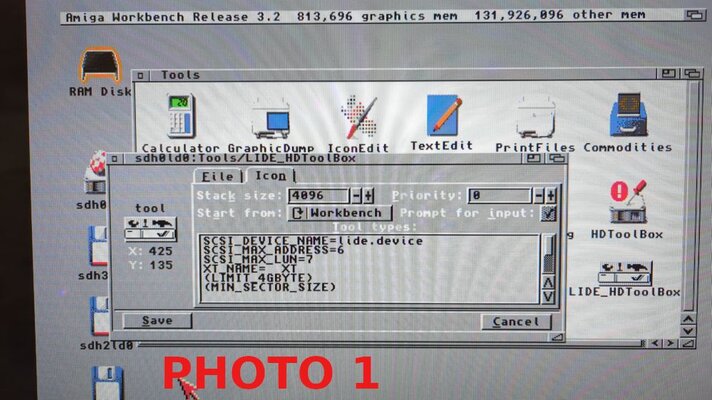
All that is needed to achieve this is to make a copy of HDToolbox and rename it something memorable such as LIDE_HDToolbox.

Click once to highlight the new LIDE_HDToolbox, go to the top menus and select Icon, and go down to Information. The LIDE_HDToolbox dialog box will open. Click on the icon tab and we can now see the one line of text we need to edit (other lines may need editing depending on your set-up, but this will get you started).

Change; SCSI_DEVICE_NAME=scsi.device To: SCSI_DEVICE_NAME=lide.device
Save and exit. PHOTO 1

We now have two HDToolbox’s. One to edit scsi.devices such as the A2091 card, and the new one to edit lide.devices found on the Dicke Olga and DjCook's IDE-CP-LAN card.

We can now format and install/transfer WB 322 onto our new Dicke Olga CF/HDD.


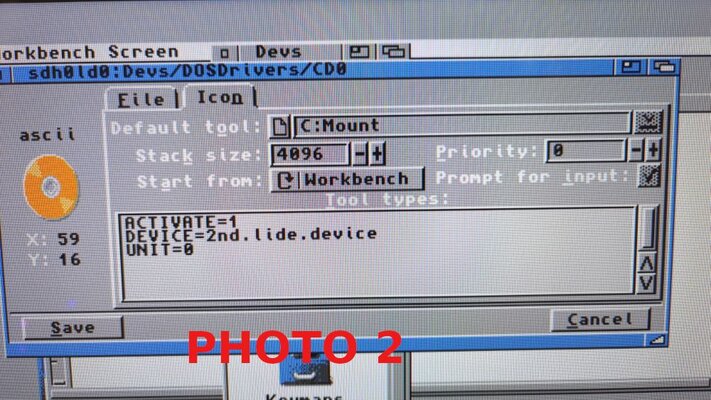
If you have purchased the IDE-CP-LAN card from DjCook, this post will help you with setting up a cdrom drive. Do not look at the LIV lide github page, it is not for us newbies :)

https://www.amibay.com/threads/zorro-ide-cp-lan-card-with-custom-brackets.2444187/page-5 Post #88
For me: PHOTO 2


Thanks for the help everyone :)

 

Attachments

  • PHOTO1.jpg
    PHOTO1.jpg
    104.2 KB · Views: 30
  • PHOTO2.jpg
    PHOTO2.jpg
    127 KB · Views: 27
Last edited:
According to my records You've got advanced version, so SATA and M.2 connectors are on the board already...
Or You want to get additional adapter?
 
Declaring interest; with cpu please
Hello,
I've started to build Your card, are You still interested?


Just a quick update:
second batch (green PCBs) is sold out,
I've started to build third batch,
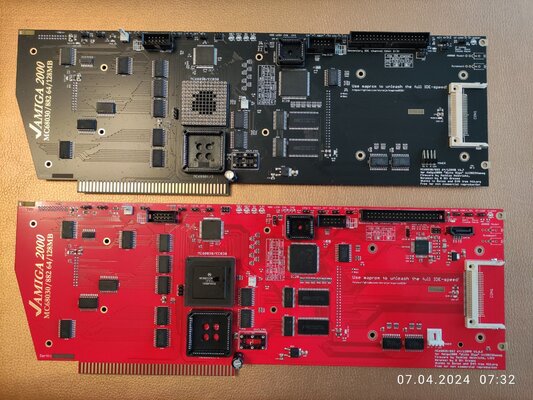
advanced are red, standard are black

IMG_20240407_073225.jpg

What's new in this revision?
starting from revision 1.6 no 4CH Adapter is needed - it is integrated on PCB, so Olga supports up to four media devices simultaneously (as long Your CF card supports Master / Slave mode)
Regards

DjCook
 
Last edited:
Seems that User @RamonFuschnik isn't interested anymore - he was online several times, but doesn't bother to answer...

What about You, @hoebedoelu
Hi,
Declaring interest for next available batch.
128MB RAM with CPU (and FPU if possible). Preferred card colour is green, but any colour will do when available. Thanks!
Seems You are next in line...
 
Mate, please give me some reasonable time to resond. I worked 8 am till 6.30 pm and while doing so, noticed that there is activity on amibay. I was prepared to reply when I get home.
 

Interest Queue

  1. Rod_cl
  2. ajrade
  3. 4MlGA
  4. cgugl
  5. SukkoPera
  6. paolopal
  7. dava1973
  8. Pythagoras
  9. Sotos
  10. alama
  11. h3kr0
  12. gewse2k
  13. Leoncjo
  14. Neztik
  15. Telsar
  16. Dano
  17. Spymate
  18. Bharaputra
  19. tmulicz
  20. Tahoe
  21. jallukas
  22. Masta_Magoo
  23. macphreak4evr
  24. Ariadne24
  25. alexflde
  26. Paradroid90
  27. Utz
  28. Buzzfuzz
  29. theq1337
  30. wills1971
  31. Tchucolate
  32. qz3fwd
  33. kavanoz
  34. Reborn
  35. RobSmithDev
  36. peoy
  37. flofromm
  38. Smarty001
  39. tequillablue
  40. deladrevoc
  41. nvana
  42. pgreffet
  43. techdyne
  44. samaron
  45. A2500
  46. Yulquen74
  47. fe22222
  48. 4pLaY
  49. nekonoko
  50. Amigafour
  51. Proximo
  52. Sgw32
  53. s800
  54. DarkHood
  55. 2600
  56. PortVortex
  57. prosonic
  58. pawellab
  59. T. Lang
  60. tmoschella
  61. andabata
  62. gewse2k
  63. Isense
  64. PaulUK
  65. A1200_Tek
  66. mezaar
  67. evilgenius
  68. zenon uchto
  69. Toaster4000
  70. Monsterkaninchen
  71. Szmn
  72. blejdaq
  73. igor75
  74. Stoom
  75. fmatejic
  76. BladeRuner
  77. Drewlio77
  78. Oliver St
  79. ironface077
  80. jpresto
  81. Lowrider91
  82. patrickgill
  83. Aquillae
  84. Smarty001
  85. Gabe829
  86. rts4e75
  87. web
  88. jbrianc
  89. Amigian
  90. web
  91. ljmarent
  92. hollik
  93. dannyboy_77
  94. kb2012
  95. Andry
  96. neo611
  97. 0001agima
  98. trialer
  99. kp73
  100. TheDirtyDon
  101. nizce
  102. gounderset
  103. Reborn
  104. St233t
  105. AwakeningStar
  106. Cosmic Space Artist
  107. vlan80
  108. cecotto
  109. olma71
  110. Linozine
  111. rc2106
  112. AlexOughton
  113. A2666
  114. caleb
  115. BAKI
  116. KiwiJimm
  117. Gunaguna
  118. drugkito
  119. Ozzyboshi
  120. qz3fwd
  121. DeyMey
  122. PapaRoni
  123. Mikko Lepistö
  124. T. Lang
  125. Skunki_
  126. Victor286c
  127. RetroPanic
  128. RealLloyd
  129. KPI
  130. 8bitguy1
  131. funghetto72a
  132. Thirty-Thirty
  133. roeich
  134. tommywinchester
  135. Kruso
  136. Cellomuc
  137. whitrkey
  138. tops4u
  139. Bartek2075
  140. CrashMidnick
  141. i4000
  142. Tbsnc99
  143. Mellaway
  144. doncheffo
  145. Fontangi
  146. Rik's Random Retro
  147. slYer
  148. Wackelstein
  149. chiark
  150. Beetlejuice
  151. hishamk
  152. btnewhouse
  153. Videot
  154. Fuzzy70
  155. kai1175
  156. HomeLate
  157. mlanie70
  158. voyager2
  159. Oldman1000
  160. amri_amin
  161. badhar68
  162. NCC1701
  163. retrosalvage
  164. Pega_De
  165. Rakeim132
  166. Viger82
  167. ajwhix
  168. grinder64
  169. SviRu
  170. uunek
  171. Skyrunner
  172. Amiga_Walker
  173. heldchen
  174. amijim
  175. Sir_Loin
  176. CA-Bay
  177. Rkotte
  178. suavek
  179. pcexpert
  180. BenJam
  181. epeace
  182. aebir
  183. obg
  184. LostFox
  185. DeluxePiantXX
  186. NenaP
  187. Tony59
  188. realBruce
  189. jasonlv
  190. epeace
  191. steveski
  192. the1Domo
  193. Starvak-Sp
  194. alxfu500
  195. zentac
  196. jvaltane
  197. Nobse67
  198. nowy80
  199. Jim_Oregon
  200. SerErris
  201. tksm
  202. ljmarent
  203. Ariadne24
  204. SwedishPete
  205. Stoertebeker
  206. Zakam
  207. Detordiggei
  208. iRonNuke
  209. Waldo594
  210. tom79
  211. Tauphi
  212. cstolarek
  213. RTheDuke
  214. Szmn
  215. Sautebroussailles
  216. Marmes

Interest Queue

Back
Top Bottom