Draco Casablanca - Using it as a general purpose Amiga

  • Thread starter Thread starter TheRogue
  • Start date Start date
  • Replies Replies 69
  • Views Views 25951
:woot: Hardware pr0n alert!:woot:

All to the battle stations: Zetr0 alert!:woot::woot::woot:
 
Well, I'd think that it has an Amiga ROM, even "patched" using loadmodule and a split rom from another amiga one owns, I think that one could have a casablanca boot onto a normal wb.

What I'd do would be to dissect the casablanca hd, and transplant files (such as rtg) onto another hd. Also, I'd want to find out if there was a draco ahi driver that could be used with the casablanca.

Are you saying that the casablanca scsi device (what ever it's called) won't support a cdrom on it's chain if one used a normal devs:dosdrivers/cd0 mountlist entry?

Also, that casablanca "keys" the floppy to it's rom doesn't worry me. As floppy isn't so interesting anymore.

And if amiga trackdisk.device can see it, then I'm hope that one could load normal rom modules to access the floppy drive as at least a pf0 with cross doss. But floppy isn't important.

hd, rtg and ahi is vital.

How to get files onto it? I guess that either it would have to be cdrom or a cf card on a scsi-ide-cf adapter type setup.

Does it have serial? If so, then I guess even amiga explorer is an alternative when wb is up.

Other than that I think ethernet and usb is out as it doesn't have zorro.
 
@arnijot: There's a few more details to take into consideration..
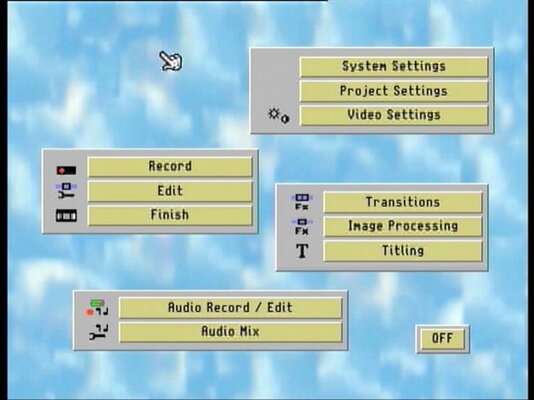
The Casablanca has an (optional - not in my case) DV port, an external SCSI, a parallel port, and a mouse and keyboard port. No other "computer-related" ports. Other than that, we don't even know if it actually boots any form of Workbench! You see, what it does once the system is installed, it boots into an environment where you start video-editing. That means that there's no actual desktop, and you see nothing inbetween. Plus, you can't get off that area through any selection or menu, shell, what-have-you. Think of it as an exclusively video-editing device as it is. You can't say that the floppy isn't important, because it's the only way to install the system. And remember, what was registered into the floppy, is passed as security info to the hard disk installation. Which means that the hard disk is also aware of the machine's serial number!
Anyway, to cheer things up a bit, i've found a few mor of my pics :)

CASSIEa.jpg


CASSIEb.jpg


CASSIEc.jpg
 
It does have serial as the mouse included with mine is a standard serial Logitech trackball. Mine has the firewire expansion if anyone wants to see it. Let me know and I'll crack mine and take pictures. It's been a while since I've had it open, but I seem to remember it looking totally different to the pictures above!
 
About the Casablanca: you wont have audio, sound chip is unsupported by current AHI drivers, Chip is an Analog Devices AD1845JP more info on it at http://datasheet.octopart.com/AD1845...heet-21662.pdf
Tocatta soundcard uses Analog Device 1848KP chipset which may be compatible with the 1845JP
details at http://datasheet.octopart.com/AD1848...eet-117009.pdf

About Casablanca floppy format:
The floppy disk is a pc one and it uses special pc format (blocks of 1 Kb with specially encoded mfm values to protect against copying on pc), but the file system is a typical amiga file system adapted to this format (changed block sizes).You can easily mount an image of this floppy disk using simple mountlist on a real amiga.

ROM/Kickstart: It uses Amiga 3000 kickstart roms plus other custom made, that heavily patches the first ones.

A workbench approach which MAY have some result:
1-Take out the harddisk from the casablanca put it in a PC, make a backup of its content (disk image).
2-Run WinUAE and add the harddisk to it
3-Format the disk using FFS
4-Instal workbench 3.1
5-Install Picasso96 or Cybergraphx Retina/Altais drivers (You should play a bit over here)
6-If casablanca is a 060 install a proper 68060.library
7-Put the harddisk back to your casablanca
8-Cross your fingers and pray... You may be able to watch something on the screen.

NOTE: Check the motherboard of the casablanca for the graphics chip it is using, and change the driver accordingly (If the driver exists). I dont know which chip it is using, i am assuming it is some NCR Altais variant!

 
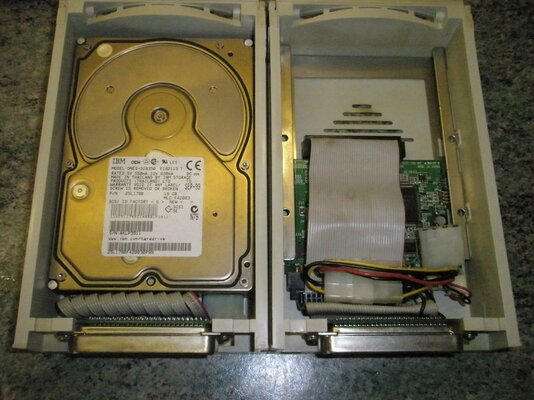
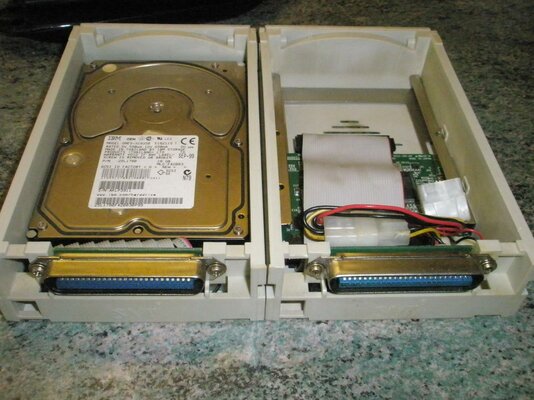
Ok, the hard disk in my Cassie is this one: http://stason.org/TULARC/pc/hard-drives-hdd/quantum/ATLAS-II-9100S-9104MB-3-5-HH-SCSI3-ULTR.html I might as well plug it on the Squirrel ASAP :) It will however take some time dismantling it from the tray, because the whole assembly is a bit rough.. I'll take a picture for advice. My dillema is if it's necessary to remove it from it's tray or use as is. The reason being, the tray's back has no power socket on it. Just the female SCSI port; is it possible the power goes through the SCSI too? Can't explain it otherwise... hmmm
 
I cracked mine open just now, and found a totally different graphics card then I've seen in any pictures of the Cassie. It is one piece, has a pass-through female "euroconnector" opposite the one that connects it to the cassie mobo. It is marked "MacroSystem Casablanca Motion II VL2" and also has 2 high density "scsi-esque" connectors, one male one female on the op of the board just behind the audio in jacks. The roms on the mobo are labeled "08.97 - U5 Casablanca CROM1.6-H" and "08.97 - U4 Casablanca CROM1.6-L" on the two large ROMs and "Casablanca U11-09.09.97 Ser. Nr. 15073" on the small one. My motherboard is labeled "Casablanca V1.3 MacroSystem" and there is an interesting unused IEC Connector on the left edge of the mobo just to the left of the floppy IEC connector. It is female and has 26 pins. Pictures to follow when I find my bloody camera!
 
Just found this on P96 driver tooltypes:
FakeNativeModes
if set (Yes) the most common native Amiga chipset screen modes will be patched to use a Picasso96 board to ease use and installation of Picasso96 on systems that don't have a native Amiga chipset like the Macrosystem Draco or that have no monitor attached to the native chip set signal connector or that don't have a flicker fixer and no 15 kHz capable monitor. Defaults to Yes for the Draco Altais and No for all other cards. If you use it, you should remove all native Amiga monitor drivers (!). Now, when the system uses one of the native Amiga screen modes (currently only LowRes, HighRes and SuperHighRes and their interlaced counter parts), a 640x480 31kHz 60Hz screen mode on the graphics card will be used. Note: this mode is not configurable and it is not intended to be, because you should use real Picasso96 screen mode IDs whenever you can. It is only there to get the workbench on a VGA compatible screen when the current screenmode.prefs contains an invalid mode id. May also be useful for some (stupid) programs that default to a custom screen with a native Amiga screen mode after installation.

So the question is, is it the "NCR 77C32 BLT" chipset which is in the Casablanca, or what other RTG system is installed on top of the Amiga ROM on that machine...
 
Here's a list of tips I collected over the years of using my Casablanca.

Some of these also refer to the Draco.

I'll try and get some pictures up of my Casablanca later today.

Dave G
 

Attachments

Alright, sorry for my delay to respond, but there's just so many projects taking place simultaneously, that it's hard to keep up.:)
Here's the promised pictures of the HD tray.

CASSIEd.jpg


CASSIEe.jpg


I'm not sure that just plugging this directly to a regular SCSI connector will give me power for the drive. Any bits of knowledge can come in handy... :roll:

@davideo: Thanks for the tips you upped, these can be helpful mostly for those that just want to stick with what a Casablanca already is, a NLE machine. Nevertheless, it's some useful stuff :thumbsup:
 
That looks suspiciously like an IDE drive tray to me. Are you absolutely sure it's a SCSI one. If it's not, you could end up releasing the Magic Smoke from your equipment.
 
Andy,

The original drive is a SCSI through and through on the Casablanca - I can't be sure of the Draco though.

You could fit an IDE/SCSI converter inside the disc tray and use an IDE though. One of my drives is full SCSI the other IDE/SCSI.

It was the cheaper option at the time to get a bigger HD (40GB).

I'll shove some piccys up shortly.

Dave G :cool:
 
The hard disk is definitely a SCSI one, check a previous link for data on it, the Cassie has only SCSI (both int/ext), and for anyone with a Squirrel, i'd say compare the two sockets. Anyway, i might go through disassembling it just in case...
 
Here's a couple of piccys of my Casablanca HDs.

The one on the left is the original SCSI the one on the right is SCSI/IDE minus the HD - I knicked that a while ago for my 4000D.

Dave G :cool:
 

Attachments

  • P1010001.jpg
    P1010001.jpg
    193.5 KB · Views: 8
  • P1010002.jpg
    P1010002.jpg
    193.2 KB · Views: 7
SCSI devices do not get their power though 50 Way Centronics connectors.

The ribbon cable is a 68 way affair to the drive, meaning it's deinitely a SCSI device.

Kin
 
I've been sure it's a SCSI all along, the thing is, do i go on plugging it as is to a SCSI socket of the opposite gender, or should i dismantle the drive from the tray? There's no outside power receptacle of the Molex type for 5 and 12V.
BY the way, the Draco is on SCSI too. And at startup, when the boot logo shows, there's a countdown stating SCSI delay or something like that. :)
 
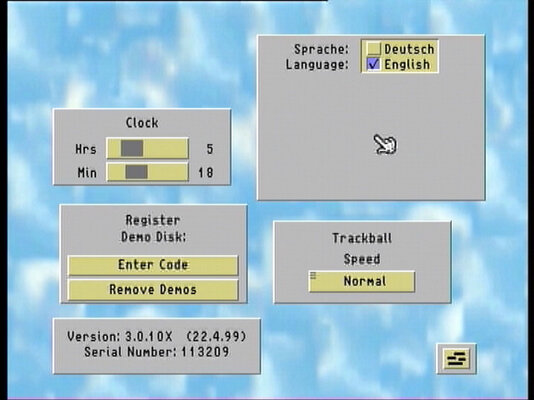
Some piccys as promised. More in a few minutes

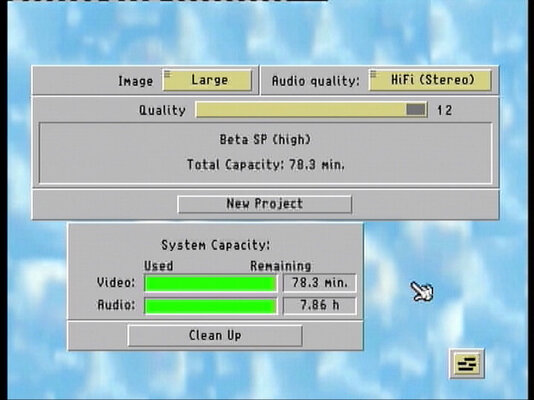
Picture 1 = the initial start screen that the Casablanca boots into
Picture 2 = the system settings screen. Setting the clock is done from here. No battery backup on clock - that could be a good thing looking at how Miggys batteries behave
Picture 3 = Video quality shows approx how much video you can store
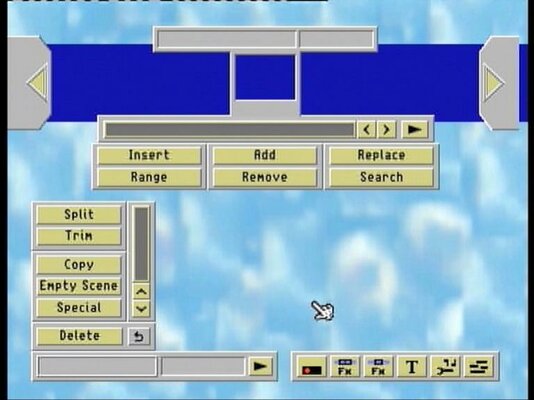
Picture 4 = the edit screen where you put your project together
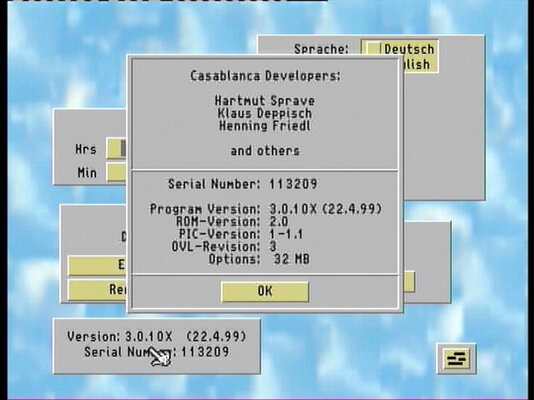
Picture 5 = the system settings screen again with the hidden info showing

Dave G :cool:
 

Attachments

  • Casablanca 1.jpg
    Casablanca 1.jpg
    47 KB · Views: 23
  • Casablanca 2.jpg
    Casablanca 2.jpg
    47.8 KB · Views: 14
  • Casablanca 3.jpg
    Casablanca 3.jpg
    49.8 KB · Views: 13
  • Casablanca 4.jpg
    Casablanca 4.jpg
    47.5 KB · Views: 14
  • Casablanca 5.jpg
    Casablanca 5.jpg
    52.5 KB · Views: 24
@arnijot: Here's the molex, red arrow shows the spot.I repeat, there's no outside molex jack, this is inside the tray!

CASSIEf.jpg
 
Back
Top Bottom