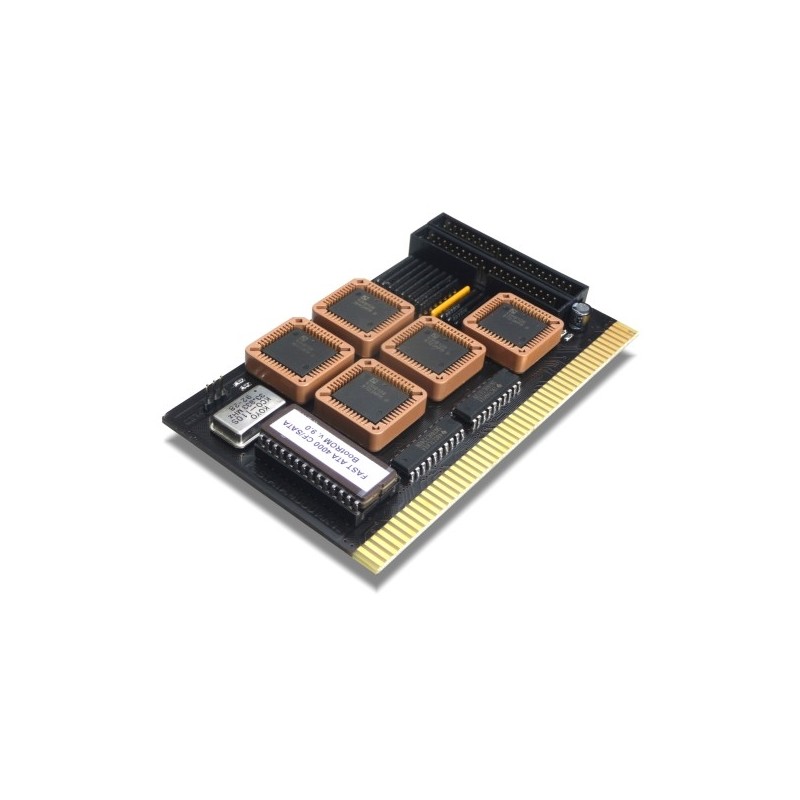
FastATA VII on A4000T at 100MHz

  • Thread starter Thread starter JHanna
  • Start date Start date
  • Replies Replies 28
  • Views Views 1077

JHanna

Active member
Joined
Dec 16, 2023
Posts
442
Country
United Kingdom
Region
Northern Ireland
Hi.

After months of research, it seems there is no way to have a reliable SCSI CD drive on an A4000T running at 100MHz with a BFG9060.

I have spoken to Thomas who designed the MMU library and he reckons there is no way round it.

With that in mind, I have decided to abandon my SCSI dream and go back to stupid IDE 😢

Is the FastATA VII reliable? At 100MHz?

I have heard many different opinions. I can't afford to be losing data.

Thanks so much for all you help over the last few months.
 
Wow! Do other SCSI devices suffer too if connected to the built in SCSI?
 
i used my fastata on my 1200 for ages ,cpu ran at 100mhz

im not sure which fastata you mean though,proably something that goes in a a zorro slot
 
i used my fastata on my 1200 for ages ,cpu ran at 100mhz

im not sure which fastata you mean though,proably something that goes in a a zorro slot
Maybe okay on a A1200 with the FastATA MK V/VI But don’t forget the OP is attempting to run on a A4000T using a Zorro III connector and Buster.
My experiences with the FASTATA MKVII have been flaky at standard speeds with a A4000D setup (Buster 11). Remember the advertised speeds Elbox say these are supposed to run at may differ to your experiences. I.e supposed to hit 16MB/s, yet in theory around 6MB/s. Even then trying for PIO5 speeds may cause I/O and Data loss 😔 And you may have to reduce to a lower PIO.

I think the issue here is the BFG. Remember if you plan to go for these newer accelerators, then you are effectively being a BETA tester! You may experience issues on your setup, that others haven’t. This is why I have stuck to tried and tested Classic accelerators. My advice is try and get something like a Cyberstorm MK2 or even MK3. Or if you are lucky to find one a WarpEngine 040 and convert to a 060. Have the latter currently running at 80mhz with built in SCSI working stable.
I also have the Cyberstorm MK1 (52mhz 060 rev 5) and Cyberstorm 060/PPC (75mhz 060 Rev 6 + 420Mhz PPC 604e). Both with DMA SCSI transfers. No CPU overheads with SCSI 👍🏻😉
 
Maybe okay on a A1200 with the FastATA MK V/VI But don’t forget the OP is attempting to run on a A4000T using a Zorro III connector and Buster.
My experiences with the FASTATA MKVII have been flaky at standard speeds with a A4000D setup (Buster 11). Remember the advertised speeds Elbox say these are supposed to run at may differ to your experiences. I.e supposed to hit 16MB/s, yet in theory around 6MB/s. Even then trying for PIO5 speeds may cause I/O and Data loss 😔 And you may have to reduce to a lower PIO.

I think the issue here is the BFG. Remember if you plan to go for these newer accelerators, then you are effectively being a BETA tester! You may experience issues on your setup, that others haven’t. This is why I have stuck to tried and tested Classic accelerators. My advice is try and get something like a Cyberstorm MK2 or even MK3. Or if you are lucky to find one a WarpEngine 040 and convert to a 060. Have the latter currently running at 80mhz with built in SCSI working stable.
I also have the Cyberstorm MK1 (52mhz 060 rev 5) and Cyberstorm 060/PPC (75mhz 060 Rev 6 + 420Mhz PPC 604e). Both with DMA SCSI transfers. No CPU overheads with SCSI 👍🏻😉
i was getting about 10MB/s in pio 5 ,no flacky or data loss here,never seen any elbox claims on this to be true as far as max transfers are concerned
i am not sure where those claims came from or what they used as a test bed,even back in the day when they first came out
im using real drives
 
i was getting about 10MB/s in pio 5 ,no flacky or data loss here,never seen any elbox claims on this to be true as far as max transfers are concerned
i am not sure where those claims came from or what they used as a test bed,even back in the day when they first came out
im using real drives
Info about them here from Elbox themselves about claimed Speed:

 
@roy_bates what hdd are you using and getting 10mb/s? What’s your full layout/config?

I love all these new accelerators that have been coming out lately but the IDE becomes a bottleneck. I am going to use a FAST ATA on my build as well due to lack of decent alternatives. I wish someone would implement SATA or something.
 
Hi.

After months of research, it seems there is no way to have a reliable SCSI CD drive on an A4000T running at 100MHz with a BFG9060.

I have spoken to Thomas who designed the MMU library and he reckons there is no way round it.

With that in mind, I have decided to abandon my SCSI dream and go back to stupid IDE 😢

Is the FastATA VII reliable? At 100MHz?

I have heard many different opinions. I can't afford to be losing data.

Thanks so much for all you help over the last few months.
I think it will probably be possible to get scsi working correctly with BFG9060 on 3000D, 3000T and 4000T once the ReSDMAC is finished and released. SDMAC is a total lottery at the moment in these machines as the timings are all over the place - some SDMACs work fine with BFG9060, others fall over completely. These timing issues will be fixed with ReSDMAC. So maybe revisit SCSI CDROM once this is available. It shouldnt be long now as most of the work is well underway.
 
From BBoAH:

"The A4000T uses the NCR 53C710 3rd generation SCSI and DMA Controller, and is not a related chip to the DMAC/SDMAC."

So the ReSDMAC project won't help me then?
 
Dunno, I’ve never used one. But looking now at the list of custom chips I think you’re right, this won’t help a 4000T.
 
From BBoAH:

"The A4000T uses the NCR 53C710 3rd generation SCSI and DMA Controller, and is not a related chip to the DMAC/SDMAC."

So the ReSDMAC project won't help me then?
Which brands of SCSI CD drive have you tried? Have you made sure that the SCSI cable is good? Termination is also good?
 
Which brands of SCSI CD drive have you tried? Have you made sure that the SCSI cable is good? Termination is also good?
I've tried 8 different drives. Tried 4 different cables. Tried active and passive termination.

No SCSI CD-ROM drives work at 100Mhz with MMUlibs. Ever.
 
With that in mind, I have decided to abandon my SCSI dream and go back to stupid IDE 😢

Not trying to troll your post but with that in mind, if SCSI was what I needed (and when owning an A4000T, this is definitely what I would want), I would simply give up on the BFG which is only good for the desktop version and go back to the good old Cyberstorm MK3 or WarpEngine, which for the latest can be nicely overclocked up to 80 MHz with SCSI still working...
Just like Boing-ball says ! :);)
 
I think it will probably be possible to get scsi working correctly with BFG9060 on 3000D, 3000T and 4000T once the ReSDMAC is finished and released. SDMAC is a total lottery at the moment in these machines as the timings are all over the place - some SDMACs work fine with BFG9060, others fall over completely. These timing issues will be fixed with ReSDMAC. So maybe revisit SCSI CDROM once this is available. It shouldnt be long now as most of the work is well underway.
There is no SDMAC in A4000, is there? That's pure A3000 technology....
 
I've tried 8 different drives. Tried 4 different cables. Tried active and passive termination.

No SCSI CD-ROM drives work at 100Mhz with MMUlibs. Ever.
What I don't get, why are only CD ROMs a problem? Isn't SCSI meant to be HW independant?

Can you explain a bit more about this?
 
Back
Top Bottom