G4 mac mini woes

  • Thread starter Thread starter ratfink
  • Start date Start date
  • Replies Replies 21
  • Views Views 1861

ratfink

Well-known member
AmiBayer
Joined
Mar 23, 2011
Posts
1,673
Country
United Kingdom
Region
Yorkshire
I recently obtained a G4 mini with the idea of installing OS9 but have run into problems not related to OS9 as such.

The hard drive died almost immediately, and I could not get it to boot from an OS9 CD, the boot menu only shows the basic return arrow and right arrow.

I have replaced the hard drive with an M2 sata SSD in a SATA->PATA housing, but it still only gives me the flashing face/questionmark on bootup. I suppose that's not surprising with no OS installed.

The boot disk I'm using is a version of OS9 adapted for the G4 mini. I created it on my Windows PC but my other G4 mini will boot from it. So it's not the boot disk.

I tried copying the OS9 cd to an external SATA SSD in a USB housing, using the good mac mini (so erased the disk, formatted as mac, copied image). Turns out neither mini can boot from that, in that it doesn't appear on the boot menu.

Next step may be to test the M2/PATA drive in my Windows PC though I'm not actually sure it still has PATA after the last upgrade. Which will at least show whether the drive works.

I don't want to take apart the known-good mini to swap parts around, or to (say) swap in the M2 drive, install OS9 then swap it out again and put it into the borked mini. Mainly because enough things have gone wrong already...

So I suppose two questions:

- is it possible to boot a G4 mini from a usb stick and does anyone know how? I can't find a clear exposition online, and the openfirmware commands don't seem to be complete on the mini. If that ought to work, would it boot from the usb-housed ssd?

- is there any way to verify whether the CD drive is working in the borked machine, other than swapping it around with the other one?

Guess a third question is whether it's possible to do anything over the network or I think I saw somewhere that you can use firewire to diagnose one machine from another?

Any advice gratefully received :)
 
I would burn an MorphOS iso to a cd and hold the c button down. It should boot to the OS. Most of the problem I have had on my Macs is not creating the ISO cd correctly. To me this is easier.

As a quick suggestion, MorphOS can browse the web, email, and playing movies is so much better than Mac OS on a PPC. The OS is just so much faster in general.
 
Thanks for the suggestion Matt, I may try Morphos some time but the aim here was OS9 in a compact format using PC-compatible peripherals (USB keyboard/mouse and DVI/VGA monitor). And the other Mini will boot from my OS9 boot cd, so I don't think the boot cd is the issue.
 
I found that a G4 Mac Mini won't boot from USB but it will boot from firewire. I had a small 120gb external hdd with firewire connection and used the disk utility to restore the Mac OS X dvd to a partition on the hdd so i could boot from that when i wanted to do a fresh install
 
You can also try the boot menu by holding the option key (alt on a windows keyboard) when turning the machine on, this should show any bootable devices (which includes the cd drive if its read the disc)


1693159135027.png
 
Thanks scrappy, useful to have that confirmation about usb. Yes, I've used the option key but nothing appears. Not really had Macs since adb, I hadn't realised there were such things as firewire drives!
 
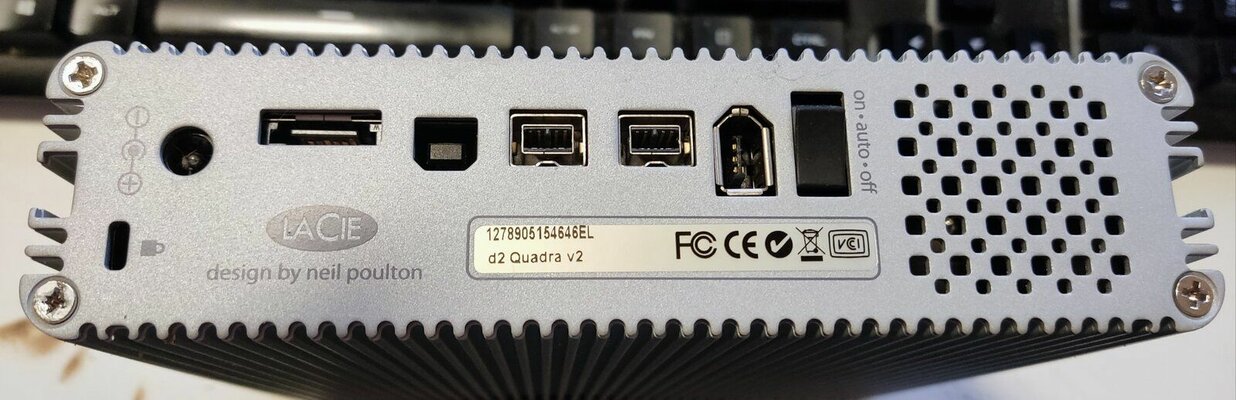
It's a Lacie D2 Quadra V2 I have, it's basically just an external HDD but has Usb, FireWire 400 and FireWire 800 connections on the back. I got it quite cheap from ebay cause the original 500gb HDD was dead but i just opened it up and swapped out the drive (it's a standard sata HDD inside. The Mac mini g4 will boot from it if connected by the FireWire connection but not when connected by usb.

Apple and their odd behaviours lol
 

Attachments

  • IMG_20230827_210758.jpg
    IMG_20230827_210758.jpg
    154.8 KB · Views: 26
you can actually boot 1 mac from another mac's storage. basically link 2 macs via firewire,

1st mac as above select boot manager and the 2nd mac set in slave mode, thats how my lad used to restore his g3 tower from his g4 laptop funky stuff.

i think it works for intel macs also, my lad got a xeon mac with a broken video card and no hdd, so to check it worked he booted the xeon from the intel macbook and used the intel macbook screen to view the xeon hardware settings etc, very weird to watch but puts windows pc to shame.
 
Thanks Sardine, I may have a go at that if I've got the right sort of firewire cable - have a few around the place that would have been used for a camcorder.
 
my lad is telling me

On the working ppc mac connected via firewire you hold "T" at boot placing into "target disk mode"

On the mac with the new hdd no os hold "alt" down and select the other macs hdd and boot off that then repair / install / partition the OS on the new mac or press as below "C" and boot the OS9 cd from the other macs optical drive, very cool

( oh p.s. my lad said it must be firewire to firewire not firewire to 1394 )
this might help

 
Last edited:
( oh p.s. my lad said it must be firewire to firewire not firewire to 1394 )
this might help
Yep, in all my boxes of why-the-hell-did-i-keep-this cables, I have 3 firewire, none the right sort. Ah well. One more to add.
 
Progress! Now I have the right cable, and I can boot the duff mini from the OS9 cd or the hard drive [osx] in the good mini.

Two problems remain, the mouse and the display.

Before any OS boots, the display signal from the duff mini is fine both for the boot selector gui and open firmware (all text and icons clearly displayed), and the mouse works - pointer goes all over the screen ok.

After booting osx [from the good mini's install] the mouse is ok but the display is weirdly corrupted as though vertical lines have been missed - you can't read the text. I have another display I can try.

After booting OS9 from the CD the display is also corrupted the same way, but the mouse only works across a horizontal line - I can't move it vertically. I guess not all usb mice are equal, so I'll try another if I have one. I assumed wired usb mice would all communicate the same, maybe that's not true. This one is a cherry laser mouse.

On the good mini display and mouse are fine in osx, there's only the mouse problem in os9 [so given the os9 is a version adapted for the g4 mini, it's down to me to get a mouse that does work with it].

Any thoughts on the display issue?
 
Well that all went pear-shaped, firewire connection topped working, I suspect some electrical fault. But I've got things working now...eventually...

It turned out reasonably easy to get Tiger and OS9 running on the G4 Mini that has a working optical drive, which was the main point of this escapade. The mouse going horizontal during OS9 installation was solved by disabling extensions (and it isn't a problem after install) and was apparently caused by not using either an Apple or Microsoft mouse

Getting any operating system onto the machine with the knackered optical drive had me stumped for a while - eventually I worked out how to boot CD image of a Tiger install disk from a USB stick from Open Firmware, but I could find no way to get past the request for disk 2, nor any way to create a single install image from a set of CD images. Luckily it was a 1.5ghz machine, so a Leopard DVD (imaged to the usb stick) booted and installed fine... turns out this Mac has an airport card which is nice.
 
Hi,

I had Mac OS9 and MorphOS running on a Mac Mini G4, I installed tge respective opersting system from CD Disk.

The booting from USB is a little complex, just burning the CD and pressing C to install is simple.

Have change the 40Gb IDE drive to M2 SATA
 
Yeah Open Firmware is weird, but the CD drive would not read disks and I didn't want to replace it until I was sure the machine was otherwise ok. Luckily devalias showed the ud device, so booting was reasonably easy, just a few iterations to get the syntax right. On my other G4 mini, when I tried Open Firmware it didn't list the ud drive - not sure what that might mean.

I haven't used the one with the M2 drive much, but so far that machine (1.5ghz) seems much slower to boot leopard than the 1.42ghz boots Tiger from an original/ordinary hard drive.
 
I have been struggling to get the Mac OS 9 for the G4 Mac mini installed and bootable. :cautious:

I gave up trying to create a partition for it along side my Mac OS X Tiger and MorphOS on the internal drive. I heard a triple boot is possible but I've found no instructions. After booting from the Mac OS 9 CD, it just wants to clobber the MorphOS BOOT partition, although when you look at it later using MOS HDConfig, it all looks fine. It is no longer recognized as a boot drive. Probably something to do with the Open Firmware being modified??

So then I found a nice 2.5" firewire enclosure I have. I swapped out the 320GB rotational drive with a 250GB SSD. The OS 9 boot CD also wants to initialize any unrecognized volume that it finds. It found one that was 159GB but I do to recall having space on the internal drive of that amount. I hit cancel and then it finds my ext. FW drive and I go forward with the initialization using the Mac OS Extended format. I seem to recall from the PowerPC days that this provided some benefit to the file system but it did not allow for larger drives. Is 128GB the largest one can use with OS 9.2? If so, this might expain why the installation proceeds without error but the G4 mini won't boot from it. I could divide up the external drive although that sounds like another thing one should avoid doing.

Even if I can get this to work, I know I will need to go back and fix MorphOS. Then I should create a sticky note for OS 9 that says DO NOT LAUNCH DRIVE SETUP!! :sneaky:
 
Last edited:
Some progress has been made.

Since booting from the external FW drive wasn't working (even though everything I've read says otherwise), I went ahead and initialized that 152GB volume that showed up knowing this was on the internal drive and I had nothing to risk by wiping it (I have a MorphOS backup and the BOOT partition is already broken).

The installation went fine and I was able to boot Mac OS 9! I quickly made some adjustments to the monitor resolution because the native 1920x1080 is too tiny for the old OS. I also disabled Extensions and Control Panels I know I won't be using.

I was pleased to discover that the TCP/IP control panel picked up an IP address on my network. I am fully aware my network and browser options are quite limited but I was hoping I might still be able to achieve file sharing with an older mac. I understand "Classilla" is the best web browser option that might get you to some web sites.

So does anyone know a way to "repair" my MorphOS BOOT partition without disrupting the newly created MacOS9 setup? Below is my partition map:

I have tried reformatting BOOT and restoring the files (making sure Autoboot is checked) in the past but don't recall that ever working. The only thing that works every time is running the MorphOS setup wizard and completing the drive setup automatically. I believe it is even mentioned in the instructions that this is the only way to get MorphOS booting on a Mac mini G4. You can then manually divide up the rest of your drive using HDConfig. This is where I discovered that my remaining drive space was divided up into two equal partitions. I swear I do not recall doing this, however. The Mac OS 9 boot CD zeroed in on "DH3" and this is where the install exists now. It does not appear to have any trouble with the partition being larger than 128GB but then I haven't tried filling it up yet. It might do the same thing an Amiga does...all will look well until you start saving data beyond the hardware limit.


MOS partitions_sml.webp


MacOS9.webp
 
In my effort to capture this working OS 9 system, I pulled my new SSD from the G4 and used Disk Utility on another Mac to make an .img of the partition. The .img file can be mounted and I see the contents of the drive just fine. While the drive was out, I also restored my working Tiger system to the first of the 1562GB partition. This worked just fine and I returned to have a working dual boot setup. For the second 152GB partition, I formatted it using Tiger's Disk Utility because it still had the "Mac OS Extended" format option.

Also while still running in Tiger, I transferred over the OS9 .img file. I tried to use Disk Utility's "Restore" option but it did not work. Thinking about this classic OS, it really isn't supposed to be too complicated. All it needs on a real Mac of the time is a recognized drive with a compatible file system and a working (blessed) System Folder. Perhaps this was lost when I created the .img. And, yet, I still think it would be more forgivable in this situation.

It is possible that if I boot back up using the OS 9.2 CD, the volume will be recognized and it will "rebuild the desktop file" I believe it was referred to.

EXCEPT...it was after booting into this CD that made my MorphOS stop booting so I am hesitant to do that again.

Any ideas?
 
Last edited:
Looks like this MorphOS cmd could restore MorphOS booting again:


But would it only be temporary until the next time OS 9 boots??

I still do not want to risk damaging my BOOT partition again by simply booting from the OS9 CD. To be fair, it automatically launches the DriveSetup program which I suspect is doing the damage, not just the booting alone.

It is a shame that I am stuck as this point because while I was testing it out, OS9 was working pretty good on the mini G4, apart from the audio. Even if using the external headphone jack, the audio volume is too low.

On a side note, I still cannot figure out why my mini G4 refuses to boot from my external firewire drive. It sees the drive just fine. I was also able to make a successful clone of Tiger using Carbon Copy Cloner. Setting the "Startup disk" also recognizes the drive as bootable but it does not work. When I hold the Option key on startup, I only see MorphOS and my Tiger install on the internal drive as bootable.
 
Last edited:
Back
Top Bottom