Guide: How to burn a Custom Kickstart 3.9 (incl. 1MB ROM)

  • Thread starter Thread starter mfilos
  • Start date Start date
  • Replies Replies 303
  • Views Views 241907
No you can't perform and Assign ENV: RAM: in ROM.
You can only do that in Startup-Sequence, so you need to make alternative Startup-Sequence for minimal boot (like ClassicWB uses alternate Startup-Sequence if you press LEFT or RIGHT mouse buttons).

VincED is not ROMable. It's a part of the OS3.9 OS and only runs if worbench is up.
If you want KingCON features from the time you have a CLI windows (even without Startup-Sequence) KingCON in ROM is the only way.
 
Hi Marios, my friend.

I have some questions :roll:

Kickstart 1.2 33.180

There is a way to decompile this ROM? I have the original IC's, also the licensed AForever files, but no sucess.

I used different tools under WinUAE and in real A500. But no way, every time I tried to decompile it, the system hangs.

RomSplit & Cloanto ROM files

What I need to do to get the application to recognize the AForever ROMs? (my rom.key file is at S: in all my systems)

What is the correct Tooltype parameter I need to set inside the RomSplit icon?

-------------

I use two ways to obtain the ROM files to work with Remus::

- Emulated Amigas with licensed AForever ROM files
- Real Amigas

Thanks in advance :)
 
I am not going to read all though this thread but I did suggest on another amiga site that perhaps FastATA maybe can be improved by using 1Mb roms.
 
@merlinkv
Pablo my friend, you're not doing anything wrong nor you can do anything different from what you do.
In fact and from what I know, RomSplit can't dissect the ROM modules from these Kickstart images because the information on where to dissect each module doesn't exist.

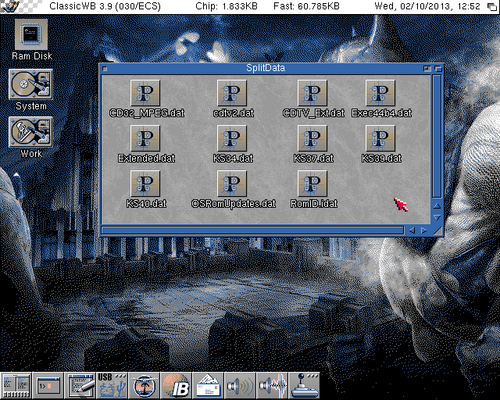
If you check the SplitData folder inside the Remus installation you'll see the following files that are used for dissecting the kickstart images

SplitData.png

So apparently we have info for dissecting as following:
- KS34.dat --> All Kickstart 1.3 images
- KS37.dat --> All Kickstart 2.0x images
- KS39.dat --> All Kickstart 3.0 images
- KS40.dat --> All Kickstart 3.1 images

So, sadly (although I don't find a reason why) there is no way to extract the ROM modules from Kickstart 1.2 as we lack the KS33.dat. Who knows, maybe in future, Doobrey can provide such a file :)


@delshay
I saw your suggestion over EAB and I'll respond the same thing here as well.
The only way for something to benefit FastATA users in custom ROMS would be an updated ATA3.driver from Elbox which could be ROMable.
That way in a custom ROM you'd have all the disks and partitions ready to run even from Early Startup Menu.

You can always write them an email asking for such feature. I'm rather sure that NO sane developer would nowadays alter Elbox drivers and spread the word easily.
 
So apparently we have info for dissecting as following:
- KS34.dat --> All Kickstart 1.3 images
- KS37.dat --> All Kickstart 2.0x images
- KS39.dat --> All Kickstart 3.0 images
- KS40.dat --> All Kickstart 3.1 images

So, sadly (although I don't find a reason why) there is no way to extract the ROM modules from Kickstart 1.2 as we lack the KS33.dat. Who knows, maybe in future, Doobrey can provide such a file :)

Hi Marios,

Yes I see this files, my friend. Thanks alot. :)

I have one image of the KS 1.2 33.180 readed with my VP-490 programmer, then I can write this image in one EPROM (concatenating 2x256 files) and the "new" ROM works fine. Also I'm working in a dual 1.2-1.3 ROM for testing purpouses (for very old games).

But I can't find a tool to save the 1.2 ROM under an Amiga (emulated or not) ...... :Doh:

And last question (sorry) ....... :whistle:

About RomSplit & Cloanto ROM files? Any idea?

Thanks again my friend :)
 
Last edited:
But I can't find a tool to save the 1.2 ROM under an Amiga (emulated or not) ...... :Doh:
About RomSplit & Cloanto ROM files? Any idea?

Have you tried the transrom tool? I think it should be able to dump any KS, although I don't know if it runs under 1.2.

I would not expect RomSplit to support the key, so you should probably decrypt the ROMs first through WinUAE (also using transrom).
 
Have you tried the transrom tool? I think it should be able to dump any KS, although I don't know if it runs under 1.2.

I would not expect RomSplit to support the key, so you should probably decrypt the ROMs first through WinUAE (also using transrom).

Hi

I will try with transrom :)

With all other ROMs I don't have problems in emulated or real Amigas, Just using the SaveROM tool and everything works fine.

Is just curiosity to know if RomSplit works directly with the encripted AForever ROMs or not :)

:)
 
Very nice guide, thank you.

Quick question though, which type of eprom do i need to burn custom roms for the a1200 and do you know where to grab them cheap?

If i'm right i think they're 27C400, are there any speed requirements?

I can find 10x 27C400-150 from ebay (buy it now) via China for about £20 shipped, will these be ok?
 
Very nice guide, thank you.

Quick question though, which type of eprom do i need to burn custom roms for the a1200 and do you know where to grab them cheap?

If i'm right i think they're 27C400, are there any speed requirements?

I can find 10x 27C400-150 from ebay (buy it now) via China for about £20 shipped, will these be ok?


they will be fine.
 
Any up to date info on sellers who can write EPROMs with an image? I can't seem to find any at the moment.
 
Can anyone here make a couple of sets for A4000 that they will sell to me?
 
Trying to build my own roms this week but sadly I run in some trouble :(

I have made 2 roms, for my A600/030 and for my A3000. Both run very nice within WinUAE, ClassicWB opens in seconds from a CF card on a cardreader on my laptop:) Excellent guide from Mfilos :thumbsup:

But the burning part is a bit troublesome for me. I tried to burn the A600 rom (without workbench library) several times on a 27c400. The guide is not so clear about making a single 512k rom for A500/600/2000, only for the 1MB rom (27c800). So after several ways to build and burn the rom for the A600, I switched to the A3000 rom and followed the guide to ther letter to build a A3000 HI and LO bin, and burned them. But the A3000's green LED doesn't go bright and no KS screen. So maybe my way of burning is wrong as this is my first attempt to burn eproms, but I do understand the basic way it works.... I have added a screenprint, maybe someone can point me what I am doing wrong?

remusA3000_1-groot_zps382fa60f.jpg


The burner is a Genius G840 (bought from Amibay: https://www.amibay.com/showthread.php?p=571383)

The DataBuffer screen is a loaded 3000 LO bin
The Information screen is the openingsscreen with eprom settings
The file Information screen below is what I get when I load a bin file and how I want to use it. I only select Bin here and let the other options as they are.

I think I go wrong in this last part, but as this is not a Williams burner but a Genius, I can't find out what I am doing wrong ??
 
did you byte swap them?

probably worth asking what you was burning to the rom.3.1?
 
Last edited:
did you byte swap them?

probably worth asking what you was burning to the rom.3.1?

For the A3000 I used the Arexx script to build the 1mb rom and answered Yes to the question to byte swap. Just like the guide says to build the A1200 rom and make the HI and LO bin. Placed then in the correct rom sockets. Original roms work when I place them back.

For the A600 I tried several things (making me to erase 4 Eproms soon;))... but the byte swap option is only explained for 1 mb roms split into 2 eproms by the Arexx script. And can't find the option to byte-swap on the Genius Software, maybe it has something to do with encryption as I understand, but don't know (or can find) if the byte swap option is in the software...?

The rom is just a basic A3000 3.1 rom with the updated BB2 libraries from first post, only some special for the A3000 /ECS like the scsi.device, graphics.library (ECS) and the A3000 bonus file and others from DonAdan. Nothing real special actually...

And they (both A600 and A3000) work in WinUAE, but not when I burn them. That is why I think I do something wrong with the burning part...
Edit: for the A3000 I select both 2 bin files (normal and extended) and select the A3000 Chipset Extra option to get the KS 3.9 screen.... The extended rom only contains the workbench.library 1.32 and the Rom Header file, all other files are in the normal rom. I have no PPC so the other files in first post are not needed as I understand...

Edit2: I read I need a hack to use 1mb rom in the A3000? Romy hack from Cosmos?

Thanks for the help @roy_bates (also from my Amiga 1200/Bliz030 with her new 64mb Edo ;))

Update:

Took the non-byteswapped 512k bin I made for the A600 and used the utility Swab (http://xe-emulator.com/index.php?m=download) to byteswap the file, burned it and the A600 shows the KS 3.9 screen :) So Swab can do the byteswap without splitting :)

Sadly I think I did something wrong building the rom as the mouse won't work and by this the early startup-screen doesn't come up, but I'm gertting somewhere !!

For the A3000 I will follow the A4000 guide, I think that will do the trick for that one :)

Another update: got the A600 512K KS working after ripping the rom again and skip the input/keyboard patch and keeping the old scsi.device... with the new scsi.device the A600 won't boot...

 
Last edited:
Great guide mfilos!

I'm making a custom ROM with Remus to blizkick on my A4000T/Cyberstorm MK2.. (No EPROM burning for now)

Do you know if is it possible to load a single 1MB custom rom file with blizkick on the A4000, or do I have to load a 512KB one and then add the remaining modules (with a large EXTRESBUF value)?
If possible, do I need the 1MB_ROM file, or is not required with blizkick? (I cannot find the 1MB_ROM file in any blizkick archives..)
 
I'm almost certain that Blizkick can't load more than 512KB ROMS directly so I guess your only bet would be loading the modules you want one by one with a large EXTRESBUF value.
Sorry but I haven't used Blizkick for ages :)
Also, 1MB_ROM module exists in the Remus archives (not BlizKick).
 
Thanks. I gave up on Blizkick after a while as it couldn't even successfully map the machine's original kickstart rom. (Saved to file with SaveRom command, or directly with 'blizkick *')
So I tried CyberMap instead, and it worked first time. Only works with 512KB roms, but hey, 512kb ought to be enough for everyone, right? :)

I have attached the rom compostition if anyone should be interested.
 

Attachments

I'm using 512k rom and extra modules like hsmathlibs with Blizkick, as you say I think 512k is the limit.
 
Don't know on A3000 but I'm using A4K Romy in all my A4K's working great. Just install the A4K Romy and you can use standard 512KB ROMs or 1MB ROMs without problems.

Maybe our "Jedi Master" @SpeedGeek can help you for A3K Romy's
 
Back
Top Bottom