GVP HD+ Not Booting!

Powerpie5000

Hardware Junkie™
AmiBayer
Joined
Mar 5, 2009
Posts
2,660
Country
UK
Region
Lancashire
I have a GVP HD+ (HD8+) with 4mb fast ram and a 2.1gb SCSI HDD installed. The drive boots up and works fine when the external SCSI CD-ROM is plugged in and powered up... But it refuses to boot when i remove the SCSI CD-ROM drive (all i get is a blank white screen). All this is running on my A500+ with Kickstart 2.04 and WB 3.1 installed.


I'm guessing this has something to do with SCSI termination but unfortunately my knowledge on this is limited as i've always avoided SCSI devices in the past. Anyway the HDD i'm using is a Seagate Barracuda model ST325550N and the GVP ROM is version 4.15. Any help is very much appreciated :smile:

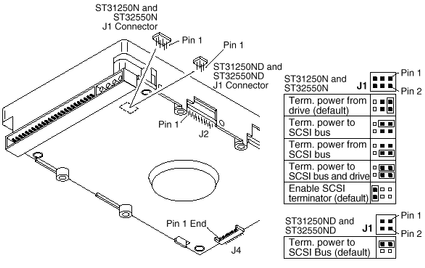
Here are the possible jumper configs (J1 is currently set to "Enable SCSI terminator" using pins 5+6, J2 is set to "Enable motor start" and J4 is set to "SCSI ID =0"):
 

Attachments

  • scsi.gif
    scsi.gif
    16.9 KB · Views: 6
  • scsi2.gif
    scsi2.gif
    25.9 KB · Views: 4
All you need is an Active 25 way SCSI Terminator to replace your External CDROM. If everything is fine with the CDROM attached, then it's safe to say the device is terminating the bus for you.

Here's the first one I managed to Google under shopping.

http://www.kikatek.com/product_info.php?products_id=139886&source=froogle

Kin

I could get an external terminator, but i know the GVP HD8+ doesn't need one... I just need to somehow find the right jumper combination on the hard drive then i think it should work (the old SCSI HDD boots up fine without attaching the CD drive). I'm guessing the HDD should stay as SCSI device ID 0, but i'm not too sure on the various termination configs shown in the diagrams :blink:
 
You need to terminate the drive, so reading the picture you should set J1 on pin 1 and 2 as described as Term power from the drive (default).
 
You need to terminate the drive, so reading the picture you should set J1 on pin 1 and 2 as described as Term power from the drive (default).


Ok i tried and it's still not working (just get a blank white screen on boot-up). Maybe i should just test each config until one works :D
 
All you need is an Active 25 way SCSI Terminator to replace your External CDROM. If everything is fine with the CDROM attached, then it's safe to say the device is terminating the bus for you.

Here's the first one I managed to Google under shopping.

http://www.kikatek.com/product_info.php?products_id=139886&source=froogle

Kin

I could get an external terminator, but i know the GVP HD8+ doesn't need one... I just need to somehow find the right jumper combination on the hard drive then i think it should work (the old SCSI HDD boots up fine without attaching the CD drive). I'm guessing the HDD should stay as SCSI device ID 0, but i'm not too sure on the various termination configs shown in the diagrams :blink:

All SCSI flavours need to be terminated correctly or the SCSI bus will fail.

It appears the Jumpers you are moving is not a suitable solution. Have a look at your External CDROM. Check the back of the external box to make sure there are no micro-switches to set SCSI options such as Termination etc. If this is the case, open her up & look at the jumpers set on the back of the SCSI CDROM. I'm only guessing Termination is set to on with a Jumper in place. This will allow the drive to work correctly as the SCSI bus is terminated by the last physical device on your SCSI bus.

Also, it's much easier to use an External SCSI Terminator as I showed than strip your machine down to swap jumpers everytime you dont want the CDROM.

Further, you can leave the SCSI CDROM attached without power to it. It should still terminate the SCSI bus for you and allow the miggy to boot from the hard drive. You can turn on the power to your CDROM whilst the miggy is running & all should be good.

Do you have the GVP software dropped in your WB Startup drawer?

Kin
 
Please, if you find the right combination let us know what you did. I had exactly the same problem with 2 different GVP devices. I put a SCSI/ide bridge and it works well but not the scsi HDD...

I am pretty sure it is a problem of termination but for me it was not possible to put a terminator on GVPA530 because the scsi connector on motherboard and the one on the HDD were too closed (impossible to plug the ribbon cable !). It was a 18.5 gb HDD.

The funny thing is that I have a 50mb SCSI HDD and it works fine without termination. I do not understand.

Thanks.
 
:thumbsup:
You need to terminate the drive, so reading the picture you should set J1 on pin 1 and 2 as described as Term power from the drive (default).

I jumpered pins 1&2 and then also jumpered pins 5&6 at the same time on connector J1... It's now working! I overlooked the fact that it mentions the word "default" twice for connector J1 :roll:

I also removed the jumper clip from pins 9&10 on connector J2 (enable motor start) because for some reason the HDD would no longer spin up! Now it only spins up when both the GVP HD+ and A500+ are switched on (the HDD used to spin up even before switching on the A500+... Now it waits until the A500+ is powered on).

Thanks for all the help people :thumbsup:
 
Is it the one you sold me ? Hope you made good work on it :)

Anyway , i want to add something about the spin up of the HDD you mentioned , on another HD+ i have , the first time i turn power on , it doesnt spin up untill i power up the A500. Then the drive spins up before the A500 .

Not a big problem but i`m curius why that happens .If anyone knows anything ......
 
Back
Top Bottom