How to uninstall Windows 8 Consumer Preview

  • Thread starter Thread starter morcar
  • Start date Start date
  • Replies Replies 28
  • Views Views 570
It depends on how Win8 was installed in the first place. For the average home user, it will install to your only Boot Partition at the time & you will be asked if you want to keep some, none or all of your current settings. There is no option for a Dual Boot Setup within the front end of Win8 in it's current state.
If you say none or some, your computer will not be as functional as it use to be & yet despite saying yes keep all, there is no removable option for Win8 over Win7.

Either restore a backup you made b4 installing Win8 or Format C & start over.

My first impression of Win8 is not good. Almost like an iPad/phone experience but without the Gloss & finger-ability. So far for me, this OS needs to Crash & burn more than Vista ever has.... :dry:
 
My general experience of uninstalling an OS involves firing up fdisk. If you upgrade and downgrade OSes, you're just asking for trouble.

I've not yet looked at Windows 8, but I've not been hearing good things about it. I'm not sure I'll bother wasting my time.
 
My general experience of uninstalling an OS involves firing up fdisk. If you upgrade and downgrade OSes, you're just asking for trouble.
Amen to that. This is why I started keeping all my data and any programs that don't need an install process on a separate partition - anything goes wrong with the OS, all I have to do is wipe 'er and then reinstall Windows and a handful of programs.
 
My general experience of uninstalling an OS involves firing up fdisk. If you upgrade and downgrade OSes, you're just asking for trouble.
Amen to that. This is why I started keeping all my data and any programs that don't need an install process on a separate partition - anything goes wrong with the OS, all I have to do is wipe 'er and then reinstall Windows and a handful of programs.

A man after my own heart! D: drive FTW!

:thumbsup:
 
Yup. Though I suppose before too long I'm going to have to start just imaging from a fresh XP-plus-updates install, when they finally kill support for it...
 
Yup. Though I suppose before too long I'm going to have to start just imaging from a fresh XP-plus-updates install, when they finally kill support for it...

Yes, because Win7 has a Hidden Partition that is Active. The OS creates this partition (100Mb) on any naked drive you install the OS on. Quite handy in some ways, especially with this program in control:

http://neosmart.net/EasyBCD/
 
This is why I always run preview's, beta's, etc in a VM. Uninstall is a simple click & delete.
 
My general experience of uninstalling an OS involves firing up fdisk. If you upgrade and downgrade OSes, you're just asking for trouble.
Amen to that. This is why I started keeping all my data and any programs that don't need an install process on a separate partition - anything goes wrong with the OS, all I have to do is wipe 'er and then reinstall Windows and a handful of programs.

A man after my own heart! D: drive FTW!

:thumbsup:

and my heart too!

Although I REALLY do wish more Windows apps didn't have registry junk and files all over the place. Far too many of them require a full-up install to work properly.

My own programs work on the principle that they have write access to their own home directory, any subdirectories of that, and absolutely nothing else, unless the user explicitly states something like, "save the current file to <absolute path>".

That means you can put 'em on a USB flash drive, or move them from C: to D: to E: without any issues, and a Windows Registry fubar is ONLY a problem for other apps and Windows.

It would be nice if other programmers could follow suit. It has the added advantage as it makes porting easier, as well as plays nice with things like Unix permissions or Windows' UAC .. thing.
 
Yeah, that's the real pain of it...I think next time I set up a new computer I'm going to try making diff files between the old registry and the new with each program I install, just to see which ones can be simple-installed that way.
 
Trying OSes by installing them like that nowadays is preposterous, you should virtualize it if you just wanna try it out.
 
Virtualized is definitely the safest way.

@ Renegrade & Andy Landy

RE the OS on C: only & your files elsewhere, D: E: F: G: H: etc, it's the only way to set up a hard drive correctly. Nice to hear there are still some old schoolers out here. :D

I also run an optimised (fixed size) Swap file on a different hard drive too. The difference is amazing, especially with memory hungry apps/games.
 
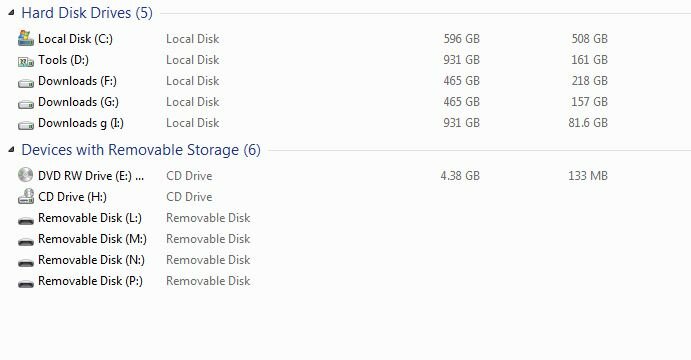
im the same here is my main system nearly full
 

Attachments

  • sys.JPG
    sys.JPG
    26.4 KB · Views: 1
Trying OSes by installing them like that nowadays is preposterous, you should virtualize it if you just wanna try it out.

I tried installing it in virtualisation on virtual PC and it had an issue with some driver or something. I can't recall the error message exactly but it was related to it not being a real machine somehow.

There is likely a way around it but it sucked and I gave up not wanting to put unnecessary time into figuring it all out.
 
out of the four people I know who have tried it, every one hates it and has cursed me for telling tell them - two have restored the vista partition ... And prefer it to winblows8

...I'm the last and I have to say its on borrowed time!
 
out of the four people I know who have tried it, every one hates it and has cursed me for telling tell them - two have restored the vista partition ... And prefer it to winblows8

...I'm the last and I have to say its on borrowed time!

so you went and left MS feedback telling them of your issues and concerns so that things can be changed?


rofl no of course you didn't and no-one else that has complained has done that either:lol::lol::lol::lol:
 
so you went and left MS feedback telling them of your issues and concerns so that things can be changed?

rofl no of course you didn't and no-one else that has complained has done that either:lol::lol::lol::lol:

:lol:

So which response do you see most often on that page?
"You don't like it? Oh OK, we'll change it back"
or a very politely worded explanation that amounts to:
"You're wrong - here's why: <insert some user-interface design theory...>"
We've been through all this with Gnome 3 and Unity on Linux - it's actually vaguely reassuring to find even Windows is now jumping the shark!
(And interestingly, the complaint is exactly the same complaint as the Linux desktops provoked - not that things changed, but that the change was forced upon us, and the old way of doing things was no longer available. Yes, the traditional desktop is still there, but - from what I've read - Microsoft seem to be determined to crowbar Metro into the user experience - you can't just select Desktop mode and ignore Metro.)

Finally, I'll be amazed if Microsoft aren't currently employing an army of college students whose job is to Google "Metro Sucks" and monitor the public response to the release candidate, so even mouthing off about it on some random forum will very likely be noted in statistics somewhere!

Microsoft's PR department will be working very hard to try and avoid a repeat of the "Vista Sucks" meme that spread like wildfire at the launch of that product.
 
Back
Top Bottom