LCD on Gotek

christopherpm

Member
Joined
Jul 13, 2013
Posts
409
Country
Scotland
Region
Highland
I've successfully installed an LCD on my Gotek (running HxC firmware). I was wondering if anyone else has done the same, and if so, where / how you've mounted the LCD?

 
After readimg that thread i think i now know less!! It shows a variable resistor or voltage regulator of some sort in the wireing diagram, how do you wire the LCD up? Ive got an lcd for my gotec but never figured the wireing
 
@Pghulme:

It is easy, you need the following


  • 1x GOTEK with latest HxC software
  • 2x 4.7kOhm resistors
  • Some wire
  • Kynar tejp or other isolation tejp

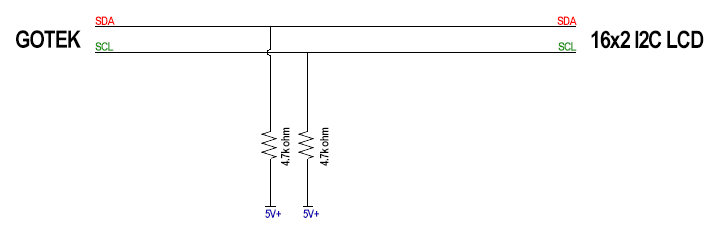
What you need to do is to add some pull-up resistors to SCL / SDA between your GOTEK and your I2C LCD Display. A Pull-Up easiest explanation is that you add a resistor to the signal line to VCC (5V in this case) with a resistor like the picture below.

HxC-GOTEK-LCD-Connection.png


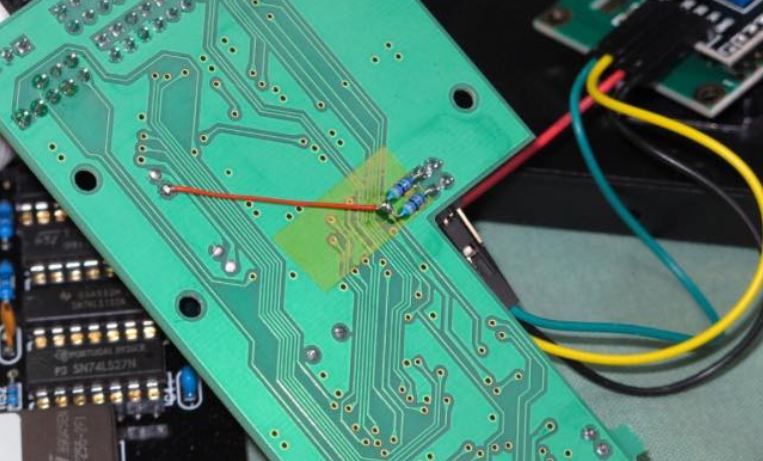
One way is to apply it on the cables and one other is to add it directly on the GOTEK. Personally I do the GOTEK version since it will be more slim and not be subjectet to any bending, causing shorts etc, at all. The picture below show the two 4.7kOhms resistors soldered to the two middle pins and then joint together and routed to 5V (VCC).

PullUpGOTEK.jpg


The pinout from the GOTEK towards the LCD Display seen from top of the GOTEK PCB is the following:

PinOut-v1-aminet.jpg
 
Last edited:
I've done one of these with the HxC and lcd , now all I need is a 3d printed bezel for my a2000 .... and a 4000 one! excuse to by a 3d printer ?
 
One way is to apply it on the cables and one other is to add it directly on the GOTEK. Personally I do the GOTEK version since it will be more slim and not be subjectet to any bending, causing shorts etc, at all. The picture below show the two 4.7kOhms resistors soldered to the two middle pins and then joint together and routed to 5V (VCC).
PullUpGOTEK.jpg

OK - I'm re-doing mine like this! Much nicer than all of the cables.

@highpuff - Do you think Kynar wire would be good enough for the +5v?
 
Last edited:
Haven't calculated on kynar wire, I used a AWG24 for the VCC, which is a bit overkill :P If I remember correctly Kynar is AWG30 and normal quality should be good up to 2.6A.
 
I am against cutting Amigas, it is a real shame for me, and i can't understand why some people are cutting/drilling cases and installing Gotek / LCD in original housing, it's Gohek who should be cutted owerall to fit our needs.. :)
I am using my Gotek drive with my Amiga, Atari ST, Spectrum +3 and Schneider 6128, so i am for external solution :)
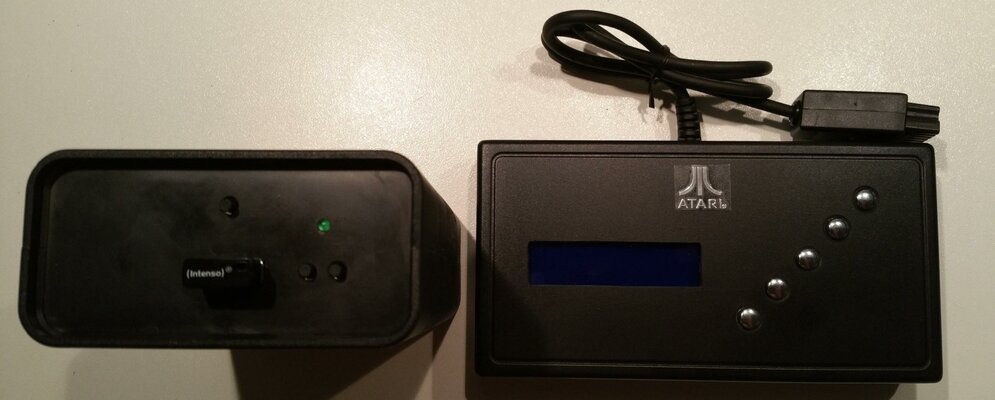
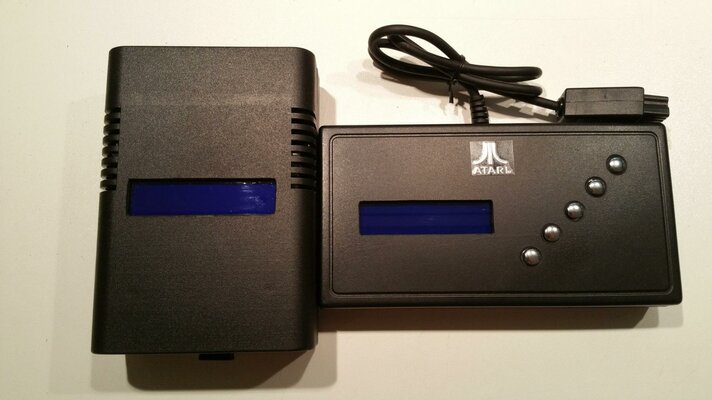
20170108_220734.jpg 20170108_203552.jpg
Second unit is my SIO2SD for Atari 8 Bit computers

@ Cryton:
You should ask Thomas (aka Corei64 for 3D printed models, he is first person here with quality 3D products and best prices!
 
Last edited:
Haven't calculated on kynar wire, I used a AWG24 for the VCC, which is a bit overkill :P If I remember correctly Kynar is AWG30 and normal quality should be good up to 2.6A.

Are you still connecting VCC and GND to the header next to the floppy drive power connector?
 
@Christopherpm:
Next to the floppy connector. The pin-out description I made might have been confusing, it was mainly to describe all output :)

@DJCook:
Made my solution from a 16x2 housing I found cheap on Ebay. My main goal was to have a no modification at all on the Amiga housing at all. So I 3D-printed an expansion plate and by a IDC-10 I routed all the signals from USB, I2C LCD and buttons to the external "control" box.

You can find the whole project here: https://goo.gl/X9zwQS
 
@DJCook:
Made my solution from a 16x2 housing I found cheap on Ebay. My main goal was to have a no modification at all on the Amiga housing at all. So I 3D-printed an expansion plate and by a IDC-10 I routed all the signals from USB, I2C LCD and buttons to the external "control" box.

You can find the whole project here: https://goo.gl/X9zwQS
Yep! i like Your solution very much! even the colour matches our lovely Miga! Exacly what i am talking about. It's Perfect!

However, i can not use it like that, because of several computers - A1200, A600, Atari ST, Schneider 6128 and Speccy +3...
 
Last edited:
Back
Top Bottom