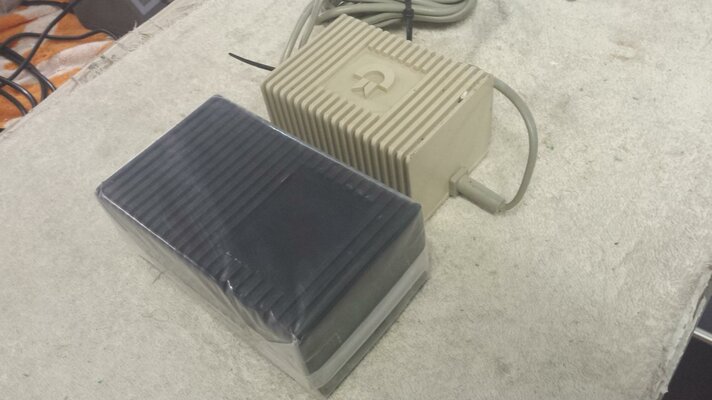
MiniC64PSU

  • Thread starter Thread starter Charlie
  • Start date Start date
  • Replies Replies 25
  • Views Views 4478

Charlie

.. . Mouse . ..
Joined
Jan 20, 2008
Posts
690
Country
UK
Region
Wirral
Darn it's been a while...

I've been a-playing some more with my C64c (donated by a most kind member of this very forum). It's been a fun journey, especially for someone who didn't have a C64 back in the day. Much fun with many, many games... and some (hopefully) tasteful upgrades. I'm also very pleased to have scored a C= Sound Expander + full 2 1/2 octave keyboard to go along with it, being somewhat in to music.

Next?
Why are C64 PSUs so, um, nasty... and really hard to replace? Currently, a-hem, mine seems fine but I've read a few scary forum posts that suggest it may not stay that way forever...

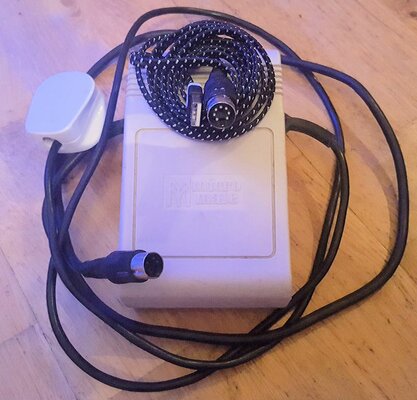
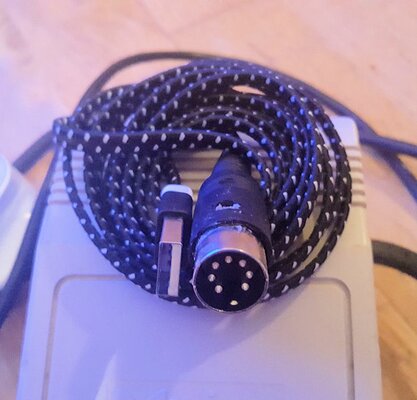
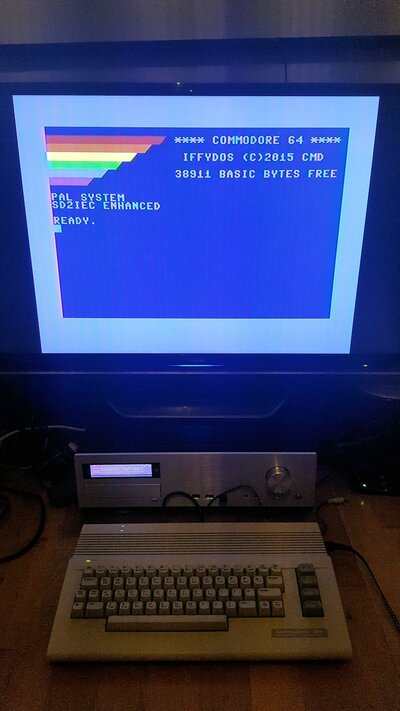
...So here's a little something I knocked up this evening:
C64PSU.jpgMiniC64PSU.jpgItWorks.jpg
-PSU, MiniPSU, and C64 too-

To all intents and purposes it's a 2m braided lead with a usb plug on one end and a C64 PSU plug on the other... with a bit of jiggery-pokery hidden inside. Anyone interested in a how-to? I may be making a few more from spares but: Don't hold your breath.

PS
I see there's a ROMable version of GEOS... I wonder if it really needs to be in a cart..?
 
Last edited:
Not at home now but c64c doesn't need 9v if not using datasette ?
Breadbin needs 9v for sid ?

I cant remember which way around but would love to replace my c64 killer psu.
 
Hi Chaps, thanks for the interest. :smile:
I should probably have taken some photos, but I'll make more with my spares over the next few days and do a proper photo how-to.

For now, Required parts:
-USB Power adaptor (2 Amp. Don't use your PC!)
-DIN Plug (C64 power socket compatible)
-USB Cable (I went for a Type A to Micro)
-MAX660 CMOS Monolithic Voltage Converter
-Two 22uF Tantallum Capacitors (1uF to 150uF likely fine, electrolytics may be too big)
-Hot glue (probably optional)

My non-expert understanding:
The C64 has some funny old power requirements. As I understand it 5v dc and 9v ac, the latter because the clock chip needs a waveform to keep time. Other voltages too, but the computer sorts those out for itself.

So... A USB supply will give the 5v easily enough but what about the 9v ac? Well, it seems the first thing the C64 does with that 9v ac supply is to turn it in to dc -doh! So it should be fine just to use 9v dc instead as long as you don't need to use that pesky clock chip... does anybody?

Ok. 5v x2 = 10v, which is kind-of close to 9v... especially once you take the machine's internal regulators in to account and 9v ac peak-to-peak is near 10v anyway...ish!

That suggests if one uses a charge-pump circuit you have all the ingredients you need to power a C64 off a sufficiently strong USB supply.

Advantages:
Fairly easy to construct from readily available components
All the parts can fit inside the DIN plug shroud
No more potentially dodgy C64 PSU

Disadvantages:
You may consider the above plan to be dodgy in itself!
Non-functioning clock chip
As constructed the MAX660 could struggle to supply enough juice for "long board" C64

Construction:
1) Lop the MicroUSB end off your USB cable and expose about 1.5cm of the four wires within. Trim off the excess outer shielding. Be sure to buzz out which two are 5v and GND, tin the ends with solder. Of the two remaining wires leave one in tact (see later) and cut the other off right at the base - don't throw it away! Tin both ends and keep it for later.
2) Take your MAX660 IC and remove pins 1 and 7 - a little waggle should see them snap off. For the remaining pins only snap the ends off at the shoulder where the thick part comming out of the IC narrows to the bit where you'd normally fit in to a socket/PCB. Then fold the now stubby legs under the IC.
3) The next bit is hard to explain but is fairly obvious with parts in hand. Take each of your caps in turn and fashion their legs in such a way that the longer one looks a bit like a fish hook turned toward the shorter one, the shorter one with very small kink at the end pointed away from the larger...
...Why?
The plan is to solder the two caps to the the remains of IC such that their legs are laying flat on each side of the IC with the bodies just hanging over the end of the IC with the notch. (Um, think testicles! I wish I'd taken a photo)
"C1" needs it's positive leg soldered to pin 2 and negative leg soldered to pin 4
"C2" needs it's positive leg soldered to pin 8 and negative leg soldered to pins 5 and 6
(For more info Google MAX660 and see page 1 of the data sheet. The Positive Voltage Doubler diagram)
3) Take your 5v USB wire (probably red) and carefully expose the copper a few mm above where it exits the stripped-back shielding. Give it bit of a kink at that point and carefully tin that spot. Don't expose too much! Push the (non-testicle) end of the IC up to where the wires exit the cable shielding and then solder the kink to pin 3 of the IC being careful not to short anything. The MAX660 now has power and you still have a 5v wire.
4) Do the same with the GND wire (probably black), this time soldering the tinned-kink to pin 5 or 6 (these are already shorted by the negative leg of "C2")
5) Remember that wire you cut, saved, and tinned both ends? Solder that to pin 8 of the MAX660...
6) ...and the last wire? Wrap that round the length of the IC passing between said testes.

The idea is the IC should now be protruding lengthways from the end of the USB cable with a couple of little gonads closely dangling as if it's a bit of a cold day. The unconnected wire wrapped around the length of the IC to help strengthen it, and three wires (+5v, +10v, GND) kind of adding to the genitalia vibe.

7) Solder GND to pin 2 of the DIN plug, +5v to pin 5, and +10v to pin 6. No further connections are needed and our little gonads should be closely nestled to the circle of pins so keeping things tidy and stopping any shorts.
8] Did you remember to put the DIN plug's plastic shroud over the USB cable before starting?
9) Next reassemble the din plug itself. You should find the electronics fit neatly within the metal bits and the cable poking out as hoped...
...If you find (like me) the metal bit that has the cable clamp is too short to clamp said cable but instead is getting in the way of the IC see below.*
10) Disasemble, wrap the electronics with electrical tape, reassemble, crimp the cable clamp over the cable, and push the plastic shroud in to place.
:-DDone!:-D

...Now time to see if it works or you have a dead C64 on your hands! Did you carefully double-check everything?

*If you had to remove the cable clamp I'd suggest taking a leaf out of Commodore's rather dodgy PSU assembly book:
Don't wrap the electronics with tape, instead cover the whole thing in hot glue being sure no metal bits are exposed. Then before it fully sets squeeze the metal shrouds round your lump of goop and top up any gaps with more hot glue. Make sure this extends on to your cable and quickly pull the plastic shroud over the lot. If you're too slow just heat it up a bit and have another go. There, just like a C= PSU, no user servicable parts inside!

PS
As mentioned above this works fine with my C64c (short board) but probably won't provide enough juice for a long board equipped machine. A second MAX660 wired in parallel with the first (maybe some diodes!) could be the answer.

 
Last edited:
I think the need for the 9vac is a bit more complicated especially on C64 breadbin who deal with it differently

A quick google,

9VAC power solution for C64
by Tomas Pribyl

2. C64 power supply
As described above C64 needs two voltages for proper function, +5VDC and 9VAC.
+5VDC is used for all logic. 9VAC is internally connected to USER PORT. C64 uses 9VAC
internally different ways:
1) rectified to 9VDC (unregulated) for CASSETTE PORT
2) internally doubled, rectified and regulated to +12VDC for SID
3) in old version C64, 9VAC is rectified and regulated to second +5VDC
+5VDC and 9VAC voltages are each other electrically isolated. Therefore only two pole
power switch is used for switching +5VDC and 9VAC power. One pole for +5VDC, second
pole of power switch for 9VAC.
3. Solution
CDROM and harddisk can be supplied directly from PC power supply.
DD1541 can be supplied from PC power supply by simple reduction cable (DD1541 has
DIN connector).
C64 +5VDC can be supplied directly from PC power supply. Only C64 9VAC needs special
converter from +12VDC.
Converter is very simple. U2 555 timer, R1 and C1 makes 50Hz (60Hz) frequency
(important for CIAs timer). Voltage polarity is alternated by full bride Q1 to Q4. U1, Q6,
Q7 and resistors are used for driving transistors in bridge.
With this converter C64 power switch cannot be used! As described above: original C64
power supply has electrically isolated 5VDC and 9VAC and only 2pole power switch. In
this converter both voltages have common ground. If you turn off C64 with original
power switch only one wire from 9VAC is disconnected but common ground is still
connected. Therefore one period from 50Hz still power your C64 what makes that half
voltage on 9VAC is present. Half voltage on 9VAC without +5VDC can cause SID noise,
VIC blinking etc.
You must use PC supply power switch to switch off your C64 correctly.
4. Conclusion
This solution is designed to simplify powering C64 and connected devices from
standard PC power supply. Is recommended for people with good electrical knowledge
and experience. Use it on own risk. Bad created converter or different internal wiring in
your C64 can damage your C64.
Be careful with connecting other devices to USER PORT, which use 9VAC power supply.
In this case check internal device powering.
If you have any doubt or question, please contact author.
 
Last edited:
@Charlie
At first glance, your solution appears non functional to me.

The C64 requires to INDEPENDENT sources of energy to work properly. The first one is obviously a source of 5Vdc of at least 1.7A and the other one is a FLOATING source of 9Vac. It MUST be AC and it MUST be floating - your source of 10Vdc is neither.

The 9Vac is required for the user port and for a voltage doubler used to generate the 12Vdc required by the VIC-II and the SID. A secondary 7805 regulator is also employed to produce a noise protected source of 5Vdc for the VIC-II.

Sardine's post simply provides more details but is technically accurate.

Ok. 5v x2 = 10v, which is kind-of close to 9v... especially once you take the machine's internal regulators in to account and 9v ac peak-to-peak is near 10v anyway...ish!
WRONG! 9Vac peak is 9*(square root of 2) or 9*1.414=12.73 - peak to peak is therefore 25.46V.

A 12V regulator requires 14Vdc or more to do its job properly so 12.73 isn't enough. The voltage doubler uses the peak to peak 9Vac BUT there are voltage drops in the diodes used to perform the function and there are at least 3 of them, a drop of 2.1V (0.7*3) so the filter capacitor feeding the 7812 is charged to a max of about 23.3V.
 
Last edited by a moderator:
Hi chaps,
Thanks for the info. I'm most certainly a very long way from being a C64 expert.

Questions:
-This 'hack' does seem to work fine with my C64c + SD2IEC + Sound Expander Cart & full keyboard. Good enough for my use case, but is there anything I'm missing to suggest this is potentially worse for my C64c than the OEM PSU?
-I can't test cassettes or real FDDs as I don't have these drives, but is there any reason to suggest there would be a problem here? Anything else that wouldn't work? (apart from anything needing a clock?)
-I made this with a 'short board' C64 in mind. My assumption was that this probably won't do for 'long boards' as-is because they draw more power than a single MAX660 can safely drive. Is it also the case that the 'long board' power circuitry is sufficiently different from the 'short board' that this just can't work?

What's on my mind is that I have enough spares to make a few of these - for 'short board' machines only unless someone was brave enough to try it with a 'long board'! I'm contemplating handing the spares off to anyone who wants one, but wouldn't want to be killing off people's C64's...

...for the time-being I'll keep using mine and thoroughly stress my system for the next few days with some demos to see if I run in to any problems before I make more.

Thanks again for the info.
 
I hope it works ok for you as you said you dont need a cassette or clock!!

but for us with breadbin models I wait an affordable new replacement, I could make my own but would prefer a 3d printed case in the commodore style with modern components inside. why no one makes these I dunno,
 
....
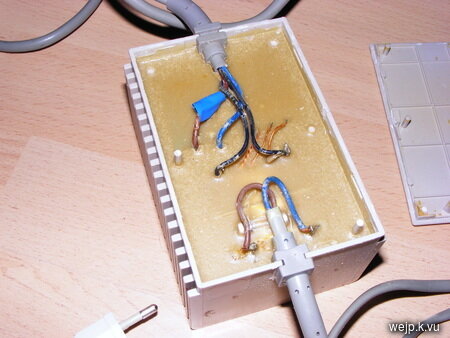
Why are C64 PSUs so, um, nasty... and really hard to replace? Currently, a-hem, mine seems fine but I've read a few scary forum posts that suggest it may not stay that way forever...

Cause most of them are filled with resin so not really repairable once some component goes bad in those things, I've opened a few and this is typical:

002-small.jpg

Now I'm not an electronics expert but AFAIK both C64 and C64C power supplies are essentially the same, 5V DC (min 1.5-1.7A) and 9V AC (1A?) so I would be careful of what I connected a hacked PSU to, in case I get hold of a long board version it might like it less.

Edit: Here is some more info:
https://www.c64-wiki.com/index.php/Power_Supply#Power_Supply_of_the_Commodore_64
Seem it's finicky with the 5V especially so if you start expanding it might need a slightly more powerful feed, maybe 2-2.5A to be on the safe side.
 
Last edited:
You can gouge out a bit of the epoxy, snip the brown and blue wire and install a UBEC inline (this goes in the space you gouged out). Then if the linear regulator blows and delivers 15vDC, this corrected back to 5vDC before it kills your DRAM. You can pick one up for about 2 us$ incl. postage from China.

Alternatively you can remove the whole epoxy block and reuse the case for a 9vAC transformer and a switching 5vDC "buck" regulator. See here.
 
Last edited:
So if I used
a) a long board with a tapuino and a 5v swinsid

b) a short board with tapuino and later Sid chip

would Charlie's 5v & I.C solution work for me?
 
... I could make my own but would prefer a 3d printed case in the commodore style with modern components inside. why no one makes these I dunno,
AFAIK, the type of plastic used by 3D printers does not meet the safety requirements for devices you can connect to an electrical outlet.

There are very good, inexpensive ABS cases used for custom built alarm systems you can buy from various electronic component distributors which do meet CSA/UL/CE requirements. All that's needed is to drill the proper holes in them.

So if I used
a) a long board with a tapuino and a 5v swinsid

b) a short board with tapuino and later Sid chip

would Charlie's 5v & I.C solution work for me?
AFAIK, Charlie's solution will not work for anyone.

I suggest you take a look at Ray Carlsen's custom built power supplies. This man has about 35 years of experience with repairing Commodore computers.
 
Last edited by a moderator:
... I could make my own but would prefer a 3d printed case in the commodore style with modern components inside. why no one makes these I dunno,
AFAIK, the type of plastic used by 3D printers does not meet the safety requirements for devices you can connect to an electrical outlet.

There are very good, inexpensive ABS cases used for custom built alarm systems you can buy from various electronic component distributors which do meet CSA/UL/CE requirements. All that's needed is to drill the proper holes in them.

So if I used
a) a long board with a tapuino and a 5v swinsid

b) a short board with tapuino and later Sid chip

would Charlie's 5v & I.C solution work for me?
AFAIK, Charlie's solution will not work for anyone.

I suggest you take a look at Ray Carlsen's custom built power supplies. This man has about 35 years of experience with repairing Commodore computers.

A little harsh..?

FWIW: I've been running my short board C64 for just about 2 months with the little gizmo I lashed together without any issues at all. That includes C64, SD2IEC, and Sound Expander with full size keyboard.
I admit I wouldn't want to hang much more off said PSU than that, but for short board owners I guess it's good enough for most use cases. Long board C64's will probably draw too much juice for the design as it stands.

Life keeps me horribly busy but I hope to knock out a few more some time with the spare parts I have... if anyone's feeling brave I'll gladly hand out some freebies.
 
I'd love one please Charlie. I can report back with long and short board usage and with various bits n bobs in place. Interested ;) will send pm

PS why no teddy-bear-animal-thing in pictures :)
 
Last edited:
I am curious to how you got your C64 to boot like a c65?


Sent from my iPhone using Tapatalk Pro
 
I suggest you take a look at Ray Carlsen's custom built power supplies. This man has about 35 years of experience with repairing Commodore computers.
While Ray's PSUs might work fine, they are inefficient, massive and looks horrible - like some 80s DIY electronics project. I think a modern PSU should be small, efficient (switch mode) and thus also universal mains which is what the C64 Reloaded PSU is. Jens just needs to make a stand-alone version of that.
 
I'd love one please Charlie. I can report back with long and short board usage and with various bits n bobs in place. Interested ;) will send pm

PS why no teddy-bear-animal-thing in pictures :)

Hello,
Will gladly send you one... but don't hold your breath, you know how slow I can be to get round to stuff.

Bear is currently on the run having been caught eating small children between filming breaks for his show. He's currently hiding in Porridge's toy box, but once the heat is off he and Porridge will hopefully make a return.

I am curious to how you got your C64 to boot like a c65?


Sent from my iPhone using Tapatalk Pro

Hi,
My C64 dual boots between the standard OS and a Frankenstein's creation made of the DolphinOS kernal that's had it's FDD routines swaped for the JiffyDOS ones as I like Dolphin but use an internal SD2IEC. The boot screen has indeed been modded to look more C65ish.
I can't claim any cleaverness for these mods. If memory serves I've got another C64 thread on here somewhere regarding how I did it and who's ideas / code I nabbed.
 
Last edited:
Some games use the 9vac so they use the clock,like Beach Head,Beach Head doesn't work without the 9vac.,I know cos I have a Sav64.If you need 9vac look for a psu for the Atari 1050 disk drive,they use the same 9v as the c64 dose.Look here for them or on the other bay.
 
Last edited:
Hi all

Ive been playing with charlies usb>C64 psuthingy and so far, all is good.

My C64 is a short board C64c, has a pseudosid board with a 8580 and a nanosid. Also a chromafixer board and 1541U2 cart.

+ to Spanner's helpfulcomments re beachhead, which as predicted loads but doesnt appear to run. Not sure what else to test it on, but wizball and ghostbusters and the usual suspects all work, with the plug staying cool after a few hours soak. sid sounds fine.

I'll be adding my tapuino to it next.

Help please! - is there a list of games/programs that use the clock and will not run?


cheers!
 
Back
Top Bottom