
You are using an out of date browser. It may not display this or other websites correctly.
You should upgrade or use an alternative browser.
You should upgrade or use an alternative browser.
My Amiga 4000 Project
- Thread starter edd_jedi
- Start date
- Replies 75
- Views 3632
- Status
- Not open for further replies.


edd_jedi
Active member
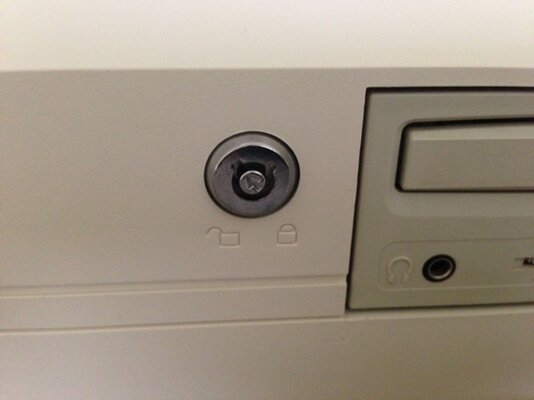
I finally managed to find a replacement keyboard lock that fits  I bought an A4000T one a while back but they are too deep to fit behind the A4000D fascia. This one fits perfectly, and is nice and cheap too.
http://www.maplin.co.uk/miniature-short-round-type-spst-2445
I bought an A4000T one a while back but they are too deep to fit behind the A4000D fascia. This one fits perfectly, and is nice and cheap too.http://www.maplin.co.uk/miniature-short-round-type-spst-2445
edd_jedi
Active member
OK thanks guys, will probably leave as is then as it's quite a pain to strip it all out again to get to the motherboard.
I completely understand this as I have pulled my A4000D's motherboard for recapping. I used to service computers for a living and have taken apart some pretty horrible cases in my time. That case was by far the worst I have ever done!
edd_jedi
Active member
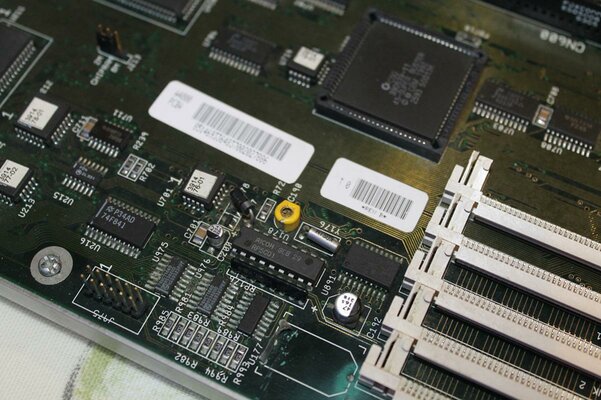
Well some bad news, I got my A4000 out last week to install a new IDE HD and it is no longer recognising any Fast RAM. As you can see in the attached photo it looks like the battery acid is finally getting to some of the traces. I removed the battery when I first got the computer in 2012 and it didn't seem too bad then, but I guess I didn't clean it up well enough.
Hopefully this isn't the end, it's going to a trusty refurbisher on here for repair. Otherwise I'll be in the market for a new motherboard
Hopefully this isn't the end, it's going to a trusty refurbisher on here for repair. Otherwise I'll be in the market for a new motherboard
Attachments

i have the same proble edd!
my 4000 do not recognise any fast ram, when i buyed it had the battery leaking but i removed and cleaned all. amiga worked correctly until today, when i powered on i got yellow screen, a second attempt booted the machine but with 0 fast ram. i finished now to check common traces between simms connectors, all appear in good conditions.. maybe a faulty ic on mainboard. i can't figure it out
my 4000 do not recognise any fast ram, when i buyed it had the battery leaking but i removed and cleaned all. amiga worked correctly until today, when i powered on i got yellow screen, a second attempt booted the machine but with 0 fast ram. i finished now to check common traces between simms connectors, all appear in good conditions.. maybe a faulty ic on mainboard. i can't figure it out

Hi Ed,
I had a similar issue with my A4000 originally, I'd not cleaned up the battery damage well enough either. If the damage is quite bad as it looks like it was from your pictures cleaning isn't always enough, I'm guessing one or more traces were barely connecting and have now failed.
I'm sure the guru you are sending the board to will do a fine job
I can see there is still some green stuff on some of the chip legs so it was never fully clean either so it's for the best it get's a proper refurbish now and then can give you many more years of service
I had a similar issue with my A4000 originally, I'd not cleaned up the battery damage well enough either. If the damage is quite bad as it looks like it was from your pictures cleaning isn't always enough, I'm guessing one or more traces were barely connecting and have now failed.
I'm sure the guru you are sending the board to will do a fine job
I can see there is still some green stuff on some of the chip legs so it was never fully clean either so it's for the best it get's a proper refurbish now and then can give you many more years of service
edd_jedi
Active member
She's alive!
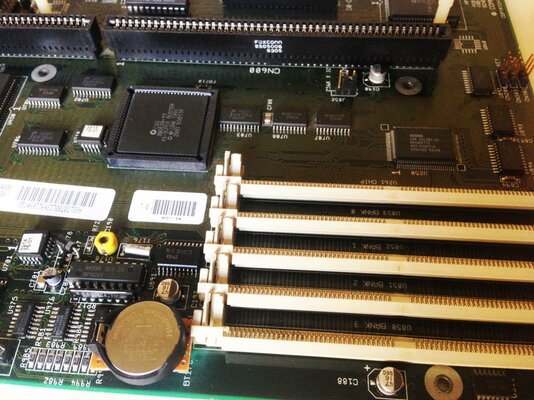
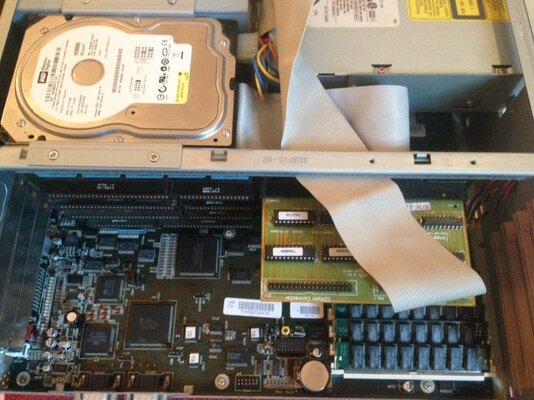
Big thanks to Bebek for doing the refurb for me, very knowledgeable and great quality of work. I now have new caps, a nice coin battery, and some repaired traces. Great to have the old girl back up and running. An unexpected bonus is that I no longer have a streaky screen, it must have been one of the caps causing it, I always assumed it was the monitor I use.
Here's photos of the restored motherboard, and my new setup with 80GB IDE HD.
Big thanks to Bebek for doing the refurb for me, very knowledgeable and great quality of work. I now have new caps, a nice coin battery, and some repaired traces. Great to have the old girl back up and running. An unexpected bonus is that I no longer have a streaky screen, it must have been one of the caps causing it, I always assumed it was the monitor I use.
Here's photos of the restored motherboard, and my new setup with 80GB IDE HD.
Attachments
Last edited:
edd_jedi
Active member
By the way, a quick question. I have Classic WB 3.1 installed, how do I get the time/date to display in the menu bar? It used to before I had to re-install workbench.

Well some bad news, I got my A4000 out last week to install a new IDE HD and it is no longer recognising any Fast RAM. As you can see in the attached photo it looks like the battery acid is finally getting to some of the traces. I removed the battery when I first got the computer in 2012 and it didn't seem too bad then, but I guess I didn't clean it up well enough.
Hopefully this isn't the end, it's going to a trusty refurbisher on here for repair. Otherwise I'll be in the market for a new motherboard
I had a similar looking board, and I thought I could see some traces disappearing between the SIMM sockets. I braved it and removed the first SIMM socket, and to my pleasure (or horror for the risk I took removing it!) it has no damage under the socket! On the other hand, every SMD cap bar 1 on this board had leaked!
Saw another board with very similar damage to yours today, but I think the acid had moved away from the SIMM sockets on that board, so looked repairable.
Seems like standard damage with those 3 ICs corroded!
Good your board is OK, so another a4k saved
edd_jedi
Active member
It's been a year since I retrobrighted my A4000 and keyboard, so thought I'd post an update. Here's the original post with photos for comparison:
https://www.amibay.com/showthread.php?38402-My-Amiga-4000-Project&p=454428&viewfull=1#post454428
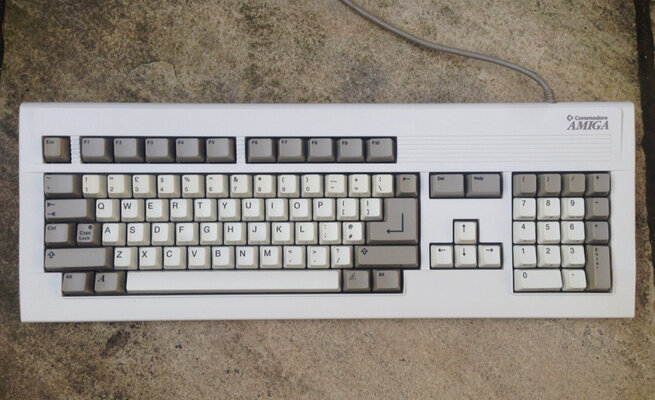
This is how it is now looking:

As you can see it has held up pretty well, some keys have started to go yellow again but if you look at the original photos these were the most stubborn ones anyway and weren't quite as white as the others after treatment. The keyboard has been out of the sun this past year and has hardly been used either. So although it is still a vast improvement, as others have found it is not a permanent fix.
https://www.amibay.com/showthread.php?38402-My-Amiga-4000-Project&p=454428&viewfull=1#post454428
This is how it is now looking:
As you can see it has held up pretty well, some keys have started to go yellow again but if you look at the original photos these were the most stubborn ones anyway and weren't quite as white as the others after treatment. The keyboard has been out of the sun this past year and has hardly been used either. So although it is still a vast improvement, as others have found it is not a permanent fix.
Attachments
edd_jedi
Active member
I've just started another retrobriting experiment, full details here:
https://www.amibay.com/showthread.php?62882-A-Retrobrite-and-Plastikote-Experiment-(Amiga-4000)
https://www.amibay.com/showthread.php?62882-A-Retrobrite-and-Plastikote-Experiment-(Amiga-4000)

edd_jedi
Active member
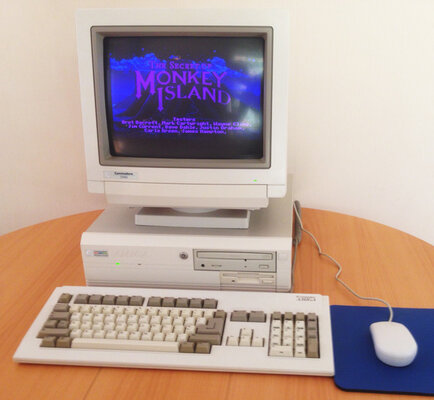
After a long search I have finally managed to find a nice matching monitor for my A4000, it's a Commodore 1940. Well actually, I found 2 monitors and had to swap some parts around to make one nice one. One of them was complete but had suffered some yellowing and a couple of things didn't work, and the other was nice and clean/white but missing the stand and front cover. So this is what I now have, an authentic period Amiga 4000 setup
All I need t do now is buy a new floppy drive that works and isn't yellowing, and try and find a keyboard with white keys.
All I need t do now is buy a new floppy drive that works and isn't yellowing, and try and find a keyboard with white keys.
Attachments
Last edited:
Hi Ed,
Is that a normal size FDD or the large HD drive?
If it's normal size I have a NOS A4000T drive here that would be perfect, I just need to check it works on normal Amiga without an adapter as some A4000T drives are PC drives that use an adapter.
I'll let you know!
Steve.
- - - Updated - - -
ps. looks awesome, you actually have some envy here
Is that a normal size FDD or the large HD drive?
If it's normal size I have a NOS A4000T drive here that would be perfect, I just need to check it works on normal Amiga without an adapter as some A4000T drives are PC drives that use an adapter.
I'll let you know!
Steve.
- - - Updated - - -
ps. looks awesome, you actually have some envy here
edd_jedi
Active member
That would be great Steve, yes it's the slim one I would be after
That would be great Steve, yes it's the slim one I would be after
Okies mate, I'll try to check it tonight for you and if it's ok we can sort something out, swapsies or something. It's been sat in the drawer for 2 years now so I really don't think I'll end up using it lol.
Speak soon!
- Status
- Not open for further replies.
Similar threads


- Replies
- 7
- Views
- 220

