My Custom A1200 Project

  • Thread starter Thread starter Cozzer79
  • Start date Start date
  • Replies Replies 190
  • Views Views 72803
I should have kept my mouth shut lol

Having seen someone else fit an A500 ANSI layout keyboard into an A1200, I've suddenly felt the need to do the same myself. This has two advantages from my point of view; 1. That the cable is smaller and easier to attach and remove (which will help with DVDROM placement etc) and 2. I think the layout is prettier :thumbsup:

Sooooo... I've ordered a through-hole 44PLCC socket and an ANSI layout A500 keyboard with the yellowest keys you've ever seen (to be replaced with the kickstarter set)

My intention is to make an adapter to clip to the keyboard MPU, which has a connector on the rear that'll take the standard A500 keyboard connector. Then on the keyboard controller, I'll remove the LEDs, and all the unused cables from the lead.

Pinout info: http://www.amiga-stuff.com/hardware/68hc05.html

Hopefully my case will turn up before I can spend any more...
 
A little something something turned up today :)

IMG_0664.jpg


So I'll be measuring it up the see how many new holes I want to make in it and where lol

I've knocked up a temporary adapter for the A500 keyboard too - waiting on parts to do it properly, but it should do the job for testing:

IMG_0667.jpg


I've removed the un-needed LEDs, and the two cables that would have fed them, as well as sanded down the front of the socket as much as possible to get a tight fit on the MPU. I've ordered a lipo 5pin socket and plug, and a bit of vero board so that I can do a tidy and functional job of the keyboard connector. Depending on space, I might dismount the membrane connector and mount it on the other side - seen another chap do the same and it looks pretty sweet.
 
Last edited:
I had to modify the VGA hole on the new case to allow my Ratte switch to stay put - managed to do a nice tidy job though, and you can see the Amiga peeps signatures here too:

IMG_0669.jpg


And I assembled the case quickly just to have a quick look at how it looks - she's going to be gorgeous:

IMG_0671.jpg


As it happens, this is going to be the keyboard I use when all is said and done - I've discovered some space issues with the A500 keyboard that I've been modifying; it just isn't going to fit with all the other bits that I want to place in the machine. If I leave the controller board where it's supposed to be, the LED board is going to have to be modified to make it fit (not a huge job, but I don't want to) and it's going to make fitting the HxC display a complete pain (it's going to be a pain anyway as the socket on the rear of the screen fouls the floppy drive - I'll be soldering fly leads direct). If I relocate it on the rear, it's going to get in the way of the floppy drive and it might also foul the SCSI kit (and in future, the second memory stick of a BPPC).

Which is a shame, as it works great:

IMG_0672.jpg


The socket fits lovely on the MPU - I didn't have to cut any traces to make it work, and nothing appears to be affected by the mod:

IMG_0673.jpg


I'll do a proper job of the mod, and sell it on when the time comes; it'd likely be ideal for someone with an A600 that they want to place in an A1200 case, or anyone with an A1200 that isn't bothered about the other bits I want to fit - in the interim, it's handy to have an external keyboard that can be quickly removed. Edit: A600 MPU is NOT the same as the one in the A1200!

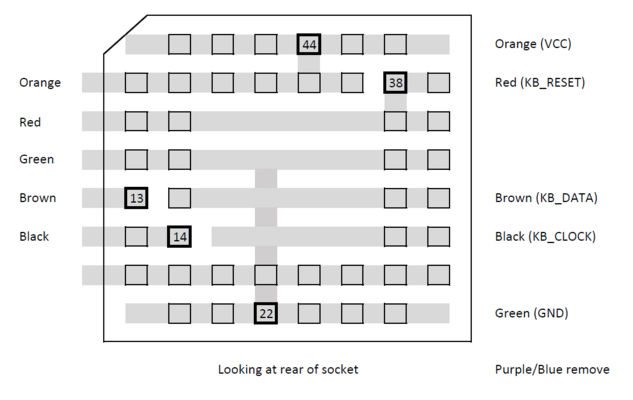
For anyone interested, this is the pinout for the MPU adapter:

MPU.png
 
Last edited:
I've found a new home for my SCSI2SD, in the quest to make everything I want to put in my Amiga fit:

IMG_0678.jpg


That space to the left, which is the side under the floppy drive, will hopefully one day have Kipper2K's HxC buttons fitted in it. It just about clears the floppy drive too:

IMG_0677.jpg


Although it's a little snug. Need to find a (removeable) way of mounting it, and something to cover the rear of the board to insulate it which isn't paper.

I voided the warranty some more on my new case too:

IMG_0679.jpg


I've removed one of the posts, and a fair amount of the lip from either side of where the optical drive is going to go - the bit in the middle helps to hold the drive where I want it to be:

IMG_0680.jpg


Which is somewhat lower than I had it before, and further over because of the post in the corner of the case. Again, it's a bit snug:

IMG_0682.jpg


And I'm back to the drawing board on creating some mounts... I'll be putting a fan in this side to blow air over the Indy and under the optical drive. Over the optical drive I will (hopefully) be mounting the HxC board - or somewhere up there. I've a second fan to mount somewhere near the accelerator (when I obtain a BPPC) - they are high airflow 15mmx15mmx4mm, so should be able to put them just about anywhere!
 
Last edited:
Found some time to finish off the A500 keyboard mod - I made a nice little board for the rear of the socket, and put a plug and socket on the resulting cable.

IMG_0684.jpg


Having heavily tested it for continuity, I tidied it up with Sugru and plugged it in.

IMG_0686.jpg


And all keys are working :thumbsup:

IMG_0689.jpg


All the next next owner will need to do is sand down the socket a little more to allow it to lock in place :)
 
Last edited:
Thats cool but more than the cost of 10 normal optical mouse.

cool though, I already want one but €40 + shipping. Hmmmm!
 
Yup - I hear what you're saying... I was thinking about it for quite some time before I decided that when funds allowed, I was going to go for a pair of them.

They're expensive, yes; but the board will fit perfect and they'll still look original - with no butchering at all. Not that I'm opposed to a bit of well done butchering lol - If you backed the Kickstarter case, you'll have a 5% off voucher hanging around too - a whole €2 euro off of each board :thumbsup:
 
I've now fitted the SCSI2SD where I want it to be :)

IMG_0773.jpg


I covered the rear of the SCSI2SD with electrical tape, to prevent it shorting out with the rear of the FDD - the sticky fixer that I've attached to the rear of the FDD mounting plate cures with heat too (as it's designed to attach heatsinks really), so it'll also make the SCSI2SD easier to remove in future in case of issues.

IMG_0774.jpg


After some careful measuring (trial and error with something less sticky), I've stuck the SCSI2SD onto the rear of the FDD

IMG_0775.jpg


And modified the SCSI cable so that it'll fit through the small gap by the floppy mount nearest the front of the case...

IMG_0776.jpg


It squeezes through there with very few issues

IMG_0777.jpg


The clearance under the drive is a little better than when it was just flopping around in there...

IMG_0778.jpg


And there's even space by the rear expansion door for something later if so needed ;)

I'm actually able to use my Amiga at the moment - as the keyboard rests nicely where it's supposed to, and the optical drive just sits in place. I'll be figuring out a way of making that stay put next; although I'm tempted to just stick a blob of sugru on Gayle, shaped to prevent the drive shifting backwards and another blob on the rear of the keyboard to hold it down!
 
Last edited:
I've made progress with the slot on the rear of the case for the DVDROM - marked it out with electrical tape and clamped it down:

IMG_0824.jpg


Then after a few minutes with a Dremel, and a bit longer with a jewellers file, I'm able to close my case again:

IMG_0826.jpg


It does close better than this when screwed shut! I'm thinking to Sugru some mounts for it, onto the PCMCIA slot and Gayle - in addition to something on the lip of the case. Not entirely sure yet, would prefer not to attach anything to the mainboard. I've started on the alternate mount point for the HxC, which will be just to the left of the DVDROM. A more suitable length HDD cable has been ordered from tbtorro too :)
 
Last edited:
Cable has arrived and now been suitably modified - and is much better than the one I had

IMG_0841.jpg


And it makes for a lot more space under the drive at the rear too, so much that it now doesn't sit flat on its own lol

IMG_0842.jpg


I've managed to salvage some rails to try to mount the drive cleanly - will have a play with those once I'm back off of holiday :) I've also ordered a Gayle reset fix adapter so I can Sugru to that, rather than directly to Gayle
 
Last edited:
Big(ish) update today... Got hold of this bad boy, which is currently on its way to Chucky in Sweden for a bit of TLC - depending on how that goes, it might pop to Poland to see Stachu100 too lol

IMG_1070.jpg


This means I need another SCSI cable to mate with the BPPC SCSI cable (that I got from Amigakit) to pass out from under the floppy too:

IMG_1094.jpg


My original attempt in the top left was too short, so opted for a more crafted solution which looks quite neat finished:

IMG_1095.jpg


Fits perfect too:

IMG_1096.jpg


All ready for the BPPC to come home :) here's that Gayle reset fix I mentioned, which is ready for a bit of Sugru'ing - the rails turned out to be less than helpful in the end.

IMG_1097.jpg


And here's the carefully crafted Sugru mounts for the drive, I'll add a blob to the rear of the keyboard if necessary to hold it in place.

IMG_1098.jpg


And whilst I had a bit of Sugru left over, I've made a start on the HxC mounts

IMG_1099.jpg


That's all for the mo!
 
Last edited:
I ordered a Ratte cable today as it is essentially a VGA cable - I've also ordered a 10pin IDC socket and VGA socket so that I can make an adapter to connect to the cable so that I don't have to butcher it, should I decide to obtain a PPC at some point in the future lol I'll order a Mk2cr once the new case has turned up. Got enough other things running at the moment!

My USA bits were imported in a colleages luggage this morning, so I now have new innards for the PSU, a 128MB 60ns EDO SIMM (now fitted) and a 3 headed 44pin IDE cable - I've had the move the centre connector on the latter as they left it in the middle rather than 4" from the end as I'd requested. I'll test it tomorrow to make sure its not going to fry anything before I put it in my Amiga. This is the idea with how I intend to run the cabling, with the CF card strapped to the underside of the DVDROM.

View attachment 102698

I mentioned a while back about the mounts for the DVDROM - here was the diagram I roughed out from vibros's design and my own modifications:

View attachment 102699

And a chap at work has produced these far more professional looking drawings for them:

View attachment 102700View attachment 102701

I've passed these to another chap at work to have a couple of each fabricated from tin plate steel - should be good once done!

The DVD rom mod is one I and many others have wanted to do. Make several brackets and I'd buy one or two.


Sent from my iPhone using Tapatalk
 
That's one helluva good-lookin' Amiga you're building there mate! Keep us posted on your progress.:thumbsup:
 
The DVD rom mod is one I and many others have wanted to do. Make several brackets and I'd buy one or two.

I would if I was able to do it myself - as it happened, I'd had two sets made, one which I gave away with the white case I'd modded, and the other set I gave away to a someone who queried them in the Amiga community as the mods I wished to add to my machine meant that I had to rethink where the drive sits. I had to wait 6 weeks for one of the chaps at work to get around to doing it lol where I've fitted the drive now doesn't need anything fancy - I'll keep pics coming. The Sugru mounts I made today will have gone off properly by tomorrow.

- - - Updated - - -

That's one helluva good-lookin' Amiga you're building there mate! Keep us posted on your progress.:thumbsup:

Thank you kind sir :) I'm going to try to attack that HxC screen hole tomorrow if I get a chance - had a go with a craft knife earlier for quite a while and it didn't seem that I was getting anywhere lol
 
Nice work!

I still think they should've incorporate the optical drive brackets and opening into the reproduction case.
 
Back
Top Bottom