Need advice: A2000 SCSI solution

  • Thread starter Thread starter Morkath
  • Start date Start date
  • Replies Replies 23
  • Views Views 585

Morkath

New member
Joined
Apr 30, 2014
Posts
28
Country
Hungary
Region
Budapest
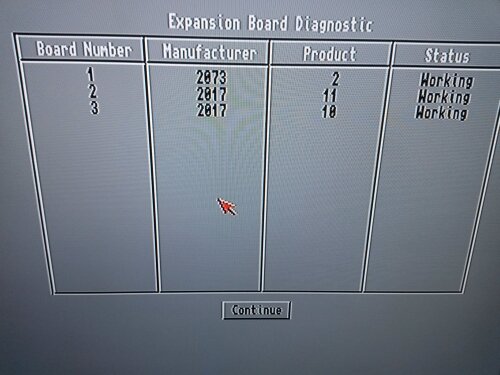
Currently I have three different SCSI cards (an A2090, a GVP Impact A2000-HC and a Kupke Golem SCSI II), but as I have figured out, they are relatively old - especially the A2090 - and I couldn't make them
work with the 3.1 ROM + 4GB HDD setup. All three cards look undamaged and show up as Working in the early startup menu, but cannot detect the attached SCSI HDD with their setup utilities.

If either the GVP or the Kupke card should work in my system - with the aforementioned setup - somehow, please inform me how.

If not, then my plan is to swap these three cards for a more modern one.
That card doesn't need to have RAM expansion abilities, because I'm planning to add FastRAM to the system via another Zorro card.
It should however support "big" hard drivers (at least 2GB ones, 4GB would be optimal), and should have no problem with the 3.1 Kickstart ROM.

Any advice appreciated.

Thank you in advance.
 
What is the Rom version of the GVP. I have several GVP's running on my Amiga's with 3.1 Roms as well as OS 3.1 and OS3.9.
 
I've had issues with Rom's lower than 3.x on the GVP and ALWAYS have issues with the 2090(have 3 I don't use because of this issue) on anything above 2.04. Don't know much about the Kupke card. I'd be willing to bet if you upgraded the Rom you'd be in business. Others might have idea's as well, but that's what I'd do first. You can sometimes find them on Ebay. I have a burner, but haven't tried to burn this one yet.
 
Have you made sure your drive is terminated? Sounds stupid, but most times it's the issue. Plus, maybe some of the controllers don't work correct/at all with the scsi.device.
I recall squirrel for example required installing the squirrelscsi.device, and so do other cards.
Good luck!
 
Kronusofchaos, salaxi54:

Thank you for your input. The HDD is properly terminated. I tried both controllers (Kupke and GVP) with their own scsidev.device and scsi3.device drivers (respectively) to no avail.
They just don't detect any hard drives attached to the card.

I do have and EPROM programmer, with which I successfully extracted both card's ROM images, then concatenated the even and odd parts. The resulting files seem perfect, that's how I could
determine the name of the SCSI device drivers. I also have a couple of 28C64 chips (pin compatible with the UV-eraseable 27C64 part), so I can put a new ROM in the cards if you suggest
that is the root of all my problems.

Mr. Babel's site states that gvpscsi.device V3.15 was the last version that was compatible with my GVP card (Series-I).
http://babel.de/amiga.html

However, I assumed by default that the cards should work even without the ROMs perfectly, it's just that you lose autoboot capability this way.
So my approach was: partitioning and formatting the HDD without the ROMs, then after making sure that the HDD works fine when booting from floppy,
trying to add autoboot capability with the proper ROM. Is that total nonsense?
 
Ok, there is some real progress here.
In the end it turned out the Golem card will be the best choice for my needs.
(The most advanced one of the aforementioned bunch.)

By creating a custom WB 3.1 Install disk with scsi3.device (the Golem's SCSI driver) and editing HDToolBox to use this driver
I was able to partition and format a 4GB SCSI HDD. I needed this boot disk because the card either cannot read it's own ROMs properly,
or the ROM contents are corrupt, or the PALs on the card lost their contents (the manufacturer guarantees 20 years of data retention only) - too many variables, unfortunately.

I was able to read both ROM IC's and all three PAL's contents with my EPROM burner, but since I haven't found any downloadable files
for this card, I have no way to compare this with the data from another card. Mine "seem" to be ok: merging the HI and LO ROM files produces
a nice ROM file with sensible strings like "scsi3.device" and stuff, but I guess that in itself doesn't prove anything, because somewhere else the
contents of the ROMs can be corrupt regardless. :(

It everything else fails, I guess I could make a custom 3.1 Kickstart by replacing my original ROM's scsi.device with scsi3.device from the Golem Install disk,
then burning this file into an EPROM to add autoboot capability to the system. In this case it would be great to know if there is any way to do this easily
on a PC instead of Romsplit / Remus on an Amiga, which - AFAIK - is aimed for those who want to create a heavily patched and updated custom kickstart
for their high-end classic Amigas. Perhaps there is an easier way to do a single file replacement like this.

Any further advice is greatly appreciated.
 
@morkath

hmmm this seems quite a pickle indeed.

Out of the A2090, GVP Impact SCSI A2000-HC and the Kupke Golem SCSI II - technically the better card is in fact the GVP Impact Series as it has DMA ability and supports all the SCSI commands. The A2090 doens't have DMA and the Kupke Golem SCSI II has neither DMA or supports a full SCSI command set.


To access the GVP via HDTOOLS you will need to change the SCSI.DEVICE to gvpscsi.device or it wont see anything on the chain.

If you can enable auto-boot and load from 3.5" Wokbench floppy disk - just edit the TOOL TYPE of HDInstallTools/HDToolsBox respectively to SCSI.DEVICE to "gvpscsi.device"

The GVP DMA based SCSI II cards work best with a stock 68k moto and Z2 RAM - I achieve 1.68Mbytes per second with a stock 68000 CPU (7.ish MHz) and it only used about 5% CPU time. Compared to an Apollo 030@40Mhz (32MB Ram) on the Native IDE of the A1200 - can only achieve 1.67MBytes per second with nearly 99% CPU time used!
 
A2000-HC is not GVP Series II model = No DMA. (it has sort of internal DMA to/from onboard buffer RAM but it is not true DMA). It most likely has much better and more compatible driver than other two, at least if updated to later version.


Zetr0, Toni.Wilen: Thanks for your advice.

In the end I chose the Golem card because the GVP card produced strange errors when loading its drivers manually.
DMA vs PIO and transfer rate doesn't matter much here, because I just want to add a relatively big (x > 2GB) HDD to the A2000
with autoboot capability.

As I suspected, the Golem has some problems with it's PAL chips, therefore it cannot load it's SCSI driver (scsi3.device) at boot.
I managed to replace the scsi.device of KS 3.1 with this scsi3.device using Remus and burned a custom Kickstart image.

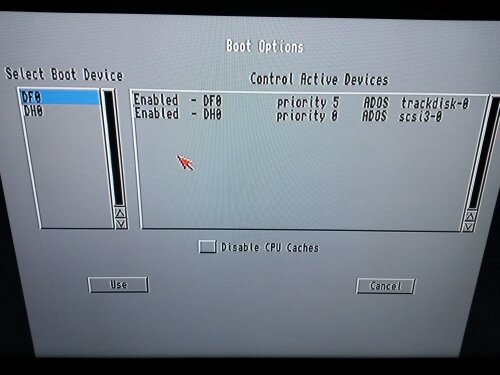
I am now another step further: the Amiga sees the HDD at the early startup menu, and it's possible to partition
the hard disk with HDToolBox without BindDrivers - using the proper tooltype, of course. I created a partition of 200MB and made
a full format just to be safe.

However, I still cannot boot from the HDD. The Workbench install (3.1) went flawlessly, but upon reboot, it still asks for a floppy.
If I boot from a floppy, the HDD appears as is should, and all installed files and folders are there.

From this point on, what could be the problem? Incompatibility between autoboot + scsi3.device + KS 3.1? Improper RDB?
I guess MaxTransfer doesn't have to do anything with this scenario. Do I have to use a "custom bootblock"?

Because now I can really see some light at the end of the tunnel, any further help is welcome. :)

2.jpg

1.jpg
 
Last edited:
Does partition also mount normally if you boot without startup-sequence? Partition is marked as bootable in hdtoolbox? :)

Max transfer can be ignored in this case (even if it would have mattered, it would not have prevented autoboot)
 
Yes, it mounts normally without startup-sequence too, even with WB 1.3 boot floppies.

I could create an 500MB FFS boot partition and an 3500MB PFS partition, both work flawlessly when booting from floppy.
I installed the PFS3AIO driver to the RDB, and it works, because if I boot from a floppy which doesn't contain the PFS handler,
the PFS partition shows up too and is usable immediately.

In the meantime I connected the HDD to a PCI SCSI card in a PC, and configured it under WinUAE as an RDB disk.
WinUAE had no problem booting from the HDD, so I suspect the RDB itself was written to the disk properly.

I also found a newer ROM version of the Golem SCSI card ( 3.9 vs 3.8 ), but it is a ROM image, and I cannot extract
the newer scsi3.device from it to check if it can possibly solve the problem.

The main question is: if the Golem card's autoboot ROM support is broken, should the autoboot facility
work even when loading the required device (scsi3.device in this case) from the Kickstart ROM instead of the card's sockets?

Seeing that DH0 shows up in the early startup menu (and DH1 too, if I make that partition bootable as well), I thought it should
be able to boot from the HDD, but there might be some other factors that require a more in-depth knowledge of the Amiga boot process.

Solving this problem could prove very helpful for all those who lost or are going to lose autoboot capability on their A2000's because of
aging PALs or other causes - regardless of the specific SCSI card type.
 
Last edited:
Does same happen if you use WinUAE's Golem SCSI II emulation? ("Golem SCSI II (Kupke)" under Expansions -> SCSI Controllers, then add your hardfile to using harddrives panel normally, change controller to Golem SCSI II)

Could you attach your v3.8 odd and even ROM dumps?

Unfortunately I don't know where to find v3.9 install disk with newest disk based driver.
 
Following your advice I set up WinUAE using Golem SCSI II emulation with both my (merged) 3.8 ROM and the 3.9 ROM image.
Both produce the same result: no autoboot, the HDD isn't visible after booting from floppy, and issuing "version scsi3.device" from CLI gives
the object not found message, suggesting that scsi3.device isn't loaded at all during boot.

I guess scsi3.device should load even without a SCSI HDD attached and configured in WinUAE, so that is strange.

I attach my ROM files (odd, even and merged one), my card's PAL's contents and the 3.9 ROM image that produced the above result.

http://s000.tinyupload.com/index.php?file_id=22639553387234564993
 
Last edited:
It is possible merged ROM don't work (odd/even pair handling is a bit special, I'll need to check it), copy v3.9 odd and even to rom-path, run paths panel rescan-rom. Then try selecting golem rom again, it should now appear in rom select box. This Golem reads autoconfig data from ROM, if ROM is not installed, nothing gets detected. (Usually disable autoboot-jumper does same as rom removal but in this case it changes rom addressing, it has two 8k rom "pages" with different autoconfig data and rom filled with "autoboot switched off!" strings)

Thanks for dumping the v3.8 rom (I already had v3.9). My plan is to collect, emulate and preserve as many as possible expansion devices and boot roms.
 
Your method (copying even+odd 3.9 ROMs to ROM folder) works. There is about 6 seconds of black screen, but then WinUAE
proceeds to boot from the HDD and everything works perfectly.

Unfortunately, the additional information about autoconfig data exceeds my level of knowledge. :)
If I get it right, without working ROMs on the card itself it is impossible to autoboot on the A2000, even if I incorporate the
scsi3.device into the Kickstart? It is somewhat strange, because it can see the HDD in the early startup menu (pictured above).
 
I can duplicate same behavior in emulation (tick autoboot disabled next to the rom selection), automounts but does not autoboot.

Explanation is probably very simple: I forgot that autoboot needs extra work (it is "automatic" only if there is autoconfig autoboot rom) and I assume it is not implemented because it was never meant to be autobootable that way.

Did you check that Golem's autoboot disable jumper works? Boot in both jumper positions and check that www.winuae.net/files/b/expdump.zip ("expdump -rom") shows same autoconfig data (same product and manufacturer) but er_Type or ROM data should be different.

- - - Updated - - -

Your v3.8 ROM dump appears to be corrupted, first 2 bytes of both odd and even images are zeroed and that can't be right. Could you recheck?
 
Of course, I will dump the ROM images again and report back.

In the meantime I tried booting with the jumper on: in that case, the A2000 refuses to boot, I only get a black screen.
It is even impossible to get to the early startup menu when the jumper is on. Something really strange must be going on here.

Note: this card only had a "disable switch" originally (at the back), which was disconnected from the pins, so I can use a jumper to short these two pins instead.
I guess we are talking about the same thing here, but I'm not sure what it should disable: autoboot or the entire card.

- - - Updated - - -

I dumped the ROMs with two different EPROM programmers, and both produce the same files.
The first two bytes of both images are really zeroes. So we can assume this ROM is corrupt?
 
v3.8 ROM works in emulation if I fix first 4 bytes of merged rom (from v39: DF FF 1F FF), without it causes invalid autoconfig which emulator detects and halts the emulation.

Your Golem probably starts working if you burn new EPROMs with v3.9 (or corrected v3.8)
 
I have to report success! You were right.

I burned the 3.9 EPROMs, and the card started working.
It turned out I had to close the jumper to enable autoboot.

Closing the jumper with the corrupt 3.8 ROMs installed caused the black screen symptom.

After doing all this it immediately booted from the HDD and works as it should!

"Version scsi3.device" tells version 3.9.

No need to use a custom Kickstart anymore (and probably it wouldn't have worked anyway).

Many thanks for your help again, and everyone else in the thread, of course.

I'm also happy that you managed to fix the 3.8 image with the help of the 3.9 one!

Now I'm going to do some heavy HDD testing and report back afterwards.
 
Last edited:
Back
Top Bottom