Need help with my ALF2 SCSI controller

  • Thread starter Thread starter dougal
  • Start date Start date
  • Replies Replies 11
  • Views Views 6834

dougal

Active member
AmiBayer
Joined
Nov 25, 2009
Posts
2,360
Country
Malta
My A2000 came with an ALF2 SCSI controller which i cannot get working :mad:

I managed to download the software disk for it from one of those Amiga hardware database sites and i converted the DMS file to ADF and wrote the ADF to disk using EASYADF.

During bootup (of the ALF2 software disk) it recognizes that the ALF2 controller is installed, but whenever i try to enter the drive ID in the software it says something about no device or drive being connected.

I dont know much about SCSI devices unfortunatly.

The drive is a Connor 1Gb with a 50pin connector which i connected to the SCSI board and powered using the Amiga's PSU.

From the Hard Drive i set the SCSI ID using the onboard jumpers.

(NOTE) I cannot find any documentation for the ALF2, only for the ISA card ST-01/ST-02 controller attached to the ALF2 zorro board. So have no idea if any jumpers need settings.

I don't know if or what a SCSI terminator is and if i have one or need one :blink:

Any help would really be appreciated :thumbsup:

P.S: The board is not found in SYSINFO, could it be because it is not Autoconfig?
 
Do you mean autoconfig or autoboot? I thought all Zorro boards were autoconfig and should show up in SysInfo or the Early Startup menu, even if there's no disk there or any drivers resident yet.
 
Do you mean autoconfig or autoboot? I thought all Zorro boards were autoconfig and should show up in SysInfo or the Early Startup menu, even if there's no disk there or any drivers resident yet.

According to what it says while booting the software disk, it does have Autoboot.

Without the card inserted in the Zorro it says no card found, but when inserted it does find it, but early startup only shows my RAM expansion card. Same with Sysiinfo
 
Non-autoconfig boards are not bootable. As so, they not load their "driver" to RAM or available early.

You must use a way to boot the Amiga with the alf_SCSI icon properly in the expansion drawer. For then you can start to search for SCSI HD or other devices.

Also, SCSI always need terminators. One on each end of the SCSI cable.

Most ancient HD from 50pin era have 3 "packs" of resistors hooked in sockets in the circuit board. I assume the same for the ALF2. They are in three rows of 11 pins very near the SCSI connector.

BTW: are you sure your ALF is not the ancient ST406/ST506 MFM controller?
 
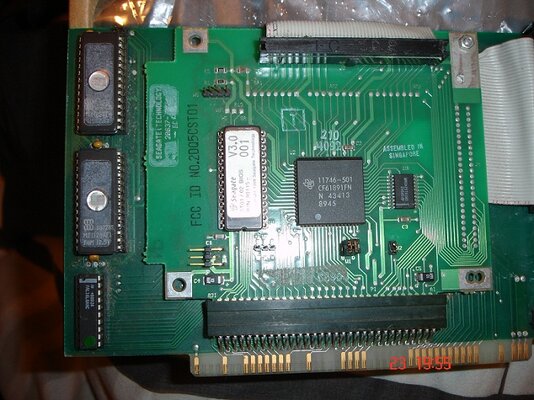
I attached an pic of the controller.

The bios says ST01/02
 

Attachments

  • DSC02972.JPG
    DSC02972.JPG
    87.6 KB · Views: 4
You noticed the 3 rows of solder isles very near the SCSI connector? There is where the resistors packs must go. Check in the other side of the board if they are still there.

The same for the HD: the resistor packs must be hooked in.

If you don't plan to hook more devices to the SCSI chain this will suffice.

If you don't find the packs, then you must provide a pair of active terminators (they are better than the passive terminators ) and check if the HD can provide TERMINATION POWER to them.

Also you'll need a 4 connectors cable or the hard to find passtrough terminators. Then a simple 2-way cable is needed.
 
Hmmm sounds like too much hassle :lol:

I think i better just find a nice IDE controller. Easier to setup.

You noticed the 3 rows of solder isles very near the SCSI connector? There is where the resistors packs must go. Check in the other side of the board if they are still there.

The same for the HD: the resistor packs must be hooked in.

If you don't plan to hook more devices to the SCSI chain this will suffice.

If you don't find the packs, then you must provide a pair of active terminators (they are better than the passive terminators ) and check if the HD can provide TERMINATION POWER to them.

Also you'll need a 4 connectors cable or the hard to find passtrough terminators. Then a simple 2-way cable is needed.
 
IDE is easier to setup, yes. But is slower and hits the Amiga CPU with no mercy.

The most economic way to set the board is using a humple set of passive terminators hooked directly on the controller and on the last device.

Even a polled I/O SCSI controller will be a lot faster than IDE in the same Amiga.
 
Just a few more questions please :wooha:

I read that most 50 pin SCSI devices (like my 1Gb HD) would have inbuilt Termination (activated by jumper/s). Does that sound right?

I bought my SCSI controller 2nd hand with my A2000.
How would i know that the SCSI controller doesnt already have a Terminator?

I have seen many different types of terminators. Which one would i need?

Does anyone in the world have a manual for the ALF2 SCSI controller? cause i cannot find any documentaion anywhere.
 
As I said before, if the resistor packs are not on the three rows of solder isles near SCSI connector, them the controller doesn't have terminators built-in.

If the HD have a termination jumper, then it have active termination built-in.

Grab a 3 connector cable and just one more active terminator for complete the termination.

Remember to set termination power on on the hd to provide power to the external active terminator.

The cable will look like this:

external_active_terminator--controller--HD
 
Back
Top Bottom