
McTrinsic
Member
Hi all,
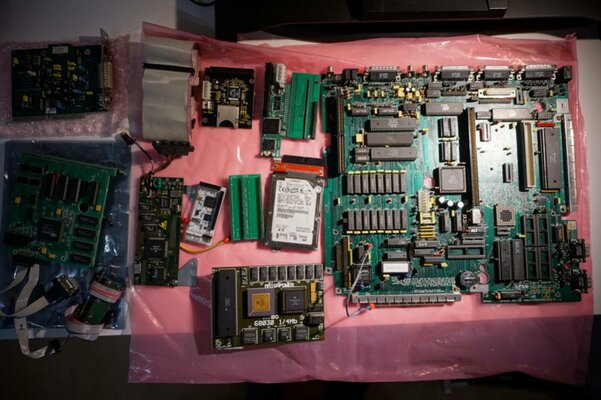
I finally have come to the conclusion that I am no longer able to put the required efforts (time!) into building a nice machine out of the hardware I have here. So, this is your opportunity to acquire a few really rare and almost unique items form the Amiga history. When building my main Amiga, I back then used a phoenix as a base to do so. Since it had may quirks and issues I soon began to build a second system to cross-check for hardware or software origins of my troubles when I had some. My main system is almost final now, so I started to build a second system out of the items I had sourced as a surplus or that were originally part of my system. As it took more and more time, starting with the need to find a case, I had to admit I don’t have the time this system deserves.
If you can put this all together you will have an awesome, incredible WHDLoad-machine that can also play mp3s.
Note: high-res-pictures are available here:
https://www.mediafire.com/file/mrxr3xyyzcvltyu/Phoenix.zip/file
What do you get?
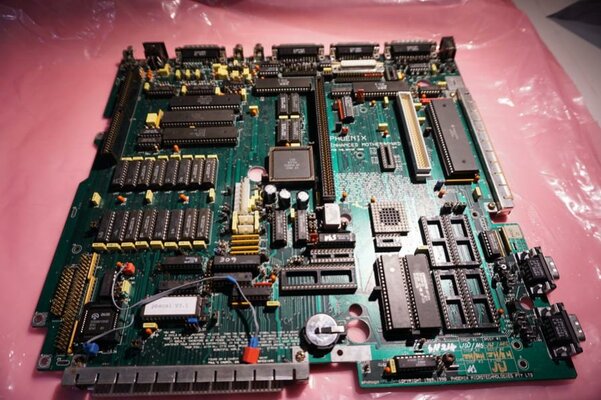
1) An original Phoenix Board
A Phoenix board in an original revision from 1991. So I assume it is one of the original run, not the later produced second run after it was financed. For example, some jumpers are slightly different to a later revision and it has an onboard-plug for an external floppy drive to be used inside the case – later revisions only have a pin connector.
See here for reference:
http://amiga.resource.cx/search.pl?product=phoenix+board
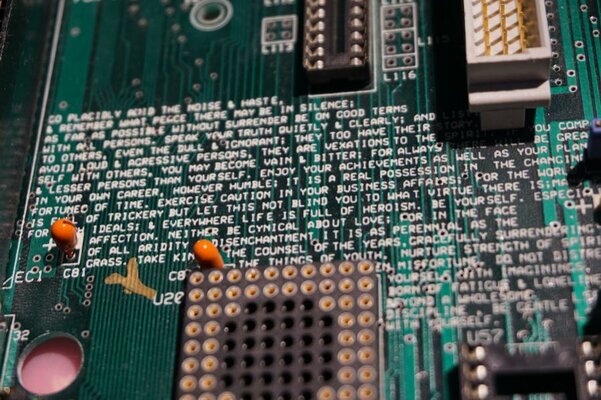
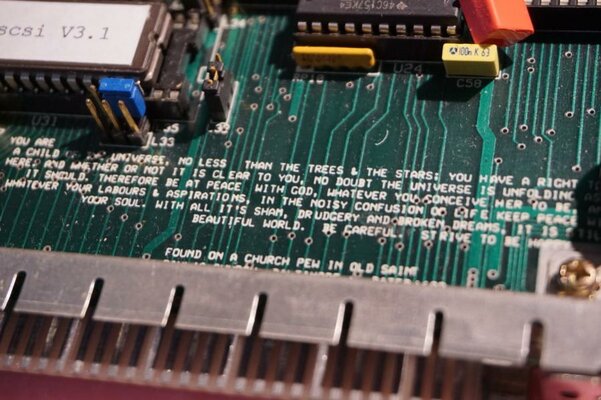
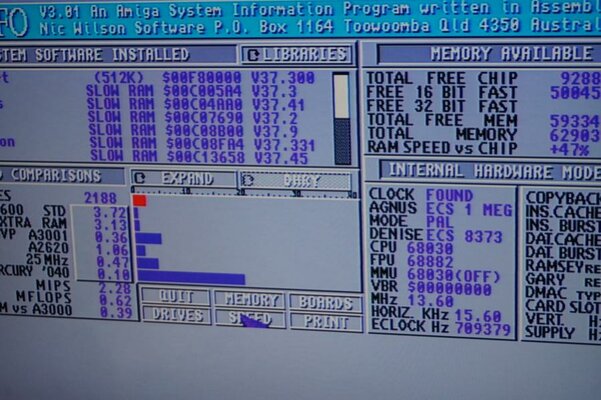
The board features 2MB onboard-RAM, fully populated. Due to the ECS-Agnus I have jumpered it for use as 1MB Chip and 1 MB FastRAM. For the other Chips please see the pics. The board itself comes with an 68000 suitable for up to 12MHz as an extra. The board was equipped with the pseudo-DMA-SCSI-hack. I will provide the respective driver electronically, i.e. download (see below). With the new driver and the hardware-hack, I am able to achieve ca. 1MB/sec transfer speed in SysInfo 4.0 with my other system which has a 68030@50. It should be pretty close to this system if you use the accelerator card of this package. The SCSI-ROM has been upgraded top the latest ROMable version 3.1. Without the driver, the board delivers the standard ca. 200-250 kb/s via SCSI.
The only issue with the whole lot that is offered here is the following: I assume the Agnus is not working properly. The onboard-RAM passes all tests. However, if you enable autoconfigure to add Zorro-cards beyond the onboard-SCSI (which works flawlessly), you get either a green or red bootscreen depending on the onboard RAM configuration. All RAM-Chips are known good, as are the Kickstart-ROMs I tested. I only don’t have a suitable Agnus to check. Installed is a standard 8372 Agnus. That’s why I believe this is the culprit. I don’t have a second one to crosscheck.
The board can be configured with switches to flip between external Floppy drives and the internal. External drives, e.g. a HxC or Gotek, could appear as DF0: for compatibility support.
On the upside, the frontslot has been equipped with a line from the Zorro-slot to provide the INT6 for cards such as the Buddha (not included). The board as a whole lacks -12V as it is not provided by the power supply, so cards like the VarIO may not work for serial sending connection out of the box.
Included is a 220V Power supply NOS from last year. It was bought on Amibay. The fan is giving some noises. The circuitry was checked prior to putting it to use. Electrically it is in really good shape.
The board is equipped with an KS2.05 and a KS1.3 ROM. I identified the 1.3 by the part number 1.3 – never personally used it.
2) Accelerator: 68030 + 4MB FastRAM
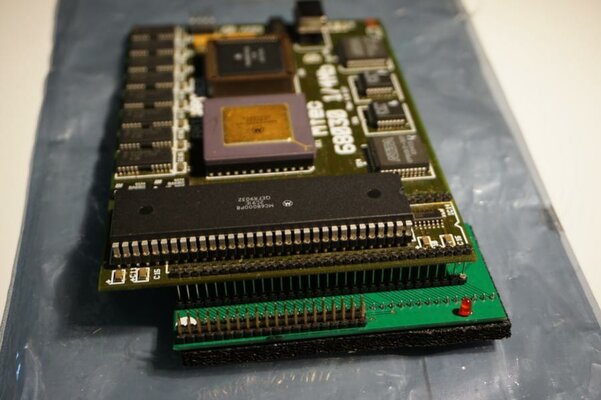
Part of the package is a an MTEC 68030 @ 14 MHz accelerator with 4MB onboard. It has a synchronous design. An ideal choice for retro-gaming machines as all extras can be switched off via hardware, i.e. a switch ( really ). So if you want to play a game via floppy you can fallback to an 68000 without any FastRAM.
See here for details:
http://amiga.resource.cx/exp/mtec530
Also added here is a stack of 68-pins/sockets to build a tower for the accelelerator. And should you need to relocate the CPU to the side a bit because of other additional boards in the 68k socket, I also have a CPU-relocator in here as well.
3) Mass-storage / storage
I provide the driver for the SCSI-hack as described above. It is not the one available on the aminet, which is similar but not the same. Prerequisite is a reset-resident RAM such as the one of the accelerator provided here. After a reboot during startup, the driver is updated.
As a mass-storage-solution I provide an SCSI-Cable and an SCSI2IDE-converter IDSCSI21- It is jumpered as ID1 and with Termination ON. During the basic tests I used a 2GB DOM with an 3,5-to-2,5-IDE-Adaptor which are all included here. I also tested with an 80GB 2,5” IDE-HDD which is also part of the package.
Even faster is the SimpleIDE from a1k.org, drivers need be loaded via loadmoule during startup. The SimpleIDE-board goes into the CPU-68k-socket. It delivers speeds up to ca. 2MB/second depending on the CPU as it is utilizing PIO transfers. In my other system I operate it with a CF-adaptor, so I include two adapters for data exchange: one CF2IDE and one SD2IDE adaptor. Please be aware that the SimpleIDE is not hot-pluggable, so you need to turn off your Amiga when taking the e.g. CFs out. In my other system I operate it with a 128GB CF-card and two 4GB-cards as well as an 512MB SD-card. I use PFS3 with it. You need to create mountfiles, for example with giggledisk from aminet. It is not bootable.
The board is the IDE-part of the following device and does not feature any turo-capabilities. I have left it in the pins of the accelerator as a transport safety measure, see pics:
https://www.amigawiki.org/doku.php?id=de:projects:a1k_68k_tksri
Also, I provide a HD floppy. Please be aware that I do not have a floppy data cable available.
4) Graphics 2MB / SVideo output
You also get a GBA RTG graphics card similar to the Kryoflux RTG card. It features 2MB graphics RAM. It is especially designed to fit into a Phoenix Board or a GBA and uses one the Cirrus Logic 5428 chips. Workbench at 1024-resolution and full of colours. The actual number of colours depends on your resolution. Btw: it is not the “Phoenix VGA” – that board is a flickerfixer. This board here is a full-featured graphics board! It has an internal connector to an Indivision ECS (not included) as a pass-through. So you can plug this board on the Indy and switch via software between native ECS/OCS chipset-modes and the RTG-modes. If you want to use an external source, I included the external bracket to use a second source for passthrough.
No links available – unfortunately, the designer has pulled any info from his Homepage but of course I have the driver.
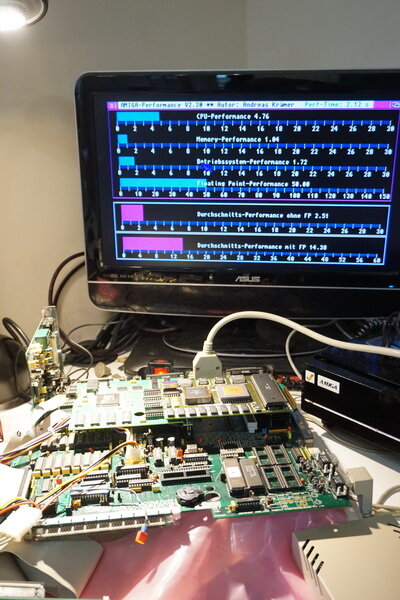
Also part of this packet is an Electronic Design Video Converter (not flicker fixer) for pristine and adjustable SVideo, Y/C and an additional RGB output. Please be aware that it needs be fine-tuned to your display, which I didn’t in the pics of the test-setup. This causes a blue tint on the pictures. On the tubes I previously had and one older LCD it worked impressively, for an analog picture, that is. The pics taken here don’t give it the fame it deserves.
See here:
http://amiga.resource.cx/exp/videokonverter
5) The Delfina clockport – mp3 in the Amiga 1000The Delfina “Flipper” is a fully featured dsp-based soundcard designed to be attached to a so-called clockport. It uses AHI as the standard music system for the Amiga to replace Paula. It is a rarity these days. It delivers an impressive soundquality as the chips have been fine-tuned. As documented here: https://hschid.wordpress.com/2012/05/19/deneb-und-delfina-flipper/ you need to carefully select the mp3 encoding engine to prevent hiccups. If you consider this the card may run really stable. At least in my case it helped. The unit offered here has been modded to better fit internally. Two metal brackets are meant to hold the board screwed to the power supply of an A1000. The In/Out – connectors have been replaced to take standard earplug-connectors. Except for the CD-In. So if you drive, lets say, a CD-ROM or DVD-RAM or whatever with the SimpleIDE you can output the sound via the Delfina and mix it with the Output of Paula. For the latter, you need to connect the Paula-out with the Delfina Line-in. Warning: the Delfina is known-good. Be really careful to make sure you fully understand which way to connect to a clockport. Otherwise, you will definitely destroy your card and maybe your complete system. Immediately smoke will appear. In my other system, I previously fried a Subway USB Hostadapter. The clockport is not to play with!
The Delfina works with the usual mp3-players such as Amplifier and AmigaAMP in AHI mode.
6) Additional expansions
One additional expansion included is an 68k-Socket-Clockport-adapter. It goes into the CPU-socket, e.g. under the SimpleIDE, and provides two clockports. You can connect e.g. the Delfina mentioned above or you can purchase a RapidRoad USB Hostadapter to connect to this board. Or whatever expansion you want. You need to connect a wire to one of the CIAs – make sure you understand which one.
One RapidRoad is included, that stopped working for me in my other system. I never used it in this system. I don’t know if I potentially connected it in the false way or did something different of if it was the cable or whatever. It still has its serial number on it, maybe it is RMA’able.
The 68k-Clockport-adapter is this, however in white:
http://amiga.resource.cx/exp/a500clockport
The VarIO high-speed serial and parallel board. The other opportunity to connect something via clockport is to use a Zorroboard with a clockport. Part of this package is a VarIO which in my other system I use for exactly this. I use the high-speed serial port with the AmigaExplorer package for small file exchange and a RapidRoad to provide a USB-port. Works great! I use the VarIO at at the front slot, for which you would need an adaptor. I added a PCB for that, but I am out of Expansion-/Zorro-slots. The VarIO is a great board that works robust and is the first board for me to check any Zorroslot for appropriate function. However, it needs -12V for the serial operation that the A1000 doesn’t supply out of the box and needs be added to the Zorro-slot it goes into.
See here:
http://amiga.resource.cx/exp/vario
7) Collectables / memorabilia
An important part of this package are some memorabilia and collectables. You get the full trip down to memory lane .
.
First is the one and only Phoenix-board Genlock-adapter I have ever seen or heard about. The description on Amiga.resource.cx is from me from this very board.
Next are original an original switch for Kickstart -selection and SCSI. The trick is that when you switch from KS2 or 3 to e.g. 1.3, you switch off SCSI or the whole Zorro bus for maximum compatibility with e.g. older games. I’ll also add a DF0:/DF1:-switch so you can use the external drive such as a Gotek or the HxC as DF0:.
Also included is the original harddrive-mounting “kit” which pretty much is a small angled metal and an instruction where to drill holes.
From the 2005 campaign I also add the manual and a letter from the designer of the board, Andrew, with some latest information. The CD that was supplied in 2005 can be made available as a copy
You also get an adverb from back then!
You also get the original bill from 1993, the original packaging including the protective foam and the test result of the Seagate HDD that was supplied back then. The HDD is long lost, though. The serial numbers of the original items from back then and the one with the board don’t match. That board was sold a long time ago.
Also I found the original labels from the floppy disks that were supplied with the board in 1993. The disks themselves I did not find. The content can be provided as files. With the files, you can easily restore the disks.
8) Other
Additionally, since I provide a KS1.3 I also add an Amiga Action Replay which works best with KS1.x. I never used it but always wanted to.
The package gets completed by ca. 30 NOS DD Disks for 880k plus some more to fill the box, but these are not NOS.
Software, drivers, ….
All software and drivers will be made available electronically, i.e. via download. The service provider is free to choose for the buyer. Upon request I can alternatively add a CD-ROM with all files burnt. I will only provide drivers and software that was part of the original package of the hardware. Copyrighted software beyond that will not be provided, especially not an OS. I highly recommend to get the new OS 3.1.4. package and to burn a respective ROM (which I cant). EPROMS that have been used with self-burned ROMs are part of the package, but I am not able to say if they can be used again, i.e. erased and written to again.
This is a very special package. I reserve the right to pass the right to a following Amibayer if the prvious one(s) are just declaring interest as a placeholder.
The price for the whole package is 1.500 €.
Postage will be significant due to size and weight. Id like to discuss with the buyer in detail once it is clear who gets it to make sure we find the best compromise of speed, cost, safety, insurance etc.
Pictures are available in my Album:
https://www.amibay.com/album.php?albumid=583
The pics may be missing the Action replay. Its standard
Feel free to ask any questions.
I finally have come to the conclusion that I am no longer able to put the required efforts (time!) into building a nice machine out of the hardware I have here. So, this is your opportunity to acquire a few really rare and almost unique items form the Amiga history. When building my main Amiga, I back then used a phoenix as a base to do so. Since it had may quirks and issues I soon began to build a second system to cross-check for hardware or software origins of my troubles when I had some. My main system is almost final now, so I started to build a second system out of the items I had sourced as a surplus or that were originally part of my system. As it took more and more time, starting with the need to find a case, I had to admit I don’t have the time this system deserves.
If you can put this all together you will have an awesome, incredible WHDLoad-machine that can also play mp3s.
Note: high-res-pictures are available here:
https://www.mediafire.com/file/mrxr3xyyzcvltyu/Phoenix.zip/file
What do you get?
1) An original Phoenix Board
A Phoenix board in an original revision from 1991. So I assume it is one of the original run, not the later produced second run after it was financed. For example, some jumpers are slightly different to a later revision and it has an onboard-plug for an external floppy drive to be used inside the case – later revisions only have a pin connector.
See here for reference:
http://amiga.resource.cx/search.pl?product=phoenix+board
The board features 2MB onboard-RAM, fully populated. Due to the ECS-Agnus I have jumpered it for use as 1MB Chip and 1 MB FastRAM. For the other Chips please see the pics. The board itself comes with an 68000 suitable for up to 12MHz as an extra. The board was equipped with the pseudo-DMA-SCSI-hack. I will provide the respective driver electronically, i.e. download (see below). With the new driver and the hardware-hack, I am able to achieve ca. 1MB/sec transfer speed in SysInfo 4.0 with my other system which has a 68030@50. It should be pretty close to this system if you use the accelerator card of this package. The SCSI-ROM has been upgraded top the latest ROMable version 3.1. Without the driver, the board delivers the standard ca. 200-250 kb/s via SCSI.
The only issue with the whole lot that is offered here is the following: I assume the Agnus is not working properly. The onboard-RAM passes all tests. However, if you enable autoconfigure to add Zorro-cards beyond the onboard-SCSI (which works flawlessly), you get either a green or red bootscreen depending on the onboard RAM configuration. All RAM-Chips are known good, as are the Kickstart-ROMs I tested. I only don’t have a suitable Agnus to check. Installed is a standard 8372 Agnus. That’s why I believe this is the culprit. I don’t have a second one to crosscheck.
The board can be configured with switches to flip between external Floppy drives and the internal. External drives, e.g. a HxC or Gotek, could appear as DF0: for compatibility support.
On the upside, the frontslot has been equipped with a line from the Zorro-slot to provide the INT6 for cards such as the Buddha (not included). The board as a whole lacks -12V as it is not provided by the power supply, so cards like the VarIO may not work for serial sending connection out of the box.
Included is a 220V Power supply NOS from last year. It was bought on Amibay. The fan is giving some noises. The circuitry was checked prior to putting it to use. Electrically it is in really good shape.
The board is equipped with an KS2.05 and a KS1.3 ROM. I identified the 1.3 by the part number 1.3 – never personally used it.
2) Accelerator: 68030 + 4MB FastRAM
Part of the package is a an MTEC 68030 @ 14 MHz accelerator with 4MB onboard. It has a synchronous design. An ideal choice for retro-gaming machines as all extras can be switched off via hardware, i.e. a switch ( really
). So if you want to play a game via floppy you can fallback to an 68000 without any FastRAM.See here for details:
http://amiga.resource.cx/exp/mtec530
Also added here is a stack of 68-pins/sockets to build a tower for the accelelerator. And should you need to relocate the CPU to the side a bit because of other additional boards in the 68k socket, I also have a CPU-relocator in here as well.
3) Mass-storage / storage
I provide the driver for the SCSI-hack as described above. It is not the one available on the aminet, which is similar but not the same. Prerequisite is a reset-resident RAM such as the one of the accelerator provided here. After a reboot during startup, the driver is updated.
As a mass-storage-solution I provide an SCSI-Cable and an SCSI2IDE-converter IDSCSI21- It is jumpered as ID1 and with Termination ON. During the basic tests I used a 2GB DOM with an 3,5-to-2,5-IDE-Adaptor which are all included here. I also tested with an 80GB 2,5” IDE-HDD which is also part of the package.
Even faster is the SimpleIDE from a1k.org, drivers need be loaded via loadmoule during startup. The SimpleIDE-board goes into the CPU-68k-socket. It delivers speeds up to ca. 2MB/second depending on the CPU as it is utilizing PIO transfers. In my other system I operate it with a CF-adaptor, so I include two adapters for data exchange: one CF2IDE and one SD2IDE adaptor. Please be aware that the SimpleIDE is not hot-pluggable, so you need to turn off your Amiga when taking the e.g. CFs out. In my other system I operate it with a 128GB CF-card and two 4GB-cards as well as an 512MB SD-card. I use PFS3 with it. You need to create mountfiles, for example with giggledisk from aminet. It is not bootable.
The board is the IDE-part of the following device and does not feature any turo-capabilities. I have left it in the pins of the accelerator as a transport safety measure, see pics:
https://www.amigawiki.org/doku.php?id=de:projects:a1k_68k_tksri
Also, I provide a HD floppy. Please be aware that I do not have a floppy data cable available.
4) Graphics 2MB / SVideo output
You also get a GBA RTG graphics card similar to the Kryoflux RTG card. It features 2MB graphics RAM. It is especially designed to fit into a Phoenix Board or a GBA and uses one the Cirrus Logic 5428 chips. Workbench at 1024-resolution and full of colours
. The actual number of colours depends on your resolution. Btw: it is not the “Phoenix VGA” – that board is a flickerfixer. This board here is a full-featured graphics board! It has an internal connector to an Indivision ECS (not included) as a pass-through. So you can plug this board on the Indy and switch via software between native ECS/OCS chipset-modes and the RTG-modes. If you want to use an external source, I included the external bracket to use a second source for passthrough.No links available – unfortunately, the designer has pulled any info from his Homepage but of course I have the driver.
Also part of this packet is an Electronic Design Video Converter (not flicker fixer) for pristine and adjustable SVideo, Y/C and an additional RGB output. Please be aware that it needs be fine-tuned to your display, which I didn’t in the pics of the test-setup. This causes a blue tint on the pictures. On the tubes I previously had and one older LCD it worked impressively, for an analog picture, that is. The pics taken here don’t give it the fame it deserves.
See here:
http://amiga.resource.cx/exp/videokonverter
5) The Delfina clockport – mp3 in the Amiga 1000The Delfina “Flipper” is a fully featured dsp-based soundcard designed to be attached to a so-called clockport. It uses AHI as the standard music system for the Amiga to replace Paula. It is a rarity these days. It delivers an impressive soundquality as the chips have been fine-tuned. As documented here: https://hschid.wordpress.com/2012/05/19/deneb-und-delfina-flipper/ you need to carefully select the mp3 encoding engine to prevent hiccups. If you consider this the card may run really stable. At least in my case it helped. The unit offered here has been modded to better fit internally. Two metal brackets are meant to hold the board screwed to the power supply of an A1000. The In/Out – connectors have been replaced to take standard earplug-connectors. Except for the CD-In. So if you drive, lets say, a CD-ROM or DVD-RAM or whatever with the SimpleIDE you can output the sound via the Delfina and mix it with the Output of Paula. For the latter, you need to connect the Paula-out with the Delfina Line-in. Warning: the Delfina is known-good. Be really careful to make sure you fully understand which way to connect to a clockport. Otherwise, you will definitely destroy your card and maybe your complete system. Immediately smoke will appear. In my other system, I previously fried a Subway USB Hostadapter. The clockport is not to play with!
The Delfina works with the usual mp3-players such as Amplifier and AmigaAMP in AHI mode.
6) Additional expansions
One additional expansion included is an 68k-Socket-Clockport-adapter. It goes into the CPU-socket, e.g. under the SimpleIDE, and provides two clockports. You can connect e.g. the Delfina mentioned above or you can purchase a RapidRoad USB Hostadapter to connect to this board. Or whatever expansion you want. You need to connect a wire to one of the CIAs – make sure you understand which one.
One RapidRoad is included, that stopped working for me in my other system. I never used it in this system. I don’t know if I potentially connected it in the false way or did something different of if it was the cable or whatever. It still has its serial number on it, maybe it is RMA’able.
The 68k-Clockport-adapter is this, however in white:
http://amiga.resource.cx/exp/a500clockport
The VarIO high-speed serial and parallel board. The other opportunity to connect something via clockport is to use a Zorroboard with a clockport. Part of this package is a VarIO which in my other system I use for exactly this. I use the high-speed serial port with the AmigaExplorer package for small file exchange and a RapidRoad to provide a USB-port. Works great! I use the VarIO at at the front slot, for which you would need an adaptor. I added a PCB for that, but I am out of Expansion-/Zorro-slots. The VarIO is a great board that works robust and is the first board for me to check any Zorroslot for appropriate function. However, it needs -12V for the serial operation that the A1000 doesn’t supply out of the box and needs be added to the Zorro-slot it goes into.
See here:
http://amiga.resource.cx/exp/vario
7) Collectables / memorabilia
An important part of this package are some memorabilia and collectables. You get the full trip down to memory lane
.First is the one and only Phoenix-board Genlock-adapter I have ever seen or heard about. The description on Amiga.resource.cx is from me from this very board.
Next are original an original switch for Kickstart -selection and SCSI. The trick is that when you switch from KS2 or 3 to e.g. 1.3, you switch off SCSI or the whole Zorro bus for maximum compatibility with e.g. older games. I’ll also add a DF0:/DF1:-switch so you can use the external drive such as a Gotek or the HxC as DF0:.
Also included is the original harddrive-mounting “kit” which pretty much is a small angled metal and an instruction where to drill holes.
From the 2005 campaign I also add the manual and a letter from the designer of the board, Andrew, with some latest information. The CD that was supplied in 2005 can be made available as a copy
You also get an adverb from back then!
You also get the original bill from 1993, the original packaging including the protective foam and the test result of the Seagate HDD that was supplied back then. The HDD is long lost, though. The serial numbers of the original items from back then and the one with the board don’t match. That board was sold a long time ago.
Also I found the original labels from the floppy disks that were supplied with the board in 1993. The disks themselves I did not find. The content can be provided as files. With the files, you can easily restore the disks.
8) Other
Additionally, since I provide a KS1.3 I also add an Amiga Action Replay which works best with KS1.x. I never used it but always wanted to.
The package gets completed by ca. 30 NOS DD Disks for 880k plus some more to fill the box, but these are not NOS.
Software, drivers, ….
All software and drivers will be made available electronically, i.e. via download. The service provider is free to choose for the buyer. Upon request I can alternatively add a CD-ROM with all files burnt. I will only provide drivers and software that was part of the original package of the hardware. Copyrighted software beyond that will not be provided, especially not an OS. I highly recommend to get the new OS 3.1.4. package and to burn a respective ROM (which I cant). EPROMS that have been used with self-burned ROMs are part of the package, but I am not able to say if they can be used again, i.e. erased and written to again.
This is a very special package. I reserve the right to pass the right to a following Amibayer if the prvious one(s) are just declaring interest as a placeholder.
The price for the whole package is 1.500 €.
Postage will be significant due to size and weight. Id like to discuss with the buyer in detail once it is clear who gets it to make sure we find the best compromise of speed, cost, safety, insurance etc.
Pictures are available in my Album:
https://www.amibay.com/album.php?albumid=583
The pics may be missing the Action replay. Its standard
Feel free to ask any questions.


