Post here everytime you get something new!

  • Thread starter Thread starter gazcbm
  • Start date Start date
  • Replies Replies 7158
  • Views Views 1098701
inconsistencies...

inconsistencies...

here's what is to be the final version (I think, lol) of the XT PC machine and monitor, that I made in C4D.

View attachment 60990

regards,

mrP


That looks brilliant but there is one inconsistency; that is a Colour CGA monitor you've rendered with an MGA IBM logo.

The logo should be IBM blue on that monitor.

:)


Ps, it needs some scan lines too as the dot pitch on those things was about .35mm iirc

hi, and thanks for your input :)

yeah, the problems I had regarding the screen took longer than actually modelling it! if it was, green, colour or monochrome. I did come to the conclusion that this version was indeed colour and that the previous versions I'd seen online (with 2 dials) was either green or mono. however, I'd actually doing the 3D for Viva Amiga, and they have asked me for a green screen image, so that's what I've done.

also, there is scanlines on the screen (and some scratches) but the angle and distance from the camera, means these aren't showing as well as maybe they should. I've already had a few other comments suggesting I need to make the scanlines more visible, so with these comments and ofc, yours, I will work on making them stand out more.

I think the image I used was up-res'd to 800x600, so I am thinking this is too high for a monitor of this age and type. so, I might play around with maybe a 640x480 (or even 320x240) hopefully, doing this will mean the scanlines are thicker, and therefore stand out more? maybe

I have attached a close-up image so you can see what they look like closer, definitely present, just not clear enough if seen further away.

actually, while you're here... some people have said that the screen is "too black" and needs to be greyer and less reflective, what are your views on these? do I have it about right or should I change it? I've never owned an XT machine, so I don't have the experience of hands-on, they only reference I could find were a few images from the net, and there's different lighting on them and other problems that make it difficult to judge.

IBM_PC_XT and Monitor - Close.jpg

thanks again for your comments, I really appreciate them as they help me make better objects and scenes, cheers.

regards,

mrP
 
Last edited:
hi, and thanks for your input :)

yeah, the problems I had regarding the screen took longer than actually modelling it! if it was, green, colour or monochrome. I did come to the conclusion that this version was indeed colour and that the previous versions I'd seen online (with 2 dials) was either green or mono. however, I'd actually doing the 3D for Viva Amiga, and they have asked me for a green screen image, so that's what I've done.

also, there is scanlines on the screen (and some scratches) but the angle and distance from the camera, means these aren't showing as well as maybe they should. I've already had a few other comments suggesting I need to make the scanlines more visible, so with these comments and ofc, yours, I will work on making them stand out more.

I think the image I used was up-res'd to 800x600, so I am thinking this is too high for a monitor of this age and type. so, I might play around with maybe a 640x480 (or even 320x240) hopefully, doing this will mean the scanlines are thicker, and therefore stand out more? maybe

I have attached a close-up image so you can see what they look like closer, definitely present, just not clear enough if seen further away.

actually, while you're here... some people have said that the screen is "too black" and needs to be greyer and less reflective, what are your views on these? do I have it about right or should I change it? I've never owned an XT machine, so I don't have the experience of hands-on, they only reference I could find were a few images from the net, and there's different lighting on them and other problems that make it difficult to judge.

View attachment 61021

thanks again for your comments, I really appreciate them as they help me make better objects and scenes, cheers.

regards,

mrP

Hehe, yeah I grew up in the 80's so I have a little experience to draw on :D

You are correct that the 3 dial IBM monitors are Colour, the other giveaway is the red, green, blue across the bottom of the IBM badge. :)

Nice scan lines btw, I couldn't see them in the original picture. CGA res is typically 320x200 with 4 colours but iirc there is a 640x200 2 colour mode as well.

Regarding the blacks, you have them perfect, some folks just never learnt how to adjust their brightness and contrast properly and so never had true blacks.
 
Last edited:
:)

:)

hi, and thanks for your input :)

yeah, the problems I had regarding the screen took longer than actually modelling it! if it was, green, colour or monochrome. I did come to the conclusion that this version was indeed colour and that the previous versions I'd seen online (with 2 dials) was either green or mono. however, I'd actually doing the 3D for Viva Amiga, and they have asked me for a green screen image, so that's what I've done.

also, there is scanlines on the screen (and some scratches) but the angle and distance from the camera, means these aren't showing as well as maybe they should. I've already had a few other comments suggesting I need to make the scanlines more visible, so with these comments and ofc, yours, I will work on making them stand out more.

I think the image I used was up-res'd to 800x600, so I am thinking this is too high for a monitor of this age and type. so, I might play around with maybe a 640x480 (or even 320x240) hopefully, doing this will mean the scanlines are thicker, and therefore stand out more? maybe

I have attached a close-up image so you can see what they look like closer, definitely present, just not clear enough if seen further away.

actually, while you're here... some people have said that the screen is "too black" and needs to be greyer and less reflective, what are your views on these? do I have it about right or should I change it? I've never owned an XT machine, so I don't have the experience of hands-on, they only reference I could find were a few images from the net, and there's different lighting on them and other problems that make it difficult to judge.

View attachment 61021

thanks again for your comments, I really appreciate them as they help me make better objects and scenes, cheers.

regards,

mrP

Hehe, yeah I grew up in the 80's so I have a little experience to draw on :D

You are correct that the 3 dial IBM monitors are Colour, the other giveaway is the red, green, blue across the bottom of the IBM badge. :)

Nice scan lines btw, I couldn't see them in the original picture. CGA res is typically 320x200 with 4 colours but iirc there is a 640x200 2 colour mode as well.

Regarding the blacks, you have them perfect, some folks just never learnt how to adjust their brightness and contrast properly and so never had true blacks.

hehe, I'm 40 :( and have used various CRT screens over the years, but not really had IBM stuff and this really caused a few head-scratches! I just want to get it as close as I can and then move onto the next render.

good call about the brightness/contrast, yeah! ofc! people had them set at all crazy settings! I remember going to friend's houses and wondering why their screens were set too bright or way too dark. lol. guess it's down to personal preference, either that or they didn't know they could change it! lol.

hehe, yeah, that was confusing to me too, the RGB logo under the IBM badge! because I had seen some images of this monitor with monochrome/green images on them?!? I concurred that the monitor may have a green-screen option by a switch? like some old monitor of the time, I think I had a CBM screen (1084s?) that had a green-screen switch, I remember other people having them and using it in green mode to be "posh" lol.

thanks for the resolution options, I will try these tonight rather than my original settings.

thanks again :)

mrP
 
Last edited:
Happy to help, I'm only a year younger than you but several mates had genuine IBM's so I remembered them as we had a Tandy.

The colour monitor you've rendered is the 5153:

ibm5153.jpg


And the monochrome monitor at the time was the 5151:

5151_monochrome_monitor.jpg


Which didn't have the RGB badge - I honestly don't recall if they had a mono switch like the commodore monitors tho (I doubt they did tho).

I was lucky in that I had the Tandy 1000ex which had PCjr aka TGA graphics which gave us the full 16 colours at CGA resolution and was supported by Sierra's Quest games and many others. :)

Ps, iirc the top dial on the IBM colour monitors is actually the on/off switch. :)
 
Last edited:
aaaah! nice!

aaaah! nice!

Happy to help, I'm only a year younger than you but several mates had genuine IBM's so I remembered them as we had a Tandy.

The colour monitor you've rendered is the 5153:

ibm5153.jpg


And the monochrome monitor at the time was the 5151:

5151_monochrome_monitor.jpg


Which didn't have the RGB badge - I honestly don't recall if they had a mono switch like the commodore monitors tho (I doubt they did tho).

I was lucky in that I had the Tandy 1000ex which had PCjr aka TGA graphics which gave us the full 16 colours at CGA resolution and was supported by Sierra's Quest games and many others. :)

Ps, iirc the top dial on the IBM colour monitors is actually the on/off switch. :)

wow! thank-you! I've been trying to find what model number it is for over 2 weeks! lol. and that image will really help get the resolution correct.

and it seems my model isn't far off the colour version of the monitor, which makes me happy, and the 2 photos show how similar but different (if that makes sense? lol) the 2 monitors are, when you can see them together.

agreed, I did think the top dial was on/off, that's why I put a small circular dirt map around this dial - assuming it would be the mostly used dial, and would have some dirt build-up around it.

right, I'm going to google IBM 5153 (now I know! - thanks) and see what other images I can find. luckily Viva won't be going 'round the back of the objects, so I don't need to worry about the rear ports and connections. but a nice side-on view would be helpful.

again, thanks for taking the time to comment and post :)

regards,

mrP
 
wow! thank-you! I've been trying to find what model number it is for over 2 weeks! lol. and that image will really help get the resolution correct.

and it seems my model isn't far off the colour version of the monitor, which makes me happy, and the 2 photos show how similar but different (if that makes sense? lol) the 2 monitors are, when you can see them together.

agreed, I did think the top dial was on/off, that's why I put a small circular dirt map around this dial - assuming it would be the mostly used dial, and would have some dirt build-up around it.

right, I'm going to google IBM 5153 (now I know! - thanks) and see what other images I can find. luckily Viva won't be going 'round the back of the objects, so I don't need to worry about the rear ports and connections. but a nice side-on view would be helpful.

again, thanks for taking the time to comment and post :)

regards,

mrP

You've done an amazing job and I'm thrilled I can make a tiny contribution to your project! :cool:
 
aaaw :)

aaaw :)

wow! thank-you! I've been trying to find what model number it is for over 2 weeks! lol. and that image will really help get the resolution correct.

and it seems my model isn't far off the colour version of the monitor, which makes me happy, and the 2 photos show how similar but different (if that makes sense? lol) the 2 monitors are, when you can see them together.

agreed, I did think the top dial was on/off, that's why I put a small circular dirt map around this dial - assuming it would be the mostly used dial, and would have some dirt build-up around it.

right, I'm going to google IBM 5153 (now I know! - thanks) and see what other images I can find. luckily Viva won't be going 'round the back of the objects, so I don't need to worry about the rear ports and connections. but a nice side-on view would be helpful.

again, thanks for taking the time to comment and post :)

regards,

mrP

You've done an amazing job and I'm thrilled I can make a tiny contribution to your project! :cool:

aaaw, that's nice to hear :) and you've been a massive help!

if you have facebook, I will like to add you as a friend, my name is Paul Kitching (I have a lens avatar currently) so please request me if that's ok :)

one thing I've noticed but can't work out, do you reckon I need to make the underside of the monitor curved? looking at the head-on photo you showed me, it does look like it is curved - slightly. but I can't work out if it's the distortion/perspective of the lens used, or if it is supposed to be curved?

regards all,

mrP

---------- Post added at 10:15 ---------- Previous post was at 10:14 ----------

thank-you to commodorejohn who has also helped with this, cheers m8 :)
 
Post here everytime you get something new!

wow! thank-you! I've been trying to find what model number it is for over 2 weeks! lol. and that image will really help get the resolution correct.

and it seems my model isn't far off the colour version of the monitor, which makes me happy, and the 2 photos show how similar but different (if that makes sense? lol) the 2 monitors are, when you can see them together.

agreed, I did think the top dial was on/off, that's why I put a small circular dirt map around this dial - assuming it would be the mostly used dial, and would have some dirt build-up around it.

right, I'm going to google IBM 5153 (now I know! - thanks) and see what other images I can find. luckily Viva won't be going 'round the back of the objects, so I don't need to worry about the rear ports and connections. but a nice side-on view would be helpful.

again, thanks for taking the time to comment and post :)

regards,

mrP

You've done an amazing job and I'm thrilled I can make a tiny contribution to your project! :cool:

aaaw, that's nice to hear :) and you've been a massive help!

if you have facebook, I will like to add you as a friend, my name is Paul Kitching (I have a lens avatar currently) so please request me if that's ok :)

one thing I've noticed but can't work out, do you reckon I need to make the underside of the monitor curved? looking at the head-on photo you showed me, it does look like it is curved - slightly. but I can't work out if it's the distortion/perspective of the lens used, or if it is supposed to be curved?

regards all,

mrP

---------- Post added at 10:15 ---------- Previous post was at 10:14 ----------

thank-you to commodorejohn who has also helped with this, cheers m8 :)


Friend request incoming (Derek O) :)

Yes the 5153 has a curved profile underneath the very front which is very similar to the front-top curve but iirc after that it's essentially flat all the way to the back.

Ps, it's only curved front to back not left to right or vice versa.
 
Last edited:
I think the image I used was up-res'd to 800x600, so I am thinking this is too high for a monitor of this age and type. so, I might play around with maybe a 640x480 (or even 320x240) hopefully, doing this will mean the scanlines are thicker, and therefore stand out more? maybe
For the record, the Monochrome Display Adapter's native resolution is 720x350 (9x14 pixels per character,) even though it has no bitmap mode (the old Hercules Graphics Card did, though.)

actually, while you're here... some people have said that the screen is "too black" and needs to be greyer and less reflective, what are your views on these? do I have it about right or should I change it?
It is more grey naturally, though the extent to which it's noticeable depends a lot on the lighting and whether it's displaying anything. djos's picture of the color monitor has about the right level of black; his picture of the 5151, on the other hand, is lit so that it's a lot more noticeable than usual.
 
cool :)

cool :)

I think the image I used was up-res'd to 800x600, so I am thinking this is too high for a monitor of this age and type. so, I might play around with maybe a 640x480 (or even 320x240) hopefully, doing this will mean the scanlines are thicker, and therefore stand out more? maybe
For the record, the Monochrome Display Adapter's native resolution is 720x350 (9x14 pixels per character,) even though it has no bitmap mode (the old Hercules Graphics Card did, though.)

actually, while you're here... some people have said that the screen is "too black" and needs to be greyer and less reflective, what are your views on these? do I have it about right or should I change it?
It is more grey naturally, though the extent to which it's noticeable depends a lot on the lighting and whether it's displaying anything. djos's picture of the color monitor has about the right level of black; his picture of the 5151, on the other hand, is lit so that it's a lot more noticeable than usual.

cheers commodorejohn :) with your help and djos, i think i can make the screen look better. i also will add a slight curve to the bottom and top of the bezel of the monitor, at the front. then (i think) it really will be complete and ready for Viva Amiga.

thanks again guys :thumbsup:

mrP
 
Last edited:
And the display is C64 compatible. I had some cheaper models with horrible low resolution and pentile display.
This is 320x240 even though it's advertized as 640x480. Square pixels and good image anyway for such a small screen.
3.5inch_display.jpg
 
Last edited:
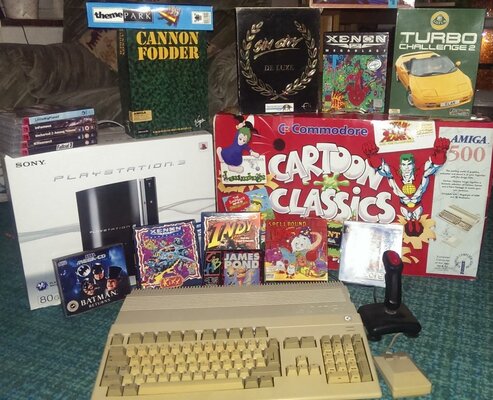
Well you might have seen me moaning a lot this week, especially for someone who joined, well, this week. Sorry about that, I promise I don't moan that much on a normal week. But on reflection, it's actually been a pretty good one... Here's what I have acquired this week. The Need for Speed game was a valentine's gift from Mrs. Cheezmonkey. She's very good to me.

The 500, by the way, has some kind of expansion board in it, presumably taking it up to 1mb, but as it's my first Amiga for 20 years or so, I don't have any stock and the Workbench disk was DOA - I don't know any other way of checking without inspecting the chips and well, I can wait a few days. Luckily a kind soul here has sold me a set of Workbench disks. (Thanks, AmigaRulez)
 

Attachments

  • IMAG0235.jpg
    IMAG0235.jpg
    202.1 KB · Views: 2
  • IMAG0236.jpg
    IMAG0236.jpg
    159.3 KB · Views: 1
Nice A500. Remember to check and snip out the battery on the A501 (or other memory expansion brand) in the trapdoor.

Those pesky batteries have the nasty habit of leaking around and kill good electronics.
 
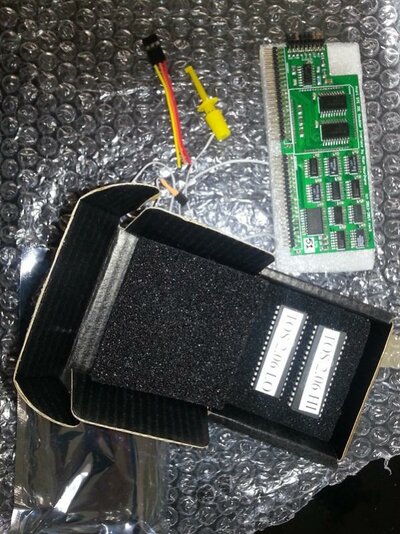
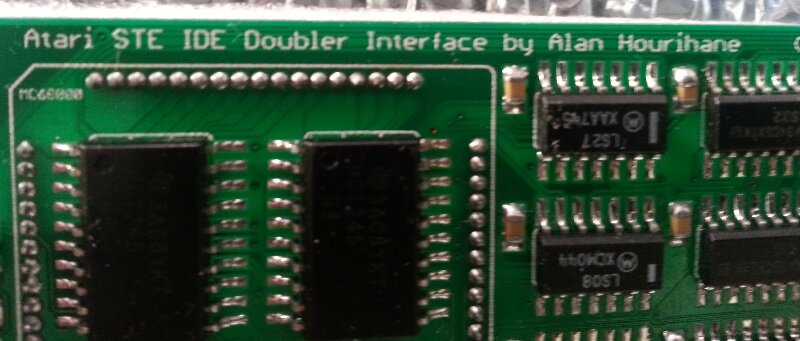
The Postman brought me this little bundle of joy today! It's an IDE board for my Mega STe and TOS 2.06 ROMS - I'll be fitting today hopefully :-)
 

Attachments

  • 2014-02-18 09.43.41-small.jpg
    2014-02-18 09.43.41-small.jpg
    106.1 KB · Views: 3
  • 2014-02-18 09.44.41-small.jpg
    2014-02-18 09.44.41-small.jpg
    49.7 KB · Views: 1
Seagate 160GB IDE Hard Drive
(This time Well Padded)
and a Blue USB to Micro USB Charger Ribbon
 
this arrived today from ebay. I knew it was a fake though, but always wondered what they were like in the flesh:


fake gba, looks like its in a real gba sp case though, but feels lighter than a real sp. The screen is a proper screen though, on a par with a 101 to be honest. But the resolution seems slightly wrong which is noticeable on the games. 99,999 games included (well about 30 on repeat), doesnt play gb games and all the gba games have framerate issues. Anyone know anything about these?
 
this arrived today from ebay. I knew it was a fake though, but always wondered what they were like in the flesh:/
fake gba, looks like its in a real gba sp case though, but feels lighter than a real sp. The screen is a proper screen though, on a par with a 101 to be honest. But the resolution seems slightly wrong which is noticeable on the games. 99,999 games included (well about 30 on repeat), doesnt play gb games and all the gba games have framerate issues. Anyone know anything about these?
Potential LCD screen donor for real GBAs perhaps? :)
 
7q251L3.jpg

Roland SC-55K

I've always had a bit of a bias against the Sound Canvas line for A. being the source of Windows's wretched default GM sound set and B. spearheading General MIDI, which turned the entire lower stratum of synthesizers/keyboards (and a healthy chunk of the upper strata) from the '90s onward into a bunch of cheap, lazy attempts at reproducing the exact same set of sounds and turned a good instrument-control protocol into a lousy audio-reproduction system. Still, it's not really fair to hold something's unintended repercussions against it, and taken on its own merits the Sound Canvas line is kind of dorkily charming - the perfect piece of equipment for replaying oldschool MIDI files from the BBS/shareware days - and certainly a million times better than its own bastardized offspring that is Windows's GM.DLS.
 
Back
Top Bottom