

You are using an out of date browser. It may not display this or other websites correctly.
You should upgrade or use an alternative browser.
You should upgrade or use an alternative browser.
Sold Pre-Orders: Final Expansion 3 Rev 11
- Thread starter SkydivinGirl
- Start date
- Replies 104
- Views 16211
- Status
- Not open for further replies.

SkydivinGirl
Retro Girl
Thanks for posting the PDF! Yes, my creative use of Ziplock bags screams professionalism. :wink: Seriously though, I'm glad the packaging worked out well. I always use new boxes for shipping and I do my best to protect the sensitive/fragile components.
It's great to see all the International packages arriving at their destinations! They usually take a couple weeks and sometimes longer. I'm always happy to mark another one off as delivered.
I hope you have fun assembling your kit and using the final product!
Heather
It's great to see all the International packages arriving at their destinations! They usually take a couple weeks and sometimes longer. I'm always happy to mark another one off as delivered.
I hope you have fun assembling your kit and using the final product!
Heather


fuzzybad
Member
Apologies if this isn't the right place to ask this question.
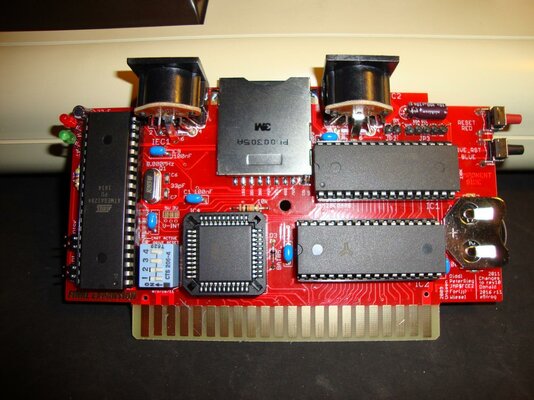
What are the DIP switches on the FE3 Rev 11 used for? They're only mentioned in the assembly guide how to set them for 'correct operation' and the manual doesn't mention them at all.
Obviously, the DIP switches were important enough to leave an opening in the case for, so what do they do?
What are the DIP switches on the FE3 Rev 11 used for? They're only mentioned in the assembly guide how to set them for 'correct operation' and the manual doesn't mention them at all.
Obviously, the DIP switches were important enough to leave an opening in the case for, so what do they do?
SkydivinGirl
Retro Girl
@FuzzyBad
Switches 1 and 2 control the device number: 8, 9, 10, or 11. I'll post the exact combinations for each device ID.
Switch 3 turns the FE3 cartridge on or off. This lets you turn off the cartridge but keep the SD2IEC functionality. This was most likely implemented to allow you to use other cartridges at the same time as the FE3.
Switch 4 controls whether or not the SD2IEC is reset when you push the Full Reset button. When this switch is on (Default), it is like power cycling the SD2IEC when the Full Reset button is switched. This also drops you to the root folder of the SD2IEC. You can turn this switch off if you want to stay in the same directory when performing a full reset.
Hope that helps!
@TheCorfiot
Beautiful work as always! Great attention to detail.
Heather
Switches 1 and 2 control the device number: 8, 9, 10, or 11. I'll post the exact combinations for each device ID.
Switch 3 turns the FE3 cartridge on or off. This lets you turn off the cartridge but keep the SD2IEC functionality. This was most likely implemented to allow you to use other cartridges at the same time as the FE3.
Switch 4 controls whether or not the SD2IEC is reset when you push the Full Reset button. When this switch is on (Default), it is like power cycling the SD2IEC when the Full Reset button is switched. This also drops you to the root folder of the SD2IEC. You can turn this switch off if you want to stay in the same directory when performing a full reset.
Hope that helps!
@TheCorfiot
Beautiful work as always! Great attention to detail.
Heather
Last edited:

SkydivinGirl
Retro Girl
Thanks for the update! I'm waiting to hear from three other AmiBayers about receipt of their packages. I know one is held up in customs but I don't know about the other two. Please let me know if you've received your shipments. 
Heather
Heather
SkydivinGirl
Retro Girl
Happy to help! I am going to re-write the user manual for this once I'm done with the second batch. The current one is nice but a little difficult to understand. I also think it only covers the Rev 9 hardware so the settings for the switch block are not there.
Heather
Heather
Last edited:
Hi Heather
My only complaint in general with the firmware is the choice of colours for the menu screens.
Yellow text on Dark blue background is just not the easiest to read.
How about a change of colours to something more sensible lol
My only complaint in general with the firmware is the choice of colours for the menu screens.
Yellow text on Dark blue background is just not the easiest to read.
How about a change of colours to something more sensible lol
SkydivinGirl
Retro Girl
Hi Bas!
I agree it's not the most attractive. I'm working on a new version of the firmware that will support an EEPROM from a different vendor. I could easily change the colors if people have suggestions. I'd love to put a color selector in the firmware but I'm not exactly sure how I could write the preferences to the EEPROM.
Heather
I agree it's not the most attractive. I'm working on a new version of the firmware that will support an EEPROM from a different vendor. I could easily change the colors if people have suggestions. I'd love to put a color selector in the firmware but I'm not exactly sure how I could write the preferences to the EEPROM.
Heather
SkydivinGirl
Retro Girl
There are a bunch of locations for the color. The border/background is in the first few bytes but the rest are scattered throughout the binary. The following file has two versions of the FE3 R022d firmware; the original and one where I've changed the colors. You can do a hex comparison to see all the values that changed.
View attachment FE3FirmwareR022D+ColorChanges.zip
I changed the background/border color Blue/Blue ($6E) to the standard VIC-20 background/border color White/Cyan ($1B) but changed all the Yellow ($9E) text to Blue ($1F) and all the White ($01) text to Black ($00). It's quite ugly but I just did it for comparison.
You can get the color information from the 6560/6561 datasheet: https://www.mdawson.net/vic20chrome/display/mos_6560_6561_vic.pdf
Hope that helps!
Heather
View attachment FE3FirmwareR022D+ColorChanges.zip
I changed the background/border color Blue/Blue ($6E) to the standard VIC-20 background/border color White/Cyan ($1B) but changed all the Yellow ($9E) text to Blue ($1F) and all the White ($01) text to Black ($00). It's quite ugly but I just did it for comparison.
You can get the color information from the 6560/6561 datasheet: https://www.mdawson.net/vic20chrome/display/mos_6560_6561_vic.pdf
Hope that helps!
Heather

I have finally started the assembly, and wanted to print the assembly instructions in a more elegant manner, so here is my PDF of them:
https://drive.google.com/open?id=0B7tsi1tazzeQc1FPSi0tVEdmVTg
The pdf size limit for amibay is 2MB, so I put it on google drive for the time being. If you find this useful, maybe it could be uploaded somewhere more permanent... (probably won't be on that link forever... )
https://drive.google.com/open?id=0B7tsi1tazzeQc1FPSi0tVEdmVTg
The pdf size limit for amibay is 2MB, so I put it on google drive for the time being. If you find this useful, maybe it could be uploaded somewhere more permanent... (probably won't be on that link forever...
)- Status
- Not open for further replies.
Similar threads

- Replies
- 1
- Views
- 290

- Replies
- 46
- Views
- 9K
- Replies
- 69
- Views
- 17K

- Replies
- 0
- Views
- 785
