Problem with my amiga 4000

  • Thread starter Thread starter Nek3d
  • Start date Start date
  • Replies Replies 21
  • Views Views 637

Nek3d

Active member
AmiBayer
Joined
Dec 30, 2024
Posts
243
Country
Greece
Region
Attiki
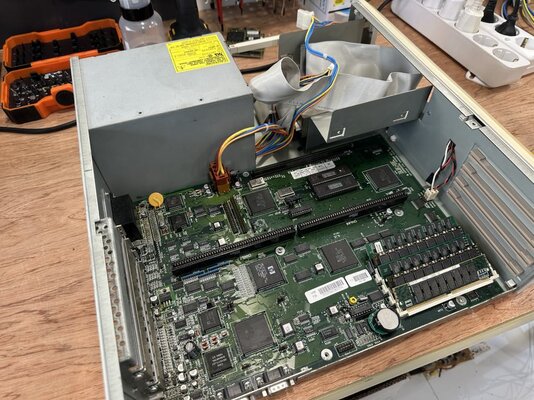
I have a perfectly working amiga 4000 D /040 with 3.1 ROMs and a week ago I tried to upgrade the ROMs to 3.2.2. I used chips 29F1615, 27c800, and 27c400 all attempts failed to boot. I got black screen and the power led was flashing. I put back the original 3.1 ROMs and still didn't boot (but the led was not flashing). Then I used diagROM and it worked.The amiga passed all tests!. (I am certain that I burned the right ROM images for amiga 4000 and used the right sockets for Hi and Low ROMs). Today I replaced the ROM sockets with new ones (better quality than originals). I tested all ROMs and got the same results: Black screen, Power Led flashing, DiagROM works and passes all tests. The only difference is that during a test boot I saw a yellow screen for 1-2 sec. Could not reproduce that again! I have a few notes that I need help with:

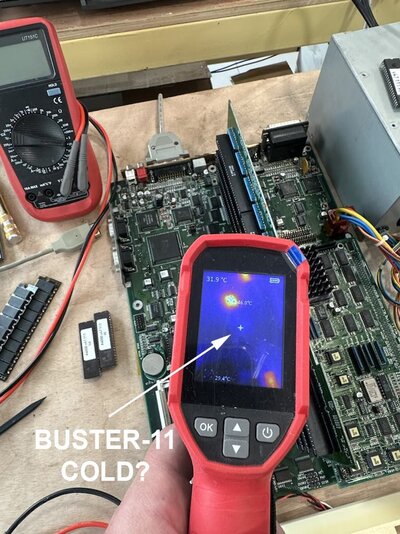
1) With a thermal camera I checked all chips and the BUSTER 11 is cold. (With Riser Board and without it, buster is cold, is that normal? Buster is soldered, I checked that the pins are OK and give power to the chip)
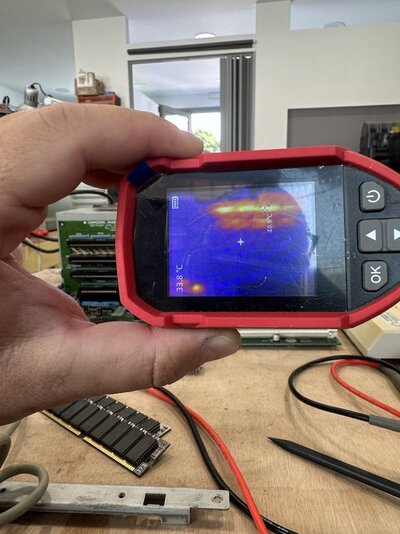
2) On the Riser Board's right side the resistor arrays get too hot (check IR photo), Is that normal?
3) On the Riser board I checked that 5V have 0.014 diode mode reading / 10ohm resistance to Ground. Is that normal?
4) Does the DiagRom need BUSTER to be working? I think the Buster chip is not checked by Diagrom...

Any ideas what to check next?
 

Attachments

  • Untitled.jpg
    Untitled.jpg
    164.5 KB · Views: 30
  • Untitled2.jpg
    Untitled2.jpg
    94.1 KB · Views: 29
  • Untitled3.jpg
    Untitled3.jpg
    152.6 KB · Views: 29
I used chips 29F1615, 27c800, and 27c400
Did you use the same .bin files for all these chips? I mean, they are of different size. Any chance to test ROMs are functioning on another machine?
Today I replaced the ROM sockets with new ones (better quality than originals). I tested all ROMs and got the same results: Black screen, Power Led flashing, DiagROM works and passes all tests.
Did you check the flashing code? In general, yellow screen does not necessary a problem with Buster, it can also be a problem with memory access (i.e. bad contact with SIMM). As you changed ROM sockets, did you trace that you have continuity from each pin afterwards? A trace could have cracked while you were replacing them.
 
Check the memory chip socket and its paths very carefully
 
Check the memory chip socket and its paths very carefully
You mean the 5 SIMM sockets for CHIP and Fast RAM? But when I install DiagRom it runs and shows the correct memory. (2 chip, 16 Fast)
 
did you trace that you have continuity from each pin afterwards? A trace could have cracked while you were replacing them.
I must check each pin then. I only looked at them under a microscope and they seemed OK.
 
You mean the 5 SIMM sockets for CHIP and Fast RAM? But when I install DiagRom it runs and shows the correct memory. (2 chip, 16 Fast)

You mean the 5 SIMM sockets for CHIP and Fast RAM? But when I install DiagRom it runs and shows the correct memory. (2 chip, 16 Fast)
I had a similar situation. Yellow or black screen and flashing diode. The chip memory path was broken. Almost no diagrom will detect a buster failure. You can run the diagrom without the daughter board inserted
Remove the ram chip (not fast ram), start it and see if the screen turns yellow.
 
I had a similar situation. Yellow or black screen and flashing diode. The chip memory path was broken. Almost no diagrom will detect a buster failure. You can run the diagrom without the daughter board inserted
Remove the ram chip (not fast ram), start it and see if the screen turns yellow.
I suspect that the yellow screen (only for 1-2 sec and happened only once) is because of not properly seated RAM chip. Later I reseated all RAM chips and I never saw a yellow screen again. But I always get black screen and flashing power led. I will try what you suggest.
 
I must check each pin then. I only looked at them under a microscope and they seemed OK.
They sometimes look OK even under the microscope, especially if you have a non-binocular one. Checking traces on all pins of ROM sockets at least can reduce the search space for the cause of the problem. Then, as suggested, check memory paths. Hafnium diagnostic board can help you to check memory slots quickly, but I'm not sure it can be shipped to EU directly.
 
I can vouch for Hafnium's diagnostic board. I used it successfully to check memory slots in battery damaged A4000's and RiscPC's.
 
When asked RetroSupplies last week about a delivery outside UK, it was still a "No".
It is clearly stated on his website that he is not shipping to EU due to recent changes in law. So, you need to find a way to bypass it, like parcel forwarding services.
 
It is clearly stated on his website that he is not shipping to EU due to recent changes in law. So, you need to find a way to bypass it, like parcel forwarding services.
I have a friend in the UK and I always send the amiga stuff to him! :)
 
I had a similar situation. Yellow or black screen and flashing diode. The chip memory path was broken. Almost no diagrom will detect a buster failure. You can run the diagrom without the daughter board inserted
Remove the ram chip (not fast ram), start it and see if the screen turns yellow.
I get your point, but how can I have a problem with the Chip or fast ram since I run DiagRom and checked the memory? Diagrom recognizes chip + Fast Ram normally and I passed the memory tests..
 
I get your point, but how can I have a problem with the Chip or fast ram since I run DiagRom and checked the memory? Diagrom recognizes chip + Fast Ram normally and I passed the memory tests..
Very easy. It depends on memory access patterns as it defines which lines on SIMMs are active and in what sequence.
 
Back
Top Bottom