Problems with a SCSI chain in CyberStorm PPC

  • Thread starter Thread starter arnljot
  • Start date Start date
  • Replies Replies 34
  • Views Views 3572

arnljot

Dad, gamer, nerd, amigian
AmiBayer
Joined
Feb 5, 2008
Posts
4,046
Country
Oslo
Region
Oslo
What I've tested:
Tested with various adapters, and two different SCSI cables.
Tested the RAM:
Chip + Fast with: sysdiag-0.1.4 - Result: All tests pass.
PPC Mem with: PPC-Memtest - Result: All tests pass.
Term power on and off on the HD
Term on/off on the CD ROM
FastSCSI-II adapter with and without high bits term.

I've also tried with lots of different Masks and Max Transfers. Mask seems to make little difference, but the lower the Max Transfer, the more data it can move before it crashes.

How the devices are configured:
The Harddrive, Seagate Barracuda ST318437LW is set to device id 1. No other jumpers are set.

Regarding TE on J2 on my HD, the manual states:
TE (Applies only to the N and W models)
On With the jumper installed, the onboard (non-removable) terminator circuits are enabled (connected
to the I/O lines). Default is jumper installed.
Off Terminator circuits not enabled (not connected to I/O lines).
Since my model is LW, and not N or W. Then I assume that this doesn't matter for my drive.

My CD Rom is set as id 5. No term is set on it. It's a Plextor Ultra Write 40x.

The chain:
Code:
#####  ######  ######  ######  #####
#   #  #    #  #    #  #    #  #   #
# A #--# CD #--# HD #--# CS #--# A #
#   #  #    #  #    #  #    #  #   #
#####  ######  ######  ######  #####

Legend:
A = Active wide terminator
CD = 50 pin (Fast SCSI-II) CDROM
HD = 68 pin Wide SCSI Harddrive
CS = CyberStorm PPC

MODS:
I suggest that you close this thread. And move these posts to the HD crash thread. So can Kin and I continue there.

Please split out, and merge this thread from post #4 (above) to this thread: "Huge file operations end in DH0 crashed"

Thanks, and thank you Kin! I trust you when you say it's not overclocking.
 
@ thread....

Ang on a minute....ffs! :roll:

I just said on the other thread I'll abstain & talk to Arnljot here about his SCSI issues, so please, don't close this thread.

@ Arnljot

I did ask one simple question m8. Do you have an external Exapnsion Port from the SCSI on the CSPPC SCSI header cable. Yes or no is the only answer I need & then we can go from there.
It's very important before we discuss further. :)

Charlie
 
Sorry for the long reply.

The illustration says: No :)

All is internal. On one side of the controller: Term, on the other: Hd, CD, Term.
 
I know Charlie asks for no intervention, but one thing must be said: TE means Termination Enabled.

If you set this jumper on the HD, actually you are installing another active termination to the SCSI chain! Remove the jumper if you have more devices attached.
 
TE is removed from my hd. And per manual, it wouldn't have mattered either as my HD doesn't support it, it's a LW model. And it's only supported on N and W devices.

And just to repeat while we wait for charlie. There are no external devices on my chain.
 
<snip>

And just to repeat while we wait for charlie. There are no external devices on my chain.

Meaning you've probably cocked up the whole Termination of the bus.

Starting over, the CSPPC & CSMKIII cards are fitted with a SCSI III controller. This controller is not phisically terminated, so the entire cable length requires termination at it's extreme-most ends.

So, lets say you wanted 3 SCSI devices in your Amiga. IE, 2 x hard drives & 1 x CDROM for example. Your cable needs to do this.

Active Term pack - a 68pin cable IDC header to CSPPC SCSI header. on the other side, the cable is best run to the hard drives with ID's 0 & 1, CDROM set to id 2. After the CDROM the cable must be terminated with an Active term pack.

Does that make sense so far? I can upload a rough sketch if you need a graphical representation.

Also, as of this post, I'm off line untill tommorow afternoon.

Cheers,

Charlie
 
You describe my exact setup Kin :-(

---------- Post added at 21:28 ---------- Previous post was at 21:13 ----------

The chain:
Code:
#####  ######  ######  ######  #####
#   #  #    #  #    #  #    #  #   #
# A #--# CD #--# HD #--# CS #--# A #
#   #  #    #  #    #  #    #  #   #
#####  ######  ######  ######  #####
Legend:
A = Active wide terminator
CD = 50 pin (Fast SCSI-II) CDROM
HD = 68 pin Wide SCSI Harddrive
CS = CyberStorm PPC

Code:
#####  ######  ######  ######  #####
#0  #  #1   #  #2   #  #3   #  #4  #
# A #--# CD #--# HD #--# CS #--# A #
#   #  #    #  #    #  #    #  #   #
#####  ######  ######  ######  #####
So to further specify:

Legend:
0: Active term, 68 pin. On the end of the cable
1: CD ROM Fast SCSI III, 50 pin. Adapter from 68 pin
2: HD, 68 pin. No term set.
3: CS Scsi controller
4: Active term, 68 pin. On the end of the cable

All of this is inside the cabinet.

All is on a 68 pin cable.
 
So the last resources: swap the cable, it may goes bananas.

Also swap the terminators, they may get bananas.

Set the device ID of the devices in a regular way: 0 for the boot disk, 1 for the second HD, 3 for the CD. Remember to use term_power jumper in one (and only one!) HD to provide power to the terminators.

Also try without the CD hooked in.
 
I will try without the CDROM in.

TE:
Seagate Barracuda ST318437LW on "TE" on jumper block "J2", the manual states:
Quote:
TE (Applies only to the N and W models)
On With the jumper installed, the onboard (non-removable) terminator circuits are enabled (connected
to the I/O lines). Default is jumper installed.
Off Terminator circuits not enabled (not connected to I/O lines).
Since my model is LW, and not N or W. Then I assume that this doesn't matter for my drive.

So maybe this drive is a lost cause. Maybe it cannot be used since it doesn't give term power?

Can I set it on the CDROM?
 
CD-ROM does not have a termination power jumper. Only HD have it, as far as I saw in my wast SCSI experience.

You can set the T_P jumper in the other HD.
 
All my Scsi hds are the same kind, but I might have one that I bought of Zetr0.

It's a Cheeta LC, 80 pin with 68 pin adapter. Maybe that one will do term power.

---------- Post added at 22:38 ---------- Previous post was at 22:21 ----------

From the manual of the Cheeta LC drive I bought of Zetr0

Terminating the drive
LC model drives do not have internal terminators or any other
way of adding internal termination to the drive. You must provide
external termination to these drives when termination is
required. Since this drive is designed to be plugged into a backpanel
or other host enclosure without cabling, this is normally
done by enabling termination on the backpanel or plane.

So... I will have to buy another drive with termination it would seem?

---------- Post added at 22:43 ---------- Previous post was at 22:38 ----------

For my LW drives manual it says:
LW drives
You can configure terminator power from the drive to the SCSI bus or have the host adaptor or other device
supply terminator power to the external terminator. See Section 8.1 for illustrations that show how to place
jumpers for this configuration.


---------- Post added at 22:49 ---------- Previous post was at 22:43 ----------

So, reading chapter 8.1.2, on the LW drive. I realised I was wrong about it. It does do term power.

TP1 (Applies only to the LW, N and W models)
Off: No terminator power is connected to SCSI bus I/O cable.1 No jumpers on is factory default.
On: Drive supplies power to SCSI bus I/O cable.1 A jumper on the TP1 position may be needed to
power external terminators (see Section 9.8 and Figure 27).


---------- Post added at 23:05 ---------- Previous post was at 22:49 ----------

I'm now running a stress-test with term power enabled.

There is only one device on the chain now.

ActiveTerm-HD-Controller-ActiveTerm.

Hd has ID=0.

---------- Post added at 23:16 ---------- Previous post was at 23:05 ----------

First rounds of stress tests passed.

Now, run one more short one for good meassure.... :) Fingers X'ed.... :)

---------- Post added at 23:26 ---------- Previous post was at 23:16 ----------

Fying colours!

Also with 0x00FFFFFF max transfer.

Now, Lets put the whole assembly together, and see how it works with the CDROM present.

---------- Post added at 23:49 ---------- Previous post was at 23:26 ----------

THANK YOU rkauer!

And to Kin Hell too. You stopped me from wasting money.

Mods. Please close :)

---------- Post added 19th March 2010 at 01:30 ---------- Previous post was 18th March 2010 at 23:49 ----------

After installing bb3 the problems are back.

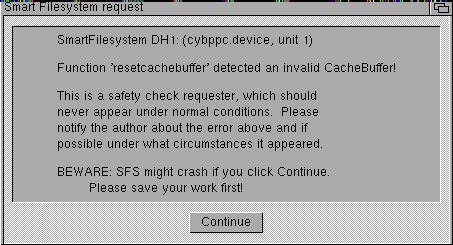
And it has corrupted my install. Now there are checksum errors on two blocks which causes SFS to crash...:banghead:

I think I'll go to bed now, do a fresh reinstall tomorrow. That's almost one weeks worth of tinkering down the toilet :-(
 
So kind of a result, but not a result. :|

Get it to where you were before & then back up the whole install to another partition before you install BB's. Install both BB's before doing a reboot & choose to kick the New ROM image during the BB2 install. ;)

If you're still crashing, try installing both BB's but dont install the new ROM with BB2. I recall having similar issues & can't remember which one worked for me, sorry.

Be sure to keep us all updated though.

Good luck m8y. :thumbsup:

Charlie
 
I will when I get home from work.

I tell you, when bb3 ruined my disk I wanted to......

LOL

Question:
I have the IDE disabler on my mother board.

startup sequence per bb3 instructions loads new fastfilesystem and scsi.device

When bb2 was installed, it loaded setpatch normally with rom updates. But I don't think scsi.device was loaded since Amiga can't see the scsi. (IDE port)

Should I forgo loading bb3 scsi.device and fastfilesystem?
 
If you're disabling the IDE with that gizmo, it doesn't matter about the libs being on the hard drive. I wasn't aware there was an option not to install them with the BB update amyways? :shrug:

You could always manually delete them I guess, but I would not have thought it would make any difference. Also, if you delete the Fastfilesystem Library, you will get problems with any ffs partitions you might have on the hard drives. ;)

Charlie
 
Not install = setpatch SKIPROMMODULES.

Doesn't that "not" update them?

Also, bb3 instructs you to do a LoadModules before setpatch.

I would also say that it doesn't make any difference the parts that were added from bb3.

But before bb3, I copied my sys partition 5 times (x165MB) to the work partition. (SYS: 1GB, Work: 2GB, both below 4GB barrier).

With bb2 the "stress test" was A-OK after I applied Term Power.

Install bb3 (in my hubris I did not do a backup).

Tried to upgrade MUI to "Full MUI" from Anthonys site on sys. Crash.

Tried to delete bb2 backups 2 to 8 on work. Crash.

So, now sfscheck reports damage on both partitions.

Trying to manipulate them reults in crash.

Only difference is bb3 being installed.
 
I know, it's just that it's so damned convenient for upgrading to patches post bb2 :)

but I guess I've learned my lesson? :D

OFFTOPIC: LOL, btw. I installed MiamiDx before the crash.

Amiga.org page was noticable slower under MiamiDx compared to Genesis.

And since sabre msn needs AmiSSL anyway, I might look into a permanent switch to Genesis.

I'm just experiencing some instability with samba, if I can blame them on Genesis, and be rid of them with Miami, well.... then I won't switch.
 
Back on topic:

Yesterdays stability must have been a fluke.

When I :

  1. boot with my bb2 created rescue floppy.
  2. sfs format dh2 as "Data" (Dh2 is 2GB big, and start at 2GB out on the disk)
  3. Copy AmigaOS3.9 volume all clone quiet to dh2:aos1
  4. It crashes.
I'm going to try a reinstall now. But I can't see how that'll help :-/

Maybe my assertions about the RAM not being a problem is wrong?

But I've tested it with three different software testsoultions, and they come up ok, and doesn't crash on the RAM.
 
This is one of my symptoms...
 

Attachments

  • sfsCrash.png
    sfsCrash.png
    3.4 KB · Views: 3
Back
Top Bottom