Raspberry PI as a real Amiga Floppy Drive

  • Thread starter Thread starter johnim
  • Start date Start date
  • Replies Replies 30
  • Views Views 1436
Status
Not open for further replies.

johnim

New member
VIP
Joined
May 18, 2010
Posts
13,048
Country
England
Region
birmingham
hi guys mram on eab posted this

Hi there,
after several years of hard work, my Amiga floppy drive stopped working leaving me in trouble... do I have to buy a new drive (but several disks are in bad condition too), buy a floppy emulator (nice but expensive for retro fun) ... or try to use my Raspberry PI other than as xbmc player?

The project is very simple as you can see and fits Amiga 500 case
Amiga+RPI+Drive+Design.JPG


The cost of interface should be very low , so, if you have already a Raspberry PI for other staff, you can use it to substitute internal floppy drive, to have an external floppy drive (it emulate 2 drives) and to put all your game on a SD.
The interface is very easy, you just choice the disk at boot time.

Amiga_RPI_Drive_Screenshot.png


if you would like to know more about this project you can find the schematic and the software here( http://amigadrive.blogspot.it/).

Hope you enjoy again Amiga as I did !
wink.gif
wink.gif
 
Last edited:
Wow, I am amazed on what Raspberry pi can do and it even fitted on floppy Emulator that somethings I havnt thought of
 
Much awesome! I am hoping that support is added for disk images for different systems. The MMC board in my BBC Master is giving me a headache and every other solution is prohibitively expensive. It'd be great to stick a raspberry pi and a home made board in there and have all my headaches gone :D
 
Cool project!

Makes me wonder if the interface could be modified to connect the RaspPi over ethernet. That way the RaspPi could act as file server to all your retro stuff.
 
Still proper floppy emulator is better option for a long run and not a lot more expensive :).
 
some of the shortcomings (all disks ejected on every read/write) dont sound so good to me. shame for a 700mhz cpu it has a really crap GPIO bus speed..
 
Cool project!

Makes me wonder if the interface could be modified to connect the RaspPi over ethernet. That way the RaspPi could act as file server to all your retro stuff.

That is exactly what i have done some months ago ! :huh:

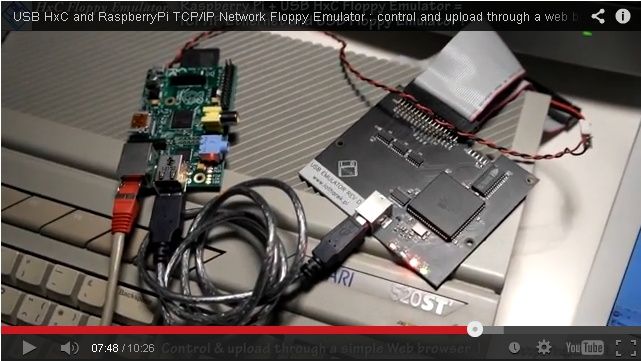
Here the Raspberry PI floppy emulator with the linux & network support ...

USB_HxC_Floppy_Emulator_Raspberry_PI_Demo.jpg


Video here :
http://www.youtube.com/watch?v=wJEekEhZtD8

It already support protected disk images ipf, dms, adf, adz, stx... (more than 60 formats directly supported... ).

The interface board is available as DIY since some years now.
All stuff to build it can be found there :
http://sourceforge.net/p/hxcfloppyemu/code/HEAD/tree/HxCFloppyEmulator/USB_HxCFloppyEmulator/
It can be also be bought at some places.

All the sources:
http://sourceforge.net/p/hxcfloppyemu/code/HEAD/tree/HxCFloppyEmulator/

http://virtualfloppy.blogspot.ca/2013/09/spi-key-to-project.html
 
Last edited:
I love that idea. Just want to know which version of the pi it will work on. If it needs a version A or B and how much memory.
 
(Post irrelevant now due to merged threads)
 
Last edited:
Link ain't working ptp170 :picard lol
 
Last edited:
I have some HxC's here but this Pi stuff is really good!

I might even go and get one, All I need is a picture or two of the interface board (Im a visual learner) So I can clone it exactly.

Ceases to amaze me all the stuff that is appearing these days :)
Can you imagine what kinda fuss all this would have caused back in the late 80's!
 
Can you imagine what kinda fuss all this would have caused back in the late 80's!

Yep. I can imagine... "Soooo, you took a computer that was much more powerful than an Amiga 1200 and put it inside the Amiga 1200s case and used it exclusively as a floppy drive. Are you nuts?!" :p:p:p

Certainly in the 1980s I never imagined that my less powerful computers would be more valuable to me than all of the more powerful computers that replaced them. Maybe we are all nuts :lol:
 
Can you imagine what kinda fuss all this would have caused back in the late 80's!

Yep. I can imagine... "Soooo, you took a computer that was much more powerful than an Amiga 1200 and put it inside the Amiga 1200s case and used it exclusively as a floppy drive. Are you nuts?!" :p:p:p

Certainly in the 1980s I never imagined that my less powerful computers would be more valuable to me than all of the more powerful computers that replaced them. Maybe we are all nuts :lol:

We are all nuts for sure, using the old Amiga and everything to keep it alive... yes but SNIP euro for a floppy drive emulator is really insane!! While it's so powerful RPI is also so cheap! So finally this is AFAIK actually the cheapest and the most "friendly" solution to the floppy drive issues, keeping the rest of the system in "original" fashion, SNIP euro for components, 4-5 hours to build, SNIP euro for a raspberry pi that can be used also in hundreds different ways... Hey, but if you can find something else cheaper that works as a floppy drive, sure I'll buy it!! I don't care if it is also more powerful :D:D

P.S. Sorry I can't put the price, but finally not needed, everyone knows.... ;-)
 
Last edited:
Love reading about all these floppy emulators that have been built over the past few years.

I actually have a Pi Model B that is running XBMC. Will this project work on an A1200? While I have no idea if my drives work I have no physical floppies to use so am very keen to get a floppy emulator working! :lol:

Regards
 
Cool project!

Makes me wonder if the interface could be modified to connect the RaspPi over ethernet. That way the RaspPi could act as file server to all your retro stuff.

That is exactly what i have done some months ago ! :huh:

Here the Raspberry PI floppy emulator with the linux & network support ...

USB_HxC_Floppy_Emulator_Raspberry_PI_Demo.jpg

That's not exactly what I was after as the interface still connects to Pi with an USB cable. In my case the Pi is in a separate room and the floppy emulator interface connects to it via my home network. The actual file storage can actually be a NAS or some computer in my home network.
 
Status
Not open for further replies.
Back
Top Bottom