
Ahhh, you are using ClassicWB.... that might explain it. I stopped using ClassicWB a few years back as I had no end of issues with things working. Is that version of ClassicWB using Scalos?Right showered, woke up and got a coffeeand in the messy mancave.
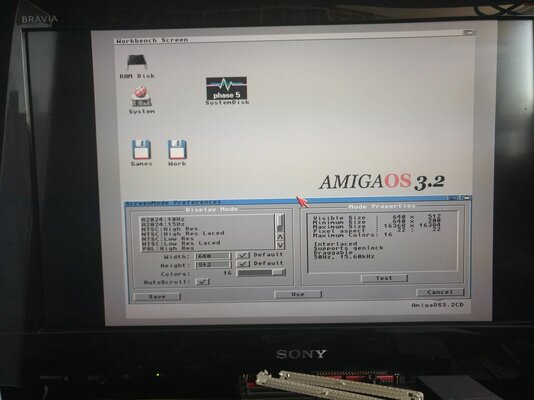
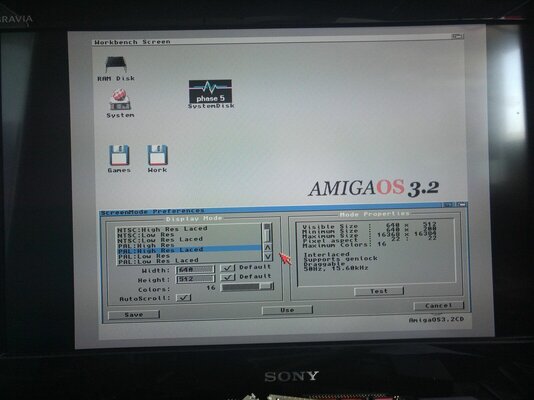
CDTV loaded and here are some pictures showing the system and screenshots
As you can see no other options I've had a similar issue when installing RTG cards, if I remember correctly that required an addition line in the Startup-Sequence wonder if it's the same added a pic to show it just has LoadMonDrvs in SS

You are using an out of date browser. It may not display this or other websites correctly.
You should upgrade or use an alternative browser.
You should upgrade or use an alternative browser.
RGB2HDMI - what screenmodes can it handle?
- Thread starter Jameson
- Start date
- Replies 36
- Views 2920

Same again using a basic install of AmigaOS 3.2.2 no ClassicWB elements added.
I've been able to get the A2024 ones to come up on it with the classicWB build but because you weren't interested in them I deleted them of my CWB 3.2.2 build and this mode doesn't work with my RGB2HDMI
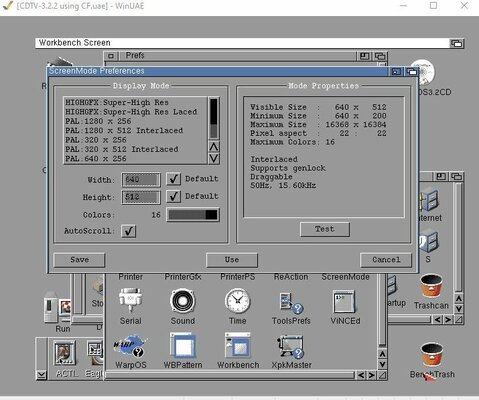
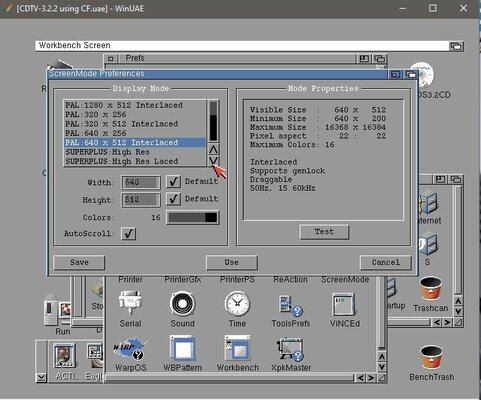
If I load this basic AmigaOS3.2.2 Setup on winUAE all modes load up
I'm gonna try my ClassicWB setup with winUAE to see what happens there too
I did take a picture of my Denise IC anyone able to tell me what model it is maybe its the original OCS? Not sure myself I'm usually using my AGA machines
I've been able to get the A2024 ones to come up on it with the classicWB build but because you weren't interested in them I deleted them of my CWB 3.2.2 build and this mode doesn't work with my RGB2HDMI
If I load this basic AmigaOS3.2.2 Setup on winUAE all modes load up
I'm gonna try my ClassicWB setup with winUAE to see what happens there too
I did take a picture of my Denise IC anyone able to tell me what model it is maybe its the original OCS? Not sure myself I'm usually using my AGA machines
Attachments
Update: Not my CWB 3.2.2 build WinUAE shows them, so I feel it might be my Denise restrictions
if I set WinUAE to OCS, ECS Agnus & ECS Denise it does not show them only if it is set to Full ECS
so I need to see if I have a newer Denise I believe there maybe more to it though
little update had a look online and I have confirmed the Denise in this CDTV is an OCS version so I will see if I have a Super Denise anywhere.
if I set WinUAE to OCS, ECS Agnus & ECS Denise it does not show them only if it is set to Full ECS
so I need to see if I have a newer Denise I believe there maybe more to it though
little update had a look online and I have confirmed the Denise in this CDTV is an OCS version so I will see if I have a Super Denise anywhere.
Attachments
Last edited:

8362 is an ocs Denise I believe matey, you want the 8373 for a Super Denise.
They are straight swappable
They are straight swappable
Yep I found this info too https://bigbookofamigahardware.com/bboah/product.aspx?id=14878362 is an ocs Denise I believe matey, you want the 8373 for a Super Denise.
They are straight swappable
I'm gonna nick the one out of my A500+ for testing purposes, placed an order for some too (hopefully still available) thought I had a spare damage A500+ board but cant find it anywhere

Last edited:
You should have asked, i've probably got a spare i could have sent you lol
You got a spare you can send meYou should have asked, i've probably got a spare i could have sent you lol

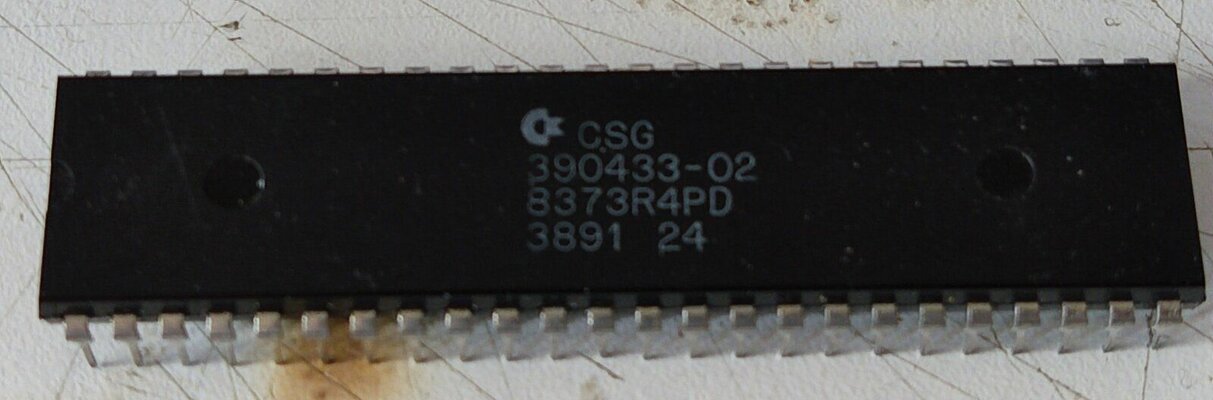
Did a test with the RGB2HDMI with a super denise from my A500+
screen modes now show on my ClassicWB build and I can test
HighGFX gives two distorted screens which are flashing
Superplus gives a readable screen but is also flashing
so best get the indy V3
screen modes now show on my ClassicWB build and I can test
HighGFX gives two distorted screens which are flashing
Superplus gives a readable screen but is also flashing
so best get the indy V3
Thanks for all the help. I didn't have a very high opinion of the RGB2HDMI before so I am not surprised it cannot even handle ECS screenmodes.Did a test with the RGB2HDMI with a super denise from my A500+
screen modes now show on my ClassicWB build and I can test
HighGFX gives two distorted screens which are flashing
Superplus gives a readable screen but is also flashing
so best get the indy V3

Looks like I am stuck having to get another Indivision ECS.
Hey there mate,Did a test with the RGB2HDMI with a super denise from my A500+
screen modes now show on my ClassicWB build and I can test
HighGFX gives two distorted screens which are flashing
Superplus gives a readable screen but is also flashing
so best get the indy V3
you have already been a big help, but I wonder i if I could ask you to check one more thing that might make the RGB2HDMI viable.
I need an 800x600 flicker free screenmode, so if Superplus is not supported by the RGB2HDMI, perhaps PAL 640 x 512 with extreme overscan might get there. From what I can tell, you can increase the maximum overscan through the RGB2HDMI settings menu. I wonder if it is possible to get close to 800x600 by pushing the overscan of 640 x 512?
Is something like this possible?
I can give this a try later after work for you
Thanks mate - really appreciate it.I can give this a try later after work for you
So sadly my CDTV decided it doesn't want to play today and is giving me a purple screen
I've tried a few different KS ROM's and no joy sadly not sure what has happened it was fine last night
I've tried a few different KS ROM's and no joy sadly not sure what has happened it was fine last night
Weird. Purple screen is a new one on me! Had plenty of Green and Red screens back in the day, but cannot remember getting a Purple. I don't think Purple is an official Amiga error screen, so it would me think it is a kickstart issue, however you have already ruled that out. Hmmmm, could it be an issue on the motherboard that is causing one of the kickstart ROM select lines to pull either high or low...
Yeah it is really annoying, it has been giving a purple screen once in awhile on startup but usually clears if i turn it off and back on again, but now its remained constant. I do have another CDTV with a broken CD drive, I believe the motherboard is OK so will be swapping that out at some point just to get it back up and running.
