Saving directory Protracker WinUAE

  • Thread starter Thread starter oundfire99
  • Start date Start date
  • Replies Replies 5
  • Views Views 672

oundfire99

New member
Joined
Mar 14, 2018
Posts
16
Country
England
Region
Norfolk
Just started using Protracker on WinUAE and when I save a mod or song (not sure which one to save I assume MOD), it says 'can't open file' I am going to Disk Op then loading samples to get to the right directory, then hitting 'Parent' then either 'Save Module' or 'Save Song' ...... I managed to save a TRK file in the correct directory. Thanks
Capture (1).JPG
 
Choose "save module" .... A song is just a playlist of what sample to play at a certain point.
 
Thank you, I tried Module as well and was getting 'Status: Can't Open File' when trying to save.
 
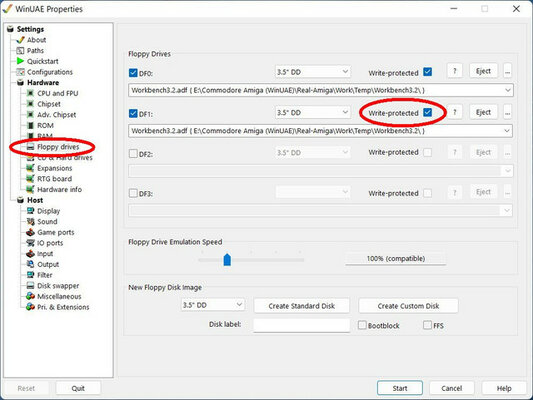
The disk assigned to DF1: might have the 'write protect' box ticked. Must be unticked if you wish to save anything onto it.

pic1.jpg
 
Last edited:
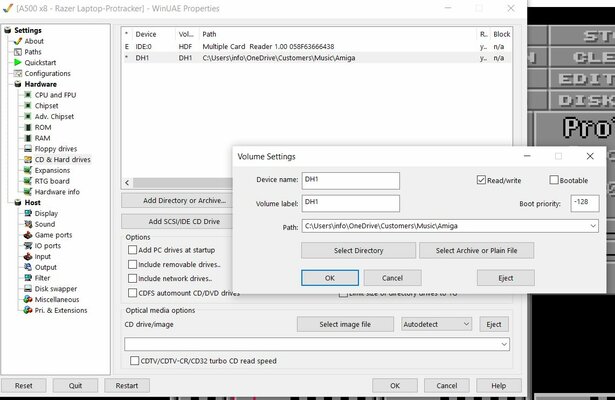
The DF1 Write-protected box is greyed out. Does this not save in Hard Drives like it does on my Octamed emulation? I checked and read/write is enabled in here, thanks
 

Attachments

  • Capture.JPG
    Capture.JPG
    106.3 KB · Views: 10
You need to tell Protracker to save to DH1: not DF1:

I usually create a folder on my Windows desktop and assign it as a drive in WinUAE so I can then save and load stuff there.
 
Last edited:
Back
Top Bottom