Solution for external Flicker fixer?

  • Thread starter Thread starter Harrison
  • Start date Start date
  • Replies Replies 814
  • Views Views 312618
Any idea how to get rid of the persistent flickering in the background? (as apart from that the picture seems ok)

---------- Post added at 21:25 ---------- Previous post was at 21:08 ----------

Maybe i should buy another vga cable and see if that helps :huh:
 
Any idea how to get rid of the persistent flickering in the background? (as apart from that the picture seems ok)


to eliminate anything else how have you got it wire up?


by that i mean from the 23 pin plug to the gbs.
 
hi roy i made his cable and was fine on mine

maybe the settings need tweeking

does the bottom flicker or all the screen
 
I tried it on my other 1200 in my bedroom it works fine, i think maybe i have an issue with my video-out port on my main 1200 :Doh:

So if i use it on my other 1200, in order to get sound i need to run a red/white audio cable from the 1200 and connect to the 3.5mm speaker jack port on my lcd tv?
 
I just made myself a cable last weekend after I bought one of the gbs 8220's and I must say I am happily surprised by the quality, it's great for games. Haven't tried it for productivity but for that I am using the 4000 with a cybervision 64/3d card.

Thanks for the pin-out and tips Johnim ! :thumbsup:
 
I just ordered this. I also bought a Picasso II video card.

What is the procedure to hook this up along with the Picasso II so that I can get high color and high resolution Picasso96 modes & native PAL resolution using the same LCD monitor without switching cables ?

The Picasso II has the Amiga video through port, so it should be pretty easy, but seeing as I am waiting for both to arrive and don't know much about either thought it would be nice to be knowledgeable enough to set it up correctly once they do arrive :-)
 
Hi dougal, you may well need one of these aswell to power the 8220:

http://www.ebay.co.uk/itm/220906265143?ssPageName=STRK:MEWNX:IT&_trksid=p3984.m1439.l2649

I needed one for the 1200, not sure about the 2000, but i think yes maybe you will need :nod:

Thought i could use one of the power supplies molex cables using just the +5v lines but yes this would be easier and i would also be able to use it on other Amigas too. Just bought it now just in case :-)

Other than that i should be sorted ?
 
@ dougal, yes i think so, you will need to follow johnim advice about the cable that connects the 8220 to your amiga video port
 
Hi all, I recently got a GBS8220 for my birthday :-)
After making the cable (johnim design) and finding a 5v 2amp PSU.
I have an almost perfect display, its not without its faults mind.
However its as good as perfect for playing games :-)
I have it setup atm externally to my 4000 but its going inside soon.

Minor faults noticed:
Slight blur (better than huge pixels)
A little static on solid colours (not noticeable when playing games)
Not quite as smooth
Image behind the mouse shimmers slightly

Its a great solution and its awesome to swap sources on my desktop from W7 to WB.
Wonderful way to spend time while waiting on projects to load / compile.

The only real problem I have found is that as soon as I change from PAL to NTSC I get "no signal" and a garbled image every 3 seconds or so.
Has anyone else had this problem and is there a solution?

 
Last edited:
Hi all, I recently got a GBS8220 for my birthday :-)
After making the cable (johnim design) and finding a 5v 2amp PSU.
I have an almost perfect display, its not without its faults mind.
However its as good as perfect for playing games :-)
I have it setup atm externally to my 4000 but its going inside soon.

Minor faults noticed:
Slight blur (better than huge pixels)
A little static on solid colours (not noticeable when playing games)
Not quite as smooth
Image behind the mouse shimmers slightly

Its a great solution and its awesome to swap sources on my desktop from W7 to WB.
Wonderful way to spend time while waiting on projects to load / compile.

The only real problem I have found is that as soon as I change from PAL to NTSC I get "no signal" and a garbled image every 3 seconds or so.
Has anyone else had this problem and is there a solution?


the ntsc one is just a case of holding down the DOWN/AUTO button for five seconds.while its in ntsc.


as for the garbage on screen that depends on what you mean by that.do you mean the garbage across the bottom of the screen or something else?
 
Thanks for the quick response.
The garbled mess was a messed up Workbench screen.
Holding the down button for 5 seconds worked but it did highlight a settings problem.
If I set the V Pos to 0 from the geometry menu (Workbench nearest top of screen) then next time I reboot only the very top bit of the screen is visible.

I have solved this by setting it to a minimum of 14 and using the Workbench overscan setting in both PAL and NTSC.
The settings I now have seem to work well for Workbench and games.
Now I can change between the two without problems other than LCD auto adjust.

On the flip side of all this I seem to have got rid of the static on solid colours problem I was getting earlier.
Also when running in NTSC (60hz) its almost perfectly smooth :smile:
Its looking very very good now.
 
Thanks for the quick response.
The garbled mess was a messed up Workbench screen.
Holding the down button for 5 seconds worked but it did highlight a settings problem.
If I set the V Pos to 0 from the geometry menu (Workbench nearest top of screen) then next time I reboot only the very top bit of the screen is visible.

I have solved this by setting it to a minimum of 14 and using the Workbench overscan setting in both PAL and NTSC.
The settings I now have seem to work well for Workbench and games.
Now I can change between the two without problems other than LCD auto adjust.

On the flip side of all this I seem to have got rid of the static on solid colours problem I was getting earlier.
Also when running in NTSC (60hz) its almost perfectly smooth :smile:
Its looking very very good now.


good job there,im glad it helped.:)


try not to mess too much with the v pos too much try h pos instead and then hit the down button to save it after your satisfied


EDIT: you are correct it is in fact the V pos.sorry
 
Last edited:
I keep hearing lots of good stuff about this! Can't wait for mine to arrive :-)

I will be using it between the Amiga video port (23pin) and the Picasso II.

The way i see it, when using Picasso modes (i.e workbench etc..) the GBS will not be in use and as soon as I switch to a game, say a WhdLoad game, the Picasso will auto switch to the native video input and the GBS will do its stuff.
 
Hi,

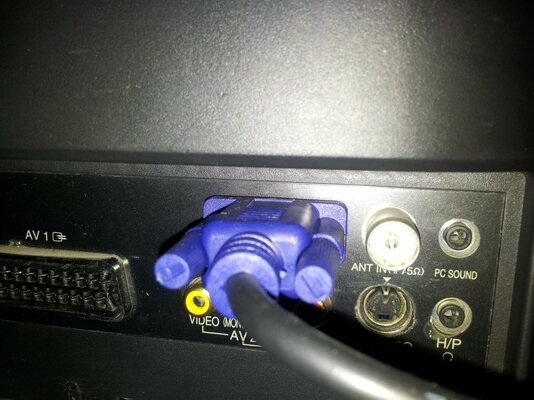
i'm sure i need some of you guys help when it comes to getting sound whilst using my 8220.

So, i'm using my gbs 8220 on my samsung 32" lcd tv which is my older tv which has red/white audio inputs.

I get a very good picture with 8220 on pc vga channel but no sound. So i link up my red white cable from the amiga to the red/white audio in ports on my tv - no sound. (Infact i try all red/white ports on my tv - no sound)

What am i doing wrong? Should i be trying to use the red/white phono cable from the 8220 ports to the tv rather than from the amiga to tv? There are no red white ports on the 8220??!

How is everyone else achieving sound through using their 8220 ?
(I've got no chance of using my 8220 on my new led tv as it has optical inputs - a technology totally beyond the amiga??)

Any advice?
 

Attachments

  • 20120315_212342.jpg
    20120315_212342.jpg
    193.8 KB · Views: 4
aha got it johnim, thanks so i got it working by using phono cable to the audio in next to the vga port (which is a 3.5 mm jack)

The main reason why i was having difficulty was due to my tv being wall mounted, i didn't want to take it down just to plug the cable in, got their in the end.

Thanks for your help:)
 
Back
Top Bottom