Thanks. It was the first thing I triedCheck your partition's MaxTransfer settings.
Set to 0x1FE00 from the default and 50 buffers on each one. Don't forget to press enter on each change or it won't take effect
See if that helps any.

Thanks. It was the first thing I triedCheck your partition's MaxTransfer settings.
Set to 0x1FE00 from the default and 50 buffers on each one. Don't forget to press enter on each change or it won't take effect
See if that helps any.
Yes, tried thatI saw over on Exxos that you state that you have the latest firmware (68090) installed so that eliminates that ... what about a change of CF card adaptor?
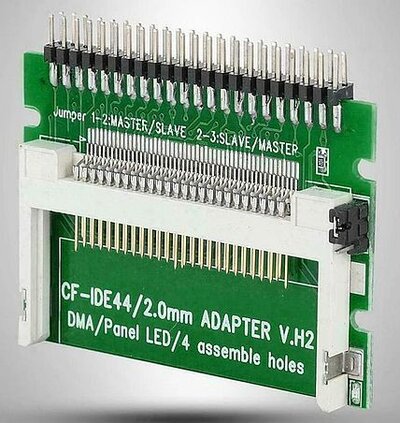
I only use this one (labelled V.H2) and am consistently getting between 5 and 6mb transfer speeds on my Tf1260.
View attachment 2532718
No, that would be pointless and asking for troubleDo you also have the buffered IDE interface plugged in between the CF card and TF1260?
I haven't tried but I am pretty positive that I would get around 2Mb/s. Which is what you would expect with a 060 on the internal (PIO-0) IDE interfaceJust out of interest, what speeds are you seeing when the CF card is plugged directly onto the internal IDE header of the Amiga?
Have you overclocked it and checked what speed you get?Well thats interesting. I have a Rev6 TF1260 that gets around 4 mb/s with no overclocking. I now have a second TF1260 with Rev 5 that gets the same. It would be good if people could confirm what speed they are getting with what Rev to confirm your theory.
Interesting, keep us posted.I have to correct my findings about Rev6 68060 and the latest 68090 firmware.
I changed my CF card to 4 GB SanDisk card with ClassicWB on it and it gives me 6 MB/S in Sysinfo 4.4. The Previous one was a noName Blue CF card which are provided with the TF 1260 got only 4 MB/S, but it only has AmigaOS 3.2.2. installed on it. Maybe it has to do with formatting with AmigaOS 3.2.2. I need to check it further.