Using the Commodore A2065

  • Thread starter Thread starter Violo
  • Start date Start date
  • Replies Replies 25
  • Views Views 986

Violo

Well-known member
AmiBayer
Joined
Dec 9, 2014
Posts
1,083
Country
Italia
Region
Ancona
Is anyone here using this board in their Amiga?
I would like to ask something about the RJ45 adapter that I should buy.

Resources that I've found:
Generic info: A2065
Other info about the ethernet connection and specifications
Here the driver that I should use in Sys: Devs/network

If I well understood the board has an "AUI" connector. It is the 15 pin D-sub port next to the BNC connector. So, in order to use a normal ethernet cable plugged by the common RJ45 I need to buy "an AUI to UTP transceive". Is it correct?
Something like this, right?

Thank you for any responses and support
 
Yes, that transceiver will do the job. Anything AUI->RJ45

I'm pretty sure that's the right a2065.device. I recall I tried the newer one and had issues. The older one from the SANA package also works.

Another thing to look out for is that many modern switches and home routers have silently dropped support for 10Mbps Half-Duplex which is what is needed here. If things aren't working you might try an old network hub or anything that explicitly supports both 10Mbps Half-Duplex and 100Mbps FDX to use as a bridge.
 
Last edited:
Thanks for your answer.
Are Every 10Mbps switch ok or have I to looking for the specific "Half-Duplex" one?
(sorry if the question appears stupid)
 
Try your current switch first, it might be okay, or check the specs. The only sure way is to get the data sheet or user guide for your specific device and see what it supports.

The A2065 will be 10mbps half duplex. In general a switch that says "10/100" will likely be a good device for a bridge. Half-duplex is the most basic, so every 10mbps hub or switch will support it.
 
The A2065 has two jumper settings at the cards rear, one for the BNC Ring token and one for the AUI. Only one can be used at a time.
 
The A2065 has two jumper settings at the cards rear, one for the BNC Ring token and one for the AUI. Only one can be used at a time.
Yes, using the Transceiver i have to set the AUI one.

Do you remember the jumper positions?
 
Yes, that transceiver will do the job. Anything AUI->RJ45

I'm pretty sure that's the right a2065.device. I recall I tried the newer one and had issues. The older one from the SANA package also works.

Another thing to look out for is that many modern switches and home routers have silently dropped support for 10Mbps Half-Duplex which is what is needed here. If things aren't working you might try an old network hub or anything that explicitly supports both 10Mbps Half-Duplex and 100Mbps FDX to use as a bridge.

Finally i've bought this transceiver.
As you can see in picture it has some jumper settings. The second picture is the relative legend.
Can you help me to set up correctly, please?

IMG20250413130258.jpg


IMG20250413130304.jpg
 
Defaults will be fine:

1. SQE test - shouldn't be needed but won't hurt if enabled
2. LinkAlert - no idea - seems like some monitoring feature of that particular transceiver - again shouldn't hurt either way
3. Polarity Correction - should only matter if you made your own cable or are trying to go from computer to computer not via switch
4. Extended distance - no idea - maybe some sort of signal boost - I'd leave it disabled
 
Defaults will be fine:

1. SQE test - shouldn't be needed but won't hurt if enabled
2. LinkAlert - no idea - seems like some monitoring feature of that particular transceiver - again shouldn't hurt either way
3. Polarity Correction - should only matter if you made your own cable or are trying to go from computer to computer not via switch
4. Extended distance - no idea - maybe some sort of signal boost - I'd leave it disabled

Thanks for your answer and your help.

About the "hardware" (and 10/100 compatibility) this is my settings:
- The first router is the Starlink Router (Here and below the specs)
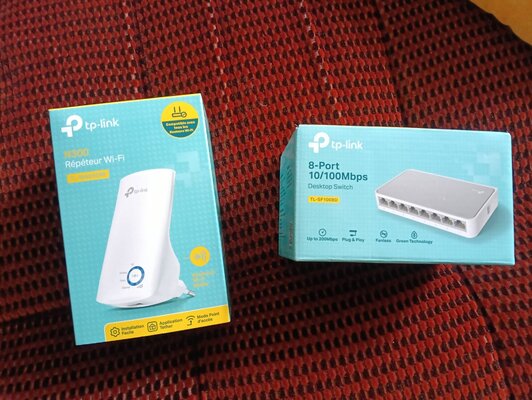
- The second in chain is the TP-LINK TL-WA850RE (picture below). My "Commodore room" is in the attic and I don't have ethernet cable. So I have to obtain it from the wi-fi signal. This N300 is configured to give me the ethernet via cable (the wi-fi Access point feature is disabled)
- Third in chain is the TP-LINK switch TL-SF1008D. It gives me eight channels for bringing the ethernet cable to my PC/Amiga retrocomputers.


In your opinion, are these settings compatible with the A2065?


Starlink Router:

Router Wi-Fi Starlink​

Wi-Fi SkysearchStandard IEEE 802.11a/b/g/n/ac
GenerazioneWi-Fi 5
RadioDual Band -3 x 3 MIMO
SecurityWPA2
Environment classIP54 - Configurato per uso interno
RangeFino a 185 m2 (2000 piedi quadratic)
 

Attachments

  • IMG20250414104028.jpg
    IMG20250414104028.jpg
    417 KB · Views: 12
The A2065 has two jumper settings at the cards rear, one for the BNC Ring token and one for the AUI. Only one can be used at a time.

Finally, I had time to test the A2065 and the Transceiver.

Unfortunately, after setting up everything with the TCP/IP Stack, I cannot establish an Ethernet connection.

Here are some details:

Firstly, I cannot locate the "two jumper settings at the card's rear". I only see two jumper blocks on the front side of the card (as mentioned in the user guide on page 3).

Secondly, I tested the card with the Lance-Test and everything passed successfully.

Thirdly, the transceiver LEDs are functioning correctly. It detects the line, the link LED is on, and the other LED blinks with package activities.

While configuring Miami DX and querying the device, everything appears to be working fine. However, when I click on "GO ONLINE," I receive the message: "Miami DX cannot detect your IP address." Obviously everything works fine with Ariadne II.

From the A2065 user guide, I read about thin and thick cables, and I'm uncertain if I should set the jumper on AB or BC. Additionally, I'm unsure about the "interrupt." JP1-JP6 jumpers are set to "2" as default, but I'm unsure if this is correct.

Lastly, the JP7 jumper sets the Ethernet type, but I'm unsure about my specific type. According to the guide: "Jumper JP7 controls the type of Ethernet transceiver being used. For type 2 Ethernet, jumper JP7 must be off. If your site uses type 1 Ethernet, a jumper block must be placed on JP7. Most sites use type 2 Ethernet, so JP7 is left off; this is the default setting pre-set from the factory."

Can anyone please help me with this?
 
Defaults will be fine:

1. SQE test - shouldn't be needed but won't hurt if enabled
2. LinkAlert - no idea - seems like some monitoring feature of that particular transceiver - again shouldn't hurt either way
3. Polarity Correction - should only matter if you made your own cable or are trying to go from computer to computer not via switch
4. Extended distance - no idea - maybe some sort of signal boost - I'd leave it disabled

Default is ok for 1, 3 and 4.
The second (LinkAlert) must be off or the Transceiver doesn't link the line
 
Network connections can be tricky on the Amiga, I changed to Roadshow (from Miami) 8 or 9 years ago because of this problem. I also use Roadie to check the settings, change DCHP to manual, DNS and Gateway settings. Roadshow has a free Demo mode (bsdsocket.library is not the same as the paid for version) allowing up to 30-minutes, I believe, at a time. The A2065 is a solid/reliable card and should work. Many times using Roadshow a manual setting works best on my intranet.
 
As bdb says Roadshow is great and the full version is what I use too. Definitely try the demo.

But still Miami DX should work with the A2065 - try and work out if it is a physical problem Miami problem or a DHCP problem by trying to set a fixed IP address as bdb says. See if you can ping your local router.

You can also try the Network Boot Disk (old site) or Network Boot Disk (new site) which is pre-configured and has the A2065 driver. This will give you a good indication if the A2065 is working without needing to make any changes to your system.
 
Last edited:
As bdb says Roadshow is great and the full version is what I use too. Definitely try the demo.

But still Miami DX should work with the A2065 - try and work out if it is a physical problem Miami problem or a DHCP problem by trying to set a fixed IP address as bdb says. See if you can ping your local router.

You can also try the Network Boot Disk which is pre-configured and has the A2065 driver. This will give you a good indication if the A2065 is working without needing to make any changes to your system.


Thanks for your help, i think the link is not working (it gives to me 404)
 
Back
Top Bottom