Workbench won't boot + other issues with A500

  • Thread starter Thread starter Sato
  • Start date Start date
  • Replies Replies 8
  • Views Views 1955

Sato

New member
Joined
May 21, 2016
Posts
8
Country
UK
Region
N/A
Hi, I'm new both with retro computers and on here so sorry if I sound ill-informed. I'll just try and summarise what's going on.


  • Tried booting the system. Both with and without a disk inserted, the screen just flickers between grey/green/yellow every few seconds.
  • Opened the expansion bay and remove a large chip/board that's inside (it's labeled AMRAM-16, but I don't know what that is :huh:)
  • Now the system powers on properly, an image appears with a hand holding a workbench disk with the version number v1.3
  • Insert the workbench disk (v1.3.2), drive light turns orange for a moment and some sound is heard, then it stops and remains on the same screen.
  • If it means anything, I don't have a mouse connected.

Just wondering if someone could help me with this? Is the board I removed an essential component/should it be replaced? Any idea why it won't boot into workbench properly?

Sorry for beginner-tier questions, but seems like the people here are helpful :)
 
It sounds like the memory expansion you removed is faulty. It may have a battery on it which could have leaked, destroying some tracks.
Next problem is that either the floppy drive or the disk is faulty so it won't start booting. Connecting a mouse is not relevant here. You should get a known working disk to try out with.
 
It sounds like the memory expansion you removed is faulty. It may have a battery on it which could have leaked, destroying some tracks.
Next problem is that either the floppy drive or the disk is faulty so it won't start booting. Connecting a mouse is not relevant here. You should get a known working disk to try out with.

God I really hope it's not a drive problem, but that's what I was thinking. Can I just insert a game/other software or do I have to boot into workbench first?
 
Try with some other disks. Most disks should be bootable by themselves and does not need WB. If it is the drive, perhaps it just needs a cleaning which is not too complicated but first make sure it is not just the disk.
 
Try with some other disks. Most disks should be bootable by themselves and does not need WB. If it is the drive, perhaps it just needs a cleaning which is not too complicated but first make sure it is not just the disk.

Tried with another few disks, definitely seems to be a drive problem. Even tried a few pirated/copied disks and had the same issue.

The drive light turns on, there's a light whirring and clicking sound and the screen goes white, then that all stops and it returns to the workbench disk screen.
 
Green and yellow screen with expansion means both RAM and CPU are causing problems.
https://www.amibay.com/showthread.p...ow-screen-mean&p=239263&viewfull=1#post239263

I wouldn't be surprised if it's the floppy drive that's causing the other problem. I had bad luck past year or so with drives being damaged in transit. When I purchased Amiga 1200 the internal drive couldn't read or write, I had to buy another one and replace it. Same issue with 1541-II couple of weeks ago, everything seems to be working but can't read/write/format, head cleaning didn't help, head resistances are within specs, purchased replacement 1541-II the other day.
 
luckily the floppy shouldn't be hard to replace if needed!
 
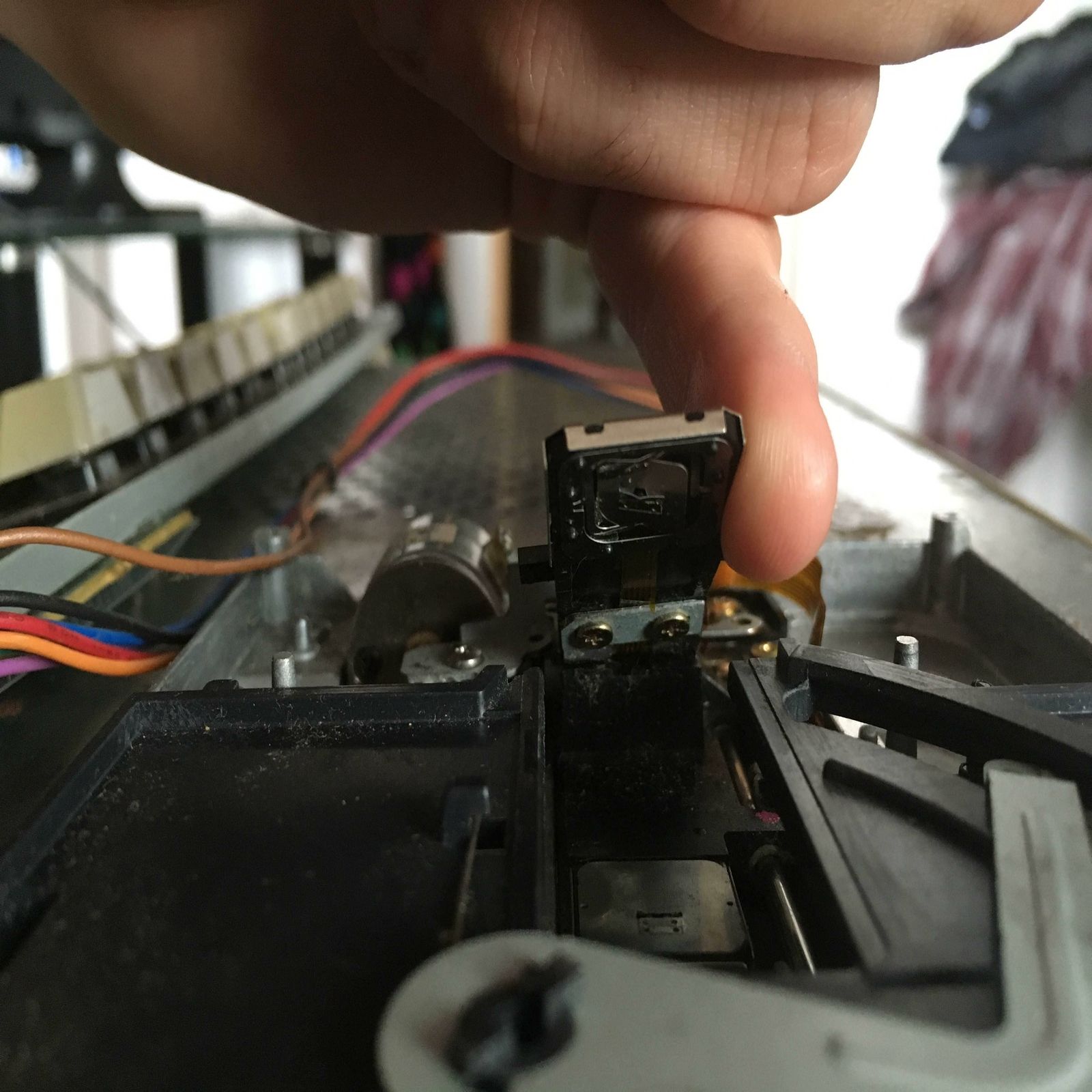
Hi, would just like to give an update as I think I've found the problem.

Seems an incredibly tiny part of a small ribbon cable in the floppy itself has torn, so the disk can't be read properly.

ZBUOJSc.jpg


If you look in the centre of the small part I'm lifting up, there's a small orange cable. The piece at the right is sticking out and appears to be broken.

Would appreciate if anyone could point out something I might have missed or a way to fix this, else I guess I'll just buy a new drive :'(
 
Looks to me like the entire head is severely bent to one side. It should be level just like the lower head. So I'd say that you should find a replacement drive and they should be easy enough to find.
 
Back
Top Bottom