A4000T owners group

  • Thread starter Thread starter JHanna
  • Start date Start date
  • Replies Replies 242
  • Views Views 13467
Just don’t put the cover back on as it will likely come back off quickly, and a pain to remove.
So you never secure the A4000T's case? Unless you move the machine or need to fit an upgrade it can normally stay on until the coin battery runs out!

But yes I agree that it is a pain to remove and causes cuts and issues with getting all the metal clips in place prior to screwing up every time! It gets easier but it's no Apple G4 case!😉
 
Last edited:

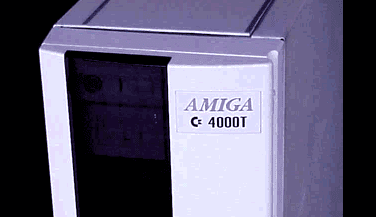
Anyone have this keychain and the 4000 Tower to check size/fit? Could this chrome debossed AMIGA tag be removed off the ring hinge, hinges filled down and thus a high quality chrome finish AMIGA insert for the Tower door? I told you guys, these beautiful 4000 Towers are missing the luxury and pride of a debossed AMIGA logo that needs to be addressed. :)
 

Anyone have this keychain and the 4000 Tower to check size/fit? Could this chrome debossed AMIGA tag be removed off the ring hinge, hinges filled down and thus a high quality chrome finish AMIGA insert for the Tower door? I told you guys, these beautiful 4000 Towers are missing the luxury and pride of a debossed AMIGA logo that needs to be addressed. :)
What's wrong with a recreation of the C= A4000T badge? It looks slick even today. That keyring will seem tacky in 10 years!
 
These (below)? Nice. Would be all about execution. Forgive me, I just feel like the decal on these towers looks cheap, especially that Amiga Technologies sticker. On photos it looks like it was printed on Avery gloss labels. Just too much CR for my liking, and for this majestic machine. I don't know...my eye always goes to it and it bugs me a lot as I'm trying to admire these beauties.
 

Attachments

  • Screen Shot 2025-03-31 at 7.19.53 PM.png
    Screen Shot 2025-03-31 at 7.19.53 PM.png
    14 KB · Views: 29
  • Screen Shot 2025-03-31 at 7.20.21 PM.png
    Screen Shot 2025-03-31 at 7.20.21 PM.png
    108.4 KB · Views: 36
These (below)? Nice. Would be all about execution. Forgive me, I just feel like the decal on these towers looks cheap, especially that Amiga Technologies sticker. On photos it looks like it was printed on Avery gloss labels. Just too much CR for my liking, and for this majestic machine. I don't know...my eye always goes to it and it bugs me a lot as I'm trying to admire these beauties.
The one on the left is iconic and is on only around 200 basically prototype quality towers that sneaked out of the C= factory prior to bankruptcy. It could be embossed or a metal badge like the A1200 ones but it should be that design IMHO. The Escom one is NOT timeless and neither is the bezel/door design. We are trying to recreate the Commodore design with better case fasteners, internal flourishes and a stronger door hinge!
 
Hi all, I'm late to this thread, but just saying that I'm also a proud owner of the A4000T tower (and actually of The Two Towers).

View attachment 2519508

Both fully equipped with many expansions. They are fun to expand, due to so much space!

Happy to have noticed this thread, and I'm watching it now to read about y'all experiences.
What are they connected to? I don't see any monitor or mouse / keyboard...
 
So the Acard SCSI to IDE adapter arrived, and I can't get it to work reliably in my A4000T.

Does anyone else have one? Am I missing something?

Recreated drive in HDToolbox and repartitioned & reformatted etc. Hangs after a few seconds of copying files. :(
 
Looks like you guys have a new member.


Hey @cluterone, let us know when you get it, set it up and start selling admission so that some of us can perhaps come over and oooh and aaah at it in person. :)

I'd also like to ask some questions as I continue to admire these beauties.
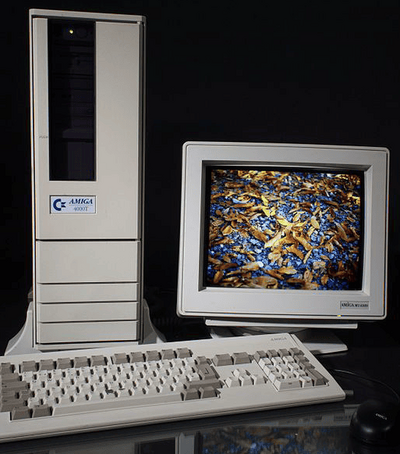
1) Seems like towers just dwarf monitors. I feel like a tower needs a nice CRT. Something 19" or better yet 21". Something maybe aperture grille like a Mitsubishi or a Sony. Anyone rocking an Amiga 4000 Tower out there with a large CRT? Can we see what a 4000 Tower next to a large CRT looks like?
2) Turbo button does nothing, right? Anyone repurpose it for something cool?
3) Who is using both video slots these 4000 Towers exclusively offer? What cards have you got in there?
3a) Mega bonus points for someone who's using an Indivision to not waste the video slot for a flickerfixer AND has both video slots occupied with video hardware. If this is you, what's your config? What cards have you got in those two video slots that isn't a flickerfixer?

1) I use a white Phillips 23 inch LCD, looks great!

2) The Turbo button turns the built-in speaker on or off

3) Never heard of anyone doing that. The ZZ9000 will make all of your dreams become true 😂
 
So the Acard SCSI to IDE adapter arrived, and I can't get it to work reliably in my A4000T.

Does anyone else have one? Am I missing something?

Recreated drive in HDToolbox and repartitioned & reformatted etc. Hangs after a few seconds of copying files. :(
I had (or likely have) several of these adapters and did not have any transfer issues. Check in HDtoolbox for aberrant settings that get auto-populated for errors - the mask and transfer settings.
 
@YouKnowWho (actually I don't)

1) Using a Dell U2410F monitor means I don't get flicker on high resolution and, thus don't need a Flicker Fixer board, as related to #3.
2) The internal speaker (Turbo on AT computers) was a first for Commodore, and allowed testing of sound output, so it could be turned off if a better sound setup was used.
3) The dual video slots were meant as a selling point, along with the extra room and slots for Video Toaster setups, an RTG video Card uses the Zorro bus, and a ficker fixer (not generally need with the video output of a Toaster setup) used a video slot.
3a) Mega Bonus: I originally used the first version of the Indivision, although I once set up a Toaster, but all the analog equipment - combined with no use for a Toaster - proved expensive and a Time Sink (why waste the time), so I sold my Toaster stuff and later the Indivision board.

I then used OS 4.1 in a dual boot system for about 6-years, testing and commenting in the Hyperion 4.1 forums until I when back to just using OS3.9.
 
Last edited:
Hello! I also own an A4000T. Does anyone know a good filament color for printing a replacement front door?
 
Hello! I also own an A4000T. Does anyone know a good filament color for printing a replacement front door?
You'll need to paint it, there isn′t a good match out there. Just take one of the front panels or something to a paint store to get it matched and get one of those small 8 oz jars of matte paint with that color.
 
Anyone else know the fix for RTC running real slow? Its losing days per month. Do plan on using an app to sync with an NTP server but even still, would be nice to have it sorted.
 
Anyone else know the fix for RTC running real slow? Its losing days per month. Do plan on using an app to sync with an NTP server but even still, would be nice to have it sorted.
Assuming that the machine has been recapped, is there a trimmer capacitor that can be tweaked? I can't remember if the A4000T has one or not.
 
I have gotten my hands on a 4000T motherboard with two of three original modules. Have to build the audio/video module. The plan is to put it into an AT PC maxi tower.

Are any of you able to measure the length of the two 40 pin ribbon cables for the port module? The two labeled "long" and "short". I assume they are different length judging by the labels. Got IDC connectors and cable, just need the appropriate length.
 
I have gotten my hands on a 4000T motherboard with two of three original modules. Have to build the audio/video module. The plan is to put it into an AT PC maxi tower.

Are any of you able to measure the length of the two 40 pin ribbon cables for the port module? The two labeled "long" and "short". I assume they are different length judging by the labels. Got IDC connectors and cable, just need the appropriate length.
If I understood the correct cables, I measured the ones in my 4000T.
The one connected to CN560 is 11 inches. The other connected to CN550 is 8 1/4 inches.
I measured from ends of the connector.
 
Back
Top Bottom