A4000T owners group

  • Thread starter Thread starter JHanna
  • Start date Start date
  • Replies Replies 242
  • Views Views 13471
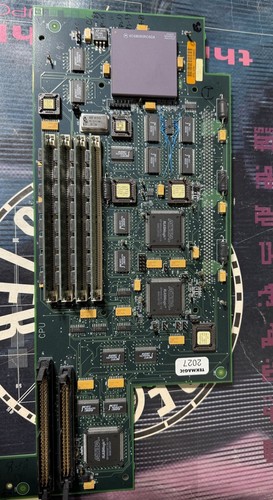
Have gotten to the point where I have put power to the computer. After a long wait, I got the 3.1 (40.070) kickstart screen. That at least confirms there's some signs of life, and I installed the components on the AV module correct. Programmed a pair of 3.2 (47.115) ROMs and verified it still boots to the kickstart screen, this time much faster.

The initial test has been with nothing connected except the modules and a TF4060 accelerator card. Found someone that will lend me their A3630 card which would be a better fit since the TF has issues with the 4000T. Anyway, the plan is to connect a floppy drive and a ZuluSCSI in order to test it further. Related to this, I got a few more questions. The manual assumes the computer is assembled, and mine is in pieces and missing essentially everything. Not the best reference point...

Is the floppy drive cable and keyboard the same as on a 2000? From what I can tell from the manual, DF0 is just a straight cable, and the outer end has a twist intended for DF1. At least on the 2000, the twist differs from a regular PC cable. The keyboard also appear to have the same pinout as the 2000 when looking at the schematics.

Should the disk module have a jumper link between pin 2 and 38 on the floppy connector? Mine has evidence that a wire at some point was soldered and glued between these two points. The schematics does not give any indication this should be the case.

As far as I can tell, the SCSI controller is terminated on the motherboard. My assumption is that the termination on the port module is only needed when no device is connected, or if any additional ones lack internal termination? Connecting the ZuluSCSI on the far end with its termination enabled should be sufficient? All DIP switches for the controller is in the off position and the ZuluSCSI image configured for ID 0.
 
Have gotten to the point where I have put power to the computer. After a long wait, I got the 3.1 (40.070) kickstart screen. That at least confirms there's some signs of life, and I installed the components on the AV module correct. Programmed a pair of 3.2 (47.115) ROMs and verified it still boots to the kickstart screen, this time much faster.

The initial test has been with nothing connected except the modules and a TF4060 accelerator card. Found someone that will lend me their A3630 card which would be a better fit since the TF has issues with the 4000T. Anyway, the plan is to connect a floppy drive and a ZuluSCSI in order to test it further. Related to this, I got a few more questions. The manual assumes the computer is assembled, and mine is in pieces and missing essentially everything. Not the best reference point...

Is the floppy drive cable and keyboard the same as on a 2000? From what I can tell from the manual, DF0 is just a straight cable, and the outer end has a twist intended for DF1. At least on the 2000, the twist differs from a regular PC cable. The keyboard also appear to have the same pinout as the 2000 when looking at the schematics.

Should the disk module have a jumper link between pin 2 and 38 on the floppy connector? Mine has evidence that a wire at some point was soldered and glued between these two points. The schematics does not give any indication this should be the case.

As far as I can tell, the SCSI controller is terminated on the motherboard. My assumption is that the termination on the port module is only needed when no device is connected, or if any additional ones lack internal termination? Connecting the ZuluSCSI on the far end with its termination enabled should be sufficient? All DIP switches for the controller is in the off position and the ZuluSCSI image configured for ID 0.

Floppy and KB the same.

Those floppy pins may have been bridged to skip the floppy delay and boot the HD quicker. Not sure.

You don't need to use the built in termination if your last device terminates correctly. ZuluSCSI works fine on mine using its built-in termination.
 
Great, thank you for confirming. I'm sure there will be more questions, but this should get me quite a bit further.
 
What is the name of the SCSI device driver?

When trying to boot, the activity LED flashes five times. Half a second flash, then two second pause inbetween. Both the motherboard and ZuluSCSI LED flash. It drops me off at the kickstart screen afterwards.

I did make sure to use the specific 4000T ROM when I made the ROM pair.

When booting from floppy and using a utility like SysInfo, I don't see any specific device driver available. The only possible one is scsi.device, but if I recall properly the IDE controller use this name. If it is like the A4091, then I would expect to see 2nd.scsi.device in the list, which I don't see. HDToolbox does not display any drives.

Tried a different cable eventhough I have been using it in another computer. The other cable also came from a working system, but still gave the same behavior.

All controller DIP switches are in the off position. ZuluSCSI (RP2040) has no configuration file and termination enabled. The image is named HD0, and verified working in WinUAE and on another computer.

The Amiga 4000T manual doesn't mention anything specific regarding my symptom and possible remedy, nor the device driver name.

As far as I can tell, it should work. Have I missed something, or should I start to suspect a faulty SCSI controller?

Probably better to make a seperate thread on the subject at this point.
 
We have 6 or 7 of the A4000T as we are going over our inventory these days :)
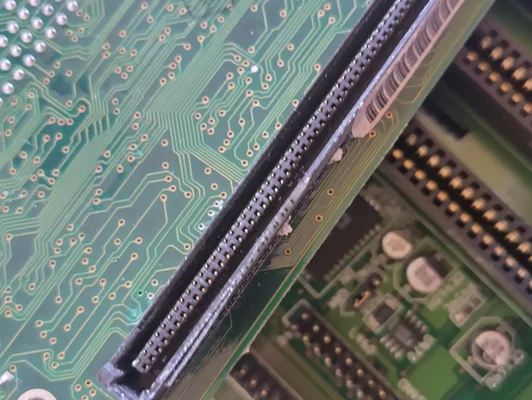
I have just started restoring the one that was always just a wreck. It has no plastics at all and is a little bit water damaged. First thing to do is clean or replace the KEL connectors on the mainboard and cpu module. Also all the small boards needs some new connectors and repairs bu everything is there.
The chassis itselft needs sandblasting and some new coating.
alternatively I just sell the board package when its working fine. I have the plastic part with the key and all the small cables to it.
 

Attachments

  • IMG_20251113_145709_HDR.webp
    IMG_20251113_145709_HDR.webp
    440.7 KB · Views: 13
  • IMG_20251113_145731_HDR.webp
    IMG_20251113_145731_HDR.webp
    181.7 KB · Views: 13
What is the name of the SCSI device driver?

When trying to boot, the activity LED flashes five times. Half a second flash, then two second pause inbetween. Both the motherboard and ZuluSCSI LED flash. It drops me off at the kickstart screen afterwards.

I did make sure to use the specific 4000T ROM when I made the ROM pair.

When booting from floppy and using a utility like SysInfo, I don't see any specific device driver available. The only possible one is scsi.device, but if I recall properly the IDE controller use this name. If it is like the A4091, then I would expect to see 2nd.scsi.device in the list, which I don't see. HDToolbox does not display any drives.

Tried a different cable eventhough I have been using it in another computer. The other cable also came from a working system, but still gave the same behavior.

All controller DIP switches are in the off position. ZuluSCSI (RP2040) has no configuration file and termination enabled. The image is named HD0, and verified working in WinUAE and on another computer.

The Amiga 4000T manual doesn't mention anything specific regarding my symptom and possible remedy, nor the device driver name.

As far as I can tell, it should work. Have I missed something, or should I start to suspect a faulty SCSI controller?

Probably better to make a seperate thread on the subject at this point.

You are correct, the IDE and SCSI both use scsi.device, and it actually changes depending on the setup. If you don't boot from IDE devices then the SCSI will use scsi.device and the IDE 2nd.scsi.device. If you boot from IDE then the IDE uses scsi.device and the SCSI uses 2nd.scsi.device.

Let's start at the beginning, you definitely have the SCSI cable in the right way round? (Gotta ask)
 
Ah, didn't know the device name would change depending on the configuration. Learned something new there. In a regular 4000 both scsi.device are present regardless, from what I recall.

I actually got the SCSI working. Double checked that the cable was in the right way and all that. Thought maybe it was a bad connection to the 56 pin header. Reseated and wiggled the card, no change. The only easy thing left before taking out the oscilloscope was the DIP switches. One by one I flicked the switches on and off a few times. It booted after that.

Well, sort of booted. The image I have is optimized for 060, so ran into trouble with crashes related to no FPU and that I have an A3630 installed. 😅 I can boot a file manager from floppy and browse the hard drive. At least that confirms the SCSI controller is working. (y)
 
Reminder: eBay is a criminal organization. But this piece is too rare and important for your lucky A4000T cats to not know about:


Turn your A4000T into an ULTRASOUND machine! :-)


Disclosure: I know nothing about this item, this seller, or anything to do with this sale. Came up in a search, and looks complete and unusual, but Book had details about it.
 
Reminder: eBay is a criminal organization. But this piece is too rare and important for your lucky A4000T cats to not know about:


Turn your A4000T into an ULTRASOUND machine! :-)


Disclosure: I know nothing about this item, this seller, or anything to do with this sale. Came up in a search, and looks complete and unusual, but Book had details about it.
Here's a review of the board.
 

Very interesting! Thanks for sharing @The Gonz. I enjoyed reading this review.

2000 more A4000T motherboards in these ultrasound machines means more A4000T members. I think the A4000T owners group should recognize their first ATL HDI 1000 Ultrasound machine owner member with a special title of the "Ultra A4000T owner group" as said member could game inbetween ultrasound sessions.

I gotta admit, it is amazing to admire the Amiga Towers, and discover their secret medical lives. All these years later, Amiga keeps surprising.

I was going to start a A2000T owners group. Would be very tiny group...basically anyone with a Mikronik 2000 tower case and of course @Corb_80 who would have to be the president and chairman of the A2000T owner group as he has what is without doubt the most beautiful A2000T on the face of this planet. But it seems so insuficient now that A4000T is a medical tool too. :-)
 
Last edited:
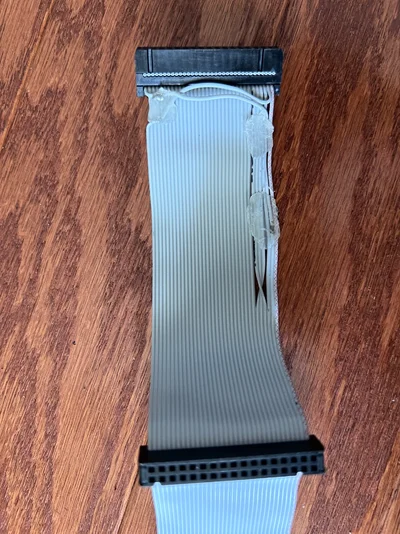
Does anyone have an idea about adding gotek as a DF1 floppy. Having problem it being recognized as df1 when connected at the end of 4000T floppy cable even putting jumpers for df1 on gotek and closing dd jumper on disk controller. Maybe because the floppy cable on 4000T is different with extra twists compared to 4000D? Anyway when I put gotek in the df0 position on cable it works just fine.
 
This is distal part if floppy cable which came with my machine. Is it correct looks strange for original NOS cable
IMG_5299.webp
 

Attachments

  • IMG_5300.webp
    IMG_5300.webp
    659.9 KB · Views: 6
IIRC, the cable on my AT A4000T purchased in late 90's was exactly like that. It came with Sony 880Mb FDD. I replaced it with regular cable and Chinon FZ357A drive shortly after.
 
IIRC, the cable on my AT A4000T purchased in late 90's was exactly like that. It came with Sony 880Mb FDD. I replaced it with regular cable and Chinon FZ357A drive shortly after.

Must've been a PC drive, as the Disk Change signal is swapped from pin 2 to pin 34 by the looks of it.
 
Yes, after Commodore demise, AT units were sold with PC drives which worked as 880Kb DD drives. I guess they could not obtain high density drives any longer. This is how they were sold by Software Hut, in USA at least.
 
Finally got an 060 installed and booted up the computer again from SCSI. However, it is very slow now. Getting into Workbench takes a couple of minutes or so, and opening a drawer that contains several icons is also slow. Icons appear one by one over 5-10 seconds.

Running benchmark tools like SysInfo or RSCP, I get around 8 MB/s. Quite a bit more than expected, actually. The A4091 is only half of that, but is a lot snappier. In fact, the onboard IDE controller is pretty much instantaneous with drawing the icons in drawers in comparison.

What am I missing?
 
I would double check that you have SetPatch in your startup sequence.. does SysInfo show that the CPU caches are on?
 
Thank you for your reply. Had a look and found SetPatch is enabled and caches are on.

After some more tinkering I have isolated the problem to be the ZuluSCSI I am using and/or the SD card. Did a full reformat of the card and copied over the image again. That had a considerable improvement on the overall perceived speed.

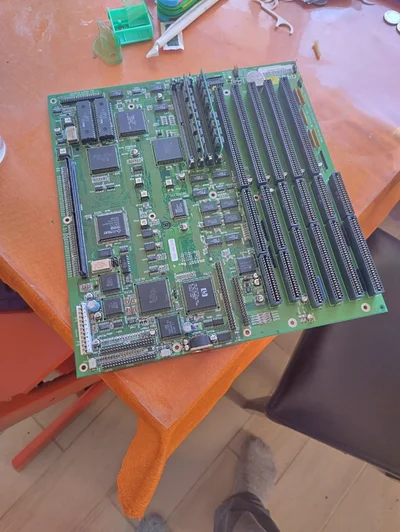
Still haven't found an AT case for the motherboard. Looks like I'll be mounting it inside an ATX case for now. I think the bench test phase is over and consider it to be in a usable state. :)
 
Tried to install the motherboard into an old maxi tower ATX case I have. Old Aopen case from the late 90s that have both AT and ATX holes available. Fits perfect apart from that the disk module doesn't have a slot available and can't be installed without butchering the case. Real bummer. Turns out ATX cases have 7 slots, while AT has 8... All AT cases I have are mini or midi towers which doesn't have enough room for the nearly full size AT motherboard that the 4000T is.
 
Back
Top Bottom