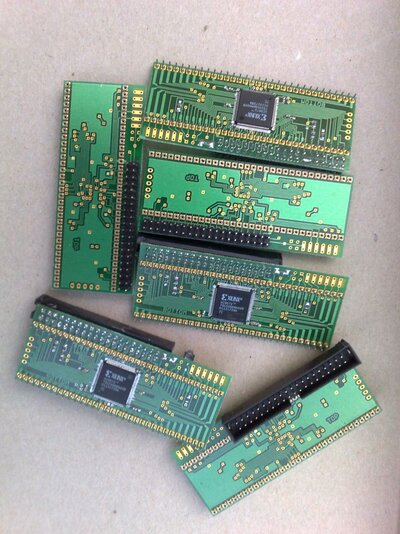
For Sale A500 IDE adapters, PS/2 mouse adapter, A600 CF adapter

  • Thread starter Thread starter mkl
  • Start date Start date
  • Replies Replies 914
  • Views Views 238215
Black Screen

Black Screen

My V402 IDE68k just died,Black Screen :(

I was using it with Toms 8mb RAM Board and WHDLoad for an hour or two and had a GURU message, then i reset and now the board is dead and just checked my 2.05 ROM and that gives blue screen:(

The IDE68k Board has been in and out of CPU socket alot, and also the CPU mounted and extracted from the Board itself alot, my bad i think

I have PM'ed Mika asking to buy a new board:)
 
2 (not 5) tested v402 boards left.
Special price offer with world wide registered mail shipping:
(5 pcs and postage = 160 euros
4 pcs and postage = 140 euros
3 pcs and postage = 115 euros)
2 pcs and postage = 85 euros
1 pcs and postage = 50 euros


Blank pcbs and new built adapters might be for sale in september.
 
Last edited:
I am interested in a 68kide board. Can you confirm this will work in a CDTV.

I want to connect a CF card to it. Do I need any adapters etc?
 
I am interested in a 68kide board. Can you confirm this will work in a CDTV.

I want to connect a CF card to it. Do I need any adapters etc?

CDTV? It should work, but cannot confirm.
V402 boards are for sale, you need an ide-cf adapter.

---------- Post added at 18:21 ---------- Previous post was at 18:19 ----------

http://iki.fi/mkl/ide/ide68k.html
 
I have an amiga 500 REV 6A and soon kipper2k's 4mb fast ram card. If i add your ide68k adapter, what else i will need to change/add to my amiga, in order to use whdload (most probable on cf card, using a ide2cf adapter)?
 
I'm here again just to say big THANK YOU for Mika from me personally and from all www.ppa.pl forum members for whom I build controller designed by Mika. I really appreciate your engagement and support.
 
I have an amiga 500 REV 6A and soon kipper2k's 4mb fast ram card. If i add your ide68k adapter, what else i will need to change/add to my amiga, in order to use whdload (most probable on cf card, using a ide2cf adapter)?

I would add a 68010 CPU so you can use the Quit key. Thats all you need.
 
Hi Mika, not sure if im doing something wrong but my IDE68K seems to be playing up?

I can boot both my CF 4GB CF Cards (1 Kingston, 1 SanDisk) using both my CF-IDE Adapters (not at the same time of course - 1x is from AmigaKit, 1x from FleaBay) but it's painfully slow to startup, takes a good 5 mins.

The first 2 mins is sitting there with a Black screen and then eventually my Floppies start clicking, then 1 minute later WB starting up and 2 mins later im finally in WB. Once im in WB it's painfully slow (barely faster than a floppy).

Im use the correct MaxTransfer settings 0x1fe00 and so forth with the usual FastFileSystem.

Any Ideas? (is mine running rev1 cpld code or rev0?)
 
I can boot both my CF 4GB CF Cards (1 Kingston, 1 SanDisk) using both my CF-IDE Adapters (not at the same time of course - 1x is from AmigaKit, 1x from FleaBay) but it's painfully slow to startup, takes a good 5 mins.

Check if you soldered two goldpins /INT2 and /OVR correctly in place. One of the www.ppa.pl forum users have had exactly the same symptom. (connector moved by one pin).
 
Update to above:

My Amiga seems to do validate the disk at each boot up - I've checked and once WB is running the Validation is finished.

It is still painfully slow even with Buffers set to 70 - the fastest I've seen it boot was with just a single 501mb FFS partition as it only took 30secs to start loading the OS and was fairly responsive once WB was loaded. As soon as I added 2x 1.7GB FFS partitions it was back to being very slow.

I did discover one other issue with the v402 IDE68k during my testing tho - because the IDE connector is to the left of the CPU the IDE cable naturally wants to drape across the CPU causing it to overheat after about an hour of running. I re-routed the cable a bit to prevent this happening again.
 
Hi,

Is Kickstart 2.05+ required for autoboot or will it work with 2.04?
no, 2.04 doesnt have the scsi.device file in it so you need 2.05+ to autoboot.

---------- Post added at 14:12 ---------- Previous post was at 14:10 ----------

Update to above:

My Amiga seems to do validate the disk at each boot up - I've checked and once WB is running the Validation is finished.

It is still painfully slow even with Buffers set to 70 - the fastest I've seen it boot was with just a single 501mb FFS partition as it only took 30secs to start loading the OS and was fairly responsive once WB was loaded. As soon as I added 2x 1.7GB FFS partitions it was back to being very slow.

I did discover one other issue with the v402 IDE68k during my testing tho - because the IDE connector is to the left of the CPU the IDE cable naturally wants to drape across the CPU causing it to overheat after about an hour of running. I re-routed the cable a bit to prevent this happening again.

Okay I've found and fixed the problem, the Fast File System is crap, im now using PFS3 and it has no issues and is a decent speed on my 500+. :cool:

I've changed to an AmigaKit CF-IDE adaptor (with a power mod as this one is designed for the 4000) and that has solved the overheating issue too. :)

2012-09-15%2010.21.58.jpg
 
Hi,

Just installed the IDE68 on my A1000 with a VXL30/8Mb ram. Also I used the V5 supply form the IDE-port to supply the FC.

Everything works Great,

THANKS for great hardware...

A1000-030IDE68.JPG
 
Last edited:
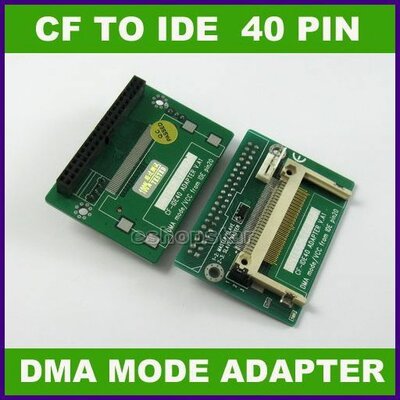
anyone know how to do the 5v hack to make the 40 pin IDE to CF get power? I ordered a 40 pin to CF adaptor from China and want to see about doing this mod.
 

Attachments

  • 40 pin to CF.jpg
    40 pin to CF.jpg
    45.9 KB · Views: 4
The pic shows "vcc on pin 20" on the cf adapter so the +5v supply is connected allready. Some adapters need a jumper set for this.

I will send feedback to buyers some day soon.
 
The pic shows "vcc on pin 20" on the cf adapter so the +5v supply is connected allready. Some adapters need a jumper set for this.

I will send feedback to buyers some day soon.

Is it easy to mod it? Please do post the procedure..
 
Back
Top Bottom