Amiga PC Bridgeboards...

  • Thread starter Thread starter furan-
  • Start date Start date
  • Replies Replies 73
  • Views Views 9512
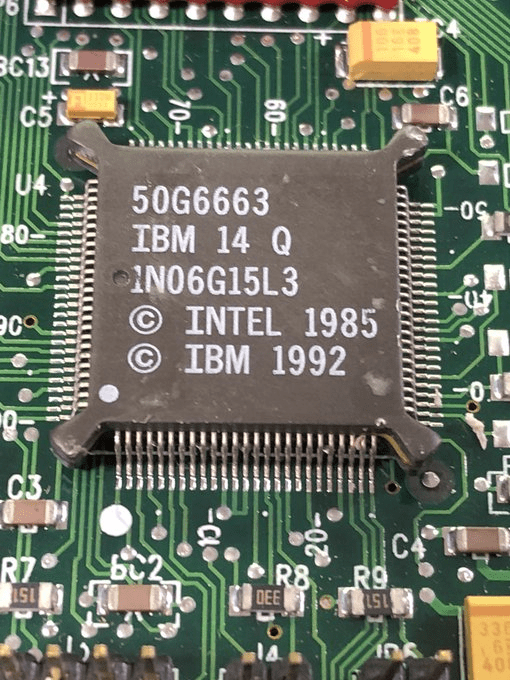
Here it is. I'm not really sure what to call it. Best thing to call it is probably the 486SLC/2 66. It runs at 66mhz, and has 16k split L1 cache.

Pardon the lack of goo gone, I've just taken off the heatsink to verify the chip.

vrTns4x.png


For more info see bottom of:
http://www.redhill.net.au/c/c-4.html

Not sure if it’s the pic or not but if this doesn’t work...it looks like some of the pins are shorted?


Sent from my iPhone using Tapatalk
 
That’s it on the original board still. You can get this visual effect when many pins fan out to the same signal in this case the 386sx and compatible chips have groups of three that fan out to ground and vcc.

There is also some sticky gunk from the heat sink I removed to verify the label that’s on the pins and board - I was too excited to clean it off first.
 
Last edited:
My only PC emulation experience has been with my original A1000 and the "Transformer" back in 1986 and currently with my A2000 and an A2088. I had no issues setting up the 2088 but have not done much with it beyond running DOS and a few small packages.

I'd considered having a Bridge Board in each of my machines that has a faster processor that corresponds to the faster Amiga, however if they are a pain then other than adding them to my collection I don't think they may be worth the energy.
 
My GoldenGate 486SLC2 50mhz is off having it’s cpu removed and a TI486SXLC2-50 put in place! Here’s hoping the extra cache will be worth the endeavour. An oscillator socket is also going on so I can try 60 and 66mhz.
 
The conversion is complete and the board is on it's way back to me! Exciting. I will report back once it's installed :)
 
Enjoy your modded A2386! And yes, it is it worth!

My "A2486" reaches nearly 100 in Sysinfo 7.0!
 
The conversion appears to have worked as the GoldenGate boots ok! However it shows a 25mhz clock. Does the GoldenGate require the BBCPUClk fix like the A2386 to get 50mhz?
 
No, you need a tool from TI to enable the internal cache and the clockdoubling...
 
Ah, ok, I have the Cyrix tool in my config.sys (or maybe autoexec.bat) which is enabling the cache, is that the same one as the TI one (or is it at least compatible?)?

- - - Updated - - -

Also, I’m now getting a weird keyboard lockup issue. The keyboard will stop responding to keystrokes in DOS after a few moments. I managed to get doom running and it worked fine for ages so I’m sure the cpu etc is fine. The only other change to my system recently (since I sent the GoldenGate away) is a change of cpu board from A3640/060 to WarpEngine 060. Anyone had any weird incompatibilities with a GG and WE?

i can still Amiga-Amiga-S to reset the board, and I can still Amiga-Amiga-Q to quit back to Workbench, so some aspects of the keyboard work ok, it’s just DOS that appears to ‘freeze’
 
Last edited:
Have you turned off all cpu caches of the 68060?

No, it is another tool! You need the TI one for the clockdoubling, the Cyrix tool enables only the cache!
 
Last edited:
Yes, caches are off. So I did not experience this keyboard issue in dos before with the A3640/060, only now since installing the Warp Engine. I can assess the Setup without issue, and like I said I once managed to run doom before the DOS ‘freeze’ started. The GG is not crashing as even once the keyboard stops responding in DOS I can see the cursor blinking and can also A-A-Q to quit out or A-A-S to restart the GG. It is a very weird bug but it is stopping progress!
 
Sadly not, it is sold! :) :o

i will maybe take the board out if I cannot find our the problem and try with the A3000s 030

- - - Updated - - -

Ok, so if I boot with no startup-sequence, turn off caches and then run digger the keyboard problem does not happen! So I guess something is wrong on the workbench side of things.
 
Quick update - the board works fine if setpatch has not been run. I can live with that for the moment. I have enabled clock doubling and the 8k cache. The TI486SXLC is quite a lot faster in real terms than the Cyrix 50mhz 486SLC2 thanks to the cache; Doom is much more responsive.

- - - Updated - - -

No, like the Cyrix one, 32 bit internal, 16 bit external but with 8 kB Cache!! It is running at 66,67 MHz...

What speed does cachechk give for the TI486SXLC2 at 50mhz? The CX486SLC/2 50mhz gives 33.2 MB/s

Answering my own question! - TI gives 38.2 MB/s for the cache speed
 
Does anyone have any tips for maximising the performance of the graphics card? I’m running an ATI
Mach64
 
Quake 1 timedemo demo1, no sound with one down from full screen (health displayed at the bottom etc) is 1.0fps! :D I guess the Cyrix FasMath fpu is really really slow!
 
Does anyone have any tips for maximising the performance of the graphics card? I’m running an ATI
Mach64

Here's a good page for maximizing bridgeboard performance - it mentions that the best graphics option is a video card that will clock the bus itself at a higher rate (or overclocking the bus yourself by changing out the 16mhz crystal that is divided /2 for the bus). It suggests the Diamond Speedstar Pro ISA, which I have on order. I'm not sure if the bus thing happens in DOS - it might be turned on by a graphics driver. It uses a Cirrus Logic CLGD5426 and doesn't look all that special, so unless the BIOS enables some special feature, it's possible other 5426-based cards do this (or that maaaaybe you can turn it on).

http://members.iinet.net.au/~davem2/overclock/a2386.html

Meanwhile, I've been doing a lot of research on bridgeboard design - I've disassembled parts of the a2386sx BIOS as well as the payload ROM the Janus software sends to the device - and from that and the WinUAE implementation (surprisingly accurate and not a fake), I've got a general good idea on how to make my own that could be compatible with the original software as well as the replacement software that lets you use a partition based image.

I also did some research on the IBM SLC2, and I'm trying to get more info on it as well. I've put that info here. Final note on power - it's 3.6v VCC, 5v I/O tolerant.

http://escapehatchlabs.com/wiki/index.php?title=IBM_486_SLC2

Unfortunately my interests have gotten away from me and now I'm working on a "upgrade" that will be a surprise.

For Americans, there is a really nice lady trying to help an old man by selling off his Amiga distributor warehouse - she just sold me another A2386SX and an A228AT for a very good deal.

She is posting items she finds (empty right now):
https://www.ebay.com/sch/texantrader214/m.html?_nkw=&_armrs=1&_ipg=&_from=

Thanks,
-Ian

Edit: I did a little more research on the VGA speed thing. It turns out that starting with the CL-GD5402, these are relabels of an acquired company's technology (AVGA). If you are lucky these (and later) cards will have a jumper for 0 waitstate, or have it on automatically (I assume the speedstar pro does). I can't find anything in the databooks at the VGA Museum for it clocking the VGA bus on its own, so it might just be the 0 waitstate thing and the overclock author got it wrong.

http://www.vgamuseum.info/index.php/component/k2/item/135-cirrus-logic-cl-gd5426

Phil's Ultimate VGA Benchmark is a really good spreadsheet. If you sort by FPS and then search for the entries that use an ISA interface, you'll find that at the top for ISA are the CL-GD5429, ET4000, OAK, and WD90C3x chips, topping out at around 30FPS with the CL-GD5429. So I guess now I'll have the WD90C31-LR(already have), Mach64 ISA, CL-GD5426 (on order), and CL-GD5429 (hunting down) to bench with each other with a faster bridgeboard.

Benchmarks here: https://docs.google.com/spreadsheets/d/1lvF9nOAMKLeCpHR_SaA48M7sUXItwIi72gHRcw0wpNU/edit#gid=0

 
Last edited:
Really interesting information there, thanks :)

The Mach64 install program has some configuration options to set zero waitstates for ram and rom plus a few other things. changing these 0 waitstates to enabled and then saving and rebooting results it a hanged machine with a flashing cursor. It looks like this line in autoexec.bat which is added by the install program when you edit and save the configuration is subsequently halting the machine:

C:Mach64utilscustom.com q

[for some reason i cant put back slashes in - they are in there correctly in my config!]

rem’ing that out solves this hang issue, but then going back into the Mach64 install.exe shows that changes to 0ws have not taken effect. It’s not necessarily the 0ws part that's hanging the machine as making any change to settings and then letting autoexec.bat call 'custom.com' causes the machine to stop responding. So I don’t know what custom.com is doing.

Making changes to the Mach64 settings seems to be written to eedata.ee_ and this is added to and called in autoexec.bat by the install program seemingly without issue:

set ati_noee_m64=c:mach64utilseedata.ee_

im guessing that custom.com is trying to then set those settings and that’s whats causing the crashing. it would be good to know if you have more success with your mach64 and 0ws setting!

it seems like my mach64 does not have an eeprom to save setting changes to and that's why config changes are made to a file instead.
 
Last edited:
I have a diamond Speedstar 64 (CL-GD5434) on the way now so I’ll test that against the Mach64
 
Back
Top Bottom