
You are using an out of date browser. It may not display this or other websites correctly.
You should upgrade or use an alternative browser.
You should upgrade or use an alternative browser.
Amiga VIDEO - VGA (DSUB) Adapter
- Thread starter a.mi.goun
- Start date
- Replies 419
- Views 86203
- Status
- Not open for further replies.


Is it normal for the image in the Amiga 500 with the Benq BL912 to be right indented with this cable??
I'm using kickstart 1.2 @ WB 1.3
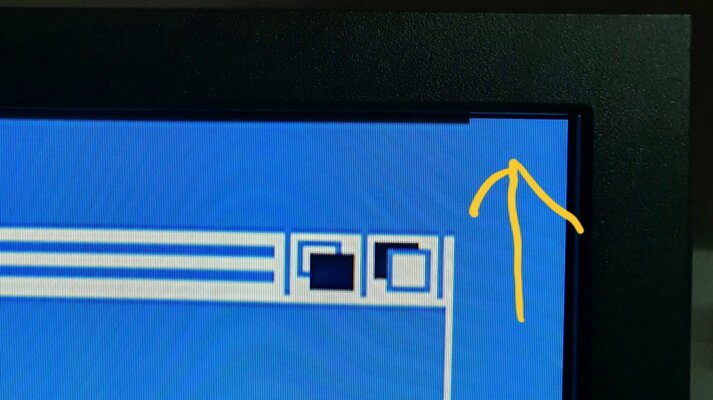
Adjusting the "H. Position" to the left to center the image, I get on the top right a black zone/stripe.
Adjusting the "V. Position" up to get that black zone to go away I get the black zone on the bottom right this time instead.
Is it normal too?
With a higher resolution, for instance in WB 3.1 using ACA500Plus, the image will center it self?
Thanks!
I'm using kickstart 1.2 @ WB 1.3
Adjusting the "H. Position" to the left to center the image, I get on the top right a black zone/stripe.
Adjusting the "V. Position" up to get that black zone to go away I get the black zone on the bottom right this time instead.
Is it normal too?
With a higher resolution, for instance in WB 3.1 using ACA500Plus, the image will center it self?
Thanks!
Last edited:

There shouldnt be any issues with picture on any amiga. Picture should be centered from the start, if not, maybe that A500 has wrongly set image position in workbench prefs?
There shouldnt be any issues with picture on any amiga. Picture should be centered from the start, if not, maybe that A500 has wrongly set image position in workbench prefs?
Hi!
I bought this cable from you along time ago but only yesterday I tested it on my A500 rev 5.
The horizontal position can be defined in wb 1.3??????
And I think that immediately in the hand boot logo, the image is allready off centered. Must test this later.
Thinking about this I think I have the same issue with a normal Amiga video to scart cable in my Philips crt monitor.
Can it be a hardware problem with my A500?
Last edited:
Never hear anyone had this problem. But if you have the same with scart on TV this looks like a A500 hardware problem.
You could also try to reset the benq to default setting if it helps.
You could also try to reset the benq to default setting if it helps.
There are a lot of reports on the web of Amigas (500/600/1200) with this issue ... image on the right side of the TV/LCD's even with the old Commodore CRT monitors.
examples:
http://eab.abime.net/showthread.php?t=67165
https://forum.amiga.org/index.php?topic=27391.0
etc...
I found that you have in your first post in this thread an example picture of my "issue" :
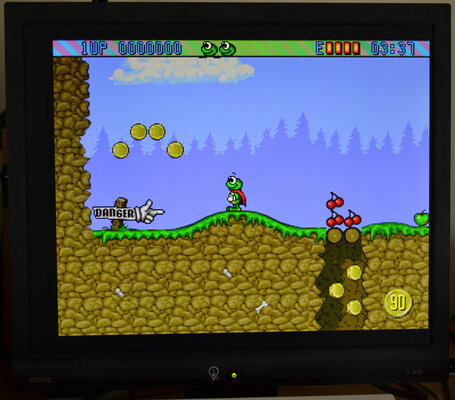
Mine BL912 looks like that when H-Position is on default!
Isn't this normal?
examples:
http://eab.abime.net/showthread.php?t=67165
https://forum.amiga.org/index.php?topic=27391.0
etc...
I found that you have in your first post in this thread an example picture of my "issue" :
Mine BL912 looks like that when H-Position is on default!
Isn't this normal?
Last edited:
This is normal. By using the H-Position you should be able to center it.
OK!
I'm glad to now it's not a defect of some sort.
The problem at least with the BL912 is when moving the H-Position to the left, on the top right corner becomes noticeable a black line/area.

- Status
- Not open for further replies.
Similar threads
- Replies
- 150
- Views
- 15K

- Replies
- 2K
- Views
- 282K
