
AmigaOS 3.2.2 Loadmodule problem

  • Thread starter Thread starter Amigaz
  • Start date Start date
  • Replies Replies 18
  • Views Views 1986

Amigaz

Active member
AmiBayer
Joined
Nov 6, 2009
Posts
163
Country
Sweden
Region
Stockholm
Hardware: CD32 with TF360 (68060) accelerator and kickrom 3.2. 32GB CF card hooked up to TF360 IDE and pfs2aio as FS
OS: AmigaOs 3.2

I have installed AmigaOS 3.2 and after that the general CPU libraries from the 3.2 install floppy, system boots fine with this setup

When I update to AmigaOS 3.2.2 I get LoadModule failed returncode 10 when booting
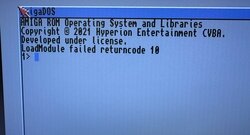
MESUAL3_t.jpg

I have noticed that the startup-sequence gets some stuff added when updating from 3.2 -> 3.2.2 that must be the root cause but I cannot understand the logic and would appreciate if I could get some help with what I should change, add or edit to successfully get my system up and running

3.2 startup-sequence
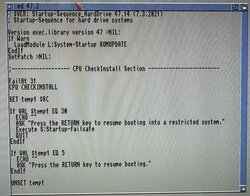
MESUAL4_t.jpg

3.2.2 startup-sequence, here the extra stuff added with the LoadModule commands must be the culprit. But what exactly?
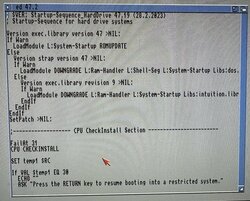
MESUAL2_t.jpg
 
Do you have the latest ehide.device file on the boot drive?

If not, try copying it over to DEVS: and add the following line to your startup-sequence before the Setpatch command:

C:Loadmodule >NIL: DEVS:ehide.device
 
Do you have the latest ehide.device file on the boot drive?

If not, try copying it over to DEVS: and add the following line to your startup-sequence before the Setpatch command:

C:Loadmodule >NIL: DEVS:ehide.device
I don't have it at all on my storage device.
Is it needed for the TF360?
 
After consulting with the TF oracle over on Exxforum, ehide.device is not required as the 530 utilises a standard IDE interface so you can safely ignore my previous post.

It could simply be a conflict or a bad install of OS3.2. I suggest you wipe the CF card and reinstall to see if the problem goes away or replicates itself.

Thomas over on EAB says the following:

Check the first section of S:Startup-Sequence. There are various LoadModule lines which list several modules explicitly.

When I looked there were these:

L:System-Startup
L:Ram-Handler
L:Shell-Seg
Libs:dos.library
Libs:gadtools.library
Libs:graphics.library
Libs:intuition.library

Make sure that they all exist.
Also double check the Loadmodule lines in the start-sequence, making sure any filenames are not truncated (cut-off). If they are, simply type them in properly then save and reboot.
 
Last edited:
After consulting with the TF oracle over on Exxforum, ehide.device is not required as the 530 utilises a standard IDE interface so you can safely ignore my previous post.

It could simply be a conflict or a bad install of OS3.2. I suggest you wipe the CF card and reinstall to see if the problem goes away or replicates itself.
You mean the TF360? It uses the standard scsi.device

I have already wiped the CF card several times and reinstalled for debugging purposes

I am going to double check what our good old guru Thomas suggests
 
Last edited:
All of these are non present in L and in Libs

1712352739708.png


Nothing is truncated
 
That's probably the reason why it's falling over during the boot process then . Copy the missing files from your install disks to the proper locations on the CF card and reboot.

<edit>

Did you also install both the 3.2.2 update and the 3.2.2.1 hotfix to your CF card after installing OS3.2?

When you installed OS3.2, did you select "Expert User" from the choices? When I first installed it as a normal user, it defaulted to installing A2000 modules, not A1200 - something everyone should be made aware of!
 
Last edited:
That's probably the reason why it's falling over during the boot process then . Copy the missing files from your install disks to the proper locations on the CF card and reboot.

<edit>

Did you also install both the 3.2.2 update and the 3.2.2.1 hotfix to your CF card after installing OS3.2?
I can add that this problem doesn't exist when I use the same CF card in WinUAE with an emulated HW config of an A1200, kickrom 3.2, 68060 CPU w FPU
 
Did you install the MMULibs ..? You need these if your CPU does not have it built in
 
Just reading this. I was under the impression 3.2 and above is not formally supported on the CD32? Due to the differences of the A1200. Or am I wrong here?
 
Just reading this. I was under the impression 3.2 and above is not formally supported on the CD32? Due to the differences of the A1200. Or am I wrong here?
The blurb says that it is available for Amiga 1000, 500, 600, 1200, 2000, 3000, 3000T, 4000, 4000T, CD32 and CDTV on CD-Rom.
 
Did you install the MMULibs ..? You need these if your CPU does not have it built in
Yes (?) thru the AmigaOS 3.2 install which I believe uses that package. The floppy is called "MMULibs"
I installed the non GVP, Phase5 and ACA CPU libs
 
Yes (?) thru the AmigaOS 3.2 install which I believe uses that package. The floppy is called "MMULibs"
I installed the non GVP, Phase5 and ACA CPU libs
I don’t see that being the problem, as the error occurs before the CPU Checkinstall part.

You need to remove the >NIL: at the end of the version lines to get a proper understanding what is the failure in what modules the Loadmodule can’t do.

I also assume you have the 3.2.2 physical ROMS installed on the CD32?
 
@Boing-ball - There are 3.2 ROM's in the CD32 which shouldn't be the root cause of the problem.

@Amigaz I've always selected "Other" from the list with my TF cards and not had any problems.
 
I don’t see that being the problem, as the error occurs before the CPU Checkinstall part.

You need to remove the >NIL: at the end of the version lines to get a proper understanding what is the failure in what modules the Loadmodule can’t do.

I also assume you have the 3.2.2 physical ROMS installed on the CD32?
Thanks.

I am going to remove those lines so I can get an output

I have a physical 3.2 ROM in this machine
 
Tried booting with the trace option from the early startup menu, seems like files are missing (??) Shouldn't they exist after I have installed AmigaOS 3.2?

🤔

IMG_20240406_102956.HEIC_compressed.JPEG
 
Type in at the 1> prompt the following pressing Enter after each line:

dir L:
dir Libs:

Match up the files from that LOADMODULE line to whats being displayed. That should clue you in on what's missing.

<addendum>

Are you just installing OS 3.2 then straight away installing OS 3.2.2? I usually install OS 3.2, then OS 3.2.1 update and finally install the OS 3.2.2 update.
 
Last edited:
Problem solved. I actually got a working disk image with AmigaOS 3.2.2.1 from a kind gentleman. He had ran it successfully in his CD32/TF360 machine. It had all the missing files in L and Libs. These files are on the AmigaOS 3.2 modules floppy so you can copy them over if you are missing them like I did.
 
Back
Top Bottom