
You are using an out of date browser. It may not display this or other websites correctly.
You should upgrade or use an alternative browser.
You should upgrade or use an alternative browser.
Amstrad / ZX Spectrum +3 Floppy Drive Hack.
- Thread starter Chinners
- Start date
- Replies 97
- Views 107850


SecondedIf you ever consider selling one of these (or making them for peeps) please let me know!

mmmm
Can't get this to work with an old Mitsumi 1.44 drive I have here.
Keeps telling me Drive is not ready & neither floppy drive responds...
Boot up screen tells me I have B: drive though...
Think I need to find another Floppy Drive to try it out...
TC
Can't get this to work with an old Mitsumi 1.44 drive I have here.
Keeps telling me Drive is not ready & neither floppy drive responds...
Boot up screen tells me I have B: drive though...
Think I need to find another Floppy Drive to try it out...
TC

It could be the cable your using, it needs to have only the two connectors on it. The one I'm using was made by cutting an old floppy cable that had enough connections for 4 disk drives.
3.5 connector --> 3.5 connector (remove) --> 5.25 connector --> (cut) cable twist --> 3.5 connector --> 5.25 connector.
This needs cut just before the cable twist and then remove the middle 3.5 connector.
Before cutting the cable I gave it a go as is and noticed that the plus 3 reported drive B was available but wouldn't respond properly. If both internal and external drives are non responsive it must be the cable.
3.5 connector --> 3.5 connector (remove) --> 5.25 connector --> (cut) cable twist --> 3.5 connector --> 5.25 connector.
This needs cut just before the cable twist and then remove the middle 3.5 connector.
Before cutting the cable I gave it a go as is and noticed that the plus 3 reported drive B was available but wouldn't respond properly. If both internal and external drives are non responsive it must be the cable.
Cheers for the tip...
I have already made a pin 1 - pin1 34 way cable with no twists...
Pin 1 on the +3 is from the RHS if looking from the front of the Speccy...
I have an older floppy I will try soon.
TC
I have already made a pin 1 - pin1 34 way cable with no twists...
Pin 1 on the +3 is from the RHS if looking from the front of the Speccy...
I have an older floppy I will try soon.
TC
Bloody Ext Floppy Pinout is numbered wrong way round in the manual  oh:
oh:
Flipped the cable over and all is now working perfectly..
SamDisk is well cool & very fast too...
Thanks for the tut Jasey
TC
oh:Flipped the cable over and all is now working perfectly..
SamDisk is well cool & very fast too...
Thanks for the tut Jasey
TC

Does anyone know what type of connector to get for the Amstrad/Spectrum end if you don't have any 5.25 floppy cables lying around ?
Would this work ?
http://au.mouser.com/ProductDetail/Kobiconn/164-0834-E/?qs=sGAEpiMZZMutB6RuyXJB1NbKoTYpZpybzxLIBKvFpOE%3d
Would this work ?
http://au.mouser.com/ProductDetail/Kobiconn/164-0834-E/?qs=sGAEpiMZZMutB6RuyXJB1NbKoTYpZpybzxLIBKvFpOE%3d
Last edited:
Does anyone know what type of connector to get for the Amstrad/Spectrum end if you don't have any 5.25 floppy cables lying around ?
Would this work ?
http://au.mouser.com/ProductDetail/Kobiconn/164-0834-E/?qs=sGAEpiMZZMutB6RuyXJB1NbKoTYpZpybzxLIBKvFpOE%3d
It looks like it, but you would need to connect it to the floppy cable yourself, which can be quite tricky, as it needs a fair bit of pressure. I find using a small g-clamp a good make-shift alternative, and slowly work from left to right, squeezing the back and attaching the wire.
As a side-note, I do have one I was going to put on the other bay, but decided against it due to the interest here. I will try get it listed when I can decide on a price, and get time but basically it is a cream metal case (7/10 condition) with a new (when installed) black facia drive, 2 switches and a nokia charger as psu. It works fine, but as my 6128 has an internal 3.5" drive, and my +3 collection has been reduced to 0, I don't really have a need for it. It was made "for me" so isn't as tidy as the first one I made.
Last edited:
Going to get some and give it a try then, have a couple of old floppy cases with dead drives that I'm planning to do this with and just got a cheap crimping tool from the other bay plus some round 34 core wire.

that looks awesome....if no one wants this amstrad pcw i am selling i might take a look at the floppy drive it has and use that for the +3. Will have to get another internal floppy though as the one i have in my main pc dont work at the moment its constantly on.
Is your cable plugged in upside down? That's exactly the symptoms of putting it in the wrong way.Will have to get another internal floppy though as the one i have in my main pc dont work at the moment its constantly on.

Update...
Update...
I have just remembered one small enhancement I have made to the design, which helps CP/M on the Amstrad recognise disk changes.
Pins 33 & 34 are shorted with a blob of solder to fake the "ready" signal. CP/M needs this ready signal to be broken then made again to recognise a disk change. A simple solution is to connect them with a "push-to-break" button instead of the solder blob, then Bob's your Uncle, CPM is happy again by pushing a button. This may also help with some multi-disk games (not that I can think of any
Update...
I have just remembered one small enhancement I have made to the design, which helps CP/M on the Amstrad recognise disk changes.
Pins 33 & 34 are shorted with a blob of solder to fake the "ready" signal. CP/M needs this ready signal to be broken then made again to recognise a disk change. A simple solution is to connect them with a "push-to-break" button instead of the solder blob, then Bob's your Uncle, CPM is happy again by pushing a button. This may also help with some multi-disk games (not that I can think of any


Excellent job though mate, told you you could do it
Fantastic
Fantastic
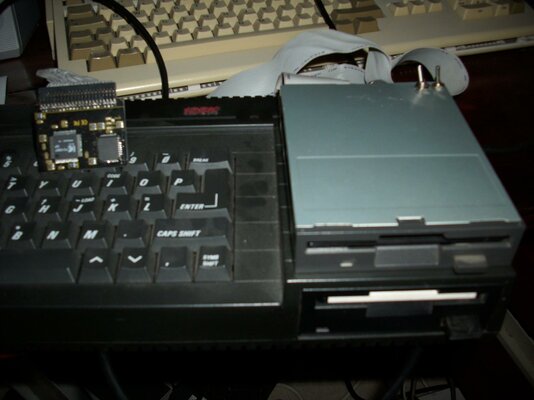
My minimalist version/emperors new clothes version
My minimalist version/emperors new clothes version
HI Heres my emperors new clothes version , usual switches on the back for disk side or drive a/b . Next attempt will be in a nice case when I can find one
Thanks Chinners it works a treat
ps the dangling sd card reader is attached to Zetros 8bit ide adaptor which also works a treat
My minimalist version/emperors new clothes version
HI Heres my emperors new clothes version , usual switches on the back for disk side or drive a/b . Next attempt will be in a nice case when I can find one
Thanks Chinners it works a treat
ps the dangling sd card reader is attached to Zetros 8bit ide adaptor which also works a treat
Attachments
Last edited:

Hi Morcar,
Drive select a/b is pin 12 on the floppy connector to ground on pin 13 directly below, all the odd pins are grounds. Is shown on the 1st page but ground was not obvious to begin with on the description.
Hope that helps
Drive select a/b is pin 12 on the floppy connector to ground on pin 13 directly below, all the odd pins are grounds. Is shown on the 1st page but ground was not obvious to begin with on the description.
Hope that helps
Similar threads

- Locked
- Replies
- 3
- Views
- 8K


- Locked
- Replies
- 1
- Views
- 925
- Locked
- Replies
- 16
- Views
- 3K

