Draco Casablanca - Using it as a general purpose Amiga

  • Thread starter Thread starter TheRogue
  • Start date Start date
  • Replies Replies 69
  • Views Views 25951
It looks like there are two pcb's.

The Centronics 50 goes into the first one, then there seem to be pins between'em. And the 50 pin ribbon cable goes from the second pcb to the drive.

That accounts for data signals.

Now there are the four power leads sticking out of the molex. They seem fixed to the box somehow, could you reverse the angle 180 degrees, so we can see it from the other side?

Also, if you'd be so kind, flip the thing over on it's back so that we can see what it looks like underneath. It looks like it should be simple enough to take apart.
 
Ok, had a hard time removing the bottom lid, real tight fit! But this is how it looks underneath... Now that i've come this far, i might as well take it out of the tray. But it still remains a surprise, how is the hard disk's power supplied through the tray socket?:huh:

CASSIEg.jpg
 
That doesn't look like a true SCSI. It looks more like my SCSI/IDE drive. See my earlier piccys - the drive on the right in both pictures.

The power for either of my drives must go through the SCSI connector as there are no other seperate power feeds to the tray.

Dave G :cool:
 
Just for the connector: it is a SCSI 68-pin (wide SCSI-2) drive.
 
^^^^^^

& as I said earlier, SCSI drives do not take power from Centronics connectors. Obviously, the Draco system went outside the envelope. :thumbsdown:

I dare say you could pull the Hard drive & use it on any other SCSI system with full success. Just not on that Centronics snatch plate as it is.

Kin
 
For the cable/connector: I bet they made a custom SCSI cable, nothing more.
 
I have seen MANY an external SCSI drive tray just like that. They just put some of the duplicate signals onto fewer pins (GND and so on) to make enough space on the centronics plug for the power signals. It's a standard external SCSI drive tray if I've ever seen one. It plugs into a drive tray that contains a female centronics port, and then the other side of the port has a standard 50 pin SCSI connector and a 4-pin power plug. I've seen them for IDE and SCSI and they all look similar. I'll check mine and tell you which pins have been used for what voltages if you want. I have 2 drives in trays for the Cassie I can check.
 
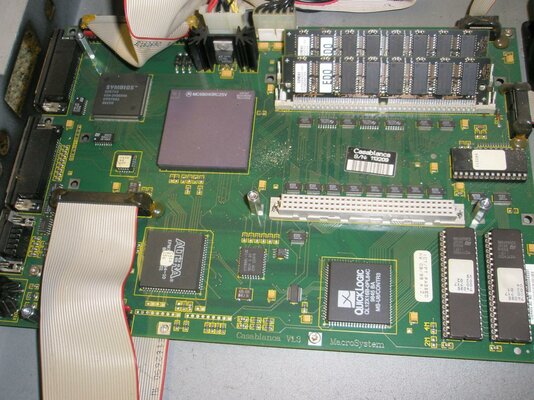
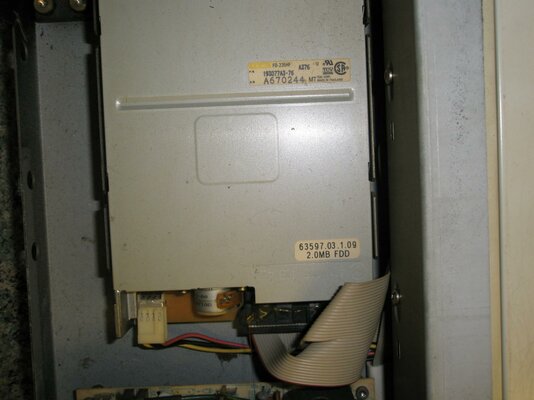
Several more pictures of my semi naked Casablanca :thumbsup:

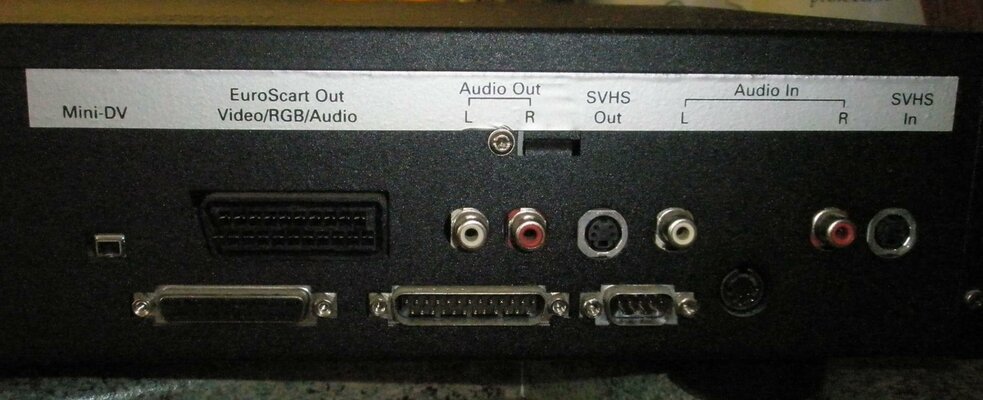
Rear panel connections are :- Euroscart, Audio out, Audio in, SVideo in, Svideo out, Firewire, Trackball connector, SCSI port, Serial port and finally keyboard connector.

The front panel hides a set of Audio in connectors and Svideo in.

Dave G :cool:
 

Attachments

  • P1010008 (2).jpg
    P1010008 (2).jpg
    204.3 KB · Views: 21
  • P1010003 (2).jpg
    P1010003 (2).jpg
    173 KB · Views: 15
  • P1010006 (2).jpg
    P1010006 (2).jpg
    191.6 KB · Views: 13
Last edited:
There's these guys who have built a "special" AOS 3.9 version for the Draco on a CD. In order for you and me to be able to purchase the CD, we have to prove that we are legal owners of the actual WB 3.9 and the Cybergrafx 4! Maybe it's insane, maybe not. All i can stress is that this is valid now, not some years ago! I personally find it insane, due to the fact that a Draco owner doesn't necessarily have a hold of the aforementioned software, since the Draco never came with the 3.9 nor the CGfx 4 package... If that was the case, we wouldn't need the "special" CD:huh:

And being a Draco owner, doesn't neccesarily mean you're an Amiga owner, does it? However, i have already purchased the 3.9 (Amiga version) and am planning to get the CGx 4 too, so i can then prove i got them, and pay 50 E for the Draco version..
Hope this covers the case!

This almost sounds like a makeshift back of the classroom project?

or is it an actual legit product from a company?

Nor does that matter if you get what you want in the end... but 50 euro? is it just me or does that sound expensive? and hellsteeth, I never complain about the amount of anything generally :lol:

I so happen to have 2 x Draco as you picked up in my first post in this thread and I own a copy of the 3.9 CD and the CGx CD... Did you go through with your purchase of this 'special' Draco CDRom?

In the next few weeks I'll be taking a closer look at my Dracos... and even open up the other one sitting in a box for the last 5 years... :wooha: :roll:

Thanks for any info
 
@Slayer: er, no... It was only yesterday i got beat in an evilbay auction for the CGX CD! But i ain't in a hurry. Finnances are going crap, and this will take some time :-( Dunno if this is all legit or not, but it's the only ready-made OS3.9 solution for a Draco that i know of. My understanding is that someone has done all the study and came up with a way to "adapt" 3.9 to the Draco just like Macrosystem did with 3.1 Now, who this is, asking for proof-of-purchase on these two items, and why, beats me!
As it is now, i can't simply spend 50 E on the whatchamacallit for the time being. Got other projects to complete, and they do require some big stash... :)
 
@Slayer: er, no... It was only yesterday i got beat in an evilbay auction for the CGX CD! But i ain't in a hurry. Finnances are going crap, and this will take some time :-( Dunno if this is all legit or not, but it's the only ready-made OS3.9 solution for a Draco that i know of. My understanding is that someone has done all the study and came up with a way to "adapt" 3.9 to the Draco just like Macrosystem did with 3.1 Now, who this is, asking for proof-of-purchase on these two items, and why, beats me!
As it is now, i can't simply spend 50 E on the whatchamacallit for the time being. Got other projects to complete, and they do require some big stash... :)

oic :unsure:

now, I know it's your circus :wooha: and you're the ringmaster :nod: but are you able to PM the details of this contact/group so I can look at acquiring this adapted 3.9 CDRom in the near future? :whistle: :cool:
 
It's been a long time.. Today i've been trying to connect the Casablanca hard disk to the Draco. Without success. It has been giving me a hard time to connect, trying every possible configuration on the jumpers, with no results!
You can see the tags of the disk here: http://i298.photobucket.com/albums/mm242/salax54/QUANTUME.jpg
It's a 68-pin SCSI Atlas II Quantum drive.
Has a 12-pin socket between the Molex power jack, and the SCSI port:
http://i298.photobucket.com/albums/mm242/salax54/QUANTUMC.jpg
And up front, a 32-pin socket for configuring the jumpers:
http://i298.photobucket.com/albums/mm242/salax54/QUANTUMD.jpg
Plus, two pins next to that for Termination Enabling.
The original configuration is exactly as shown in the pics, with two jumpers in front, and only the termination was off.
I have tried either way, (TE on/off), hooked it using an external drive case:
http://i298.photobucket.com/albums/mm242/salax54/QUANTUMA.jpg
And also internally:
http://i298.photobucket.com/albums/mm242/salax54/QUANTUMB.jpg
I'm not trying to boot from that disc. The Draco has its own Workbench.
All i'm trying to do is make the OS see the contents. It's just that no matter how i connect it, the machine won't boot.
Ideas anyone?
 
Old thread but new Question

Old thread but new Question

Obviously you can't just install Workbench on a Cassie, but I think the SCSI/WinUAE route has some potential. Once I get home with my Cassie in the morning, I am going to crack it open, add the SCSI drive to my PC's SCSI controller, fire it up and load up WinUAE. I'm not going to boot directly from the Cassie's HD, but I am going to try to mod the startup sequence, adding "LoadWB >NIL:" and adding the LoadWB file to the C directory if necessary.

Hopefully WinUAE will see the Cassie's HD, and I can read the HD. I haven't seen where anyone has even attempted to do that yet.

Also could it be that part of the Macrosystem made 2nd ROM is Loading Workbench but disabling its windowing function somehow? Hopefully we'll find out tomorrow.

The worst thing for me that could happen is that it doesn't work and I have to use it as a Standalone editor, and continue to use a PC with Amikit Amiga emulation. At least I could still get rid of the Amiga 2500 Toaster system I have now, as the Cassie would do video editing worlds better than it would. And I hate to say it, but objectively looking at the future, I don't think I'd be able to afford to get an Amiga up to even the same graphical capability as a WinUAE equipped PC, much less any of the speed and flexibility.

I've faced up to the truth. And that is, the Casablanca is my last hope for a high powered Amiga ANYTHING hardware wise. Its gonna be Something WinUAE Powered with as much compatibility as possible from now on. :(
 
Progress So Far....

Progress So Far....

I got the Cassie this morning and found that the HD was very easily removable from hit hotswap tray(removed the 6 screws holding it in and it came out pretty easily.) Installed it in my WinUAE machine and added it as a drive in WinUAE. Fired it up and found that it didn't show up in Workbench or Dopus4 as it did not have a Device Name. Trying to figure out how to manually mount it now.
 
Has anyone succesfully mounted a Casablanca floppy on an Amiga yet?
I remember fooling around with it years ago and getting a name up on Workbench but I can't remember what mountlist I used...
 
The Casablanca, I believe, for some reason, uses the MMU (memory management unit) features of the CPU, but *not* the FPU. Strange. One would think the FPU would come in handy for rendering...

Cassie's can also be upgraded in memory and CPU which most owners aren't aware of.. You can go 68060 from 040, double the RAM, etc..
 
Just tried to mount the casablanca system HD on Winuae (on amiga system), this does not work, even do not show RDB on the HDs list...
Has someone successfully mount the HD on an amiga,though I doubt it can be done....
I would be interested on how to mount the floppy install disk too...
 
Big thanks to toni wilen...

http://www.winuae.net/files/b/winuae.zip

It's now possible with the above beta to mount a Casablanca classic hard disk on winuae, this open the possibility to browse/replace or add files on the casablanca system, maybe install an other os. :thumbsup:

By studying the casablanca roms, the casablanca could do a bit more than editing movie..
 
Last edited:
Thanks for the update! But, would it simply be ok to boot into a Casablanca environment? Or just edit the disks' contents? I fear that booting would be difficult, due to the protection system...
 
Back
Top Bottom