
GBA1000 rev4 Build Log

o.t.
now i repair the third a500 plus, removed gary socket and U12, tomorrow replace and test

I have removed ALL the custom chip sockets and the CPU, ROM sockets too. Pressing all the chips in didn't work (Still Black screen). You see I plan on using this 500+ as my GBA-1000 replacement (With a ACA 500 and a ACA 1233 fitted, and that nice plastic enclosure too) ..

Oh I did find one pad under the resister network (right next to the Gary socket) badly corroded and one under the Paula socket too..

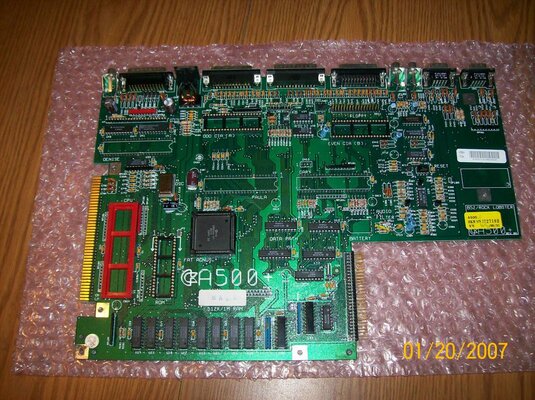
Here's a pic of my GBA-1000 replacement so far, as I waiting for the 48 pin sockets to arrive and the caps too, so I can finish of the recapping (Hopefully it'll boot up again after a really long sleep)..... One thing I haven't looked at is the Angus socket...
 

Attachments
  • 002.jpg
    002.jpg
    212.5 KB · Views: 7
Last edited:
Ok will do thanks..

I have just checked u12 and looks fine to me. Maybe I should remove it any way, as I do have spares, an I can solder a socket in there eh??
 
Last edited:
I tried to power my board on for the first time.... And the screen is black :-(. Sync is working, but nothing else. All the noteworthy chips get warm, except Gary.
 
Hi

I'm just about to start out on my GBA1000 build and have a number of bits ready to go. I have the TSOP already soldered and the components from the group buy (thanks Kipper :thumbsup:) and I've stripped down a donor A500+ that I tried to save in vain a few years back.

I have gone back through this thread and have been trying to locate a mouser project to source remaining components and I have found the GBA1000osku project link (https://uk.mouser.com/ProjectManager/ProjectDetail.aspx?AccessID=9174CFD8CC) but this seems to be a v1 list. There is also a GBA1000tkm project referenced but I can't seem to find the Url.

Is there a recommended Mouser project that someone could supply the mouser project Url for?

Thanks for your help and advice.
 
Last edited:
Hi
Having delayed my build by a year for personal reasons I am now ready to get started.
Can anybody supply me with ready programmed the GAL (PAL?) chips?

thanks
 
Last edited:
Hi squareeyes,

I am in a similar position and have delayed building my GBA1000 until now :).

I believe I've just purchased the last few components off of the other bay according to the inventory list and following a mouser purchase recently (thanks for the BOM details hese :thumbsup:). So should be good to start soldering soon.

Have you found a way to programme the lsi1024 chip yet? I can't seem to find anything on how to do this.
 
Hi

Would anyone who has already programmed their isp lsi1024 chip be willing to programme mine?

Many thanks
 
Yikes, mine came fitted and pre-programmed, I suspect you can program it once it is soldered in (vague memory) but please do not take my word for it as I have no details as to how.
 
GBA1000 rev4 Build Log

Squareeyes are you sure you're not thinking of the flash rom?
The LSI1024 needs to be programmed beforehand, the board won't boot without it.


Sent from my iPhone using Tapatalk
 
Last edited:
squareeyes said:
Yikes, mine came fitted and pre-programmed, I suspect you can program it once it is soldered in (vague memory) but please do not take my word for it as I have no details as to how.

Thanks squareeyes - did you buy a board assembled?

stevebootes said:
This thread might help you program it, or at least find someone who knows how to:
https://www.amibay.com/showthread.php...service-needed

Cheers Steve, looks like Britlord has bought the cable and built a test harness - I can see the cable on the other bay for about £20gbp. Not sure about building a programming harness :unsure:
 
Last edited:
My board came with the Flash pre-soldered, not the LSi, apologies, my mistake.
It's a pretty good sign the board came from Kipper originally but I bought it off a seller on AmiBay.
I need to do another inventory to see what else I need, mostly 'board feed' as I said before but I am holding off starting soldering until I have it all.
I believe it is easier to do the surface mount stuff first.
 
Back
Top Bottom