GoldenGate 486SLC problem (error 90)

  • Thread starter Thread starter Templar
  • Start date Start date
  • Replies Replies 81
  • Views Views 10520
Is there a source for the English-version of the manual for the GG?
 
Is there a source for the English-version of the manual for the GG?
I think some one has a done a copy of it but I need to find the thread, problem is the manual is not small
 
Try contacting @Dale423 he mentions having the English manual on pdf on this thread.

----Update----

It's actually available to download on this thread 😆
 
Last edited:
I actually asked because a while back I couldn't find an English copy and the German one was really poorly copied. I went ahead and spent a day hand translating and reformatting the GG manual into English with the supplemental files and some info from various sources and formatted it into a more legible PDF. It's also got the Monitor Master booklet.
 

Attachments

Last edited:
I was lucky enough to find an original Manual on here but some times it's better on a PDF.
Your creation looks good @FastRobPlus
 
I'm pretty bummed, but the patched library didn't work for me. At least not in one of my A2000's.
With the original library I get the error 90 (Coldboot) and strange enough with the patched library I get error 51 (can't find goldengate).

Damn this card, back in the closet for another month or two! I'll just settle for my Commodore bridgeboards, they never fail me. 😅
 
This is a shame :(

Amiga hardware database mentions this:
  • in A2000 an adapter is required under the 68000 (a simple capacitor is connected between two pins)
Do you have this adapter? Do you have a 3000 or 4000 to try the board in?
 
I do own the adapter but it's only needed in the A2000 if you have the original 68000 CPU in place. I'm currently using an accelerator in the CPU slot that requires that the 68k socket is empty so I didn't use it.

This got me thinking though.. I do have a "spare" GVP A3001 030 accelerator that goes in the CPU slot and requires that the original 68k CPU is still in it's socket. I guess I could try with the GVP and the CPU adapter but that basically means taking the whole machine apart again. I'll have to sleep on it first. :D

I do have a towerized A4000 which currently has an A2386SX installed and I'd hate to tear that apart too just to test the GG again. I think I'll have to sleep on that too before making any decisions. :rolleyes:
 
Alright call me crazy, stubborn or persistent, but I just couldn't let this go. I barely slept last night thinking about different ways to get the GoldenGate working and today I ended up trying the following:

Pulled out one of my older A2000's which was pretty much a blank canvas. Just the case, motherboard, PSU and the GVP3001 accelerator. It has 8Mb of Z2 RAM so jumpered that to 4Mb. Then added a 4Mb SupraRAM jumpered to 2Mb which gave me a total of 6Mb Z2 RAM.

Then I added a Matze "IDE-LAN-Clockport" card for IDE hard drive, except I used a basic compact flash IDE adapter and a Sandisk 2Gb card.

Next up the GoldeGate to a free bridgeboard slot and then the hardware side of things was done. Now to a fresh install of Workbench, which was quick and easy using WinUAE and ADF disks.

So the changes I've made so far are:

A2000 motherboard rev6 --> rev4.1
Kickstart 3.2 --> 3.1
OS3.2 --> 3.1 (clean install)
DH0 file system, PFS --> FFS
Added the adapter between the 68k CPU and the motherboard socket

I then proceeded installing the patched GoldenGate library and drivers and on with the testing! "CPU nocache" in the shell and of we go, or so at least I was hoping. :) But alas, no dice... "error 51", can't find yadda yadda gate.

Now this is where the crazy and stubborn part comes in: I kept at it and as a last effort I thought about using the original GoldenGate library. Replaced the patched one with the original one, turned off the caches and:

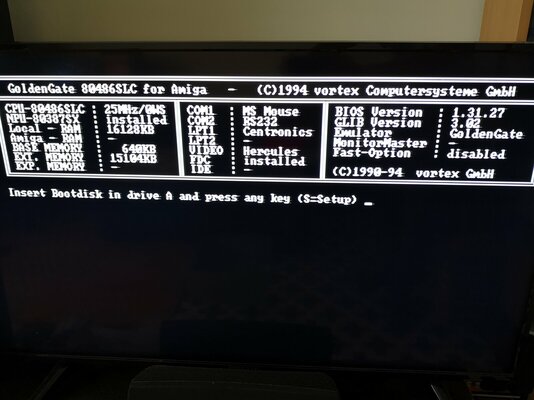
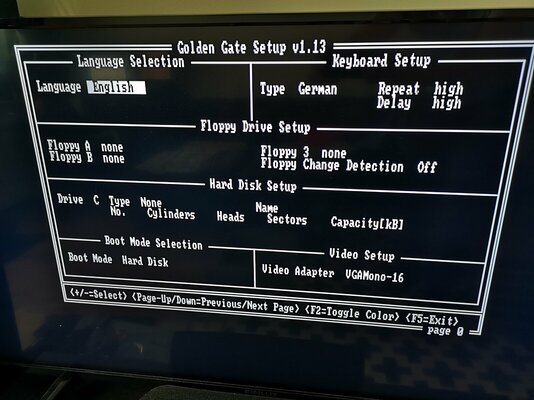
IT WORKED! :) The GoldenGate buzzed and booted very nicely up to the bios. Now I've never even gotten to the settings page (by pressing S) before, but now I do! Consistently! I kept rebooting the Amiga and starting digger thinking this was just a fluke but no, the damn thing seems to work with this setup. Digger even starts without disabling the caches, it does it automatically!

I'm not sure what change made the difference but this opens a whole new world for me. So many ISA cards to test, DOS games to try and so on. :)

One last question for you experts though: can the empty "option rom" slot on the GG card be used in any way? I was immediately thinking if it was possible to put an XT-IDE boot rom in it?
 

Attachments

  • IMG_20221024_161523.jpg
    IMG_20221024_161523.jpg
    197 KB · Views: 19
  • IMG_20221024_165056.jpg
    IMG_20221024_165056.jpg
    237.5 KB · Views: 18
This is excellent news! No idea about the option rom, but I’d be interested to know if you manage to get it working
 
Great job @Rontti! I'm also a big fan of GG486 and have been curious for years about whether the option ROM is functional and would work with XT-IDE (to drop dependency on OnTrack DM for larger HDD and free some precious conventional memory). Keep us posted if you try :-)
 
Thanks! :) I almost gave up but I'm glad I didn't.

I actually found an XT-IDE rom I had burned and tried it on the option rom slot, but it didn't work. I'm not sure which rom version that was so I need to burn another one and keep testing. This will need further investigation and possibly some trial and error approach, but I'm going to try. I'll keep you posted if I succeed with this!
 
I've used a SD to IDE adaptor on mine just connected to the GG IDE works well, have Win3.11 running, SoundBlaster and ISA Video
 
Hello, I read that you replaced the motherboard from a 6.0 to a 4.1.
Are the Zorro buffer chips the same on both boards? (U600-U605)
On the 4.1 board 4x LS245 and 2 ALS245?
 
I can't say for the rev6 board as that A2000 chassis is currently closed and boxed up. But yes, on the rev4.1 the chips are:
U600 = SN74LS245N
U601 = SN74LS245N
U602 = SN74ALS245AN
U603 = SN74LS245N
U604 = SN74LS245N
U605 = SN74ALS245AN
 
Last edited:
If the chips are different on the Rev.6 board, that could be the cause of your problems.
 
Back
Top Bottom