
Solution for external Flicker fixer?

  • Thread starter Thread starter Harrison
  • Start date Start date
  • Replies Replies 814
  • Views Views 312618
@DancingManson

dont use both power options just try the external one
have you pressed the downbutton to resync

@roy
do you or anyone know if i can just hook up the 5 volt's needed to my towers supply: fine mate
im thinking of making a custom box for my 1200D and just plug the whole thing in the back,does this sound good? mines in a small plastic box
from what i can see it has a passive heatsink,does this unit give off much by way of heat? not much heat at all mate
 
If you are getting a scrambled display, disconnect from the Amiga and try again using a 5v power supply.

Should the same scrambled graphics appear on the monitor screen, then your power supply is at fault and you should seek out a supply that is more compatible.

As per my previous post - 5 volts @ 2 Amperes (Amps) is the recommended power input. If you are unable to find such a power supply, PM me and I will point you in the right direction.
 
I'm trying to get GBS working with my A600 and the picture quality is horrible. I've tried with external PSU (5V/1000ma, hope it's enough) as well as getting 5V from video socket but all I get is no-good picture. e.g. In the insert diskette screen the purple background is very restless. I'm not sure what are the right terms to describe it but there's lot of waves and distortion. Any similar experiences? The cable I'm using is made with johnim's instructions.


if ive read your post right,its not a good idea to take two 5 volt supplys from two different places at the same time(this can course interference),going by a previus post its 2 amps on the 5 volt line is a minimum(a 1000ma is 1 amp)thas can be the course of a wobbley picture(if thats what your getting)another is a bad screen cable or ground.

i dont know as of yet i dont have one untill after xmas.


if im wrong here can someone please correct me.

---------- Post added at 19:45 ---------- Previous post was at 19:40 ----------

@DancingManson

dont use both power options just try the external one
have you pressed the downbutton to resync

@roy
do you or anyone know if i can just hook up the 5 volt's needed to my towers supply: fine mate
im thinking of making a custom box for my 1200D and just plug the whole thing in the back,does this sound good? mines in a small plastic box
from what i can see it has a passive heatsink,does this unit give off much by way of heat? not much heat at all mate


cheers johnim,looks like im good to go.


what i think ill do is get two, one for the 1200D and another for the 1200T and wire them in a slightly different way for both.(ive already found a 5volt 2amp supply for the desktop)
 
what i think ill do is get two, one for the 1200D and another for the 1200T and wire them in a slightly different way for both
:thumbsup:

thats what i have got 2
1s in a box
1s not wired up yet but will put in my tower
 
if ive read your post right,its not a good idea to take two 5 volt supplys from two different places at the same time(this can course interference),going by a previus post its 2 amps on the 5 volt line is a minimum(a 1000ma is 1 amp)thas can be the course of a wobbley picture(if thats what your getting)another is a bad screen cable or ground.

dont use both power options just try the external one
have you pressed the downbutton to resync

What I tried to say was I tested both but not at the same time :roll: I understood the 2A mentioned in the specifications is a bit overestimated so I decided to go with 1A PSU. Not the first bad decision I've made :) Also I didn't try that resync thing. Better check that first and then go and buy more powerful PSU.

edit. no luck with resync
 
Last edited:
I have the exact same problem (no signal, green screen, etc.), and I noticed something. The BM1084 voltage regulator IC, which is supposed to create 3.3V has it's 2nd pin (Vout) chopped off. Maybe this causes the problems. I took a picture it, is this normal? :blink: Others with working units also have this pin missing?
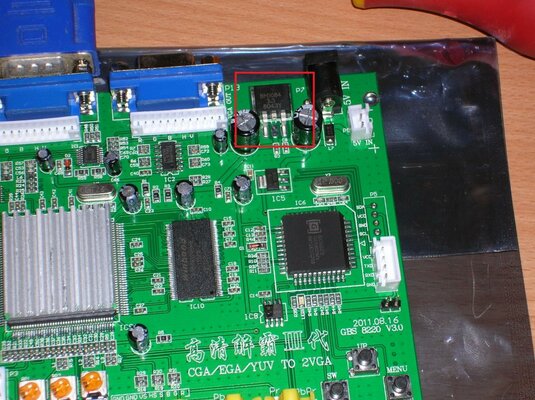
 

Attachments

  • DSCN4589_.jpg
    DSCN4589_.jpg
    208.1 KB · Views: 2
I have the exact same problem (no signal, green screen, etc.), and I noticed something. The BM1084 voltage regulator IC, which is supposed to create 3.3V has it's 2nd pin (Vout) chopped off. Maybe this causes the problems. I took a picture it, is this normal? :blink: Others with working units also have this pin missing?


yes this is normal for that regulator, if you look at the ic oppasite from the two legs that are soldered you will see the other end of it is soldered down (its a small tab on the other side that you cant see in the photo)the tab is Vout.
 
Aah, thanks! :lol: Then I guess the 5V isn't stable enough. I have to find another power supply...

Edit: I tried powering the unit from my PC's PSU which supplies 5.064V. That should be close enough, but the screen still cycles between green, no signal, and some garbage.
 
Last edited:
Oh boy, I feel so stupid. I forgot that the board requires composite sync for 15KHz and 24KHz inputs :Doh: With composite sync it works perfectly, although the picture is a bit noisy. It's probably because of the nasty spliced cable I built :lol:
There is a slight problem however. When a part of the picture changes, it becomes slightly blurry and shifted upwards. It's only visible for a fraction of a second, but when I move the mouse cursor it's noticeable. It's more pronounced in the interlaced modes. Unfortunately I can't make a video of it. My crappy camera only records low-res low framerate videos :dry: Have any of you noticed anything similar?
 
Aah, thanks! :lol: Then I guess the 5V isn't stable enough. I have to find another power supply...

Edit: I tried powering the unit from my PC's PSU which supplies 5.064V. That should be close enough, but the screen still cycles between green, no signal, and some garbage.

Mine has exactly that characteristic, maybe its the power source then?
I plugged in a 5v 2.5A external one, do you think thats wrong?
 
Is there any way to save the selected resolution on GBS-8220? Every time I turn it on it returns to the default resolution. :dry:
 
Well, what do you know, it did save the selected resolution now. I wonder why it didn't work yesterday :blink:
I made a shorter cable, got rid of the split, and the picture is a lot clearer now. But there's still some "CGA snow"-like noise when the screen changes.
 
I wonder if some sheilding is needed and if the cable length makes much difference how long is your cable mate mines about 6 inches

Sent from my GT-I9100 using Tapatalk
 
I used the cable I got with the adapter, the one with the 8 pin header. I soldered it directly to the DB23 connector, so that shouldn't be the problem. And there's no noise when the picture isn't moving.
 
Last edited:
Probably not, because these adapters have separate horizontal and vertical sync for VGA, but the GBS-8220 requires composite sync for 15KHz modes.
 
Back
Top Bottom