Tapuino, the $20 C64 Tape Emulator

  • Thread starter Thread starter sweetlilmre
  • Start date Start date
  • Replies Replies 1059
  • Views Views 299319
Ok, so on the main board, we have an 8-pin female header. On the mux board we have three 8-pin female headers.

To the header marked "BUS -> Datasette" on the mux board, we connect a male Datassette connector, like the ones mentioned in post 154 or post 272. This will allow us to connect a Datassette recorder to the Tapuino.

To the header marked "BUS -> C64" on the mux board, we connect a female Datassette connector. This will allow us to hook up the Tapuino to a C64.

To the header marked "BUS -> Tapuino" on the mux board, we connect dupont cables or a ribbon cable, whose other end will be connected to the 8-pin header on the main board.

Complete bill of materials for the mux board:
- piece of strip board (size approx. 16 x 24 holes)
- three 8-pin female headers
- 12 pieces of jumper cable
- 1 x 74HC4052

Can you spot any errors in the above? ;)
 
Ok, so on the main board, we have an 8-pin female header. On the mux board we have three 8-pin female headers.

To the header marked "BUS -> Datasette" on the mux board, we connect a male Datassette connector, like the ones mentioned in post 154 or post 272. This will allow us to connect a Datassette recorder to the Tapuino.

To the header marked "BUS -> C64" on the mux board, we connect a female Datassette connector. This will allow us to hook up the Tapuino to a C64.

To the header marked "BUS -> Tapuino" on the mux board, we connect dupont cables or a ribbon cable, whose other end will be connected to the 8-pin header on the main board.

Complete bill of materials for the mux board:
- piece of strip board (size approx. 16 x 24 holes)
- three 8-pin female headers
- 12 pieces of jumper cable
- 1 x 74HC4052

Can you spot any errors in the above? ;)

That looks spot on, in fact I might just crib those instructions for a blog post ;-)
I will be interesting to see another strip board build.
Additionally:

Only the BUS->Tapuino connection has the Control 1 & 2 lines wired in

Here are the back and front stip board for ease of reference again.

View attachment 76894View attachment 76965

Link to a pic of the real one: https://goo.gl/photos/YHm4kW1BdEj27cLG7
 
Dears Forumers,


I have built the tapuino (thanks Sweetlilmre and Spcbm)! But i have a problem with the recordings : the games runs but after few seconds blocking.

It's strange, because the tape recorders (i have a datassette and a compatible tape recorder) directly connect to 64 loads same games without problems (then i don't have problem of azimuth, cleaning, etc.)

The sd card is fast (HC)
The invert is "1" when record and "0" when play
The cables of the recorders are originals....

What's the problem?

Best regards

Giulio
 
Thank you for Tapuino. I build it with your instructions. I have C64, C128 and C16 and it work perfect. Can you add support for ZX Spectrum and TI99/4a?
 
Hi,
Would it be possible to in some way plot the pulses being read from or written to the memory card (in real-time)? That is, something similar to what the Tiny C2N Monitor does here:
https://www.youtube.com/watch?v=Ba5iuf9HwM8&feature=youtu.be&t=56
...but the display wouldn't have to be so large and the graph wouldn't have to look so pretty, and the file name extraction feature could be left out as well.
Would this require major hardware changes or could it be achieved just by programming?
 
Hi,
Would it be possible to in some way plot the pulses being read from or written to the memory card (in real-time)? That is, something similar to what the Tiny C2N Monitor does here:
https://www.youtube.com/watch?v=Ba5iuf9HwM8&feature=youtu.be&t=56
...but the display wouldn't have to be so large and the graph wouldn't have to look so pretty, and the file name extraction feature could be left out as well.
Would this require major hardware changes or could it be achieved just by programming?

It can be done, though most Tapuino's have text displays that would require quite some work and program space to show graphics. It should be easier on OLED equipped devices. But I think this would negatively affect the read / write process, so it would have to be done separately, that is, you choose between read / write or just plotting. Keep in mind that the recording process isn't extremely accurate currently.
Anyway I must admit a feature like this would be very useful for aligning Datassettes without a working C64 setup.
 
Hi!

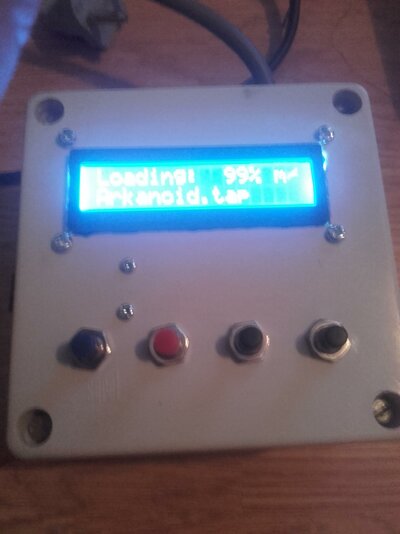
Finally built my own tapuino, used an old relay box it was perfect for the tapunio :-D

Also skipped the button board completely and used screw fitted buttons, iam very happy with the end result! Attach a pretty crappy pic of the end result!

Everyone involved in this development, awesome work!!

i have some questions as well, first can some one explane to me what the resistor r1`s purpose and function in the circuit?

Is there any way to dim the backlight of the 1602 lcd ic2, can i just replace the jumper for on/off with a resistor? anyone tried? What resistor did you use!

Well keep the good work up!

Cheers! Dan
 

Attachments

  • 20160619_135048.jpg
    20160619_135048.jpg
    184.6 KB · Views: 4
Hi!


Is there any way to dim the backlight of the 1602 lcd ic2, can i just replace the jumper for on/off with a resistor? anyone tried? What resistor did you use!


Cheers! Dan


Hi Dan

Nice build you've put together there.

You're on the right track looking at the on/off jumper if you are looking for a no fuss way of dimming your LCD backlight. There is no perfect answer to what value resistor you should try as we're not going to know the level of brightness you're looking for.


My suggestion would be to just experiment. Assuming you have a number of resistors at your disposal perhaps try starting with a 1K (this is potentially very dim but gives you a starting point). If this is too bright or dim grab the next value up or down that you may have.

Alternatively as you have this nice enclosure built up with the screw in buttons, a POT would look the part in your build and would allow you to dial in the brightness you desire in different lighting conditions.
 
That is a fantastic write up! What a beautiful build and case, I'm going to laser cut one for my build. Awesome work! ????

Thanks
-(e)
 
Nice assembly!!! and thanks for the Spanish translation I will try :thumbsup:
 
Dears Forumers,


I have built the tapuino (thanks Sweetlilmre and Spcbm)! But i have a problem with the recordings : the games runs but after few seconds blocking.

It's strange, because the tape recorders (i have a datassette and a compatible tape recorder) directly connect to 64 loads same games without problems (then i don't have problem of azimuth, cleaning, etc.)

The sd card is fast (HC)
The invert is "1" when record and "0" when play
The cables of the recorders are originals....

What's the problem?

Best regards

Giulio


anche io ho questro problema .
qualcuno puoi aiutare me?
grazie
 
I'm planning to build my own tapuino, so I went looking for schematics and pcb layouts. From reading here, the latest revision is the 1.72 but the latest layouts I can find are for the 1.71. Is 1.72 available anywhere?

Thanks!
 
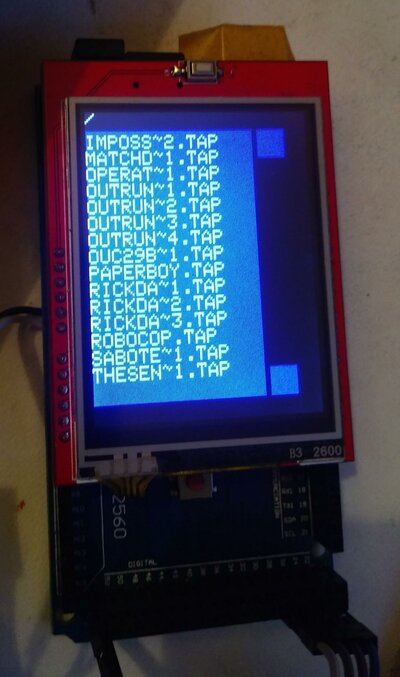
Tapuino on Arduino Mega + Touch screen

Tapuino on Arduino Mega + Touch screen

Hi
I've built a tapuino version for the Mega 2560, using a cheap TFT/Touchscreen/SD shield. It comes handy for browsing the sd card, and showing the user interface without needing external buttons.That would also help for adding additional buttons (for example, saving tape position for multiload games, adding games to "Favourites",etc).
As managing the LCD / SD using the standard arduino libraries was the fastest way to go, i had to modify the tapuino source to change the program flow (instead giving control to tapuino, which reads the buttons, and manages the screen, in my version, the tapuino code is called from the main sketch which manages the UI).
In all, there were not a lot of changes to the original code, but the way tapuino is supports different LCD's, etc, wasn't used, so the code for the Mega is too modified to make it a simple "patch".
As the TFT shield covers the Vin and GND pins, two cables were soldered in the backside of the Arduino.

With this kind of build, the only needed hardware is the optocoupler (i used a small, 4 pins one, to keep everything compact), and the casette conector.

Here's an image of the build:
20161201_004806.jpg
 
Last edited:
Hi
I've built a tapuino version for the Mega 2560, using a cheap TFT/Touchscreen/SD shield. It comes handy for browsing the sd card, and showing the user interface without needing external buttons.That would also help for adding additional buttons (for example, saving tape position for multiload games, adding games to "Favourites",etc).
As managing the LCD / SD using the standard arduino libraries was the fastest way to go, i had to modify the tapuino source to change the program flow (instead giving control to tapuino, which reads the buttons, and manages the screen, in my version, the tapuino code is called from the main sketch which manages the UI).
In all, there were not a lot of changes to the original code, but the way tapuino is supports different LCD's, etc, wasn't used, so the code for the Mega is too modified to make it a simple "patch".
As the TFT shield covers the Vin and GND pins, two cables were soldered in the backside of the Arduino.

With this kind of build, the only needed hardware is the optocoupler (i used a small, 4 pins one, to keep everything compact), and the casette conector.

Here's an image of the build:
View attachment 115280
Very nice. Will you release your modifications?

Sent from my Z010D using Tapatalk
 
Back
Top Bottom