Fitzsteve's A1200 Tower Project =)

  • Thread starter Thread starter fitzsteve
  • Start date Start date
  • Replies Replies 120
  • Views Views 25419

fitzsteve

Retired Slacker
Assistant
AmiBayer
Joined
Aug 19, 2009
Posts
20,777
Country
UK
Region
Sevenoaks
Well since I don't have all the bits I can't start the build yet but hopefully when my 2nd order of bits from Amigakit arrives probably early next week I'll be able to make a start :ninja:

Here's what I have so far:

EZ Z4 Tower from Amigakt
ATX-Amiga power adapter
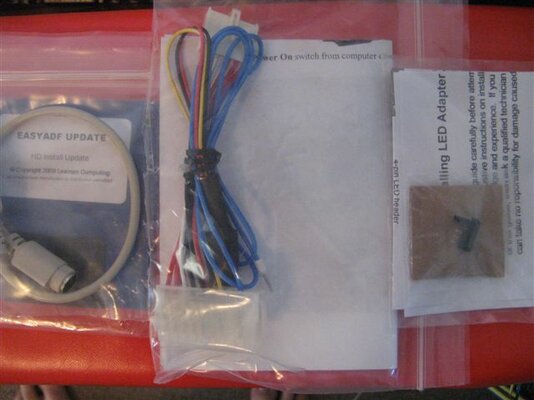
LED Adapter for Case
AT-PS2 Mouse adapter
A1200 Mobo - 3.1 Roms
PC Key Keyboard adapter
40GB HDD with CWB ADV SP installed
SCSI CD Rom
New & Shiny FDD
Micronik Z3i Busboard & Video Adapter
Typhoon MK2 030 @ 40mhz & 64mb + SCSI
SCSI & IDE Cables

Still waiting delivery for:

Cybervision 64/3D
A2000 Keyboard
ATX-Micronik Power Adapter (Amigakit are maikng up)
Netgear MA401 PCMCIA card

Here are some pics of what I have so far! I'll update along the way with progress :thumbsup:

IMG_7861.jpg


IMG_7859.jpg


IMG_7860.jpg


IMG_7852.jpg


IMG_7854.jpg


IMG_7855.jpg


Steve.
 
Last edited:
Nice hardware, though that pic at the bottom, the device looks like NuBus or RiscPC CPU slots, never seen anything like it for Amiga...

Best of luck and look forward to see it taking shape. :)

P.s. Strange un-labeld 030 (or 68880), what's up with that?
 
That small nubus-like pcb is the part that connects the bridge board to the accelerator port of the A1200 and provides a thru port for an accelerator.

The cpu card must be some Power Computing either Viper 4 or 5, and the right chip should be an 68882. If you're thinking about the one with the heatsink it's an 030. :)
 
Good luck Steve in your A1200-Tower-Quest.:thumbsup:

Thanks :thumbsup:

Nice hardware, though that pic at the bottom, the device looks like NuBus or RiscPC CPU slots, never seen anything like it for Amiga...

Best of luck and look forward to see it taking shape. :)

P.s. Strange un-labeld 030 (or 68880), what's up with that?

Thats a 68882 FPU, it did have a heat sink thats been removed hence why some of the gold layer has come away. It still works fine...

That small nubus-like pcb is the part that connects the bridge board to the accelerator port of the A1200 and provides a thru port for an accelerator.

The cpu card must be some Power Computing either Viper 4 or 5, and the right chip should be an 68882. If you're thinking about the one with the heatsink it's an 030. :)

The card is a Typhoon MK2 68030 @ 40mhz. You may have seen in another thread I'll be looking for a CPU to go on the busboard which is a Micronik Z3i

You're right about the connector.

Thanks guys - I'll update the thread as I go :ninja:

Steve.
 
Yay! My 2nd Parcel from Amigakit is here :D

Now I can make a start and at least get it going with the 030 :ninja:
 

Attachments

  • IMG_7889.JPG
    IMG_7889.JPG
    37.8 KB · Views: 8
It's funny, i teardowned my tower couple of days ago and it's the same tower as you have.

The one is down and another comes.

Have fun with it, looks like there is a pckey on his way to you. :thumbsup:
 
Here's some more pics:

Got CD & Floppy working fine as you can see from the workbench shot :thumbsup:

Must have done something wrong with the LED's as they are not working :Doh: *fixed they were plugged in the wrong way round*

Just have to wait for the CV64/3D to arrive and for a power adapter for the Micronik Z3i before I can move on. Also once the CV64 is in I'll probably want to upgrade the CPU, 040/060 depending on budget.

Anyway, back to the Pr0n...

IMG_7890.jpg


Mobo Installed, nice tight/secure fit - Good Job on the case design Amigakit :thumbsup:

IMG_7891.jpg


CDRom wired up although I had to remove the PSU later make some changes to the ID + I plugged in the SCSI cable the wrong way round to start (oops) Lucky nothing go fried :roll:

IMG_7893.jpg


Here's how I setup the LED's, what did I do wrong? *fixed they were plugged in the wrong way round*

IMG_7895.jpg


PC-Key 1200, working well with a basic PS2 keyboard, just waiting for an A2000 Keyboard to arrive for more a more authentic Amiga experience :D

IMG_7896.jpg


All setup - Good to go, now for that first power on... Doh black screen, hmm... Unpluged the Accelerator and she fired up so I checked the SCSI cable and yep, was fooled by how the previous cable I had plugged in and plugged it in the wrong way round, once corrected she fired up fine with the Typhoon :thumbsup:

IMG_7898.jpg


All up and running :thumbsup:

CD & Floppy working fine (once I worked out how to change the device ID jumper settings hence the PSU comming out)

Played a game from CD and some WHDload, seems ok.

Now to fiddle with the OS and sort out Large HDD support.

Steve. :ninja:
 
Thanks guys!

Can't wait for the CV64/3D to arrive and get the PSU adapter for the busboard so I can really start to turn this into a powerful workbeench machine :thumbsup:

But for now I am pleased the basics work as thats always a great stepping stone to move forward.

Steve.
 
Some more pics of how I've set it up:

IMG_7905.jpg


IMG_7900.jpg


IMG_7902.jpg


IMG_7904.jpg


Should keep me ocupied till I get the rest of the upgrades sorted :thumbsup:
 
Really nice.

If I'm not mistaken, you are using AGA modes right? I believe with a gfx card you will have widescreen resolutions on your Workbench.:thumbsup:
 
Really nice.

If I'm not mistaken, you are using AGA modes right? I believe with a gfx card you will have widescreen resolutions on your Workbench.:thumbsup:

Thanks :thumbsup: & I really hope so :D

And as its a TV/Monitor I should be able to switch back to scart for WHDLoad.

Oh and sorry yes this is High Res Interlaced 64 colour.

I'm hoping to sort an Apollo 1240 out for it as well :cool:

I know they are not so great for WHDLoad but I've still got the 030 desktop on the shelf below that will be plugged into the 2nd scart socket... Plus the joystick for has two cables and a selector for 1-2 player, cool eh?

Steve.
 
Looking good! :thumbsup:

Cheers :D


And I have an update...

WoooooooooooooooooooooooooooooooooooooooooooooooooooooooooooT!

My CV64/3D has arrived!!!!! :ninja:

And no Customs charge :thumbsup:

And my A2000 keyboard turned up but its pretty ugly, should for bought the A4k one from Kin, but I was being cheap at the time, I guess you get what you pay for £6.50 lol

Maybe I'll retrobright the keys and spray the case!

I've also sorted out a trade for an Apollo 1240 so I should have that soon as well. :D

Photo's to follow when I get the camera back, wife has taken it to work to show off the Holiday snaps, clearly a USB memory stick is a stupid idea, take the whole camea and plug it in with the USB lead. Women :roll:

Steve.
 
Nice one Steve! Congratz!
You'll have a pretty powerful Amiga 1200 mate. I used to have in the past an 1200 towered with Mediator and Apollo 1240 upgraded to 1260 by PG... It's a nice and beastly card that worked just fine.
Busboard is awesome and tbh, having Zorro slots adds more Amiga feelin' than the plain PCI busboards :)
 
As promised here is a pic of the CV64/3D :D

IMG_7925.jpg


Looks like its had a repair at some point, has been sold as fully working so hopefully don't have any problems.

My only concern is I've been reading the manual for the Micronik Z3i and it says if you're using an A1200 Accelerator, which I will be the Zorro slots only work in Zor2 mode which is a bit of a bummer but this card is Zorro 2/3 auto selecting so I hope it'll be ok.

The above will also rule out using a Zor3 Ram expansion but I can live without that for now :cool:

More to follow when I get the Apollo 1240 & Modified PSU (for the busboard)

Steve.
 
@Steve: IS your busboard (OK, not yours, the A1200's one) the type who have a socket for A3/4000 accelerator?

If so, just install any accelerator you can grab and the Zorro3 features will become available. Even a miserable A3640 will work. :)

If no bananas, grab any Zorro-2 video card and sell or use this babe into A Zorro-3 Amiga.
 
Back
Top Bottom