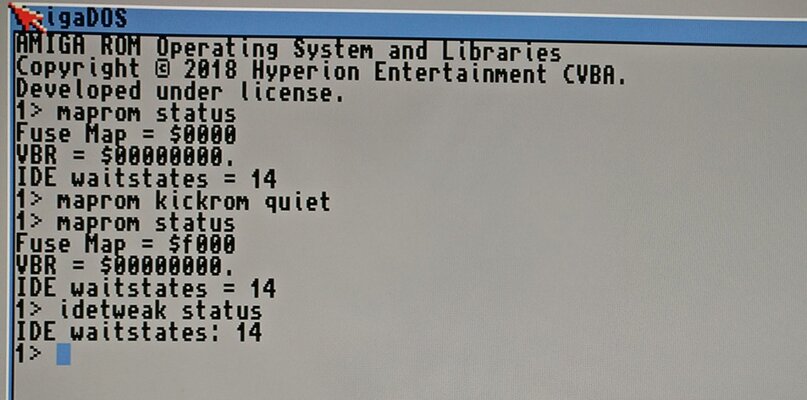
Oh, this card has MapROM function built in, so basically You can copy any ROM Image in it's memory and run it:
Here is official thread: (You need to be signed in)
https://www.a1k.org/forum/index.php?threads/62419/
here is translation:
To use MapROM - use following tool: (attatched)
Code:
MapROM kickrom quiet
This copies the built-in ROM into the RAM and activates MAPROM. A reset is not necessary.
If you want to load other ROM files, you have to
Code:
MapROM kickfile <file>
enter and do a monkey grip (soft reset)
Note: The software comes from @Scrat including an automatic reset from @Bubbob
Update 09/25/2019:
Now IDETweak has also moved into the firmware.
(see attachment on the bottom of this post)
In order to solve the annoying problem with IDE / CF disks that some devices simply did not get the correct control signals on the bus quickly enough, IDETweak has now been introduced as with the 64MB extension for the 68030 card:
By default, the IDE controller runs with 15 waitstates, which corresponds to a slow 3MB / sec.
With the IDETweak tool you can do two things:
Code:
IDETweak status
outputs the current wait state setting
Code:
IDETweak waitstate <0-15>
Sets 0 to 15 wait states. Less Waitstates means faster IDE. With 0 wait states I have 10MB / sec.
Oh yes and the ranger mem is now 1.8MB
 UPDATE 01/14/2020
New MapROM tool
The following things can be done with it:
KICKROM: Loads the built-in ROM into the TK memory, where it can now be read with 13MB/7Sec
VBR2FAST: Loads the interrupt vector base register ins fastram. That makes the Lady even faster!
KICKFILE <file>: Loads the specified file as a kickstart and does a reset
EXTFILE <file>: Loads the specified file as an extended ROM (CDTV and 1MB ROMs) and does a reset
DIAGFILE <file>: Loads the specified file as F0-ROM and makes a reset
FORCE: Ignores read-only ROM regions
REMOVE: Removes all ROM overlays
STATUS: indicates the current status of the configuration
WAITSTATE <number>: Sets the IDE waitstates to the specified number.
FUSE <hex>: Sets the fusemap for read / write protection (see below)
QUIET: Eliminates all expenses
If Maprom is already active, it ignores itself and issues a warning level 5 so that you can react to it in the startup sequence.
Which fuses can be set?
The TK supports two memory area blocks, which can be given write protection separately and a ROM overlay
One area is the classic Kickrom area from $ F80000- $ FFFFFF and is referred to below as F8.
The second area actually comprises two areas: The extended ROM area at $ E00000- $ E7FFFF and the diagram area at $ F00000- $ F7FFFF. These two are labeled E0 below.
There are 4 fuses:
ENABLE_F8_READ_ENABLE 0x1000
ENABLE_F8_WRITE_PROTECT 0x2000
ENABLE_E0_READ_ENABLE 0x4000
ENABLE_E0_WRITE_PROTECT 0x8000
By default everything is off (0).
If you want to e.g. have normal RAM at E0, you enter:
MapROM FUSE 0x4000
to allow read access.
The fuses can be added in hexadecimal to combine them:
X4000 + x8000 becomes xC000 (even hexadecimal: 10 = A, 11 = B, 12 = C, 13 = d, 14 = E, 15 = F)
View attachment MapROM.zip
View attachment IDETweak.zip