Sold 68EC020 TK - new A500/A1000/A2000 accelerator by Matze

Status
Not open for further replies.
Yeah, i know, that's the reason why im keep using GBAPII++ graphic card instread to order ZZ9000..
As about 020 - its cheap, and it's deamn nippy..
Who wants more should really take a look on 68030TK+64MB ive started upgrade program and some new cards are available too
 
Yes, today I would choose the 68030TK instead for a ZZ9000 build but back when it only had 4MB it was unfortunately not really enough..
 
I’m wasn’t sure where to post this. Has anyone tried running relokick, since installing their 020. I have 3.1.4 roms installed and I tried playing Tobias Richeters Star Trek PD game on my Amiga. It won’t run for some reason, I thought perhaps it might be the new roms. So I tried using relokick to downgrade to 1.3. But it resulted in a Yellow screen, which I think is ram related..I’m not sure.
 
Oh, this card has MapROM function built in, so basically You can copy any ROM Image in it's memory and run it:
Here is official thread: (You need to be signed in)
https://www.a1k.org/forum/index.php?threads/62419/

here is translation:
To use MapROM - use following tool: (attatched)

Code:
MapROM kickrom quiet


This copies the built-in ROM into the RAM and activates MAPROM. A reset is not necessary.
If you want to load other ROM files, you have to


Code:
MapROM kickfile <file>
enter and do a monkey grip (soft reset)

Note: The software comes from @Scrat including an automatic reset from @Bubbob


Update 09/25/2019:


Now IDETweak has also moved into the firmware.


(see attachment on the bottom of this post)


In order to solve the annoying problem with IDE / CF disks that some devices simply did not get the correct control signals on the bus quickly enough, IDETweak has now been introduced as with the 64MB extension for the 68030 card:
By default, the IDE controller runs with 15 waitstates, which corresponds to a slow 3MB / sec.


With the IDETweak tool you can do two things:

Code:
IDETweak status
outputs the current wait state setting


Code:
IDETweak waitstate <0-15>
Sets 0 to 15 wait states. Less Waitstates means faster IDE. With 0 wait states I have 10MB / sec.

Oh yes and the ranger mem is now 1.8MB;)


UPDATE 01/14/2020
New MapROM tool

The following things can be done with it:


KICKROM: Loads the built-in ROM into the TK memory, where it can now be read with 13MB/7Sec
VBR2FAST: Loads the interrupt vector base register ins fastram. That makes the Lady even faster!
KICKFILE <file>: Loads the specified file as a kickstart and does a reset
EXTFILE <file>: Loads the specified file as an extended ROM (CDTV and 1MB ROMs) and does a reset
DIAGFILE <file>: Loads the specified file as F0-ROM and makes a reset
FORCE: Ignores read-only ROM regions
REMOVE: Removes all ROM overlays
STATUS: indicates the current status of the configuration
WAITSTATE <number>: Sets the IDE waitstates to the specified number.
FUSE <hex>: Sets the fusemap for read / write protection (see below)
QUIET: Eliminates all expenses


If Maprom is already active, it ignores itself and issues a warning level 5 so that you can react to it in the startup sequence.

Which fuses can be set?


The TK supports two memory area blocks, which can be given write protection separately and a ROM overlay


One area is the classic Kickrom area from $ F80000- $ FFFFFF and is referred to below as F8.
The second area actually comprises two areas: The extended ROM area at $ E00000- $ E7FFFF and the diagram area at $ F00000- $ F7FFFF. These two are labeled E0 below.


There are 4 fuses:
ENABLE_F8_READ_ENABLE 0x1000
ENABLE_F8_WRITE_PROTECT 0x2000
ENABLE_E0_READ_ENABLE 0x4000
ENABLE_E0_WRITE_PROTECT 0x8000


By default everything is off (0).


If you want to e.g. have normal RAM at E0, you enter:
MapROM FUSE 0x4000
to allow read access.


The fuses can be added in hexadecimal to combine them:
X4000 + x8000 becomes xC000 (even hexadecimal: 10 = A, 11 = B, 12 = C, 13 = d, 14 = E, 15 = F)

View attachment MapROM.zip
View attachment IDETweak.zip

 
Last edited:
Thank you Viktor! I can’t express how helpful this was, I’ll give this a try when I’m next in front of my A500. I’m currently laid up with bad joints.

- - - Updated - - -

Thank you Viktor! I can’t express how helpful this was, I’ll give this a try when I’m next in front of my A500. I’m currently laid up with bad joints.
 
I just tried using the maprom tool on my A500 and it tells me it isn't an executable file. Am I missing something?
 
I've been waiting to hear back from Viktor about his 030 boards, but not had a reply for over a week. Hoping he's ok.
 
I just tried using the maprom tool on my A500 and it tells me it isn't an executable file. Am I missing something?

I didn't try it yet (machine is disassembled until I get my ZZ9000 fixed), but did you set the executable flag on the file? zip doesn't preserve that flag so you need to set it manually after extraction.
 
I thought that was only a windows / Linux thing? Didn't realise WB had that lol

Actually now that you mention it, you only need to do that for scripts.. But it may not be runnable from WB if it was only meant to start from CLI. Don't know if by any chance this is how it was tested?
 
I'm hoping Viktor will get back, but he's been awfully quiet for the past week. It's not like him, so I can only assume he's either busy or dealing something that's keeping him away.
 
I'm hoping Viktor will get back, but he's been awfully quiet for the past week. It's not like him, so I can only assume he's either busy or dealing something that's keeping him away.

I guess he's allowed to take a vacation once in a while. :)
 
Last edited:
I just tried using the maprom tool on my A500 and it tells me it isn't an executable file. Am I missing something?

I just added the files to my system and both maprom and idetweak run fine. They don't do or write anything if you just run them without arguments though. Maybe you didn't transfer them corrrectly? Did you unpack them on the Amiga or PC side?

Enabling maprom did a significant boost to my system (which has a 3.1.4 physical ROM) - booting feels like 50~100% faster even without changing IDE waitstates. Sysinfo speed even improved from ~6700 to ~7100 although I am not sure why that one should be affected. :)
Setting waitstates to 1 did crash my machine though but 5 seemed stable to me. That gave me ~6MB/s which is also a very nice increase.

So far I am very happy with this board. :)
 
Could you post an example of the command as your writing it in CLI? I thought I was typing it right, but maybe not. I unpacked them on the Amiga.
 
Could you post an example of the command as your writing it in CLI? I thought I was typing it right, but maybe not. I unpacked them on the Amiga.

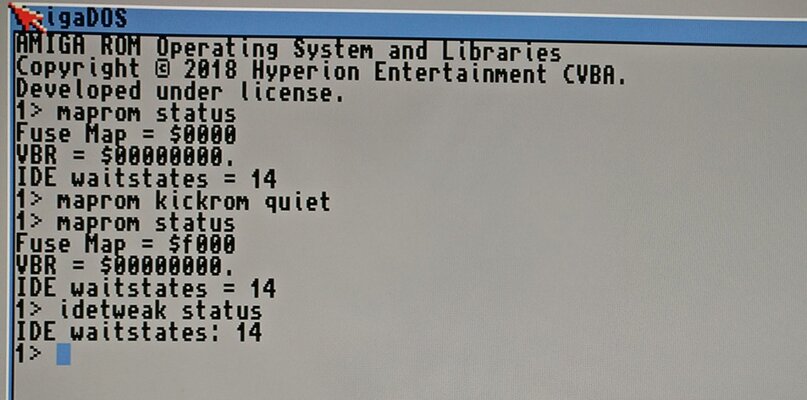
I use the command like like they are written in the guide above. Here I have put the files in C:
maprom-idetweak.jpg
Notice that the fuse map changes after running maprom kickrom quiet.
If it still doesn't work for you, try unpacking the files on the PC instead - perhaps there is some incompatibility with the Amiga unzip program you are using.
 
That was how I was typing it in, except I didn’t try those commands. I was trying to do “maprom kickfile a500.rom“

As I wanted to degrade the A500+ to run bards tale.
 
I tried to load a rom from file but could not make it work with 1.3 - not sure if it the tool supports 256k roms? I could make it work with a 2.04 rom (37.175), but since the hdd controller has its own ROM it would still try to boot from HDD, even though this rom does not have any scsi.device in it. So I could not get to the KS screen, but I could see that it was indeed ks 2.04 after booting a disk. I could get to a KS1.3 screen by using relokick but that was probably not what you were after. :)
 
Status
Not open for further replies.
Back
Top Bottom